CutSweep | Remove Silence & Fillers, No Install
CutSweep | Remove silence and filler words from raw footage
Upload your footage and get back a trimmed MP4 plus edit lists for Premiere and DaVinci Resolve. Nothing to install on your computer.
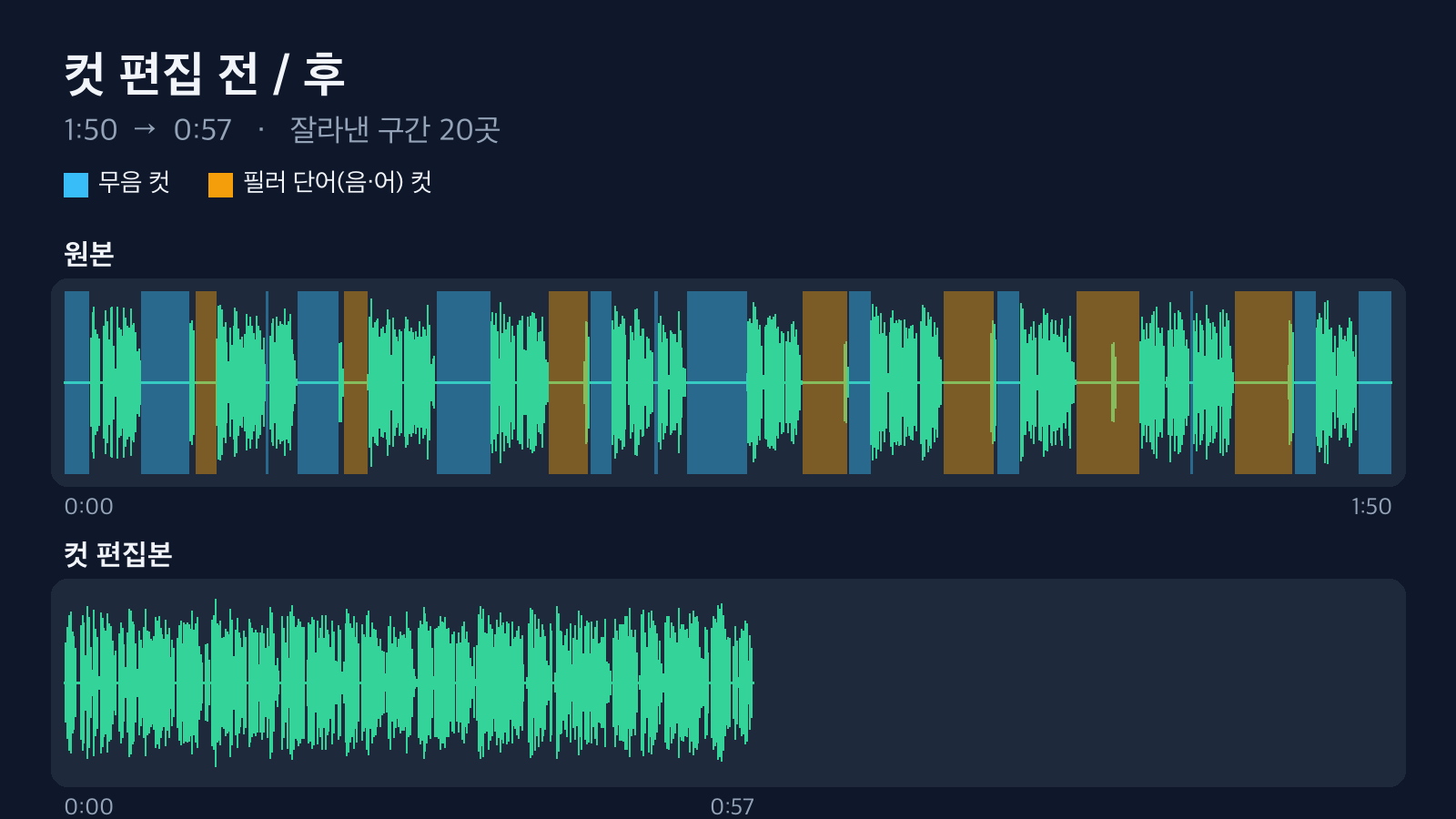
Actual result from a 110-second synthetic-voice sample. Blue blocks are silence cuts; orange blocks are "um/uh" cuts.
| You upload | You get back | Time |
|---|---|---|
| 11:01 sample | 5:37 MP4, 109 cuts, FCPXML, EDL and CSV | 3:13 |
| 1:50 sample | 0:57 MP4, 20 cuts, FCPXML, EDL and CSV | 32 s |
Both samples are synthetic speech with extra silence added on purpose, so the reduction looks large. Real footage usually shrinks less than this.
Cut the silences and the "um"s and "uh"s out of this video.
The weekly plan starts with a 1-day free trial (1 request).
A demo made from a test video.
How to use it
Upload a video to the chat and type one line. When it's done, the files come back in the same conversation. Turnaround was about 30 seconds for a 1:50 video and about 3:20 for an 11-minute video.
- "Cut the silences and the 'um's and 'uh's." Uses the default settings.
- "Cut only the silences, keep the filler words." Turns filler detection off and trims pauses only.
- "Show me where you plan to cut before you render." You see the cut plan first, adjust what stays, and then the video is made.
- "Just give me the edit lists." No video is rendered; you get the FCPXML, EDL and CSV only.
After you record a lecture or vlog, you're left scrubbing the timeline to find and trim every pause and every "um..." and "uh..." one at a time. Any single cut is easy; there are just a lot of them. CutSweep finds those spots, hands back a trimmed video, and generates edit lists you can carry straight into your editor.
What you get back
| File | What it is |
|---|---|
name_cut.mp4 |
Your video with the silences and fillers removed and the pieces stitched together. Each cut gets a 25 ms audio fade so there's no click. |
name.fcpxml |
A sequence you can keep editing against your original footage in Premiere, DaVinci Resolve, or Final Cut. |
name.edl |
A CMX3600 edit list. Import it into DaVinci Resolve. |
name.csv |
A table of cut points, so you can see exactly where it trimmed. |
summary.md |
Length before and after, number of cuts, and the audio/video length difference. |
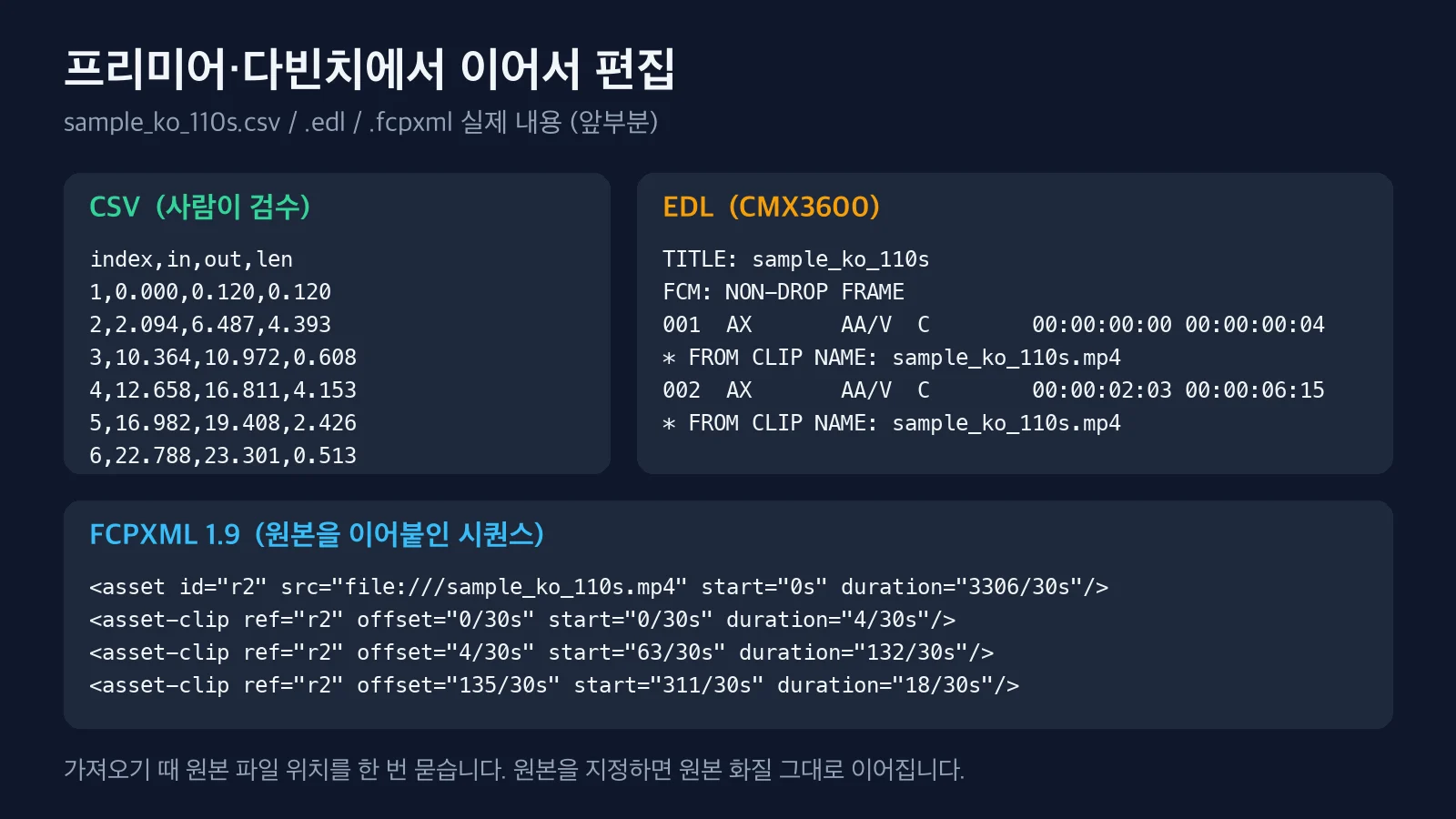
The edit lists reference your original file by name only. Point your editor to the original video once on first import, and you pick right back up at full source quality.
Real results
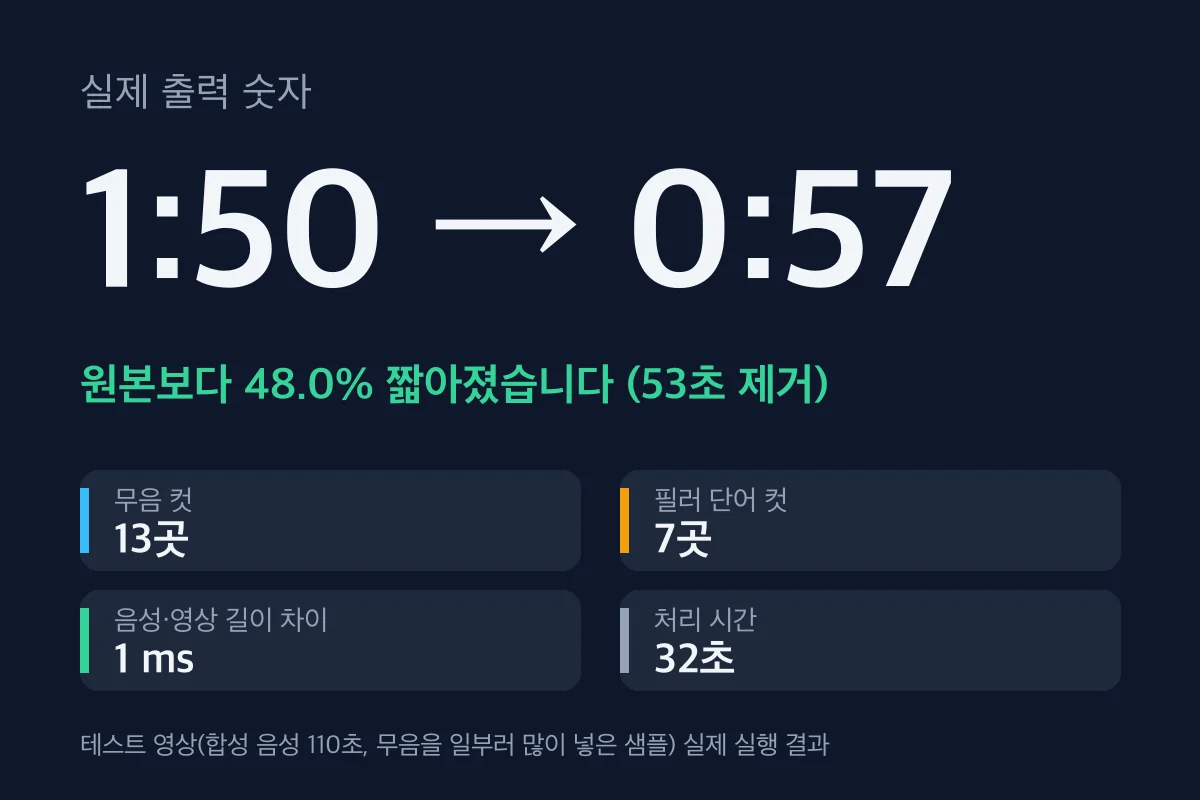
These are synthetic-voice samples with extra silence added on purpose, so the reduction looks large. Real footage usually shrinks less than this.
| Input | Environment | Result | Time |
|---|---|---|---|
| 1:50 sample | 2 CPU, 4 GB | Down to 0:57, 20 cuts (13 silence, 7 filler), 1 ms audio/video offset | 32 s |
| Same sample, filler detection off | Same | 0:59, 21 cuts | 12 s |
| 11:01 sample | Same | Down to 5:37, 109 cuts (69 silence, 40 filler), 31 ms audio/video offset | 193 s |
Of the 42 "um/uh"s deliberately planted in the sample, it caught 40, and all 42 it flagged overlapped with a real occurrence. These figures are from synthetic speech. With real human mumbling, expect more misses.
What this agent doesn't do
- Pick highlights or short-form clips. It only strips the dead time out of the whole video.
- Delete retakes or flubbed lines. If there's sound, it stays.
- Subtitles, background music, or color grading.
- Catch every filler word. The speech-recognition model sometimes misses or mishears them, and the results report how many it caught.
- For videos with nonstop talking (a speech, say), there's almost nothing to cut, so the result comes out close to the original.
FAQ
The cuts are too tight. Just say "only cut pauses longer than 0.6 seconds" and it'll rerun at that sensitivity. If words are getting clipped at the ends, say "leave more room."
Which filler words does it catch? In English: um, uh, erm, hmm. In Korean: 음, 으음, 어, 그니까, 인제. Words that double as real vocabulary are left alone.
Does it work on English videos? Yes. Just tell it "this is in English."
Does my video go anywhere? Everything is processed inside the agent's workspace. The only external call is a single download of the speech-recognition model.
How are requests counted? Every message you send uses 1 request from your plan. The first request you send with the video is one, and a follow-up like "leave more room" is another. Put your settings (silences only, pauses over 0.6 seconds, and so on) in the first message to save requests.
Any length limits? 5 seconds to 30 minutes, in MP4, MOV, MKV, or WEBM. A 30-minute video should take about 9 minutes (extrapolated from the measured 11-minute run).
Pricing
| Plan | Price | Requests per period |
|---|---|---|
| Daily | US$2.99 | 5 |
| Weekly | US$3.99 | 5 |
| Monthly | US$9.99 | 15 |
Every message you send uses 1 request from your plan. The weekly plan starts with a 1-day free trial (1 request). Cancel any time.
Questions: [email protected]
The test videos are samples we made ourselves using synthetic speech.
External APIs
PyPI (pypi.org, files.pythonhosted.org) · Hugging Face (huggingface.co)