Get started
AI Brainstorm: Ideas from Claude, ChatGPT & Gemini

AI Brainstorm: Ideas from Claude, ChatGPT & Gemini

AI Brainstorm puts Claude, Gemini, and ChatGPT in the same room — each one answering independently, so you actually see where they agree, where they don't, and why. Useful when the stakes are high enough to want more than one opinion: picking a tech stack, stress-testing a strategy, getting honest feedback on your writing, or thinking through a decision you've been sitting on too long. Stop copy-pasting the same prompt across three tabs. One question gets you all three answers, in one place.
#Consulting#Productivity#Analysis
Rating
4.2
Sold
22
How to use
Run on Capafy
Also on external apps
Publisher provides
Claude Sonnet 4.6

Brainstorming with Powerful LLMs: Claude, ChatGPT & Gemini

Most questions deserve more than one take.

ai-brainstorm-1.webp

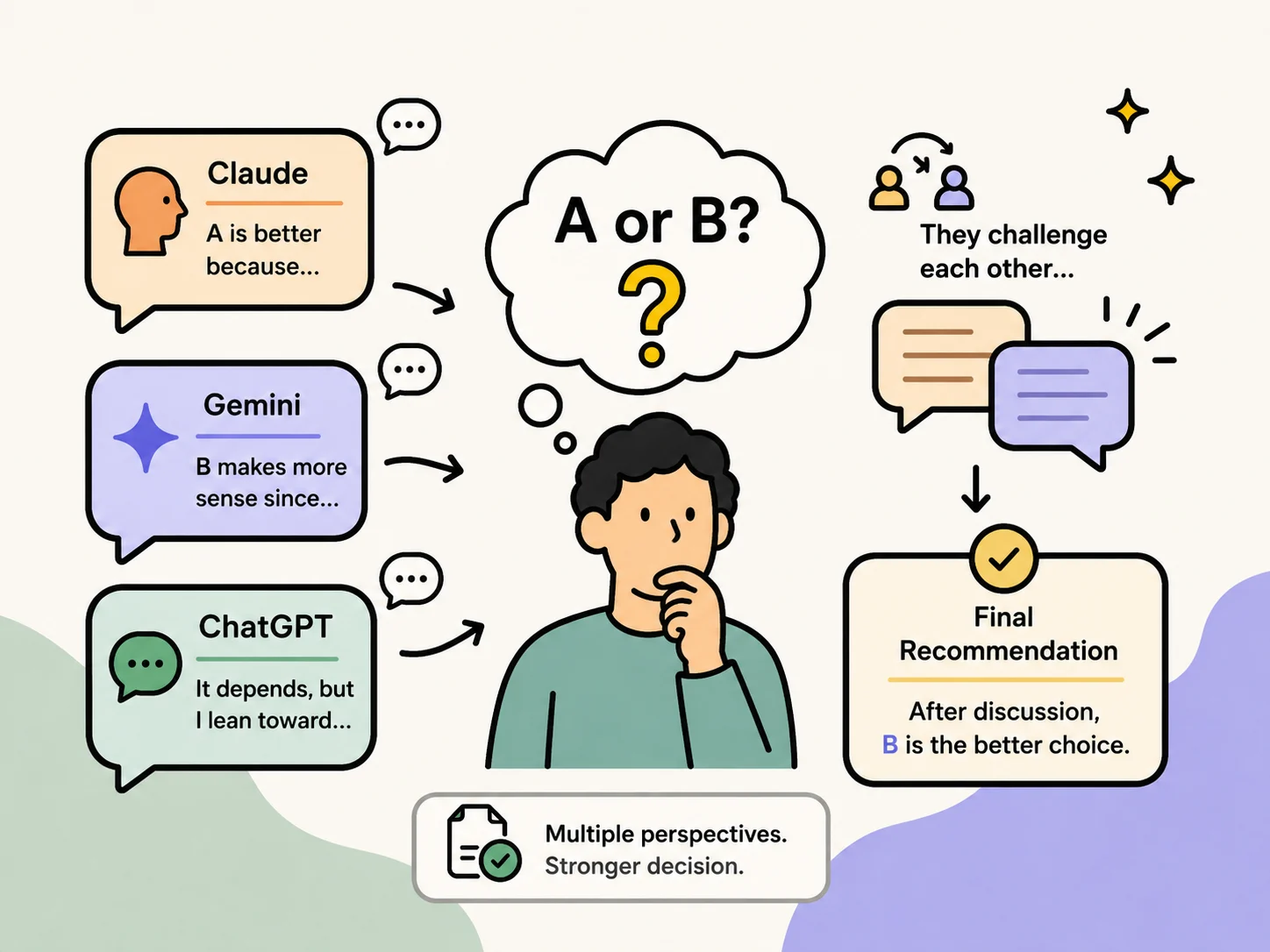
AI Brainstorm sends your question to Claude, Gemini, and ChatGPT at the same time, then makes them hash it out before landing on a final call. Not one opinion — three independent takes, real pushback, and a recommendation that's already survived some scrutiny.


Who It's For

Some questions are easy. This isn't for those.

If you've ever pasted the same prompt into three tabs just to see who says what, this is the faster version of that habit — except now they actually argue with each other instead of you playing referee.

Good fits:

  • Picking between two tech stacks and not sure which trade-offs actually matter for your setup
  • Stress-testing a strategy or architecture call before you ship it
  • Getting an honest read on your writing instead of a pat on the back
  • Anything where you suspect the "right answer" depends on who you ask

How It Works

Send your question with a 🧠 or brainstorm prefix. All three models answer cold — no peeking at each other's work. Then they read what the others said, push back on anything they disagree with, and either hold their ground or change their mind. Claude moderates: pulls the discussion together, weighs the pushback, and writes the final answer — including where people disagreed and why the call landed where it did.

If everyone agrees early, it wraps fast. If not, the debate keeps going until it's settled — up to 5 rounds.


What You Get

Every session drops two files into .brainstorm-logs/ in your working directory:

📄 Full transcript (.md)
Everything, unedited — every answer, every objection, every rewrite. Good for tracing exactly how the conclusion came together, or double-checking the logic later.

🌐 Discussion view (.html)
The readable version. Each response shows up as a 2–3 line summary you can expand for the full thing. Faster to skim than the transcript, and easy to send to someone else.

Both file paths get printed at the end. Copy them as-is — don't go digging through folders.


Examples

A career call you've been putting off:

🧠 I got offered a promotion, but it means relocating. My partner has a solid job here. Should I take it?

One model zooms in on long-term trajectory. Another asks something you hadn't even considered. A third pokes holes in the assumptions baked into the question itself. The final answer won't decide for you — but it'll make sure you've actually thought it through instead of just going with your gut.

A purchase you can't quite talk yourself into:

🧠 Is $2,000 on a mirrorless camera worth it if I'm mostly shooting family stuff and the occasional trip?

Instead of a lazy "yes" or a knee-jerk "no," you get the actual trade-offs — and a call that fits your specific situation.

A topic everyone has a hot take on:

🧠 Better to rent forever or stretch your budget and buy in your 30s?

Three different angles on the same argument, with the disagreements laid out clearly. Beats scrolling 40 Reddit threads to figure out who's right.