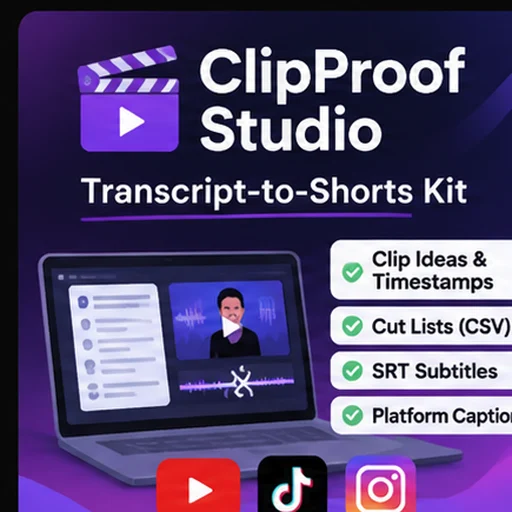
ClipProof Studio — Transcript-to-Shorts Kit
🎬 ClipProof Studio
Turn Long-Form Transcripts into Editor-Ready Short Videos
Stop spending hours organizing podcast and video transcripts. Start creating short-form content with a smarter workflow.
ClipProof Studio is an AI-powered content repurposing Skill designed for podcasters, YouTubers, video editors, content creators, and marketing agencies.
Transform timecoded transcripts into structured short-form production kits for YouTube Shorts, TikTok, and Instagram Reels.
Get clip recommendations, source timestamps, subtitle files, editing instructions, and ready-to-customize social media captions.
🚀 What Can ClipProof Studio Do?
🎯 1. Identify Promising Video Clips
Analyze your timestamped transcript and identify up to five potential short-form clips by default.
Each recommendation includes:
- Source start and end timestamps
- Original transcript quotes
- Suggested editing angle
- Explanation of why the moment was selected
- Potential context or accuracy concerns
✂️ 2. Generate Editor-Ready Cut Lists
Create structured CSV cut lists that help editors locate and organize important moments.
Spend less time preparing editing instructions and more time creating videos.
💬 3. Generate SRT Subtitle Files
Produce individual SRT subtitle files for selected clips.
Subtitle timing is based on the supplied transcript and should be verified against the original video.
📱 4. Create Social Media Captions
Generate editable English caption drafts for:
- YouTube Shorts
- TikTok
- Instagram Reels
Adapt messaging for each platform and customize your call to action.
📝 5. Create Production Briefs
Receive organized editing briefs containing:
- Clip concepts and content angles
- Source quotes and timestamps
- Suggested hooks and headlines
- Editorial notes
- Quality-control recommendations
🔎 6. Keep Your Content Traceable
Every selected clip is connected to its original transcript timing and wording.
This helps creators and editors review accuracy before publishing.
👥 Who Is This Skill For?
Podcasters: Repurpose podcast episodes into short-form content ideas.
YouTubers: Find useful moments in long-form video transcripts.
Video Editors: Prepare structured editing briefs and cut lists.
Marketing Agencies: Build repeatable transcript-to-content workflows for clients.
Social Media Managers: Generate editable platform-specific content drafts.
Content Creators: Organize reusable content from interviews, webinars, and educational videos.
⚡ How It Works
Step 1 — Upload Your Transcript
Provide your own timecoded transcript in one of these formats:
- SRT
- VTT
- CSV with start, end, and text columns
Step 2 — Specify Your Content Goals
Optionally provide your audience, content topic, preferred tone, desired clip length, and call to action.
Step 3 — Generate Your Production Kit
ClipProof Studio analyzes the supplied transcript and prepares source-grounded short-form clip recommendations.
Step 4 — Review and Export
Depending on your Agent environment, use the included Python helper to export:
- Markdown editorial briefs
- CSV editing cut lists
- JSON clip manifests
- SRT subtitle files
- Social media caption drafts
Step 5 — Create Your Videos
Review the suggested clips and use your preferred video editing software to produce the final videos.
📦 What's Included?
The Skill package includes:
✅ Structured AI editing instructions
✅ Transcript analysis workflow
✅ Python-based processing and export tool
✅ Source-grounded clip selection guidance
✅ Editorial quality-control guidelines
✅ Example transcript
✅ Automated test suite
✅ Documentation and setup instructions
⭐ Why Choose ClipProof Studio?
More than a basic caption generator.
ClipProof Studio focuses on turning transcripts into practical production materials that can be reviewed and handed to a real video editor.
Our approach emphasizes:
- Traceable source quotes
- Organized editing deliverables
- Repeatable content workflows
- Transparent clip-selection criteria
- Human editorial control
No invented timestamps or guaranteed viral predictions.
💻 Technical Requirements
- A compatible AI Agent client that supports Skills
- A timecoded SRT, VTT, or CSV transcript
- Python 3.9 or later for the optional local export tool
The bundled Python processing script uses standard-library modules and requires no additional Python packages or external API keys.
🔒 Privacy & Content Ownership
The included Python helper processes transcript files locally without making outbound network requests.
However, your AI Agent client or model provider may process the transcript under its own privacy and retention policies.
Only use transcripts and source material that you own or have permission to process.
⚠️ Important Limitations
ClipProof Studio is a transcript analysis and production-planning tool.
It does not automatically:
- Download or transcribe online videos
- Cut, render, or export finished video footage
- Publish content to social media
- Predict views or guarantee viral performance
Users should verify transcript timing, source context, captions, and publishing rights before distributing finished content.
🎬 Create Smarter. Edit Faster.
ClipProof Studio helps turn your long-form transcripts into organized, editor-ready short-form production materials.
Build a more repeatable content repurposing workflow for YouTube Shorts, TikTok, and Instagram Reels.
Get ClipProof Studio and start planning your next batch of short-form content.