Kids Episode Scripts, Character Sheets & Prompts
Scripts, character sheets and prompts for one kids' episode
This is a pre-production tool. It writes the plan for one children's video - the series bible, the characters, the cut list, the narration and the prompts - so you can take it into the image, video and voice tools you already use. It does not make the video itself.
Every character gets one fixed look line, and each cut's image and video prompt repeats that line word for word together with your style line, so the description you give your tools never drifts from cut to cut. That makes the look easier to keep, but image and video tools can still draw a character differently from one clip to the next - review each clip and regenerate the ones that drift. Every narration line is timed against its cut by a script, using a reading pace set for the age band.
What it looks like
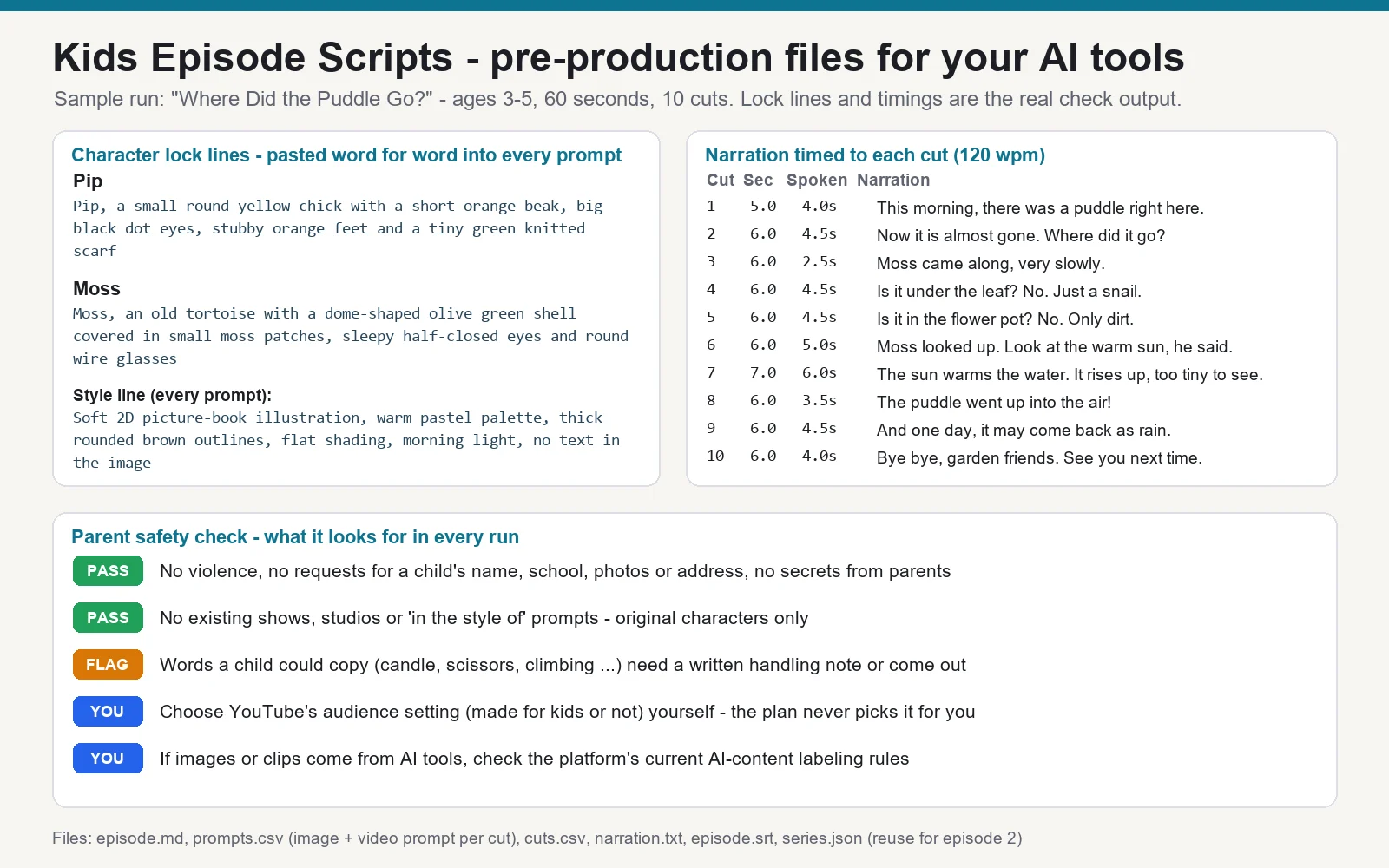
A real run of the sample episode "Where Did the Puddle Go?" (ages 3-5, 60 seconds, 10 cuts): the two character look lines, the style line, and the narration timed to each cut. The safety check lists what it looks for in every run.
What you send
- The episode idea, the age band and the length (60 seconds by default, up to 5 minutes)
- (optional) your characters and look, your language, your video tool's clip limit (8 seconds by default)
- (optional)
series.jsonfrom an earlier episode, to reuse the same characters and look lines
What you get (text and files)
- A series bible: premise, format, tone and the one-line style line
- A character sheet with each character's fixed look line, voice and "never change" list
- A cut list: seconds, scene, camera, narration timed to the cut, on-screen text, sound
prompts.csv: an image prompt and a video prompt for every cut, plus an avoid list, written tool-neutral (check your tool's current limits)narration.txtfor a voice tool, andepisode.srtcaptions- A parent safety check: scary moments, things a child could copy, requests for personal information, other studios' characters - each removed or handled with a note
series.jsonto send with your next episode
What it does not do
- It does not generate images, video or voice, and posts nothing. You need external tools for those, which may have their own accounts and fees.
- It cannot guarantee that a tool draws the same character every time; the look lines only keep the description the same.
- It does not choose YouTube's audience ("made for kids") setting for you - you set it in YouTube Studio.
- It does not use existing shows, characters or "in the style of" a named studio or artist, and never uses a real child's name, face or voice.
- No promises about views or income.