Session Checkpoint
Session Checkpoint — your project survives the summary
Long projects don't end because the work is hard. They end because the thread is lost.
You spend three days with your agent on one thing. The conversation gets long, gets summarised, and from then on the agent has the sentences but not the details — why you chose this approach, which two things already failed, the account ID you read out loud once, the exact command you were about to run.
So you re-explain. Every session.
What a new session looks like with it installed
You open a session and say hello. Before you ask for anything:
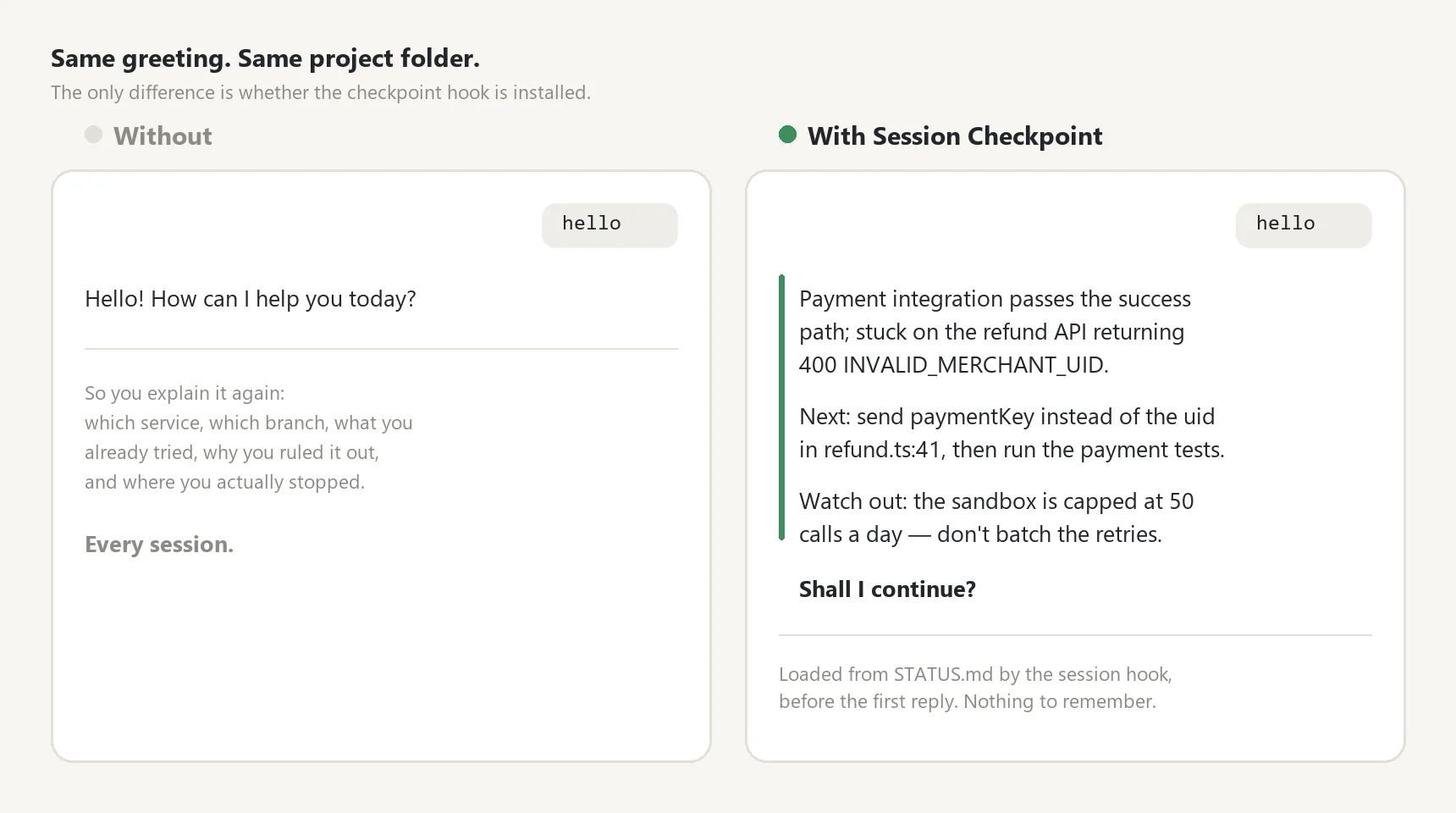
The briefing comes from STATUS.md, loaded automatically by the session hook — no tool call, no "read the file first", nothing for you to remember.
The one thing that makes it work
You can already tell an agent "keep notes in STATUS.md". That approach fails the same way every time: it only works if the agent remembers to read the file. When it doesn't, nothing happens, and nothing tells you.
Session Checkpoint installs a session hook. The file is loaded before your agent's first reply — not by its judgment, but by the harness. It fires when a session starts, when you clear it, and right after a compaction.
| When | What gets loaded |
|---|---|
| Session start · clear | The full checkpoint + a three-line briefing protocol |
| Right after compaction | Recovery guidance + a raw transcript snapshot + the full checkpoint |
| Resuming a conversation | Just the file location — the conversation already has its context |
| No checkpoint in the folder | Nothing at all. The hook stays silent |
Your agent installs the hook for you — say "install the session-checkpoint hook" and it checks your Python, edits your settings file, and leaves your existing settings untouched.
What you get
SKILL.md— 10 sections: when to save (and when not to), what to rescue first when the conversation is about to be summarised, the checkpoint format, the 120-line ceiling and what to cut when you hit it, archiving before overwrite, how to hand off to the next session, and an 8-point checklist the agent passes before it claims a checkpoint is saved. Hook installation is in here too.scripts/checkpoint_hook.py— the session hook. Standard library only. Nothing to install.references/hook-install.md— per-platform install and verification, plus the five things that actually go wrong and how to tell which one it is.references/status-writing.md— good sentences vs. dead sentences, side by side. The difference between "upload in progress, some issues" and a line the next session can act on immediately.examples/— three finished checkpoints: a software project, a research report, a system migration (two in Korean, one in English).
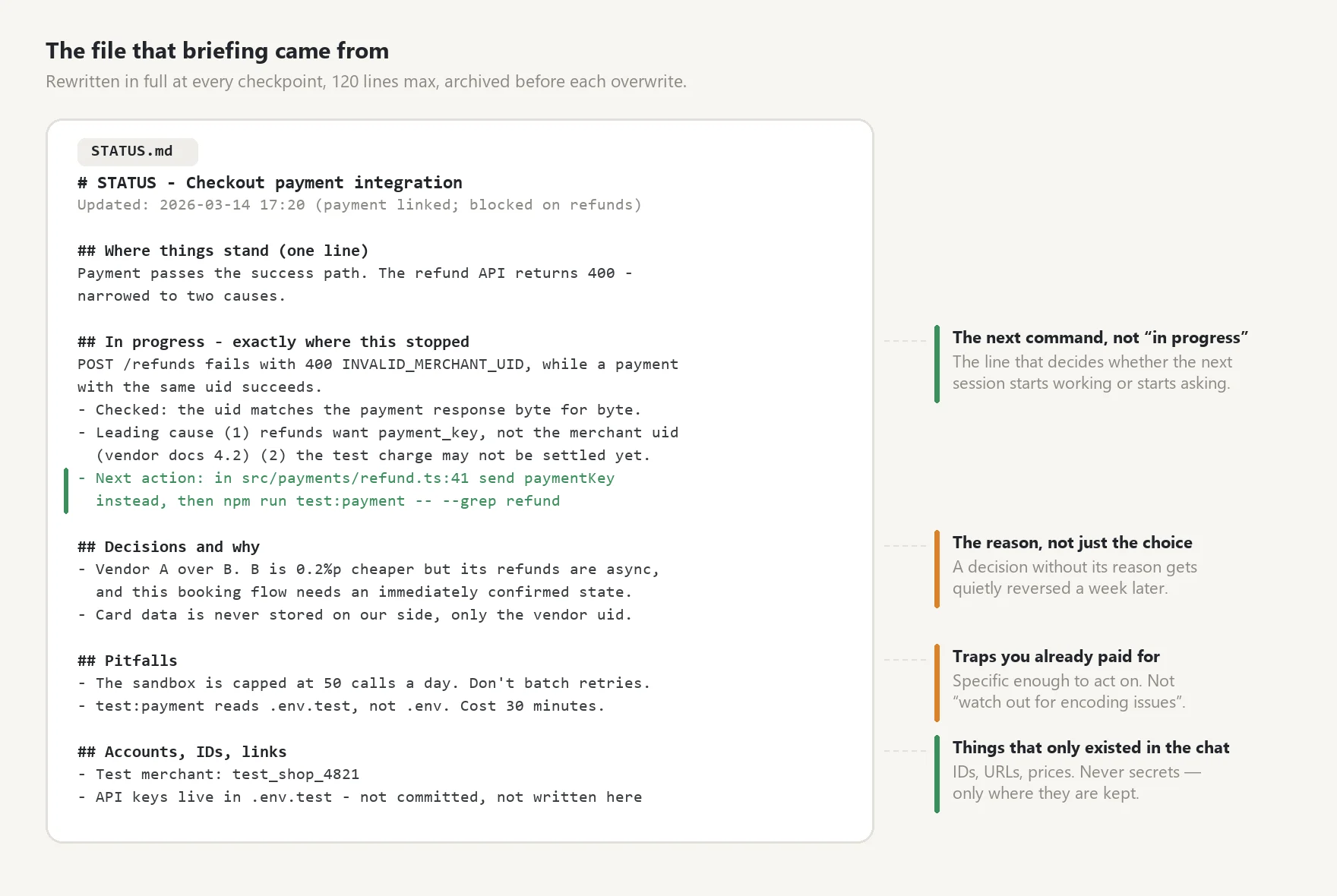
The checkpoint behind that briefing. Rewritten in full each time, archived before every overwrite, and capped at 120 lines so it stays worth reading.
What it actually saves
The parts a summary throws away first:
- Exactly where work stopped — and the next command to run. Not "in progress".
- Decisions with their reasons. A decision without its reason gets reversed by the next session.
- What already failed, and why. So you don't pay for the same dead end twice.
- Pitfalls you hit and the workaround. The platform bug, the encoding trap, the flag that has to come first.
- Identifiers that only ever existed in the chat. Account names, IDs, URLs, prices.
Never secrets. Passwords, tokens and API keys don't go in the file — only where they're stored.
Archived, not overwritten
The checkpoint is rewritten in full every time, so old versions would vanish. They don't: each overwrite is archived to .checkpoints/ with a timestamp. Two weeks later, "why did we decide it that way?" is still answerable.
Scoped per project
Install the hook once and it runs everywhere — but it only ever reads the checkpoint in the folder you opened. A trading project's state never leaks into a school report. Folders without a checkpoint behave exactly as they did before.
Works with
Claude Code · Codex — any agent with a working folder that survives the session. Python 3 is needed for the hook; without it the hook is skipped and the rest still works.
Nothing leaves your machine. No account, no external service, no packages to install. The checkpoint, the archive and the transcript snapshots are all plain files inside your own project folder.
What it writes into your project
| Path | What it is | Commit it? |
|---|---|---|
STATUS.md |
Current state, rewritten in full, 120 lines max | Yes |
.checkpoints/YYYY-MM-DD-HHMM.md |
Previous versions | Yes |
.checkpoints/transcripts/ |
Raw transcript snapshot taken before compaction | No — add it to .gitignore |
Good for
Anything that runs longer than one sitting — feature work and migrations, research and writing, a product launch, recurring operational work. The difference is largest on projects you pick up in short bursts across days.
Not for
Work that finishes in one session, and environments without a persistent working folder (plain web chat) — there the skill steps aside on its own rather than writing a file nobody will read.
The rules are written in Korean; your agent reads them fine and writes your checkpoint in your language. See examples/ for an English one.