ShotFrame | App Store Screenshot Generator
Store screenshots without a design tool
You have captures of your app. The stores want a specific set of sizes for each device class, with no transparency, and a headline on every screen if you want the listing to read well. Doing that by hand means one canvas per size and a lot of nudging.
Upload 3 to 10 portrait captures (PNG or JPG, or one .zip) and tell me the app name and what each screen does, one line each. I build the sets at the sizes the stores list, with a plain device frame, a background taken from your app's colors and a short headline per screen.
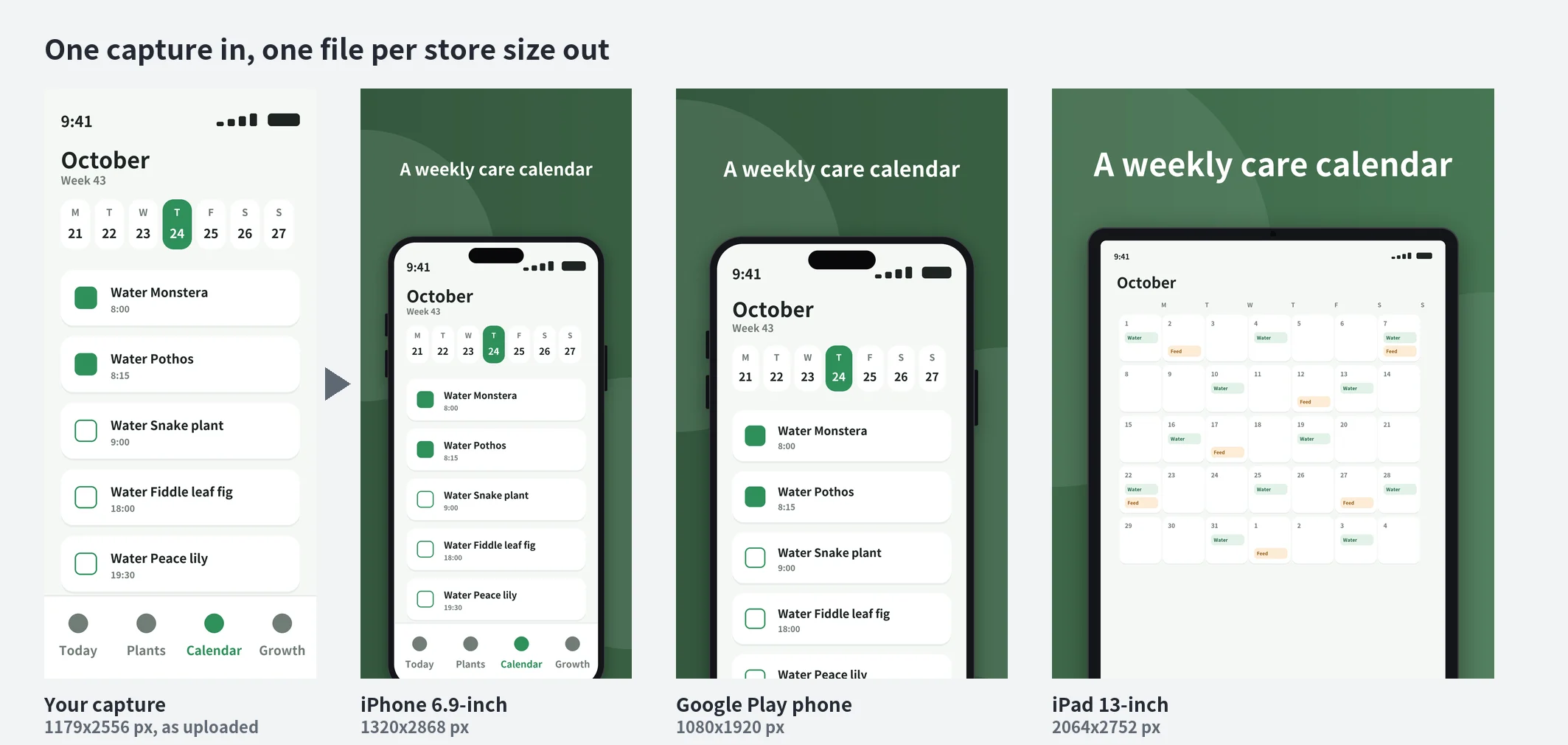
The sample app "Fernly" is a made-up plant care app drawn for this page. The same capture becomes an iPhone 6.9-inch file, a Google Play phone file and, from a tablet capture, an iPad 13-inch file.
What you get
| Folder | Pixels | Files |
|---|---|---|
ios_iphone_69 |
1320x2868 | up to 10 |
ios_iphone_65 |
1284x2778 | up to 10 |
ios_ipad_13 |
2064x2752 | up to 10 (needs tablet captures) |
play_phone |
1080x1920 | 2 to 8 |
play_tablet_7 |
1440x2560 | up to 8 (needs tablet captures) |
play_tablet_10 |
2160x3840 | up to 8 (needs tablet captures) |
play_feature |
1024x500 | 1 |
Each language gets its own set of folders. You also get a ZIP of everything, a one-page preview sheet per language, and UPLOAD_GUIDE.txt, which says where each folder goes in App Store Connect and Play Console. Every image is an 8-bit RGB PNG without transparency.
The sizes come from Apple's screenshot specifications page and Google's graphic assets page, read on 2026-11-01. Both stores change these rules from time to time, so check the current page before you submit.
How it works
- Reads your captures. Unpacks a .zip, sorts phone from tablet captures by shape, and takes the main colors of your screens.
- Writes the plan. The AI turns your one-line descriptions into short headlines, in each language you ask for, and picks layouts. A screen can show the headline above a device that runs off the bottom edge, the whole device, or the headline below.
- Draws the sets. A script scales your captures into a vector device frame (a plain drawing, not real device artwork), draws the background and fits the headline to its box. Your screens are never redrawn or retouched.
- Checks every file before you see it.
- exact pixel size for each store slot,
- no alpha channel, 8-bit RGB PNG,
- number of images within what each store accepts,
- headline fits its box and does not touch the device,
- text contrast of at least 4.5:1 against the measured background,
- no ranking, award, price or "free" wording (Google Play does not allow it in store graphics), no emoji, no filler phrases,
- Google Play feature graphic text covers under 20% of the image.
A set with an open problem is fixed and rebuilt, not delivered.
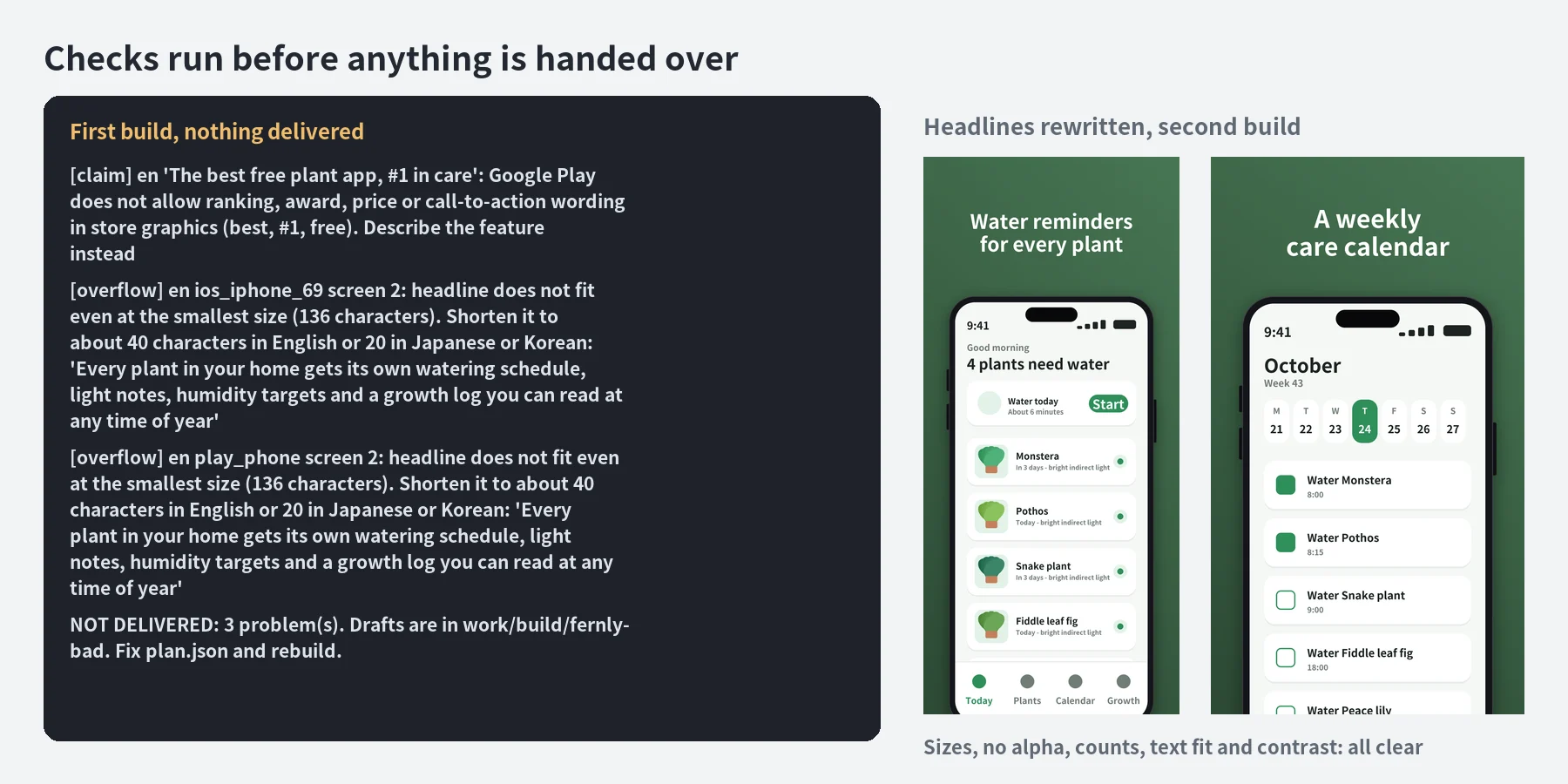
Left: the real output of a first build with a headline that claims "best free" and one that is far too long. Nothing was delivered. Right: the second build after the headlines were rewritten.
Connected backgrounds and several languages
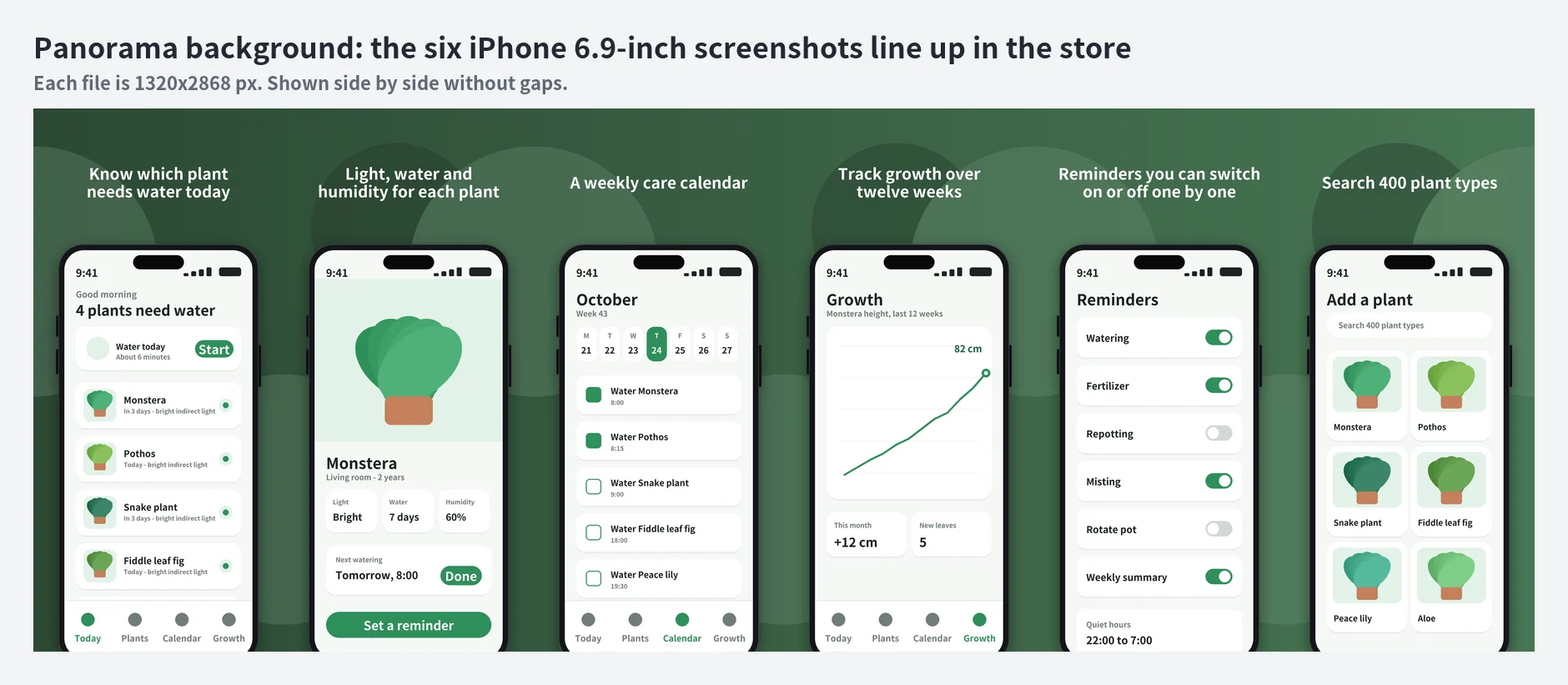
Panorama option: one background runs across all screens of a set, so neighbouring screenshots line up in the store listing.
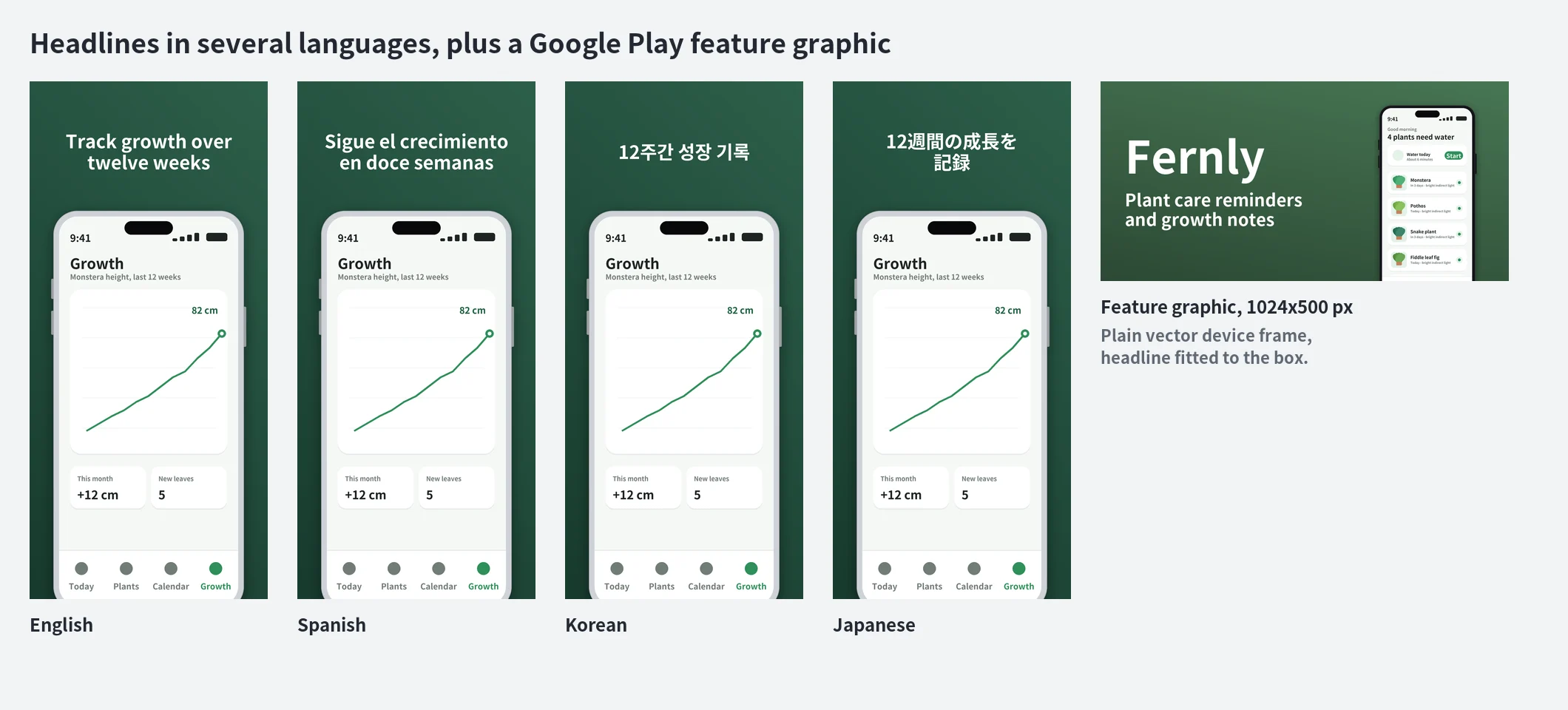
English, Spanish, Korean and Japanese headlines on the same screen, with the Google Play feature graphic. Latin, Cyrillic, Greek, Korean and Japanese text is supported; open-license fonts ship inside the agent. Translations are written by the AI, so have a native speaker read them before you publish.
Timing
Measured on a local copy of the sandbox (2 CPU, 4 GB): reading 9 captures from a .zip takes about 1 second. A set of 14 images (3 sizes, 2 languages) is drawn and checked in about 4 seconds. A full set of 56 images (7 sizes, 2 languages, panorama background) takes 25 to 36 seconds. Most of the time per request is the AI writing your headlines.
Plans and limits
| Plan | Price | Requests |
|---|---|---|
| Daily | $3.99 | 5 per day |
| Weekly | $5.99 | 8 per week |
| Monthly | $14.99 | 20 per month |
Every message you send uses 1 request from your plan.
What this agent doesn't do
- Use real device artwork or store badges. Frames are plain vector drawings.
- Redraw or improve your app screens. They are placed as you captured them. If a capture is small, it is enlarged and may look soft; the agent tells you.
- Write claims for you. Headlines name features from your own description. No ranking, award, rating, price or call to action.
- Make landscape sets, video previews or app icons.
- Set text in Chinese, Arabic, Hebrew, Thai or Hindi.
- Submit anything to App Store Connect or Play Console, or promise that a listing will be approved. The agent checks sizes and format; store review is the stores' decision.
- Make tablet sets from phone captures. Tablet sizes need tablet captures.
FAQ
Q. Can I use my own device frames or brand colors? Brand colors, yes: give a hex code. Frames are the built-in plain frame in black, silver, white or midnight, or no frame at all. For Google Play the agent defaults to no frame, because Google calls device imagery discouraged; ask if you want frames there.
Q. Will the background color match my brand? By default it takes the strongest color from your captures and darkens it only as far as needed so white text stays readable. If you give an exact color, it is never changed; if text on it would be hard to read, the build stops and says so.
Q. Does my app data leave the workspace? No. Your captures are processed inside the agent's cloud workspace. The only download is two Python packages from PyPI, once, if they are not already there. Captures can show personal data such as names or photos, so look through the result before publishing.
Q. How many screens should I send? 3 to 10 portrait captures. Google Play needs at least 2 phone screenshots and takes at most 8; App Store takes up to 10 per device size.
Q. Can I change something after the first result? Yes. Ask in the same conversation: "shorter headlines", "swap 2 and 3", "red background", "no frame", "add Japanese". Each message uses 1 request and rebuilds the sets.
Q. Do the headlines come out right in other languages? They are written by the AI from your description. Short feature headlines usually translate well, but a native speaker should read them. Japanese headlines get a manual line break at a phrase boundary.
Q. Questions? [email protected]
外部 API
pypi.org, files.pythonhosted.org