
Startup Idea Stress Test — Should I Build This?
Should I Build This? — Startup Idea Stress Test
Find out if your startup idea survives the real market before you spend months building it.
💡 What it does
You describe your startup, app or online-business idea. The agent treats it the way a co-founder putting in their own money would. It hunts for what would kill the idea, and it works just as hard to find the version that would work.
Everything is researched live, not from memory. Competitor prices, free tiers, platform rules and regulations change every few weeks. An answer from training data is out of date the day you get it.
⚙️ How a run works
1. You describe the idea. A paragraph is enough, in any language.
2. A few quick questions, numbered so you can answer in seconds (like "1a, 2b"). Your budget, your time, your skills, how you'll reach customers, what revenue would make it worth it, and what finding would make you walk away. The walk-away bar is set before any research, so the evidence can't quietly move the goalposts.
3. It shows you the plan: the exact questions it will answer about your idea, grouped by theme, plus what it's leaving out and why. You can add anything.
4. Live research, usually 20–30 minutes.
5. A short verdict in chat, then the full report to download.
🔍 What it checks
Every idea gets its own checklist. These are the areas that most often decide the answer:
• Competitors & price — who already sells this, at what price, and whether a free option already covers your buyer at your price
• Their worst reviews — what paying customers of those competitors complain about, and what that says you could build differently
• Platform & API access — whether the platform your idea depends on will actually let you in, and on what terms
• Regulation — rules that apply to the idea itself or to what it promises customers
• Unit economics — whether your price covers what each customer costs you to serve
• Market size vs your goal — how many paying customers your revenue goal needs, compared with how many exist
• Distribution — whether the channel you plan to use can actually reach those customers
• Demand — whether anyone besides you is asking for this: forum threads, workarounds, feature requests
• …and more: trust, retention, build difficulty, ongoing workload, gatekeepers, payments
📦 What you get
• A score out of 10, set by the worst problem it found, never averaged. A great market doesn't hide a blocker. The report names the finding that set the score.
• At a glance: what's blocked, what's still open and what's already clear, in colour-coded boxes.
• Every claim labelled by its source: read directly from the source, confirmed by several sources, or from a single source. Anything it couldn't confirm is said plainly.
• Both sides of every open question: why it isn't a dealbreaker, and why it still matters.
• Your walk-away bar, checked: met or not, and what that does and doesn't rule out.
• Charts of the price landscape and your costs, whenever the numbers exist.
• The version worth building if your idea as described doesn't hold up, in the business shape you asked for where one exists.
• One concrete next step with a pass/fail line set in advance, plus a list of findings to re-check before you commit.
• Your report, three ways: a PDF in light or dark, or an interactive web page.
🧪 Real output: a sample run
Idea tested: "A $49/month tool for small B2B SaaS companies that connects to Intercom, Zendesk or Help Scout, reads every support ticket, and turns them into a ranked list of feature requests and bugs, with how many customers asked and how much revenue they represent." Researched on 30 September 2026. Prices change over time.
The verdict
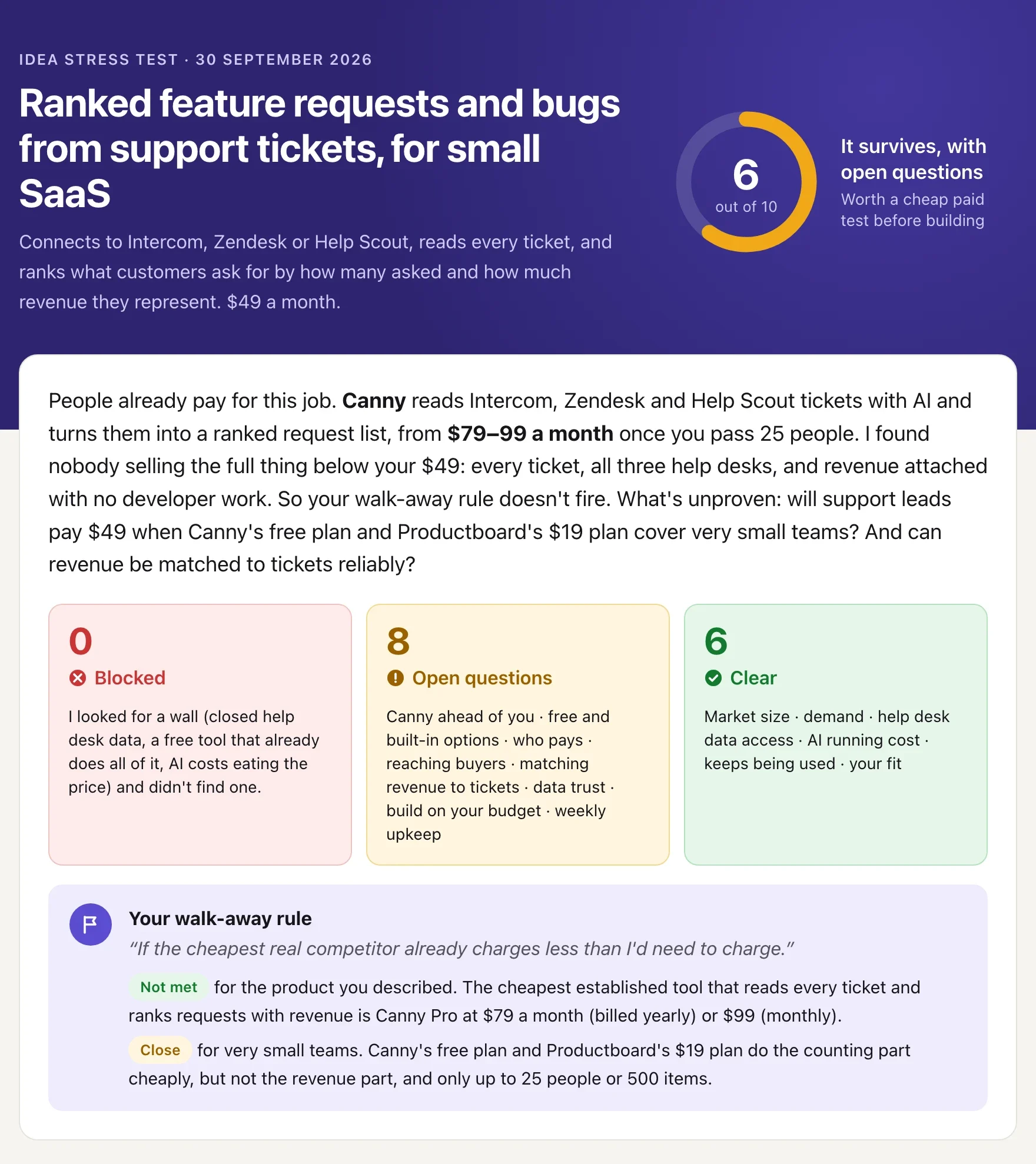
The idea scored 6/10: it survives, with open questions. People already pay for this job: Canny's AI reads Intercom, Zendesk and Help Scout tickets and ranks the requests, from $79 a month (billed yearly). But nobody sells the full thing below $49: every ticket, all three help desks, and revenue attached with no developer work. Nothing was blocked, and the report says so plainly: it looked for a wall and didn't find one.
The price landscape
Every price was read directly from the vendor's own pricing page. The orange band is the founder's intended price.
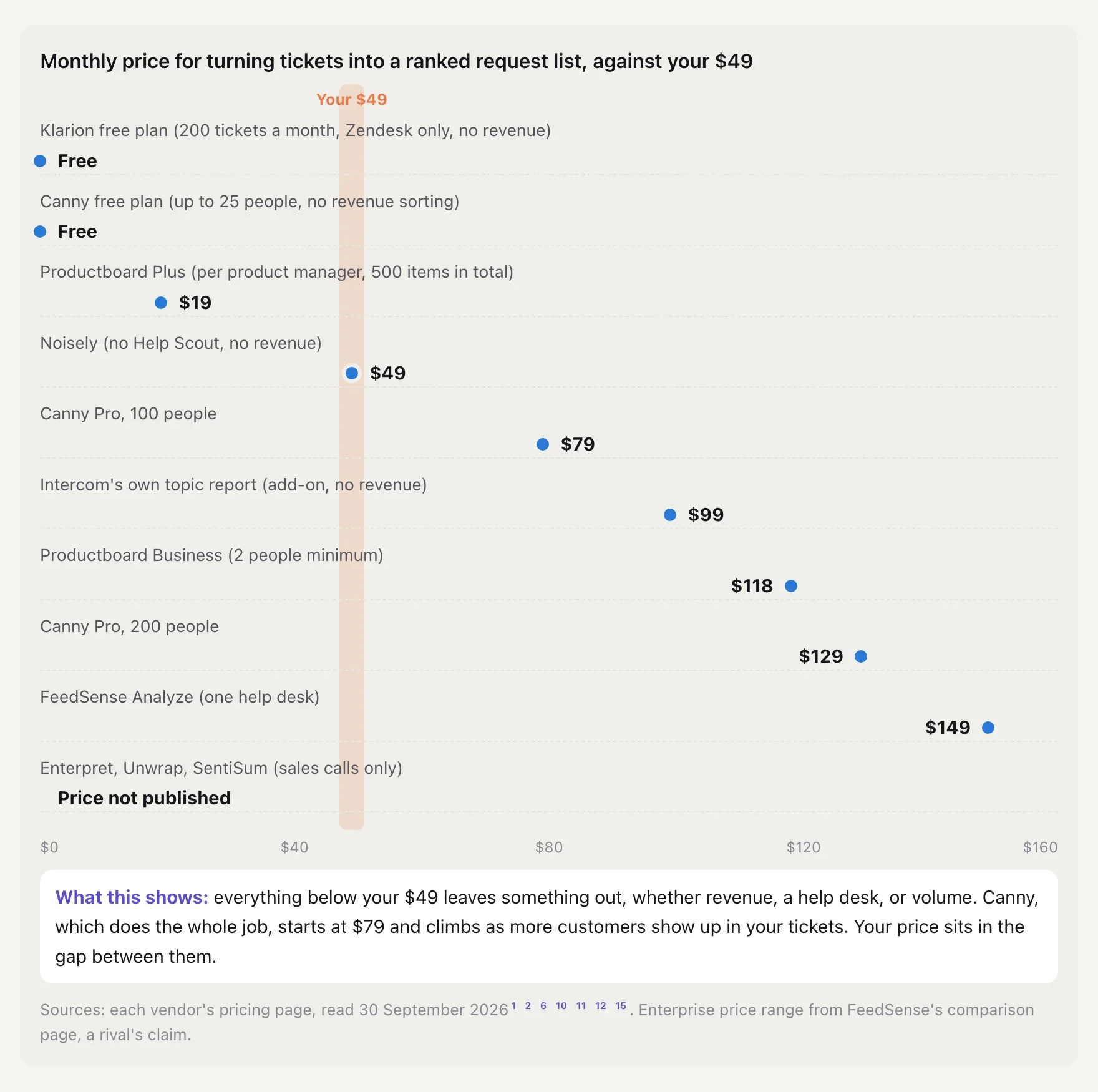
Everything below $49 leaves something out: revenue, a help desk, or volume. The one tool that does the whole job starts at $79. The founder's price sits in the gap between them.
Does the price cover the cost?
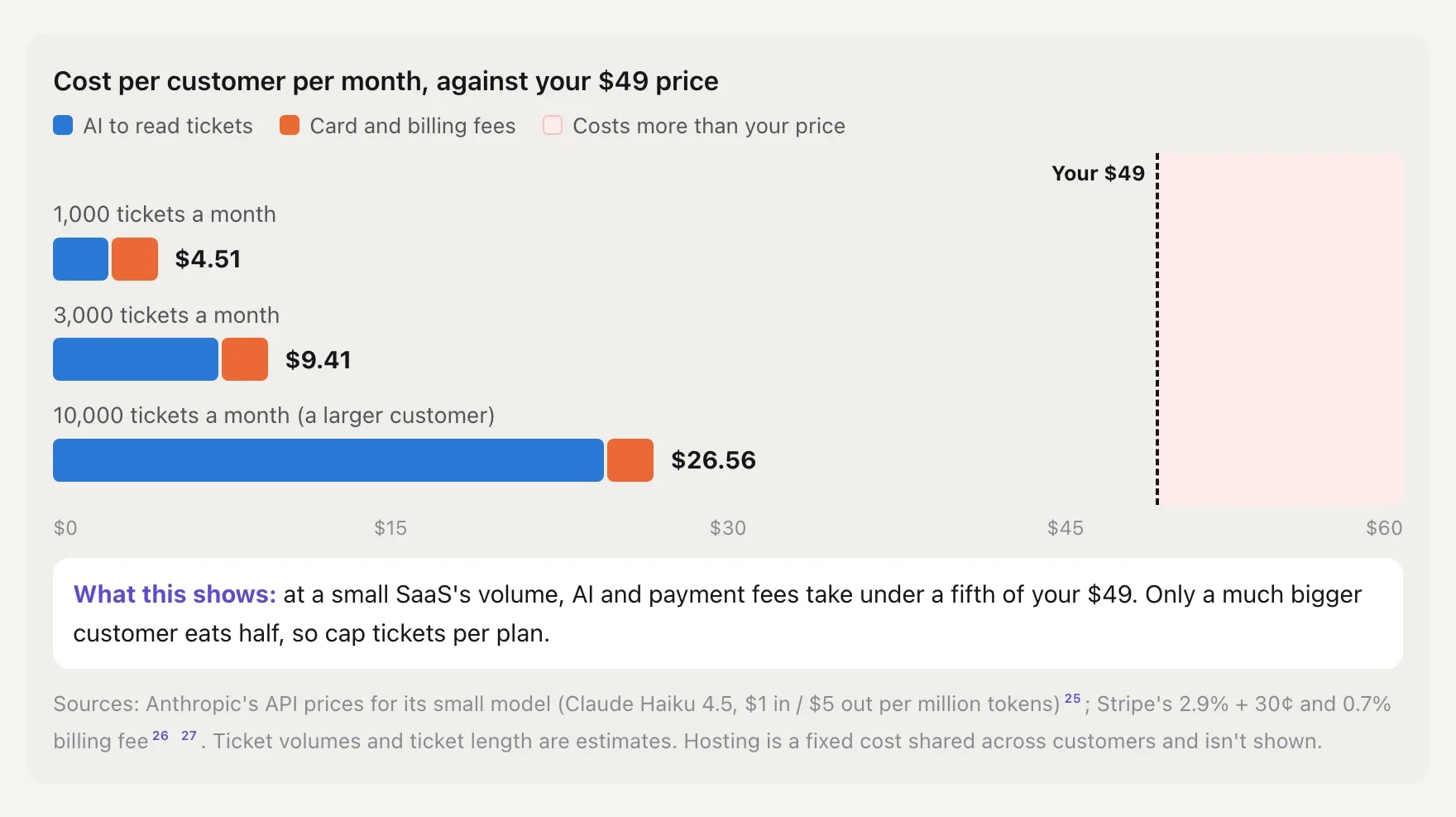
At a small SaaS's ticket volume, AI and payment fees take under a fifth of $49. Only a much bigger customer eats half, so the report recommends capping tickets per plan.
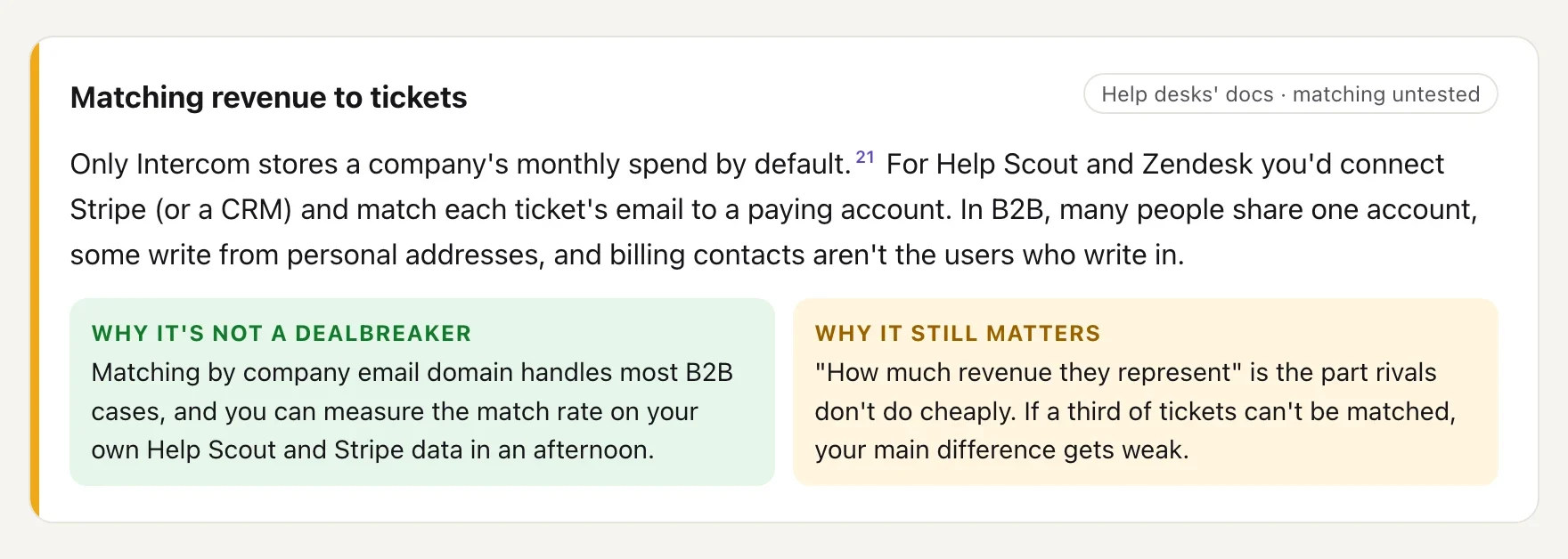
Both sides of every open question
What competitors' customers complain about (excerpt)
The big review sites blocked automated reading, so it read the reviews on Product Hunt instead and says so. Then it counted how many separate people raised each complaint:
• "Too expensive for what a small team uses": three independent people, about Canny and Productboard. Strong enough to shape the offer.
• "Duplicate feedback is hard to manage": one reviewer. Dropped: an anecdote, not a pattern.
The version worth building
Same buyer and price, built around the gap Canny leaves: Help Scout first (it has no revenue field, so Canny needs a CRM or a developer to attach revenue there), revenue pulled from Stripe in one click with the match rate shown so founders know how far to trust it, and a weekly founders' report instead of a feedback board, at one flat price with a ticket cap. The report also names what that costs: no voting portal or roadmap, so teams that want those will still choose Canny.
The next step
Before building anything: make the report by hand for three real teams from last month's tickets, then ask each for $49 for next month's. It fails if fewer than 2 of 3 would pay, or if revenue matches under 70% of tickets.
🤖 Why not just ask a chatbot?
A general assistant will give you a thoughtful opinion. This agent gives you a decision you can check:
• It sets your walk-away point before the research, not after.
• It reads the sources itself (pricing pages, app listings, regulations, reviews) and tells you which claims rest on what.
• It scores against the worst finding instead of balancing pros and cons into "it depends".
• It separates problems in the idea from problems in your budget, and names the budget that would change the answer.
• It looks for the version that works with the same effort it spends looking for flaws.
✍️ Try it with
"I want to build an app for independent dog groomers: online booking, SMS reminders, before/after photos. £25 a month. Worth doing?"
"Tear apart my idea: AI that writes Etsy listings from a product photo, $12/mo."
"I've got $2k and 3 months of evenings. I want to build a tool that turns freelance consultants' sales calls into CRM notes, $19/month. Should I?"
ℹ️ Good to know
• One idea per plan, with follow-up questions about your report included.
• A run takes about 20–30 minutes of live research.
• It answers in your language.
• It's an evidence-based assessment, not a business plan, legal advice or a guarantee. The decision is always yours.
• Market facts change. The report lists which findings to re-check before you commit.
External APIs
Web search · Public websites (competitor sites, app stores, forums) · Domain registries (RDAP/WHOIS)