

Video Editing - Online Skill
Video Editing
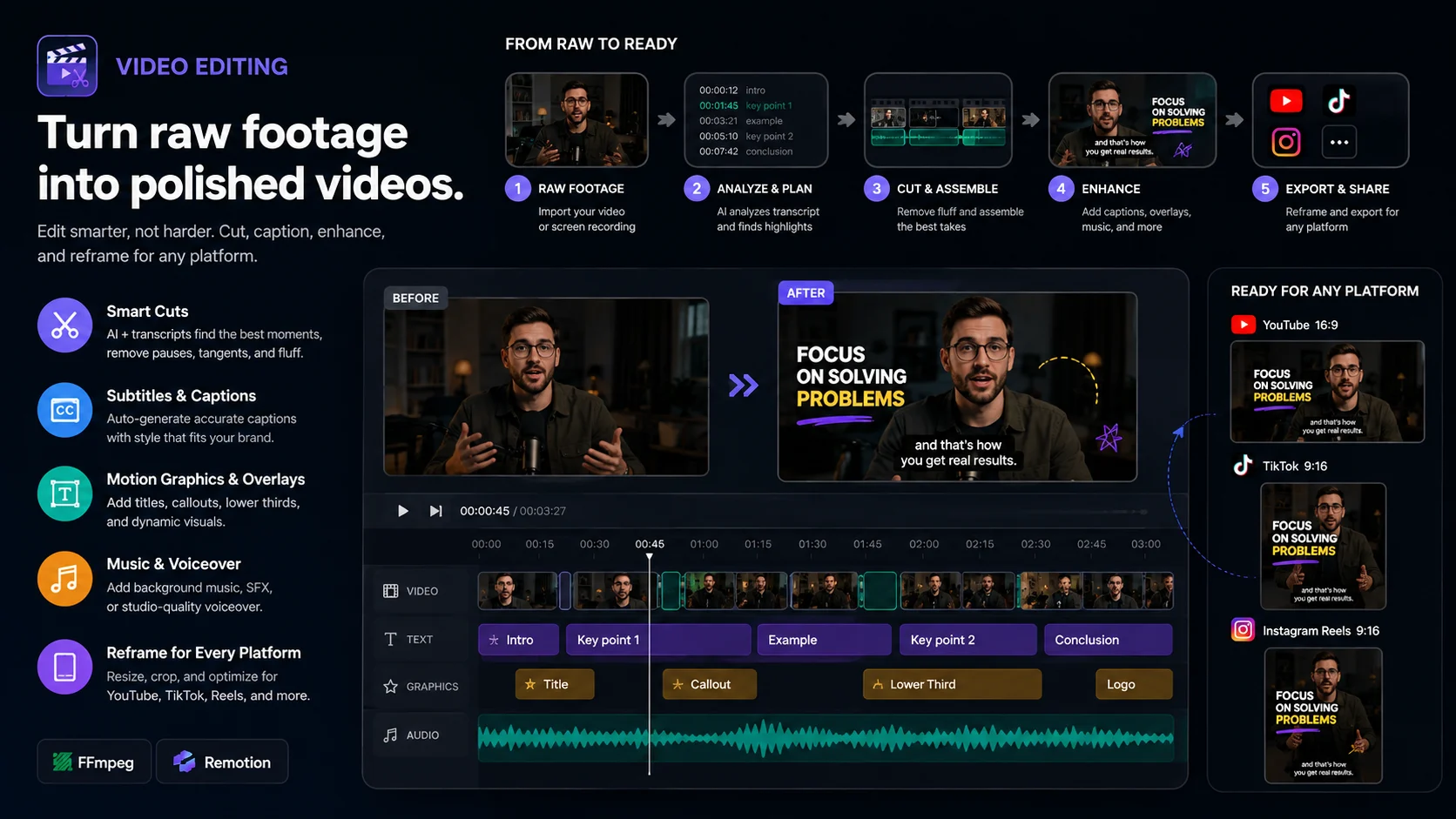
Turn raw footage into a polished, ready-to-share video with practical editing, captions, voiceover, reframing, visual enhancements, and final export.
This skill is built for editing real video content, not just giving editing advice. Upload your footage, images, or audio and describe what you want changed. The skill can analyze the material, perform the edit, and produce the finished video file.
Note: This agent edits existing video footage. It cannot generate a new video from scratch.
What it does
Edit and restructure footage
Clean up raw recordings and turn them into a tighter final cut.
It can help with:
- Trimming unwanted sections
- Cutting and joining clips
- Removing unnecessary pauses
- Reordering segments
- Changing video duration
- Creating faster-paced edits
- Extracting useful sections from longer footage
- Converting footage into short-form content
The edit is performed with FFmpeg-based local tools instead of requiring an external editing service.
Reframe for different platforms
Convert existing footage for different publishing formats, including:
- 9:16 vertical video
- 16:9 landscape video
- 1:1 square video
The skill can resize, crop, and reposition footage for platforms such as TikTok, YouTube Shorts, Instagram Reels, YouTube, and other social channels.
Add subtitles and captions
When transcription is available, the skill can turn spoken audio into timed captions and use those timestamps during editing.
It can create:
- Standard subtitles
- Short-form social captions
- Large readable captions
- Dialogue captions
- Timed text overlays
For long recordings, it first reduces the transcript into the relevant edit plan and timestamps instead of repeatedly processing the entire transcript.
Add voiceover
The online version includes local text-to-speech support, so simple English narration can be generated without requiring an ElevenLabs account or API key.
Voiceover can be used for:
- Narration
- Explainer videos
- Intro or outro lines
- Replacement voice tracks
- Image-based videos
- Short social content
The generated audio can then be mixed directly into the final video.
Add visual overlays and motion
Enhance existing footage with lightweight motion graphics and visual elements.
Examples include:
- Titles
- Text overlays
- Intro and outro cards
- Zoom effects
- Pan effects
- Image overlays
- Full-screen visual inserts
- Simple transitions
- Reframing and animated crops
These effects are designed to improve existing footage without requiring a full animation or generative-video pipeline.
Generate supporting visuals when useful
If the host environment provides image generation, the skill can create a small number of supporting visual assets for the edit.
Generated visuals can be useful when the original footage is missing a relevant shot—for example:
- B-roll illustrations
- Background visuals
- Concept images
- Supporting graphics
- Visual explanations
- Scene inserts
- Title or transition artwork
Generated images can be inserted directly into the video while preserving the original audio underneath.
Image generation is intentionally limited
Image generation is an enhancement tool, not the primary video source.
The skill follows these rules:
- Default: use no generated images
- Normal edit: usually 1–2 generated visuals
- Maximum: 4 generated visuals per edit
- Reuse existing footage or generated assets whenever possible
- Do not generate unnecessary variations
- Do not regenerate an image unless the edit genuinely requires it
This keeps edits efficient while still allowing AI-generated B-roll when it adds real value.
Turn images into video
You can also provide still images instead of traditional footage.
The skill can combine images with:
- Pan and zoom movement
- Voiceover
- Captions
- Timing
- Cuts
- Background audio
- Simple motion effects
This works well for slideshows, explainers, narrated image stories, product visuals, and lightweight motion-video content.
Audio processing
The skill can use FFmpeg to process and combine audio as part of the edit.
Depending on the source material, it can help with:
- Audio extraction
- Voiceover mixing
- Volume adjustment
- Audio replacement
- Combining narration with existing video audio
- Adding supplied music or sound effects
How it works
A typical workflow looks like this:
- Upload the source video, images, or audio.
- Describe the result you want.
- The skill inspects the available media.
- It creates a compact editing plan with the required timestamps and operations.
- Existing footage is reused wherever possible.
- Optional supporting visuals are generated only when they improve the edit.
- Captions, voiceover, overlays, crops, and other requested changes are applied.
- FFmpeg renders the final video.
- The finished MP4 is returned.
Example requests
You can ask things like:
Turn this into a 30-second TikTok and add large captions.
Remove the slow parts and make the pacing faster.
Convert this landscape recording into a 9:16 Short.
Add a cheerful voiceover using this script.
Add visual B-roll when I talk about AI agents.
Insert a generated illustration from 00:18 to 00:23 while keeping my original voice.
Add subtitles and export the finished MP4.
Turn these images and narration into a vertical video.
Create a cleaner intro, add captions, and normalize the audio.
What it is not
This skill is primarily a video editor.
It does not perform full generative video synthesis such as producing an entire cinematic 3D animation from a text prompt.
For example, a request such as:
Create a fully animated 60-second 3D cartoon with moving characters from scratch.
requires a dedicated text-to-video or animation model.
When appropriate, this skill can instead use generated still visuals, motion effects, narration, captions, and editing techniques to create a simpler illustrated or motion-graphic version—but it will not present that as true generated animation.
Built for online use
The editing workflow is designed to avoid unnecessary external dependencies.
Core functionality uses bundled or local tools such as:
- FFmpeg
- FFprobe
- Local text-to-speech
- Python-based media utilities
External services such as ElevenLabs, fal.ai, Descript, CapCut, or Replicate are not required for the core editing workflow.
If image generation is available through the host AI environment, it can be used as an optional enhancement without making the rest of the editing workflow dependent on it.
Best for
- TikTok and Reels
- YouTube Shorts
- YouTube videos
- Talking-head videos
- Tutorials
- Product demos
- Explainer videos
- Podcasts and interview clips
- Social media content
- Narrated image videos
- Existing footage that needs a cleaner final edit
Upload your footage and describe the result you want—the goal is to return a finished video, not just tell you how to edit it.
Source
Video Editing comes from affaan-m's ECC project.
Source:
https://github.com/affaan-m/ECC/tree/main/skills/video-editing


