
WaveCard | Podcast clips to captioned audiograms
WaveCard: podcast clips to captioned audiograms
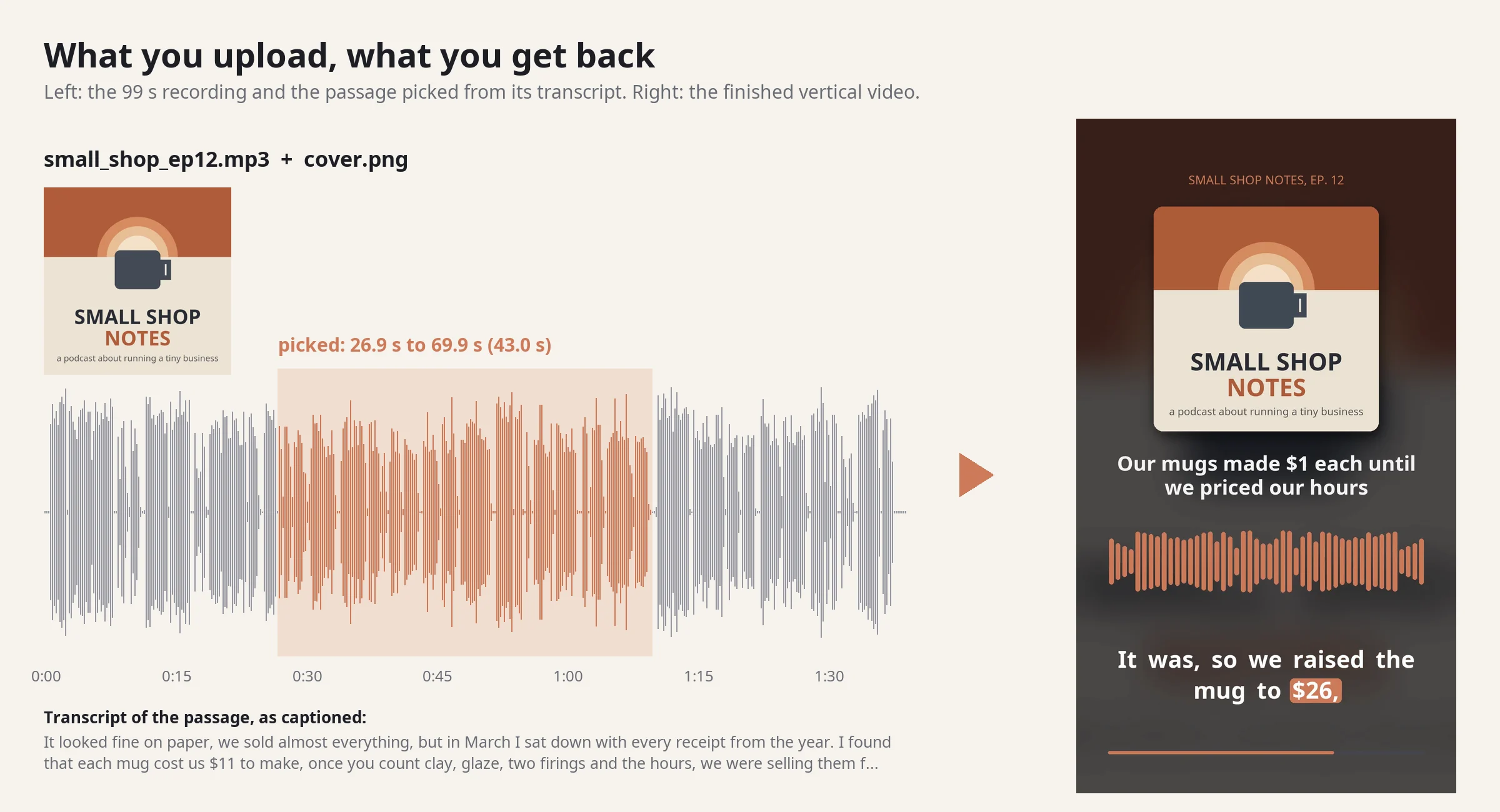
Upload a podcast episode or an interview. WaveCard finds a 30 to 60 second passage worth posting, cuts it, and hands back three ready-to-post videos with your cover, a headline, moving bars and captions that light up word by word as the speaker says them.
What you send
- One recording: MP3, WAV, M4A, AAC, FLAC, OGG, or a video with sound (MP4, MOV, MKV, WEBM). Up to 90 minutes.
- Optional: a cover image (square works best), the show name and episode, the moment you want ("12:40 to 13:30"), a colour, bars or waveform.
You can send just the file. Without a time range, WaveCard reads the transcript and picks one passage that stands on its own: a single story, number or piece of advice, starting at the start of the thought and ending at the end of one.
What you get back
| File | What it is |
|---|---|
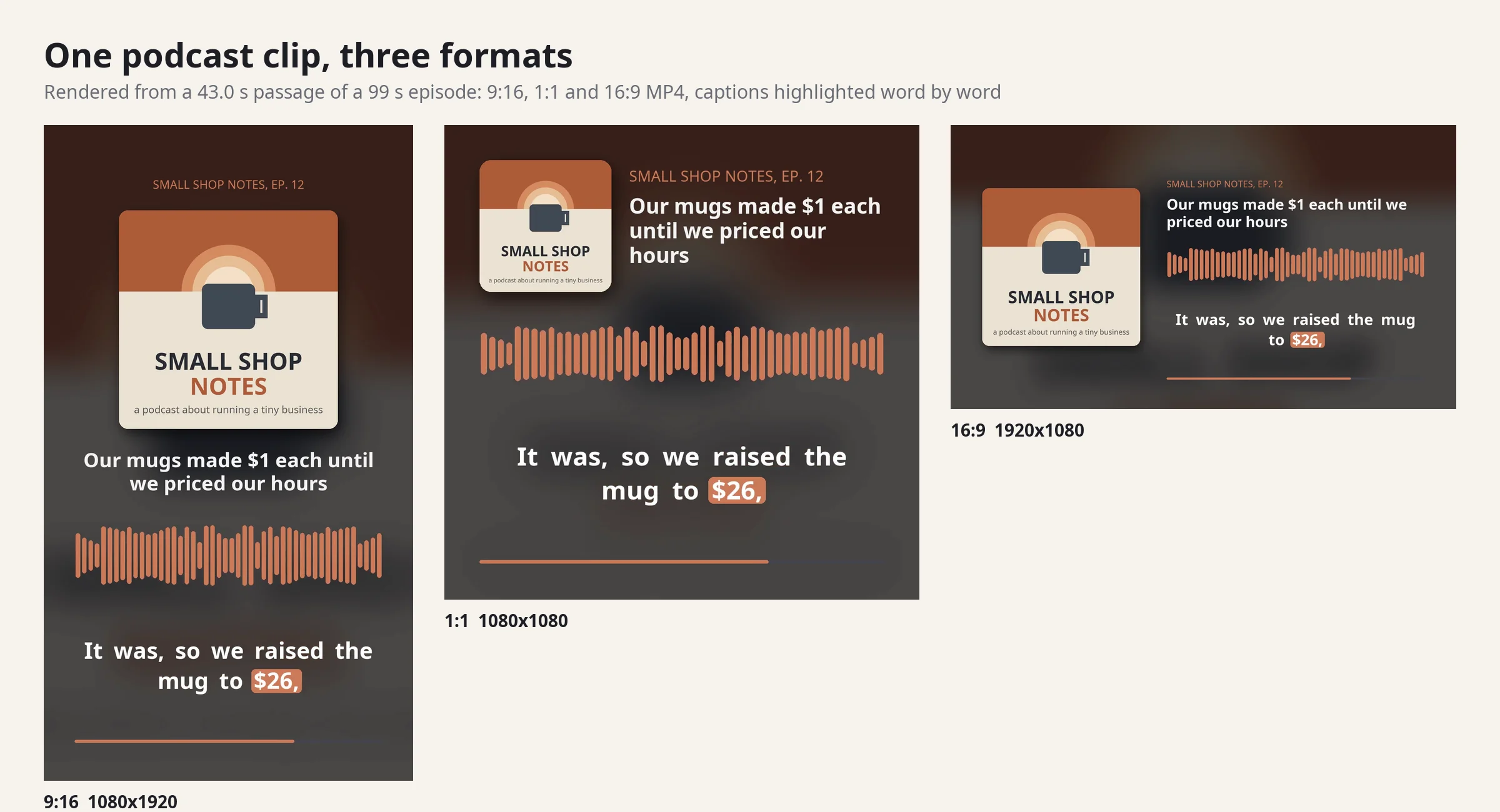
audiogram_9x16.mp4 |
1080x1920 for Reels, TikTok, Shorts, Stories |
audiogram_1x1.mp4 |
1080x1080 for feed posts and LinkedIn |
audiogram_16x9.mp4 |
1920x1080 for YouTube, X and websites |
audiogram_captions.srt |
The same captions as a subtitle file |
audiogram_preview.png |
The formats side by side |
audiogram_report.md |
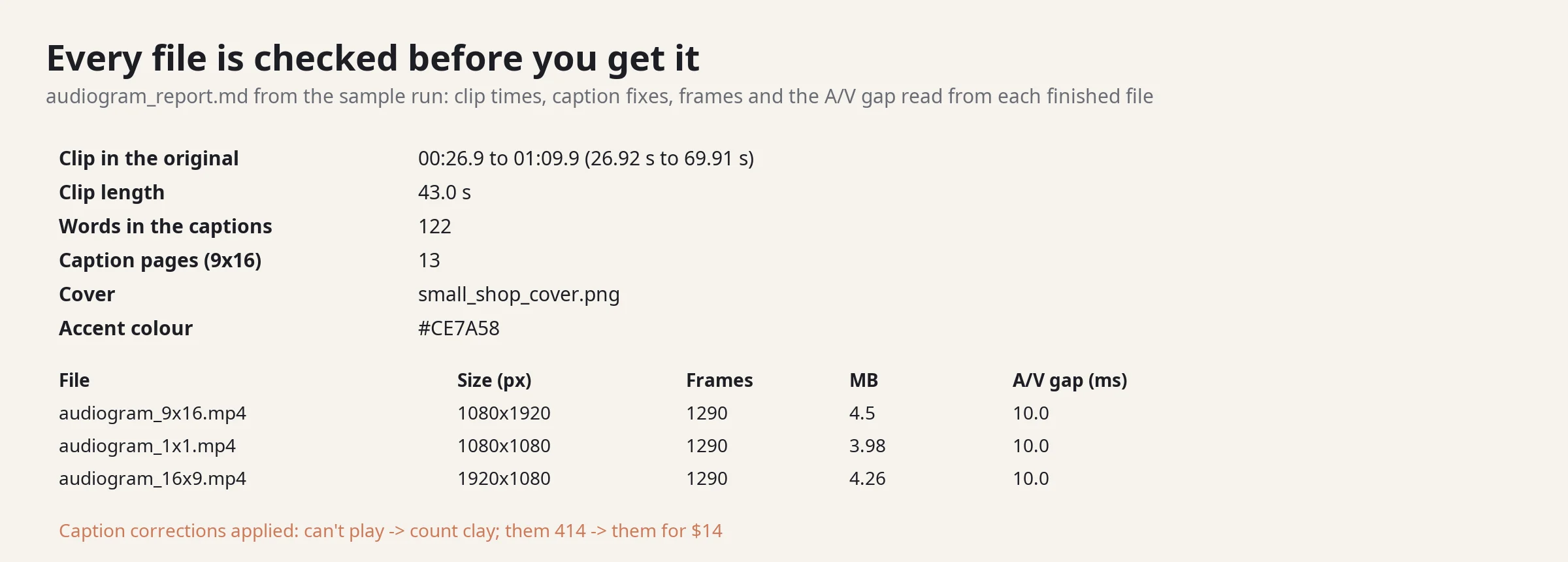
Clip times, headline, caption fixes, each file's size and A/V check, the clip transcript |
transcript.txt |
The whole recording with times, so you can ask for another clip |
All videos are H.264 with AAC audio at 30 fps.
Captions that follow the voice
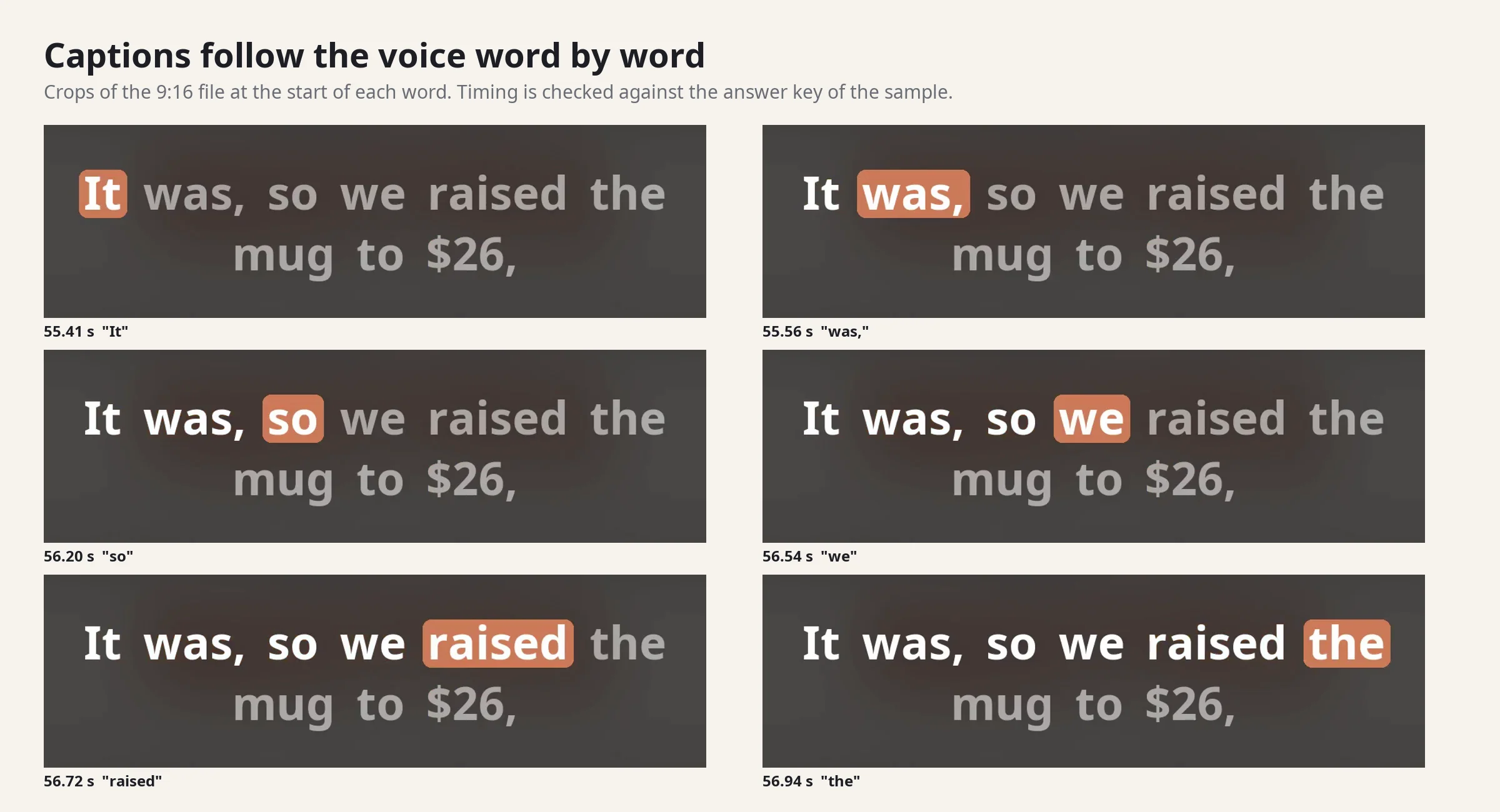
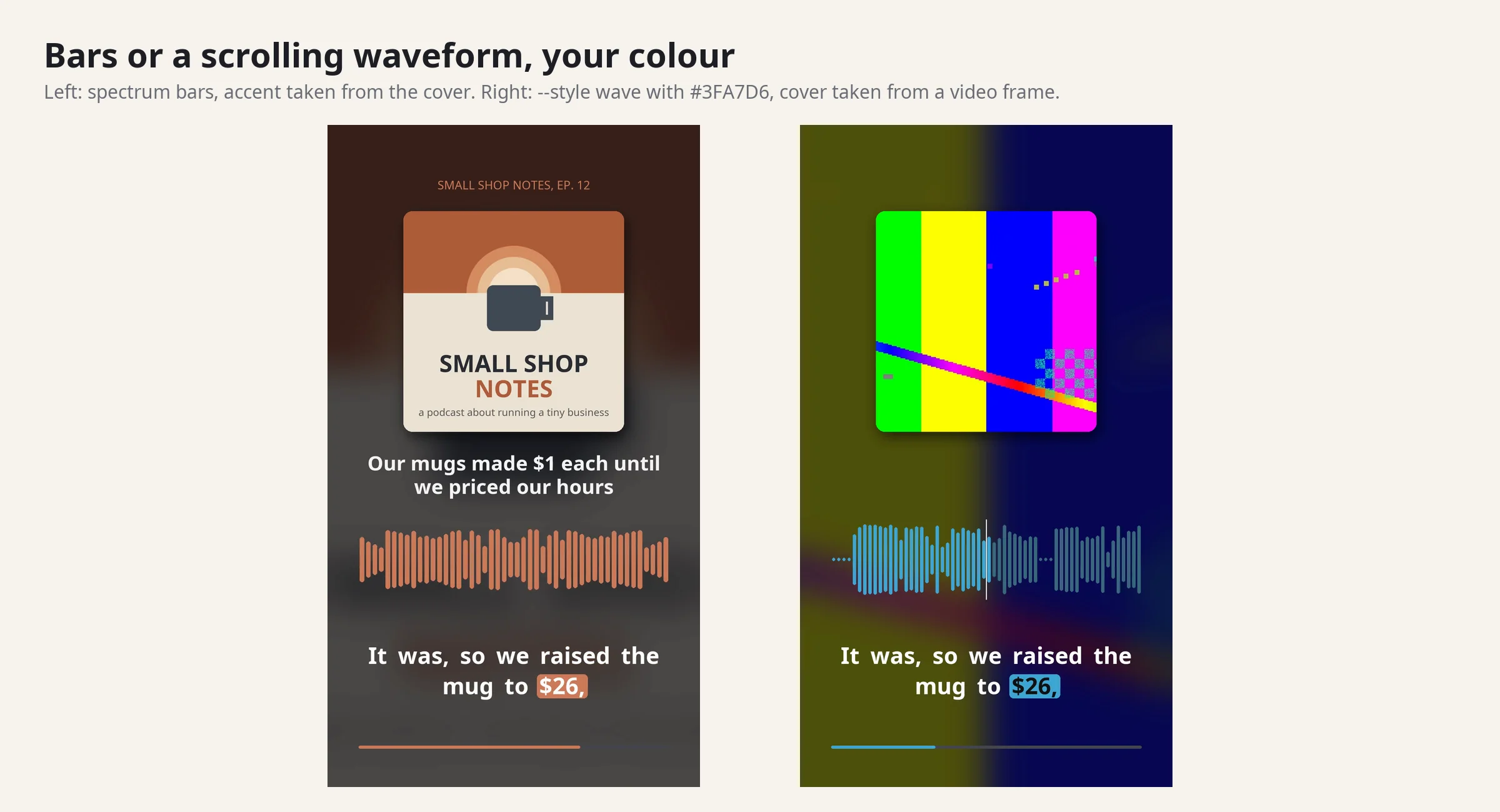
Words are timed by a speech model that runs inside the workspace. The current word sits on a highlight in your accent colour, words already spoken turn white, words still to come stay dimmed. Captions break at commas and sentence ends, not in the middle of a phrase.
The speech model is small, so it can mishear a word. Before rendering, the clip is proofread and clear mishearings are corrected without changing what was said. On the sample episode the transcript read "once you can't play, glaze" where the speaker said "count clay"; that was fixed and the fix is listed in the report.
Bars or waveform, your colours
The default visual is a set of spectrum bars that moves with the voice. Ask for the scrolling waveform instead and you get two seconds of audio on each side of a playhead. The accent colour is taken from your cover, or set it yourself ("use #3FA7D6"). With a video upload and no cover image, a frame from the clip is used as the cover.
Checked before you get it
Every file is measured after rendering: the last video frame and the last audio sample must end within 40 ms of each other, or the render stops with an error instead of handing you a drifting file. In our sync test (tone bursts at known times) the picture moved within 17 ms of the sound, and the cut was accurate to 25 ms.
How long it takes
Measured in a 2 CPU, 4 GB Linux container like the one the agent runs in:
| Step | Time |
|---|---|
| Transcript of a 99 second episode | 4 s |
| Transcript of a 30 minute episode | 60 s |
| Transcript of a 90 minute episode | 150 s |
| 43 second clip, all three formats | 37 s |
| 60 second clip, all three formats | 56 s |
Plans
| Plan | Price | Requests |
|---|---|---|
| Daily | $2.99 | 5 per day |
| Weekly | $7.99 | 10 per week |
| Monthly | $19.99 | 30 per month |
Every message you send uses 1 request from your plan. A typical clip (upload, pick, render, reply) is one request; asking for a different passage, headline or colour afterwards is another. The weekly plan starts with a 1-day free trial that includes 1 request.
What it does not do
- It does not clean up audio: levels, noise and music stay as uploaded (only a short fade in and out at the clip edges).
- It does not label speakers in the captions.
- Captions and headlines support Latin, Greek and Cyrillic scripts. Recordings in Korean, Japanese, Chinese, Arabic, Hindi or Thai can only be rendered without captions.
- It does not download from Spotify, Apple Podcasts or YouTube links. Upload the file.
- It does not generate images, voices or music, and it does not post anywhere.
- Clips are 5 to 90 seconds; 30 to 60 seconds works best.
FAQ
Can I get more than one clip from an episode?
Yes. Ask for another passage or give times; each clip gets its own file names in the same folder. Each message uses 1 request.
Will the captions be perfect?
No speech model is. Read the captions before posting. The report lists every correction that was made, and you can ask for more ("the name is Priya, not Korea").
Who picks the passage?
The agent reads the transcript and picks one complete thought of 30 to 60 seconds. If you know the moment you want, give the times and it uses them, keeping words whole at the edges.
Where do my files go?
Nowhere. Transcription and rendering run inside the workspace with a bundled model and fonts. The only network use is installing Python packages from PyPI at setup.
Do I need the rights to the recording?
Yes. Use recordings and cover images you own or have permission to post.
The sample episode in these images is synthetic: computer voices reading a script written for this demo, about an invented show.
External APIs
PyPI (pypi.org, files.pythonhosted.org)
