YouTube Chapters & SEO — Local Kit (Download)
YouTube Chapters & SEO
What you're buying: a one-time purchase download package (skill instructions + Python scripts) that runs on your own computer inside your own AI agent — it is not a cloud service.
You need: an AI agent that supports skills (e.g. Claude Code or Codex) — its subscription or API costs are yours; Python 3.9+, ffmpeg andfaster-whisper.
Third-party services: none at run time. The first transcription downloads the open-source Whisper speech model once from Hugging Face (none of your content is sent). Your video is never uploaded, and the skill never logs into YouTube. No API keys.
One long video in, a complete YouTube upload kit out: chapters, titles, description, tags, a pinned comment and an SRT caption file — with every chapter timestamp checked against what is actually said.
What you get
- ⏱️ Chapters that pass YouTube's rules: first at 00:00, at least 3, each 10 s or longer, in order — paste them and the chapter bar appears
- 🏷️ 5 title options from different angles (keyword-first, list, mistakes, result, question), with one ⭐ recommended
- 📝 Description, ready to paste: hook for the first lines, value bullets, chapters, links and 3 hashtags
- 🔖 Tags counted the way YouTube counts them — always within the 500-character limit
- 💬 Pinned comment: an easy question that gets people commenting
- 💬 SRT captions: short, readable lines split at punctuation — upload them to replace auto-captions
- 📋 Upload kit summary: everything above plus a "what is said at each timestamp" evidence table
Example
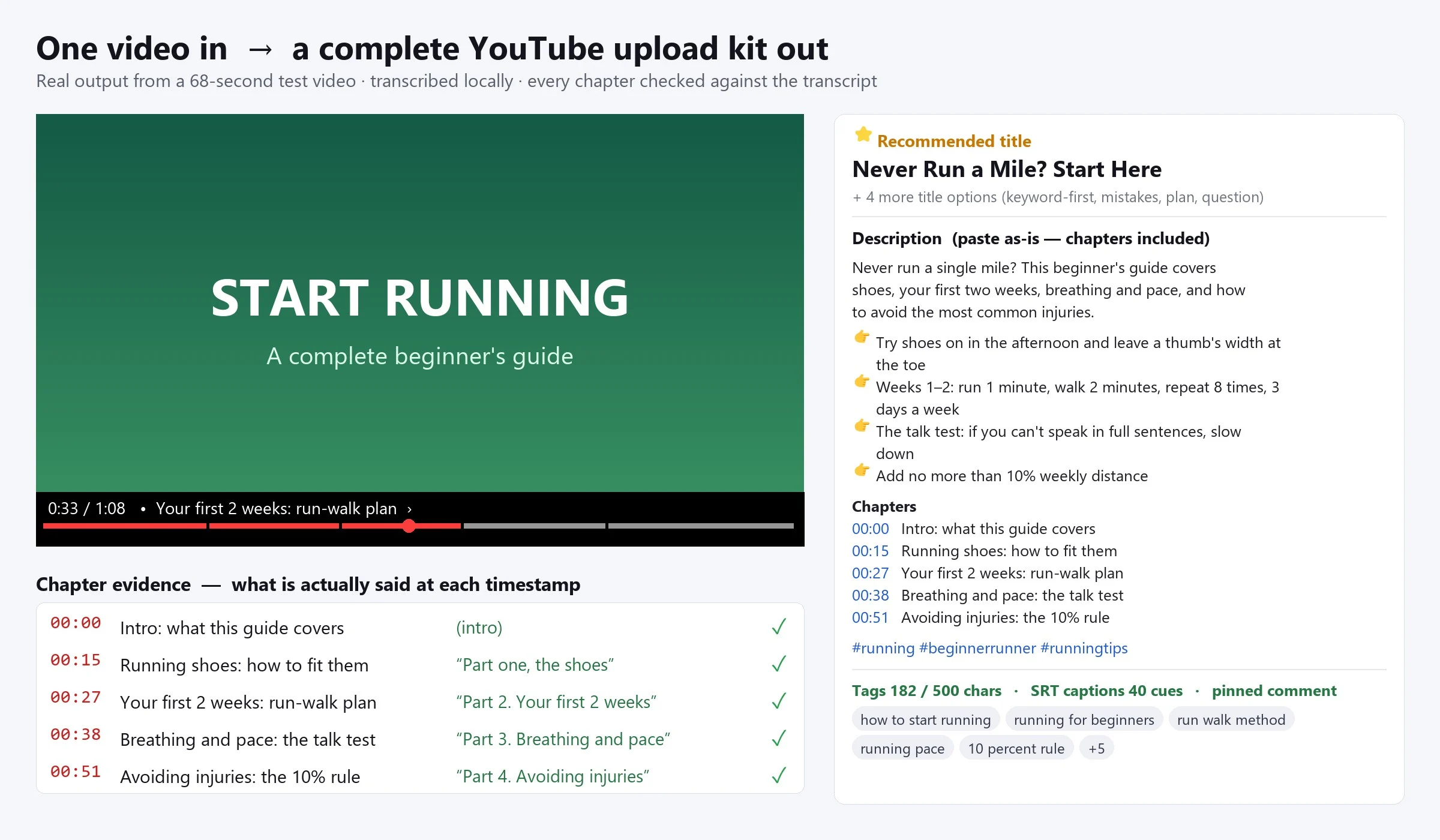
A 68-second beginner running guide, transcribed locally in about 15 seconds: 5 chapters (00:00 Intro · 00:15 Running shoes · 00:27 Your first 2 weeks · 00:38 Breathing and pace · 00:51 Avoiding injuries), each backed by the exact words spoken there, 5 titles, a 632-character description, tags at 182/500 characters and 40 caption cues. The speech model misheard "breathing and pace" as "breathing in pace" — one line in a fixes file corrected the transcript and the captions together.
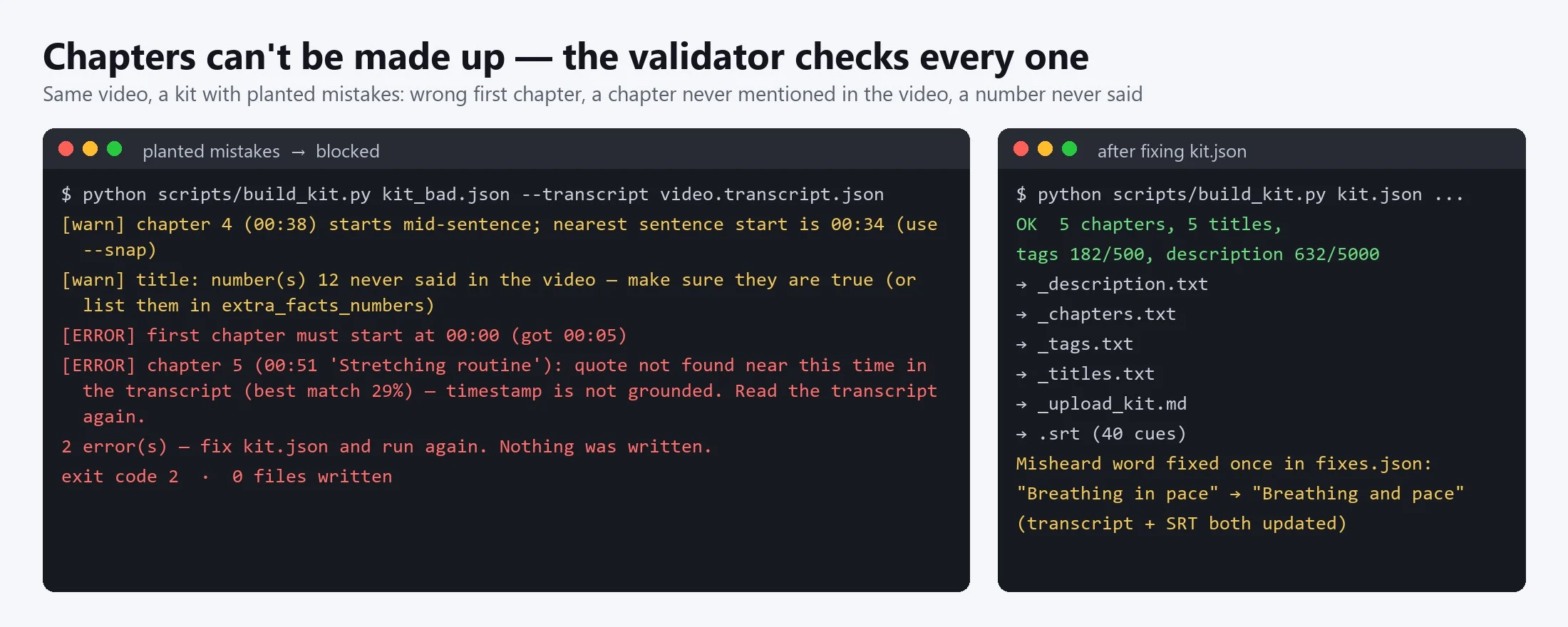
Then a kit with planted mistakes — first chapter at 00:05, a "Stretching routine" chapter the video never mentions, and "12 Running Tips" in a title — was blocked with nothing written, and the made-up number was flagged.
A 3-minute Traditional Chinese camping video produced 6 chapters, 70 caption lines and a full kit; the validator also caught 8 kinds of planted errors (wrong timestamps, invented chapters, too-short chapters, over-long titles and tags).
Try it — copy a prompt
- "Make chapters, 5 titles, a description and tags for
episode_42.mp4. Names said in the video: Notion, Zapier." - "I already have
lecture.srt— turn it into YouTube chapters and a description in English."
Chapters that land on the right moment
Many AI tools guess chapter times — click one and you land somewhere else. This skill:
- Requires every chapter to quote the words spoken at that moment; the validator searches the transcript and rejects any chapter it can't find
- Puts a chapter where the topic really starts, not where the intro previewed it
- Warns when a chapter starts mid-sentence, and can snap it to the sentence start
Copy that sticks to the video
- Titles and description use only what the video actually says
- A number in a title or description that never occurs in the video triggers a warning (the video says 5 tips, the title says 12)
- No other channels' names or unrelated trending words as tags (YouTube treats misleading metadata as a policy violation)
Works with
- Video or audio: mp4, mov, mkv, webm, mp3, m4a, wav… (local Whisper, 99 languages; Chinese can be output in Traditional characters)
- Existing captions (.srt / .vtt) — skips transcription entirely
- Podcasts, livestream replays, online courses, interviews and tutorials; videos over an hour switch to h:mm:ss automatically
Why buy it
One payment, unlimited videos of any length — no per-minute transcription fees and no monthly subscription.
Who it's for
YouTubers, podcasters who post to YouTube, course creators, educators, video editors and social media managers who upload long videos every week.
Requirements
- Python 3.9+ and ffmpeg (the skill checks your setup first and tells you what's missing)
pip install faster-whisper(addopencc-python-reimplementedfor Traditional Chinese)- The first transcription downloads the Whisper model once (small ≈ 500 MB); after that it works offline
- On an ordinary CPU, a 3-minute video transcribes in about 45 seconds; use the medium model for noisy audio or strong accents (slower)
Limitations (please read)
- This is AI-written copy — review it before you publish.
- No guarantee of rankings or views, and no keyword search-volume data; keywords come from your video and your niche knowledge.
- It doesn't upload to or log into YouTube — you paste the files into YouTube Studio.
- Speech recognition mishears names and jargon; list them before you start, and fix repeat errors once with a replacement file.
- YouTube decides whether chapters are shown; a few videos may not show them even when the format is correct.
- Not affiliated with or endorsed by YouTube or Google.
Files
SKILL.md— agent workflowscripts/transcribe.py— local transcription, replacement list, transcript and SRTscripts/build_kit.py— checks chapters and copy (YouTube rules + transcript match) and writes the upload filesreferences/chapter-rules.md— YouTube chapter rules with examplesreferences/seo-writing.md— how to write titles, descriptions, tags and pinned commentsreferences/example_kit.json,example_kit_en.json,example_fixes.json— Chinese and English examples