發票文件批次轉 Excel|每格附原文出處 Batch Document Extraction
發票文件批次轉 Excel|每一格都附原文出處
Batch Documents to Excel — every cell carries its source quote and confidence score
這是什麼 / What this is
月底又是一疊發票、報價單、合約要一筆一筆敲進 Excel。敲三小時,還不敢保證沒打錯。
把它們壓成一個 zip 丟進來,用一句白話說你要哪些欄位,拿回一本可以直接用的 Excel。
關鍵不在「叫 AI 讀文件」——關鍵在每一格都附上原文引述與來源檔名(PDF 另附頁碼),是模型在抽取當下被強制一起交出來的,不是事後推的;加上 0 到 1 的信心分數,低分的自動隔離進「待覆核」表,不會混進你要直接用的乾淨資料。財務跟稽核不採用沒有出處的數字,這支工具就是為了這件事做的。
Month-end again: a stack of invoices, quotations and contracts to key into a spreadsheet by hand. Three hours of typing, and still no guarantee it is right.
Drop in one zip, describe the columns you want in plain language, and get one workbook back. The point is not "an AI reads your documents". The point is that every extracted cell carries a verbatim quote and its source file (plus a page number for paged PDFs), produced at extraction time by an enforced schema rather than reconstructed afterwards, plus a 0-1 confidence score. Anything below the threshold is quarantined into a review sheet instead of quietly contaminating your clean data. Finance and audit do not accept numbers without provenance — that is the problem this solves.
你會得到什麼 / What you get
- 一本 .xlsx 活頁簿,五張表 / One .xlsx workbook, five sheets
- 摘要 Summary — 跑了幾份、成功幾份、失敗幾份、抽出幾列、幾筆待覆核、估算成本
- 資料 Data — 你要的欄位,一列一筆
- 出處 Trace — 每一格的原文引述、來源檔名、信心分數(PDF 另附頁碼)
- 待覆核 Review — 信心低於門檻的,獨立隔離
- 失敗 Failed — 壞檔、加密檔、不支援格式,各自列出原因
- 一份 .csv — 純文字資料表,要接後續程式的人直接用
- 聊天視窗一段文字摘要 — 跑了幾份、幾筆待覆核、花了多少,不用開檔就看得到結論
- 信心高低用綠黃紅底色標示,一眼看出哪裡要人看
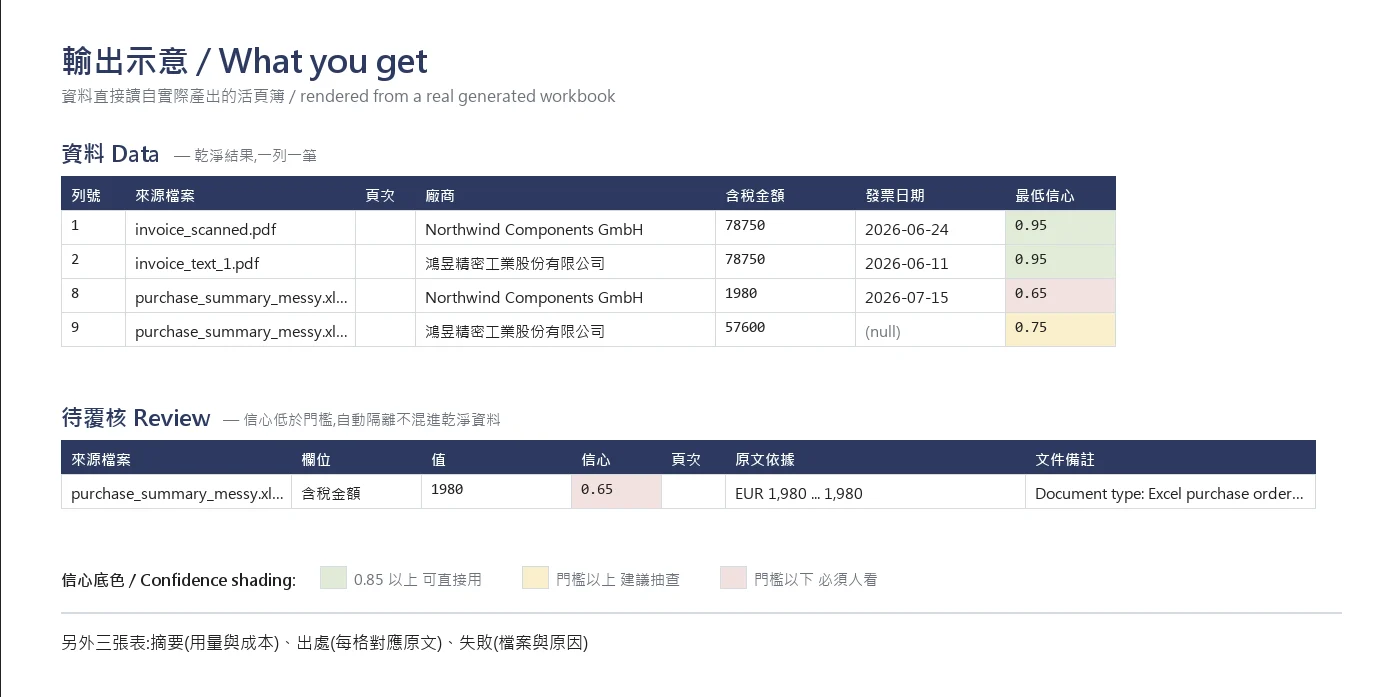
檔案直接回傳給你。抽出來的商業資料只寫進檔案,不貼進對話。
Files are returned to you directly. Extracted business data is written to the output file only — never pasted into the chat.
怎麼用 / How to use
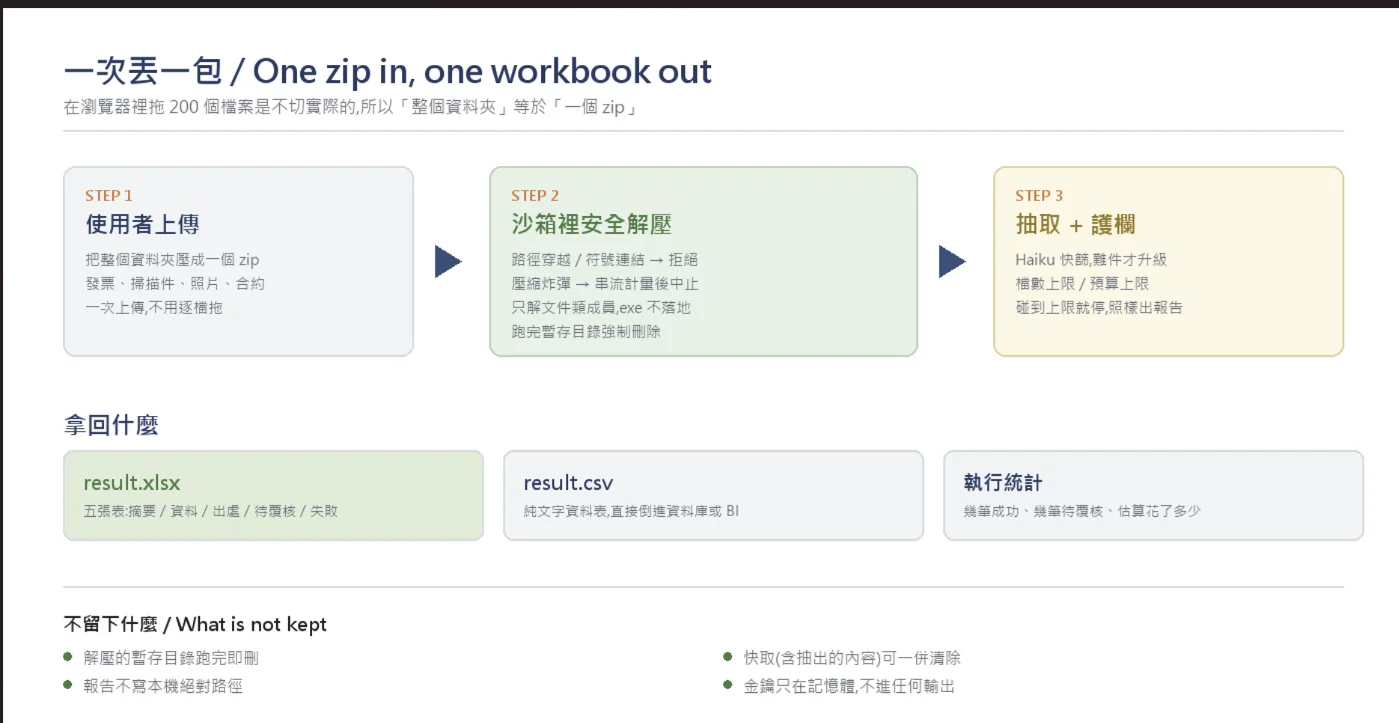
- 把要處理的文件壓成一個 zip 上傳
- 用一句話說你要哪些欄位,例如「廠商、含稅金額、發票日期」
- 工具先列出會處理哪些檔案、推導出哪些欄位給你確認
- 確認後開始跑,結束回傳 Excel 與摘要
不必寫 schema、不必設規則、不必先把文件分類。
Describe the columns in plain language — no schema authoring, no rules, no pre-sorting.
支援的檔案格式 / Supported formats
| 類型 | 說明 |
|---|---|
| PDF(有文字層) | 走便宜的文字路徑 |
| PDF(掃描件) | 自動改走視覺路徑 |
| PNG / JPG 照片 | 手機拍歪的報價單也吃 |
| XLSX | 多層表頭會自動升級重抽 |
| DOCX | 合約類文件 |
| CSV | 直接讀 |
一批裡混什麼格式都可以,工具自己分流。Mixed formats in one batch are routed automatically.
實測數字 / Measured, not estimated
2026-08-01 端到端實跑,11 份混合格式測試檔(含 3 個故意壞掉的檔案):
- 成功 8 份 / 失敗 3 份 —— 3 個壞檔全部照預期進失敗清單,整批沒有中斷
- 抽出 11 列,其中 1 筆進待覆核
- 耗時 18.9 秒
- 多層表頭的 xlsx 觸發自動升級重抽,升級後抽出 4 列
以上都是實跑數字,不是估算。All figures above come from an actual end-to-end run, not estimates.
額度 / Quota
| 方案 | 每週期執行次數 | 每次最多份數 |
|---|---|---|
| 月方案 Monthly | 25 次 | 50 份 |
| 週方案 Weekly | 8 次 | 50 份 |
| 日方案 Daily | 5 次 | 50 份 |
超過 50 份請分次上傳。被上限擋掉的檔案照樣會列進失敗清單並標明原因,不會人間蒸發。
Files blocked by the cap are still listed in the Failed sheet with the reason — nothing silently disappears.
誠實說限制 / Honest limits
手寫字的辨識率明顯低於印刷體
跨頁的表格可能切錯列,請抽查「出處」表
頁碼只有分頁文件(PDF)才有;xlsx、csv、docx 沒有頁的概念,該欄會留空
找不到的欄位會回空值,不會猜一個給你——編出來的數字比空格危險得多
一份完全沒有可抽資料的文件(例如純條款合約)會回 0 列,這是正確行為,不是失敗
Handwriting is markedly less reliable than print
Tables spanning pages may split rows incorrectly — spot-check the Trace sheet
Page numbers exist only for paged documents (PDF); xlsx, csv and docx have no page concept, so that column stays empty
Missing fields come back as null rather than a guess: a fabricated number is far more dangerous than a blank
A document with nothing extractable returns zero rows — correct behaviour, not a failure
資料與隱私 / Data handling
- 文件內容會送到 Anthropic API 判讀。受保密義務的資料,請先確認貴組織的雲端政策。
- 每次執行結束清除抽取快取,解壓用的暫存目錄強制刪除。
- 輸出報告只寫相對路徑,不帶絕對路徑。
Document content is sent to the Anthropic API for interpretation — check your organisation's cloud policy before processing regulated material. The extraction cache is purged and the temporary unzip directory is force-deleted at the end of every run.
常見問題 / FAQ
Q:我要自己準備 API 金鑰嗎?
不用。線上版由作者託管金鑰,訂閱就能直接跑。
Q:一批裡有壞檔會不會整批停掉?
不會。壞檔、加密檔、不支援格式各自列進失敗表並標明原因,其餘照跑完。
Q:欄位名稱會被翻譯嗎?
不會。系統表頭有中英兩版,但你自己定義的欄位名原樣輸出。
Q:一次可以丟多少份?
單次最多 50 份。超過請分次上傳,被擋掉的檔案照樣列進失敗表。
Q: Do I need my own API key?
No. The online version runs on the author's hosted key — just subscribe and go.
Q: Will one broken file kill the whole batch?
No. Broken, encrypted and unsupported files are each listed with a reason; everything else keeps running.
Q: Are my column names translated?
No. System headers ship in Chinese and English, but the field names you define come back exactly as you wrote them.
適合誰 / Built for
每月要整理單據的會計、採購、行政與事務所。
Accounting, procurement and admin teams doing monthly document runs.