
Audiogram Maker — Local Kit (Download)
Audiogram Maker
What you're buying: a one-time purchase download package (skill instructions + Python scripts) that runs on your own computer inside your own AI agent — it is not a cloud service.
You need: an AI agent that supports skills (e.g. Claude Code or Codex) — its subscription or API costs are yours; Python 3.9+, ffmpeg,faster-whisperandpillow.
Third-party services: none at run time. The first transcription downloads the open-source Whisper speech model once from Hugging Face (none of your audio is sent). Your audio never leaves your computer. No API keys.
One podcast episode in, social-ready audiogram videos out. Social feeds don't autoplay plain audio — video they do. That's what an audiogram is for.
What you get
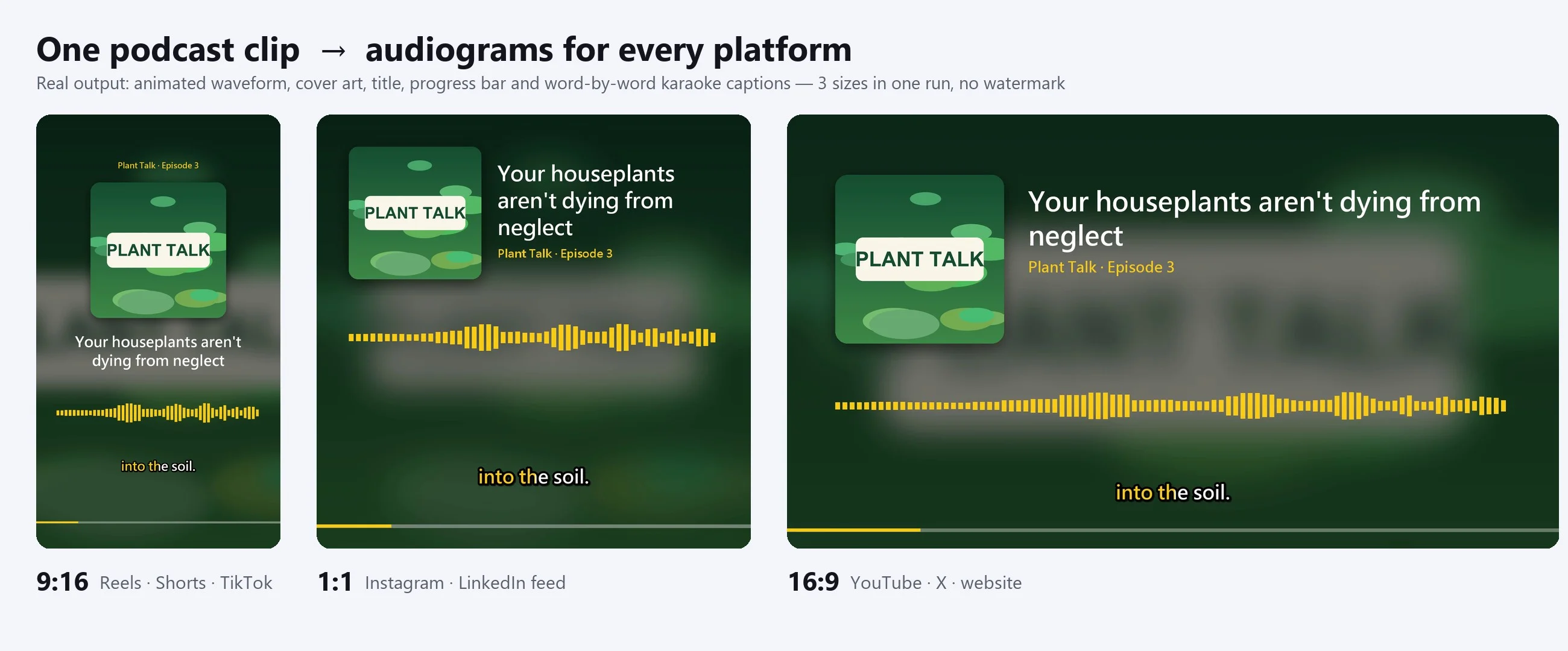
- 🎬 MP4s in three sizes: 9:16 (Reels / Shorts / TikTok), 1:1 (Instagram / Facebook / LinkedIn feed), 16:9 (YouTube / X)
- 🌊 Animated audio visual: three styles — smooth waveform, bars or frequency spectrum
- 💬 Karaoke captions that light up word by word, so the clip works with the sound off
- 🖼️ Cover art and title: use your show artwork (the background becomes a blurred version) or let it generate one; titles wrap at punctuation
- ⏱️ Progress bar, plus a poster image for each size
- 🚫 No watermark, no export limits
Example
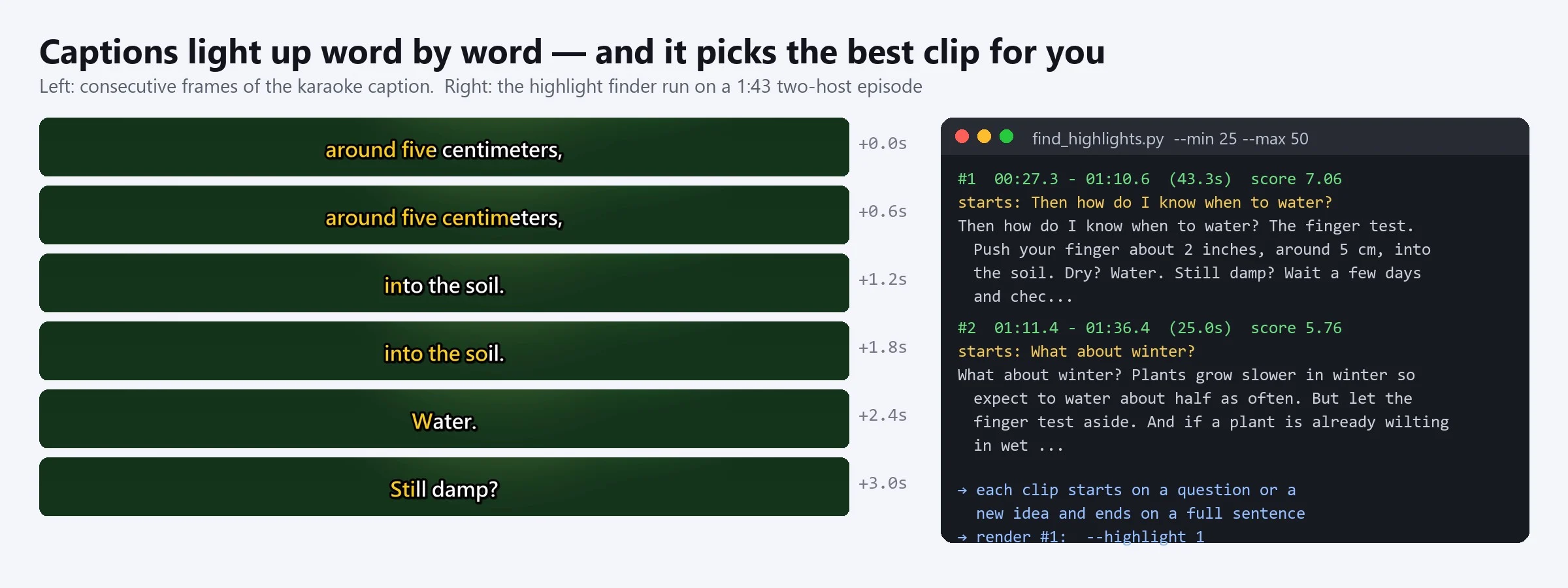
A 1 min 43 s two-host episode ("Why Your Houseplants Keep Dying"): the highlight finder ranked the best clips, and #1 was 00:27–01:10 (43 s), starting on the question "Then how do I know when to water?" and ending on a full sentence. The clip was rendered in 9:16, 1:1 and 16:9 with the show's own cover art, bar waveform and a yellow brand accent.
A 2 min 21 s Traditional Chinese episode was transcribed locally in about 55 seconds (35 lines, every character time-stamped). A misheard word was fixed with a replacement file — re-running took 0.2 s thanks to the cache — and the top highlight (38.5 s, opening on a question) rendered as 9:16 and 1:1 in about 13 seconds.
Try it — copy a prompt
- "Make a 9:16 and 1:1 audiogram from the best 30–60 seconds of
episode12.mp3. Title: 'The one habit that fixed my mornings', show name 'Morning Fuel · EP12', usecover.jpg." - "I have
interview.srt— use it for the captions and make all three sizes with the ocean theme."
It picks the clip for you
Not sure which part of a long episode to post? The skill ranks the top 5 candidates by whether they open with a hook (a question, a contrast, a number), avoid dead air and start and end on complete sentences. Your agent reads them and recommends the one that stands best on its own — or you pick the start and end times yourself.
Two caption sources
- Local speech recognition: Whisper runs on your computer, 99 languages; Chinese can be output in Traditional characters with full-width punctuation
- Your own SRT: if you have a script or captions, use them for zero typos
Misheard names can be fixed once with a replacement file; re-running takes seconds.
Style
5 colour themes (midnight, ocean, sunrise, berry, mono), or set your own brand colour.
Pairs well with
Podcast Audio Overview: turn an article into a podcast, then turn its best moment into a short video to promote it.
Why buy it
One payment, unlimited audiograms — no monthly subscription, no watermark and no per-video export limits.
Who it's for
Podcasters, interview and talk-show hosts, coaches and course creators, radio producers and social media managers promoting audio content.
Requirements
- Python 3.9+ and ffmpeg (the skill checks your setup first and tells you what's missing)
pip install faster-whisper pillow(addopencc-python-reimplementedfor Traditional Chinese)- The first transcription downloads the Whisper model once (small ≈ 500 MB); after that it works offline
- An ordinary CPU is fine: a 2-minute file transcribes in about a minute, and a 40-second video renders in about 10 seconds
Limitations (please read)
- Captions come from AI speech recognition: poor audio, loud background music, strong accents or lots of jargon cause mistakes — check before posting.
- With an SRT, word timing inside each line is estimated from length, so long lines may be slightly early or late.
- It doesn't identify speakers and doesn't alter or synthesise voices — it only visualises your audio.
- It doesn't post to social platforms; you get the video files and posting suggestions.
- Only clip audio you have the right to publish, and get your guests' consent.
Files
SKILL.md— agent workflowscripts/transcribe.py— local speech recognition (word timestamps), SRT import, replacement listscripts/find_highlights.py— scores and suggests highlight clipsscripts/make_audiogram.py— video renderer (background, cover, waveform, progress bar, karaoke captions)references/platform-specs.md— sizes, lengths and post templates for each platformreferences/example_fixes.json— replacement list example

