

Listful — Amazon Listing Images
✨ What it does
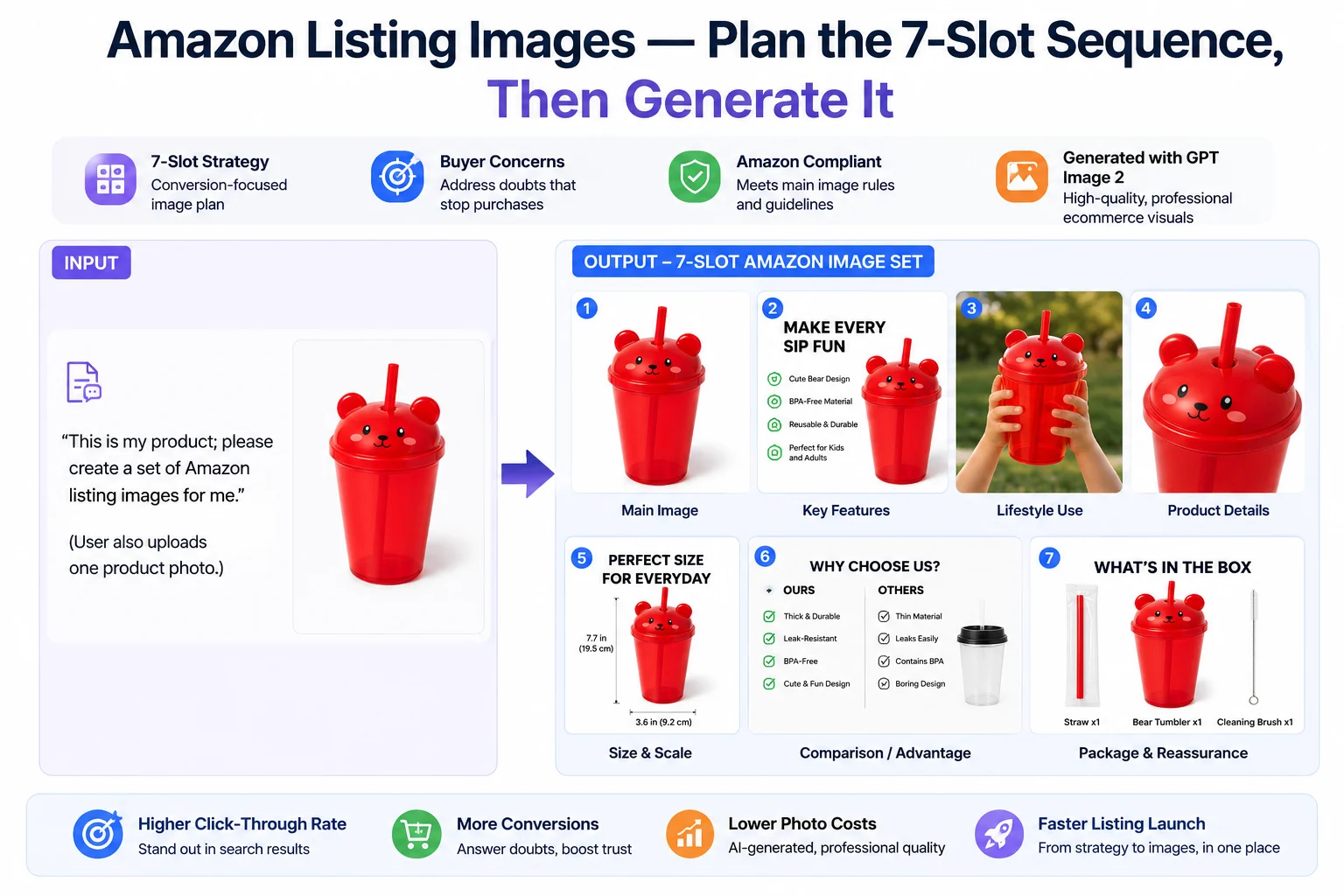
This skill plans and generates a complete 7-slot Amazon listing image sequence built around buyer concerns, conversion flow, and Amazon compliance.
Once the image strategy is approved, each slot can be generated through OpenAI GPT Image 2, with control over scene design, product presentation, lighting, composition, and text layout. The result is a professional ecommerce-style image set — not just a loose collection of visuals.
It is built for Amazon sellers who are:
- 🚀 Launching new products
- 📈 Improving underperforming listings
- 🎨 Replacing part of a traditional product photography workflow with AI-generated listing images and concepts
Three ways to use it
- 🧭 Strategy + Create — provide product information and get a full 7-slot image plan, then generate each slot one by one
- 🔍 Diagnose + Optimize — upload existing listing images, get a conversion-focused diagnosis, then rebuild weak slots
- 🖼️ Reference-Guided — share a reference image plus directions and generate a single slot
What you get back
- ✅ A complete 7-slot Amazon image strategy
- ✅ Buyer concern analysis for the category or product
- ✅ Per-slot rationale explaining what each image should do
- ✅ Slot-by-slot image generation with GPT Image 2
- ✅ Amazon compliance checks, including main-image rules for Slot 1
- ✅ Text overlay planning for secondary images
- ✅ Optional diagnosis and regeneration guidance for existing listing images
💡 What makes this skill different
- Plans before generating — The full 7-image sequence is mapped out first, so the gallery works as a conversion system rather than a set of disconnected images.
- Built around buyer concerns — Each image is designed to answer a real hesitation before purchase.
- Every slot has a job — No random product angles. Each slot has a specific role: attracting the click, explaining the value, answering doubts, or reassuring the buyer.
- Generates, not just suggests — Approved slots are produced through OpenAI GPT Image 2 with controlled scene design and text layout, instead of stopping at strategy or prompts.
⚙️ How it works
1️⃣ Understand the product and marketplace
Identify the product, category, core selling points, target audience, price positioning, and target marketplace — since strategy depends on category buyer behavior and listing region.
📌 If not specified, the default is Amazon US (image text in English).
2️⃣ Analyze buyer concerns
Identify the main purchase concerns the images need to address — drawn from category patterns, competitor reviews, or objections you already know (e.g. quality, durability, ease of use, size, compatibility, package contents, value).
3️⃣ Build the 7-slot image strategy
Map the listing into a 7-slot conversion sequence. A typical set may include:
| Slot | Type | Purpose |
|---|---|---|
| 1️⃣ Hero image | Main image | Clean main image for search and listing entry |
| 2️⃣ Feature infographic | Selling points | Key selling points and product benefits |
| 3️⃣ Lifestyle image | Use context | Product shown in a real use context |
| 4️⃣ Detail image | Close-up | Close-up on material, mechanism, or build quality |
| 5️⃣ Size or scale image | Dimensions | Dimensions, capacity, or everyday comparison |
| 6️⃣ Comparison or advantage image | Strengths | Strengths shown clearly and safely |
| 7️⃣ Package contents / reassurance | Trust | What buyers receive, plus supporting trust information |
Each slot is assigned a role, a buyer concern, and a visual direction before generation begins.
4️⃣ Generate images slot by slot
After approval, generate one slot at a time — each with a prepared design direction covering scene, composition, background, product presentation, and text overlay. Step-by-step review keeps the set easy to adjust without losing strategic consistency.
5️⃣ Check compliance and product integrity
Check Amazon listing requirements before and after generation:
- Slot 1 — pure white background, no text, no props (unless included), proper product visibility
- Secondary images — readability, safer text claims, product accuracy, alignment with the real product and user-provided facts
⚠️ Any compliance or accuracy risk is flagged with a safer alternative suggested.
📥 Input formats
You can provide any combination of the following:
- 📝 Product info — name, category, features, selling points, price range, target marketplace, and exact specs (dimensions, capacity, weight, package contents)
- 🖼️ Visual references — real product photos, existing Amazon listing images for diagnosis, or reference images for single-slot guided generation
- 🎯 Strategy hints — competitor review insights, known buyer objections, preferred visual style, target buyer, or listing position
💡 Tip: Concept visuals can still be created without product photos, but real photos give stronger product accuracy across the full 7-slot sequence.
واجهات API الخارجية
openai


