LINE Sticker Launch Kit — Idea to Submission
DETAIL PAGE — 繁體中文
LINE 貼圖上架套件:從構想到送審
你已經有角色。可能剛好看到 LINE 的特輯公告,也可能只是想做一組日常聊天用的貼圖。這套流程帶你從定主題開始(有特輯就先讀懂公告),一路做到貼圖打包、後台填寫和送審前檢查。每一步的規則都來自真實的上架準備。
適合誰用
- 想報名 LINE 貼圖特輯,但沒搞清楚條件、日期和價格下限的創作者
- 想做一般日常貼圖、沒有特輯期限,只想把流程走順的創作者
- 用 AI 生圖做貼圖,卡在切圖、去背、加字、檔案規格的人
- 第一次填 Creators Market 後台,不確定標題、說明、版權和 AI 勾選怎麼寫的人
- 想把貼圖流程固定下來,每年特輯重複使用的小工作室
功能說明
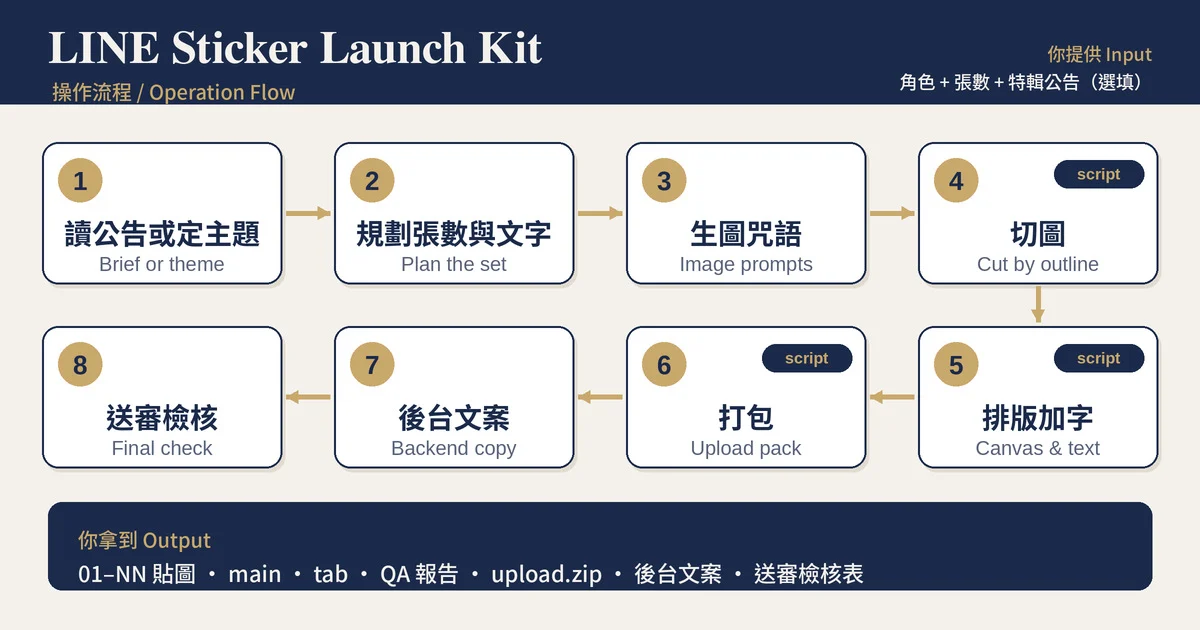
1. 讀公告或定主題
有特輯:貼上報名公告,整理成一張條件表:商品類型(貼圖或表情貼)、張數、價格下限、禁止項目、審核期間、開賣期限。同時檢查日期邏輯,例如審核期間的結束年份寫錯,並算出建議的送審日。
沒有特輯:跳過公告,直接問一句「這些貼圖是傳給誰用的」,再從回覆、道謝、累了、餓了、晚安這類日常聊天情境規劃。
2. 規劃張數與文字
依特輯主題分配每張貼圖的文字、情境和構圖,每個主題至少兩張,文字控制在 2 到 6 個字,避開姓名與暱稱。
3. 角色鎖定與生圖咒語
提供角色定稿咒語和單張咒語模板,每張都附參考圖、不含文字、預留文字空間。
4. 切圖(附腳本)
偵測每張貼紙的外框切開,保留白色貼紙邊。邊線太淡時自動改用重建白邊。深色底預覽,方便抓缺邊和灰線。
5. 排版與加字(附腳本)
放進 370×320 透明畫布,在空位自動找出放得下的最大字級,避開角色。字太小會提示縮角色。
6. 打包(附腳本)
產出 01 到 NN、main(240×240)、tab(96×74)、QA 報告和 zip。
7. 後台文案與檢核
標題、說明、版權、AI 勾選、風格與角色類別、價格、超值方案說明、標籤優先順序,最後一份送審前檢核表。
跟其他工具的差異
依同類工具頁面公開的說明比較,頁面沒列出的項目不代表對方沒有,只代表我看不到。
| 項目 | 常見做法 | 這套流程 |
|---|---|---|
| 起點 | 角色與主題 | 有特輯:公告全文轉成條件表和日期。沒有特輯:從日常聊天情境規劃 |
| 切圖 | 一張 4×4 Grid 固定裁切,需先自備 Grid 圖 | 偵測每張外框,一張圖或九宮格都能切 |
| 白色貼紙邊 | 未說明 | 保留原邊,邊線漏掉時自動重建 |
| 加字 | 建議用設計工具後製 | 腳本自動找最大字級,避開角色 |
| 後台欄位 | 部分提供名稱與介紹 | 標題、說明、版權、AI、價格、標籤、檢核表 |
| 實際成品範例 | 頁面未列出 | 附特輯 16 張與一般 8 張兩組完整規劃,含腳本實跑紀錄 |
範例輸出
輸入
角色:圓滾滾的白色小羊
張數:16
特輯文件:羊年賀歲貼圖特輯(四個主題)
第 1 步發現的問題
| 項目 | 結果 |
|---|---|
| 商品類型 | 貼圖(不是表情貼) |
| 價格 | 至少 60 |
| 審核期間 | 寫成「2026/10/15 到 2026/1/8」,結束年份應為 2027,請以後台顯示為準 |
第 2 步規劃(節錄)
| # | 文字 | 主題 | 情境 |
|---|---|---|---|
| 06 | 咩有不可能 | 諧音 | 頭頂橘子、自信咧嘴 |
| 09 | 這題我咩聽到 | 圍爐神回覆 | 捂住耳朵、冒汗 |
| 11 | 年終咩有 | 圍爐神回覆 | 倒著抖空紅包 |
腳本實跑
close=15: 8 pieces, border score 0.76
Using close=15. Writing 8 files to cut/
09_這題我咩聽到.png: size 60, lines ['這題我', '咩聽到']
0 failing check(s). Pack: pack/upload.zip
範例二:沒有特輯的一般貼圖
輸入
角色:圓滾滾的企鵝,黃圍巾,白肚子
張數:8
特輯文件:無
規劃(節錄)
| # | 文字 | 情境 |
|---|---|---|
| 01 | 好喔 | 半瞇眼、比讚 |
| 04 | 累了 | 癱軟、頭上冒暈圈 |
| 07 | 好餓 | 捧空碗、流口水 |
結果:8 張完成切圖、加字、打包,檢查項目沒有失敗。
輸出包含
- ✅ 特輯條件表、日期檢查、建議送審日(有特輯時)
- ✅ 逐張貼圖規劃表
- ✅ 角色定稿與單張生圖咒語
- ✅ 切圖、排版、加字、打包四支腳本,加上說明與疑難排解
- ✅ 01 到 NN、main、tab、QA 報告、zip
- ✅ 後台各欄位文案與送審前檢核表
- ✅ 兩組完整範例:特輯 16 張、一般 8 張
不會出現的東西
- ❌ 不保證通過審核,也不預測審核時間
- ❌ 不替你上傳到 LINE
- ❌ 不自己生圖,你用慣的生圖工具負責畫
- ❌ 不用生圖模型畫中文字,文字一律後製
- ❌ 不處理動態貼圖和全螢幕貼圖
- ❌ 不把規格當成固定事實:每個數字附上看到的時間,送審前請對照最新官方說明
四支腳本內嵌在 SKILL.md 裡。第一次要切圖時,會先問你是否存進工作資料夾,再安裝套件(pip install -r requirements.txt)並執行。需要檔案工具和 Python 3,例如 Claude Code 或 Cowork。沒有這些時,規劃、咒語、文案和手動步驟仍可使用。
DETAIL PAGE — English
LINE Sticker Launch Kit: From Idea to Submission
You have a character, and maybe a LINE campaign announcement, maybe just an idea for everyday chat stickers. With a campaign, start by reading the announcement. Without one, start from the chat situations your stickers will cover. Then cut the images, add text, build the upload pack, fill the backend, and run the last check. Every rule in the kit comes from real submission prep.
Who it's for
- Creators who want to join a LINE sticker campaign but can't tell what the rules, dates, and price floor mean
- Creators making a regular set with no campaign deadline who want a clean process from idea to upload
- People making stickers with an AI image tool who get stuck on cutting, transparency, text, and file specs
- First-time users of the Creators Market backend who don't know what to write for titles, descriptions, copyright, and the AI field
- Small studios that want a repeatable process for each season's campaign
What you get
1. Campaign reading or set theme
With a campaign, paste the announcement. You get a rules table: sticker or emoji, count, price floor, banned items, review window, on-sale deadline. The check also catches date typos, such as an end year that comes before the start, and gives you a submit-by date.
Without a campaign, the skill skips the announcement and asks one question: who sends these stickers to whom. Then it plans around everyday chat situations such as reply, thanks, tired, hungry, and goodnight.
2. Set planning
Each sticker gets text, a theme, and a scene. Every theme gets two stickers or more, text stays at 2 to 6 characters, and names and nicknames stay out.
3. Character lock and prompts
A master sheet prompt and a single-sticker template. Each prompt carries your reference image, asks for no text, and leaves room for the words.
4. Cutting (script included)
The script finds each sticker's outline and keeps the white border. When the outline is too faint, it rebuilds the border. A dark-background preview shows missing borders and gray fringes.
5. Canvas and text (script included)
Stickers go onto a 370×320 transparent canvas. The script searches the free space for the largest text size that fits and stays clear of the character.
6. Upload pack (script included)
Outputs 01 to NN, main (240×240), tab (96×74), a QA report, and a zip.
7. Backend copy and final check
Titles, descriptions, copyright line, AI disclosure, style and category, price, premium-plan notes, tag priorities, and a pre-submission checklist.
How it compares
Based on what similar tool pages state. A blank cell means the page doesn't list it, not that the tool lacks it.
| Area | Common approach | This kit |
|---|---|---|
| Starting point | A character and a theme | With a campaign: the full text turned into a rules table and dates. Without one: planning from everyday chat situations |
| Cutting | One 4×4 grid, fixed crop, grid image supplied by you | Detects each outline; works on one image or a sheet |
| White sticker border | Not stated | Kept; rebuilt when the original outline is faint |
| Text | Add it later in a design tool | Script picks the largest size that fits and avoids the character |
| Backend fields | Some list name and description | Title, description, copyright, AI, price, tags, checklist |
| Worked example | Not listed | Two full plans, a 16-sticker campaign set and an 8-sticker regular set, with real script output |
Example
Input
Character: round white sheep
Count: 16
Campaign: Year of the Sheep sticker campaign (four themes)
Step 1 findings
| Item | Result |
|---|---|
| Product type | Stickers, not emoji |
| Price | at least 60 |
| Review window | printed as "2026/10/15 to 2026/1/8"; the end year should be 2027, so confirm it on the backend screen |
Step 2 plan (excerpt)
| # | Text | Theme | Scene |
|---|---|---|---|
| 06 | 咩有不可能 | pun | orange on the head, confident grin |
| 09 | 這題我咩聽到 | family-dinner reply | covering ears, sweat drop |
| 11 | 年終咩有 | family-dinner reply | shaking an empty red envelope |
Script run
close=15: 8 pieces, border score 0.76
Using close=15. Writing 8 files to cut/
09_這題我咩聽到.png: size 60, lines ['這題我', '咩聽到']
0 failing check(s). Pack: pack/upload.zip
Example 2: a regular set with no campaign
Input
Character: round penguin, yellow scarf, white belly
Count: 8
Campaign: none
Plan (excerpt)
| # | Text | Scene |
|---|---|---|
| 01 | 好喔 | half-lidded eyes, thumbs up |
| 04 | 累了 | slumped, dizzy swirl overhead |
| 07 | 好餓 | empty bowl, drooling |
Result: 8 stickers cut, texted, and packed, with no failing check.
What's included
- ✅ Rules table, date check, submit-by date (campaign sets)
- ✅ Sticker plan table
- ✅ Character and single-sticker prompts
- ✅ Four scripts (cut, canvas, text, pack) with usage notes and troubleshooting
- ✅ 01 to NN, main, tab, QA report, zip
- ✅ Backend copy for each field and a final checklist
- ✅ Two full worked examples: a 16-sticker campaign set and an 8-sticker regular set
What this skill will never do
- ❌ Promise that your set passes review, or predict review time
- ❌ Upload anything to LINE for you
- ❌ Draw the stickers itself; your image tool does that
- ❌ Use an image model to draw Chinese text; text is always added afterwards
- ❌ Handle animated or full-screen stickers
- ❌ Present a spec as fixed. Each number carries the date it was seen; check the current LINE guideline before you submit
The four scripts are embedded in SKILL.md. Before the first cutting step the skill asks whether to save them to your working folder, then installs the packages (pip install -r requirements.txt) and runs them. You need a file tool and Python 3, for example Claude Code or Cowork. Without those, the planning, prompts, copy, and manual steps still work.