
PDF Table Extractor — Local Kit (Download)
PDF Table Extractor
What you're buying: a download package (skill instructions + a Python script) that runs on your own computer inside your own AI agent — it is not a cloud service.
You need: an AI agent that supports skills (e.g. Claude Code or Codex) — its subscription or API costs are yours; Python 3.9+ withpdfplumber,openpyxlandpypdfium2.
Third-party services: none. Works offline, no API keys. Your PDFs are never uploaded (scanned pages are read by your own AI agent, so its provider's data policy applies).
Tables in a PDF go in; an Excel file you can actually calculate with comes out — plus a report showing whether anything was copied wrong.
What you get
- 📊 Excel workbook: one sheet per table; numbers are real numbers (sum them, pivot them), dates are Excel dates; frozen header, filters on, total rows in bold
- 📋 Summary sheet: page range, row count and check results for every table — problems highlighted in red
- 📄 CSV: one per table, UTF-8 (opens cleanly in Excel, even with CJK text) — ready for Google Sheets, databases or accounting software
- ✅ Check report (Markdown): column-by-column and total-by-total details
Example
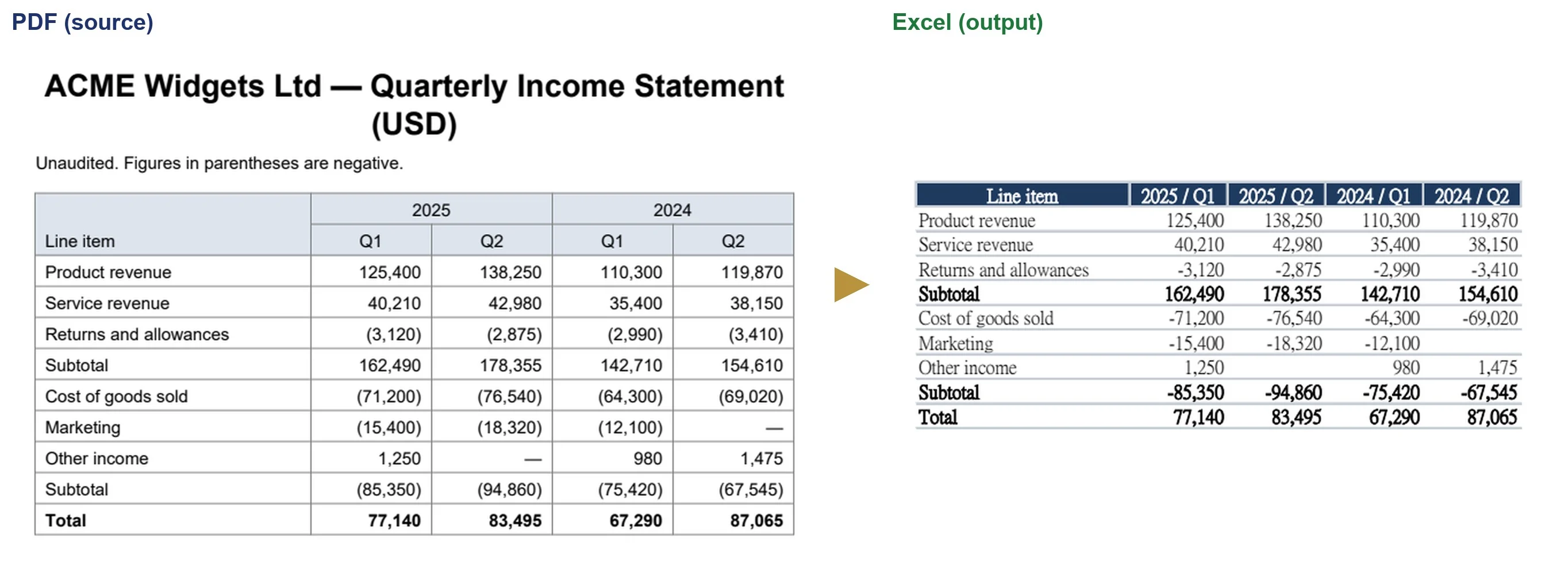
A quarterly income statement with a two-level merged header (2025 / 2024 × Q1 / Q2), negatives in parentheses, "—" for empty cells and two subtotals plus a total: the header became "2025 / Q1"-style column names, parentheses became negative numbers, dashes became blanks, and all 12 subtotal/total cells re-added correctly.
A 160-row sales table across 5 pages — continuation pages had no header — with the grand total deliberately inflated by 100: the 5 fragments were stitched into one 161-row table, 1,130/1,130 cells were found in the PDF text, all 3 numeric columns matched on re-read, and the one real problem was caught: "Total" says 188,090, rows above add up to 187,990.

Try it — copy a prompt
- "Extract every table from
Q3_report.pdfinto Excel and tell me if any totals don't add up." - "Turn the price list in
supplier_catalogue.pdf(pages 4–12) into one CSV I can import."
The annoying stuff it handles
- Tables spanning pages: stitched into one table; repeated headers removed; continuation pages without a header still join correctly
- Merged header cells: two-level headers become "2025 / Q1"-style column names
- Number formats: thousand separators
1,234, parentheses(1,234), trailing minus1,234-,△500, currency marks ($,NT$,€,¥), percentages12.5%, full-width digits, European1.234,56(with a flag) - Empty values:
—,-,n/abecome blank instead of 0 or stray text - Borderless tables: when no grid lines are found, it switches to text alignment to find the columns
Three checks (the big difference from ordinary converters)
- Every cell must be found in the PDF's own text
- Every numeric column is re-read from the page by position (bypassing table detection); its count and sum must match the output — shifted columns, dropped rows and duplicate rows get caught
- Total and subtotal rows are re-added with exact decimals; if the PDF itself doesn't add up, you're told by how much
Scanned PDFs
Pages without a text layer (scans, photos) are turned into images, your AI agent transcribes the table, and the same Excel is produced. Totals are still checked, and the report clearly says these numbers were read from images and should be spot-checked.
Why buy it
One payment, unlimited PDFs — no monthly subscription for a converter, and no uploading confidential statements to someone else's server.
Who it's for
Accountants and bookkeepers, analysts, finance and operations staff, researchers and journalists working with PDF reports, and anyone who retypes tables from PDFs.
Requirements
- Python 3.9+
pip install pdfplumber openpyxl pypdfium2(the skill checks your setup first and tells you what's missing)- No internet connection or API keys needed
Limitations (please read)
- Password-protected or copy-protected PDFs can't be processed — get a copyable version first.
- Very complex layouts (nested tables, rotated text, deliberately spanning cells, charts) may need parameter tweaks or manual clean-up.
- Borderless tables with lots of wrapped text inside cells are the hardest — check the row count in the report.
- Numbers from scanned PDFs are transcribed by AI and can be misread — always spot-check.
- It moves numbers; it does not interpret them and gives no financial, accounting or tax advice.
Files
SKILL.md— agent workflowscripts/extract_tables.py— extraction, page stitching, number normalisation, checks, Excel / CSV / report outputreferences/verification.md— the three checks and number rulesreferences/json-format.md— transcription format for scanned PDFsreferences/example_scanned_tables.json— transcription example
