
Admin Workflow Specialised Task Agent
Workspace Workflow Automation: Skill Guide
This Claude skill turns a paper, Excel or WhatsApp-based admin process into a working Google Forms + Sheets + Apps Script approval system, delivered in one conversation with guides and a test plan.
• Who it's for: HR, admin, finance and operations teams on Google Workspace or free Gmail, with no programmer on staff.
• What you give it: a plain-language description of how the process works today and its rules.
• What you get back: ready-to-paste script files, an English setup guide, a one-page staff guide, a process map and a test plan.
• Built from tested code: a core of about 550 lines that has passed 63 automated checks, so each new system reuses proven logic instead of being written from scratch.
• Running cost: none beyond Google Workspace. Everything runs inside your own Google account.
- Sample inputs and outputs
A one-paragraph request is enough. The skill asks short multiple-choice questions for anything missing, then builds.
Sample inputs (the three requests it was tested on):
• Expense claims: "Staff submit claims on paper with receipts stapled. Under RM500 goes Manager then Account; RM500 and above also needs the Director. Receipts older than 60 days are not allowed. Account needs a PDF payment voucher and I want a monthly summary by department."
• Outlet repairs: "Outlets WhatsApp their Area Manager when something breaks. The AM approves, then it goes to our maintenance team. Urgent ones skip the AM. Need reminders if stuck. 57 outlets."
• Off-day swaps: "Area Managers' only off-day is Wednesday. They can swap it to another day in the same week, max 2 times a month, applied 1 day ahead. Approval: Operations Manager, then HR."
Sample output (what came back for the expense-claim request, in about 6 minutes):
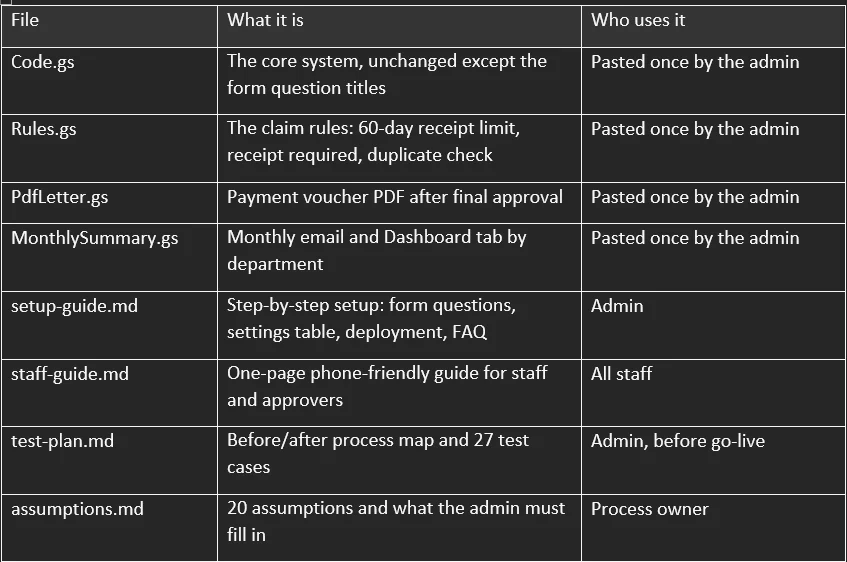
The approval chain itself is two rows in a sheet tab, not code:

What staff and approvers see is shown below: the approval email, and the page that opens from its button.
Approval email (sent to the approver for each step):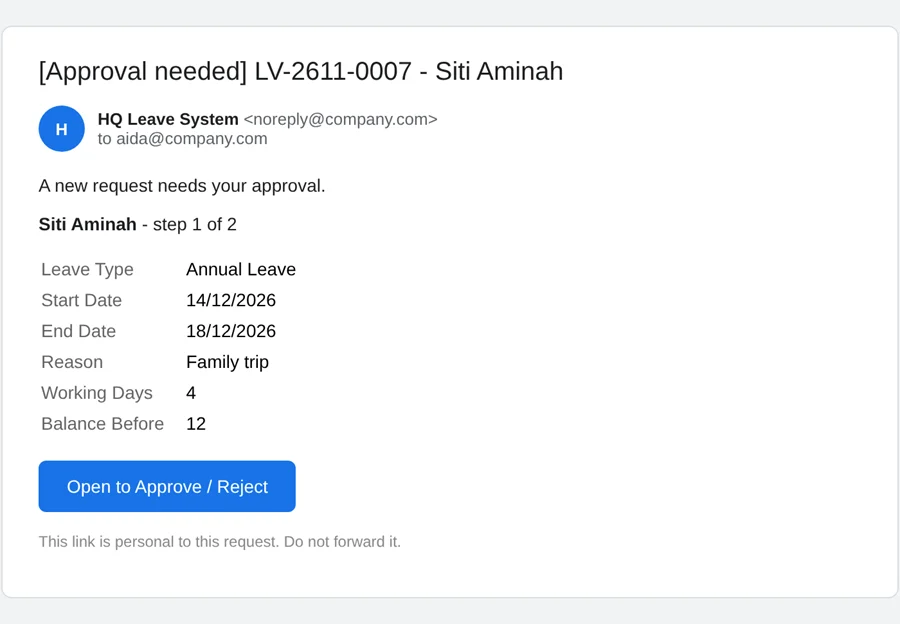
Approval page on a phone (opens from the email button; nothing is decided until a button is pressed):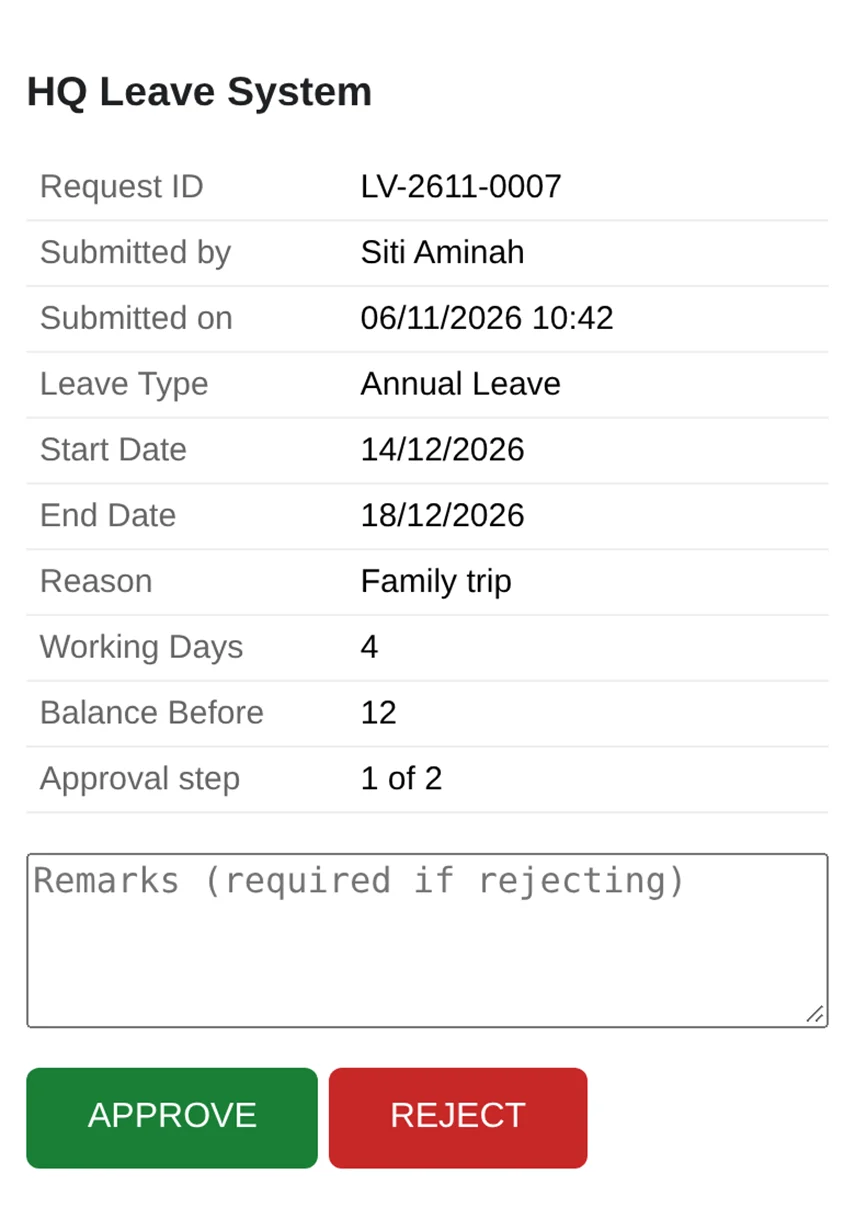
Names and emails in these screenshots are examples.
Capabilities
Every system it builds shares one tested core; optional modules and workflow rules are added on top.
Approvals
• Any number of levels, e.g. Manager > HR > Director.
• Conditional chains by request type and amount, set in a sheet tab, not in code.
• Approvers can be named by role (HR, Account), by "the requester's manager", or by email.
• A requester never approves their own request; that step is skipped automatically.
• Mobile approval page with APPROVE / REJECT; a reason is required to reject.
• Button wording can change per step, e.g. MARK DONE for a maintenance team.
• Auto-approval for low-risk types (e.g. stationery).
Business rules
• Auto-reject on submit with a clear reason: limits, notice periods, deadlines, duplicates, eligibility.
• Working days per person: own off-days, state public holidays, gazetted replacement days, a holiday on an off-day moving to the next working day.
• Balance tracking from a ledger, with carry-forward credits that expire on their own dates.
• Counted limits, e.g. "max 2 per month", counting pending requests too.
Notifications and follow-up
• Emails to approvers, requesters and CC lists (e.g. HR, Account).
• Daily reminders for stuck requests, at most one per request per day.
• Escalation: the admin is copied after a set number of days.
• Receipt photos and file uploads appear as clickable links.
Outputs and reporting
• PDF letters or vouchers from a Google Docs template after final approval.
• Monthly summary email by status, type and department.
• Dashboard tab: this month, last month, year to date, and everything still pending.
• Full Audit_Log and Decision Log of who did what and when.
Admin tools (sheet menu)
• Setup / repair: safe to re-run; creates tabs, settings and triggers.
• Re-process a failed row, keeping the same request number.
• Resend an approval email, or reassign to a stand-in approver.
• Cancel a request with a reason; everyone affected is emailed.
• Check the remaining daily email quota.
Safety built in
• Each approval link has a secret token and stops working after use.
• Opening a link never decides anything, so email security scanners can't approve by accident.
• Two quick clicks can't approve twice.
• Form text can't inject anything into emails or pages.
• Errors are logged and emailed to the admin instead of failing silently.
Documents produced
• English setup guide written for a non-technical admin, with FAQ.
• One-page staff and approver guide.
• Process map (before and after) and a test plan with one test per business rule.
• List of assumptions and what the admin must fill in.Use case: YEBENG HQ leave system
YEBENG, a 57-outlet footwear retailer in Malaysia, used the skill to replace paper and WhatsApp leave requests for its 36 HQ staff with a phone-friendly Form > Manager > HR system.
Before
• Staff asked for leave on WhatsApp or paper; HR often heard last.
• Balances were worked out by hand, including carry-forward expiry.
• Area Managers' Wednesday off-day and public holidays were easy to miscount.
• No single record of who approved what.
After
• Staff fill a Google Form on their phone; working days and balance are checked in seconds.
• Requests breaking a rule are auto-rejected with the reason, before any manager sees them.
• Manager approves from email, then HR; the staff member and HR are notified.
• Every request has an ID, a Decision Log and an Audit_Log entry; HR sees a live Dashboard.
How each policy rule maps to the skill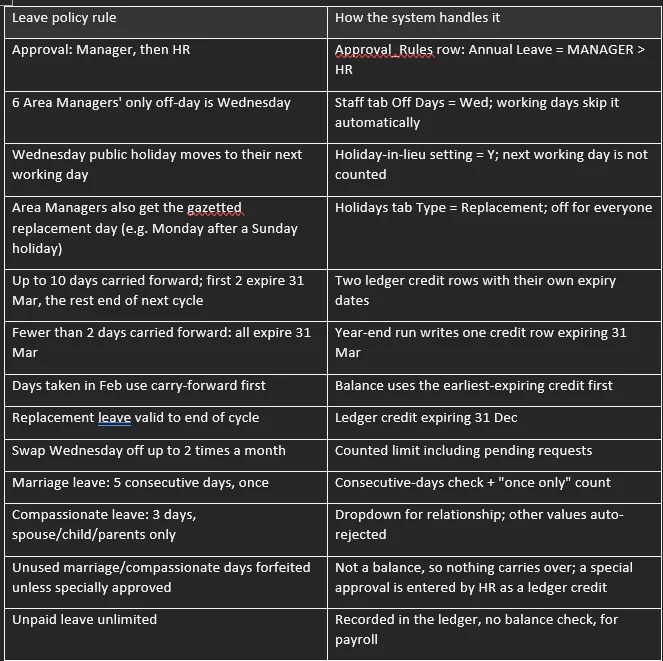
Worked example: Siti, an Area Manager in Selangor, applies for annual leave from Mon 14 to Fri 18 Dec 2026.
- The system counts 4 working days, because Wednesday 16 Dec is her off-day.
- It checks her balance (12 days) and the notice period, then assigns Manager > HR.
- Her manager gets the approval email shown in section 1 and approves from their phone.
- HR gets a fresh link (step 2 of 2) and approves.
- Siti and HR get the APPROVED email; 4 days are deducted in the ledger.
The flow below shows the same steps, including the reject and auto-reject paths.
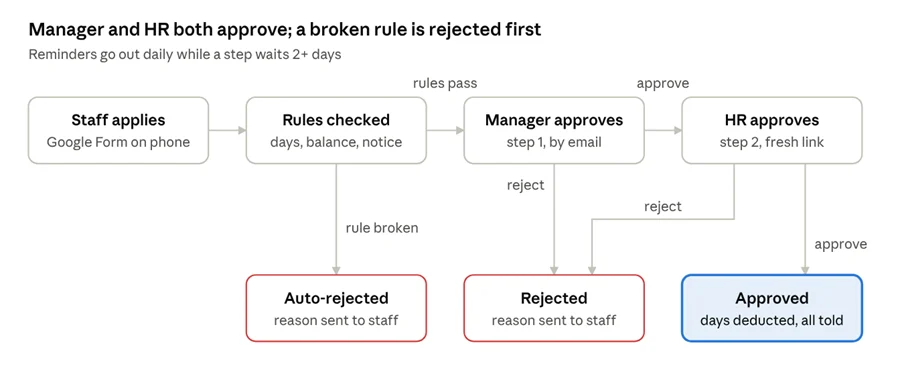 leave approval flow · 2 approval steps, 3 outcomes
- FAQs for companies using this skill
Getting started
• Do we need a programmer? No. An admin who can copy and paste and follow numbered steps can set it up; the setup guide is written for them.
• What do we need? A Google account (Google Workspace recommended), a Google Form, a Google Sheet, and access to Claude with this skill installed.
• How long does setup take? Usually under an hour for the admin, plus time to fill in the staff list and settings. Plan a test week before go-live.
• Does it work with free Gmail? Yes, with lower email limits (about 100 recipients a day vs about 1,500 on Workspace). Approvers on mixed accounts need the web app set to "Anyone".
• What does it cost? Nothing extra: it runs inside your Google account. You only pay for Google Workspace and Claude.
Fitting it to our company
• Our process is different. Can it adapt? Yes. You describe your process and rules in plain words; the skill asks about gaps, then writes only the rules file for your workflow.
• Is it only for leave? No. It fits any request-and-approve process: claims, petty cash, purchase requests, stock transfers, repairs, onboarding checklists, memo acknowledgement.
• Can approvers change without touching code? Yes. Approvers, CC lists, reminder days and limits all live in sheet tabs (Staff, Config, Approval_Rules).
• Our staff work different off-days, in different states. Each person has their own Off Days and State, and holidays can be state-specific.
• Can emails and pages be in another language? The skill writes English by default. Ask for another language when you make the request.
• Can we use our own letterhead on PDFs? Yes. The PDF comes from your own Google Docs template with placeholders like {{Request ID}}.
Running it
• An approver is on leave. What happens? Reminders go out daily and the admin is copied after the escalation days. The admin can reassign the request and resend the link from the menu.
• Someone submitted by mistake. The admin uses Cancel selected request; the requester and any waiting approver are emailed.
• The approval link says "invalid or has expired". That link was already used, or belongs to an earlier step. Each step gets a new link on purpose.
• The button does nothing on a phone. Usually the phone is signed in to several Google accounts. Open the link in an incognito / private window.
• We changed the code but nothing changed. Deploy a New version under Manage deployments; the link stays the same.
• Something failed. How do we know? Errors go to the Error_Log tab and are emailed to the admin. A failed row can be re-processed from the menu.
Security and data
• Where is our data stored? In your own Google Sheet and Drive. Nothing is sent to an outside server.
• Can someone approve by forwarding or guessing a link? Each link has a secret token for one request and one step. It stops working once decided. Opening a link alone never approves.
• Is there an audit trail? Yes. Every submission, decision, cancellation and error is logged with time and person.
• Can staff see each other's requests? Only if you share the Sheet with them. Staff only need the Form link; approvers only need their email links.
Limits to know
• Volume: suited to hundreds of requests a month. Above a few thousand rows a month, consider a proper HR or workflow platform.
• Not real-time: reminders and dashboards update once a day; approvals themselves are instant.
• Google's own limits apply: daily email quotas and a 6-minute limit per script run.