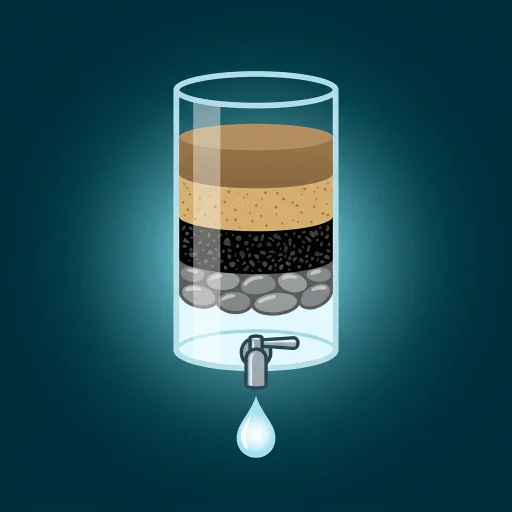
Clearflow: 10-Second Muddy-to-Clear Water Filter
Get a ready-to-use kit for a satisfying 10-second water filter demo: muddy water poured through sand, charcoal and pebbles until it drips out crystal clear, filmed as one smooth zoom-out and tilt-down shot. Includes 3-5 image prompts, a Google Flow prompt, a Veo version under 900 characters, caption + hashtags, a science guide and a QA checklist. Made for short, loop-friendly Reels, Shorts and TikTok. Download once, reuse for every episode.
#Redes sociales#Vídeo#Productividad
Valoración
Se necesitan más valoraciones
Vendidos
0
Cómo se usa
Descargar
Clearflow: 10-Second Muddy-to-Clear Water Filter
A ready-to-use kit for a satisfying 10-second, hands-only science demo: muddy water poured through layers of sand, charcoal and pebbles until it drips out crystal clear, filmed as one smooth zoom-out and tilt-down shot.
What you get
- 3 core image prompts (+2 optional) for the start, mid-descent and final reveal
- Google Flow video prompt (10 seconds, 9:16, one continuous shot)
- Veo version under 900 characters (template + a counted example)
- Caption and hashtags in a ready format
- Science guide so every layer and its order stays believable
- QA checklist and a troubleshooting table
- An intake with defaults, so you can start in one message
The 10-second timeline
| Time | What you see |
|---|---|
| 0-1s | A hand pours muddy water onto the sand |
| 1-3s | Water seeps down, clearing from the top |
| 3-5s | Charcoal layer, water lightens |
| 5-6.5s | Pebble layer, water nearly clear |
| 6.5-8s | The outlet is revealed, the first clean drop falls |
| 8-10s | A hand lifts a glass of clear water, light passes through |
Swap-in options
- Liquids: muddy river, green pond, soot, orange clay, tea-brown peaty
- Layers: sand, charcoal, pebbles, crushed brick, coconut coir, crushed shell
- Containers: glass cylinder with spigot, inverted bottle, bamboo tiers, terracotta stack, lab funnels on a stand
How to use
- Answer the short intake, or accept the defaults.
- Generate the image prompts.
- Paste the video prompt into Google Flow, or the short version into Veo.
- Check the frames with the QA list.
- Post with the caption and hashtags.
Good to know
- Hands only. No faces, no music, no voice, no text on screen.
- No API key or subscription needed: it is a prompt kit you run in your own video tool.
- Results vary between generations. The QA checklist helps you find and fix what drifted.
- Safety note: this kind of filter reduces cloudiness, color and smell. It does not make water safe to drink, and the kit tells you not to claim that in captions.
- Add your platform's "AI-generated" label where it is required.
FAQ
Which tools does it work with? Built for Google Flow and Veo; the idea also works in similar image-to-video tools.
Can I change the colors and containers? Yes. Change the intake values, keep the rules.
Is it one video per kit? One kit, unlimited episodes: swap the liquid, layers or container each time.