
CutSweep | Trim dead air and filler words
CutSweep | Cut silences and filler words from your raw footage
Got 30 minutes of raw footage? Skip the tedious cut-by-cut editing — just drop it in the chat.
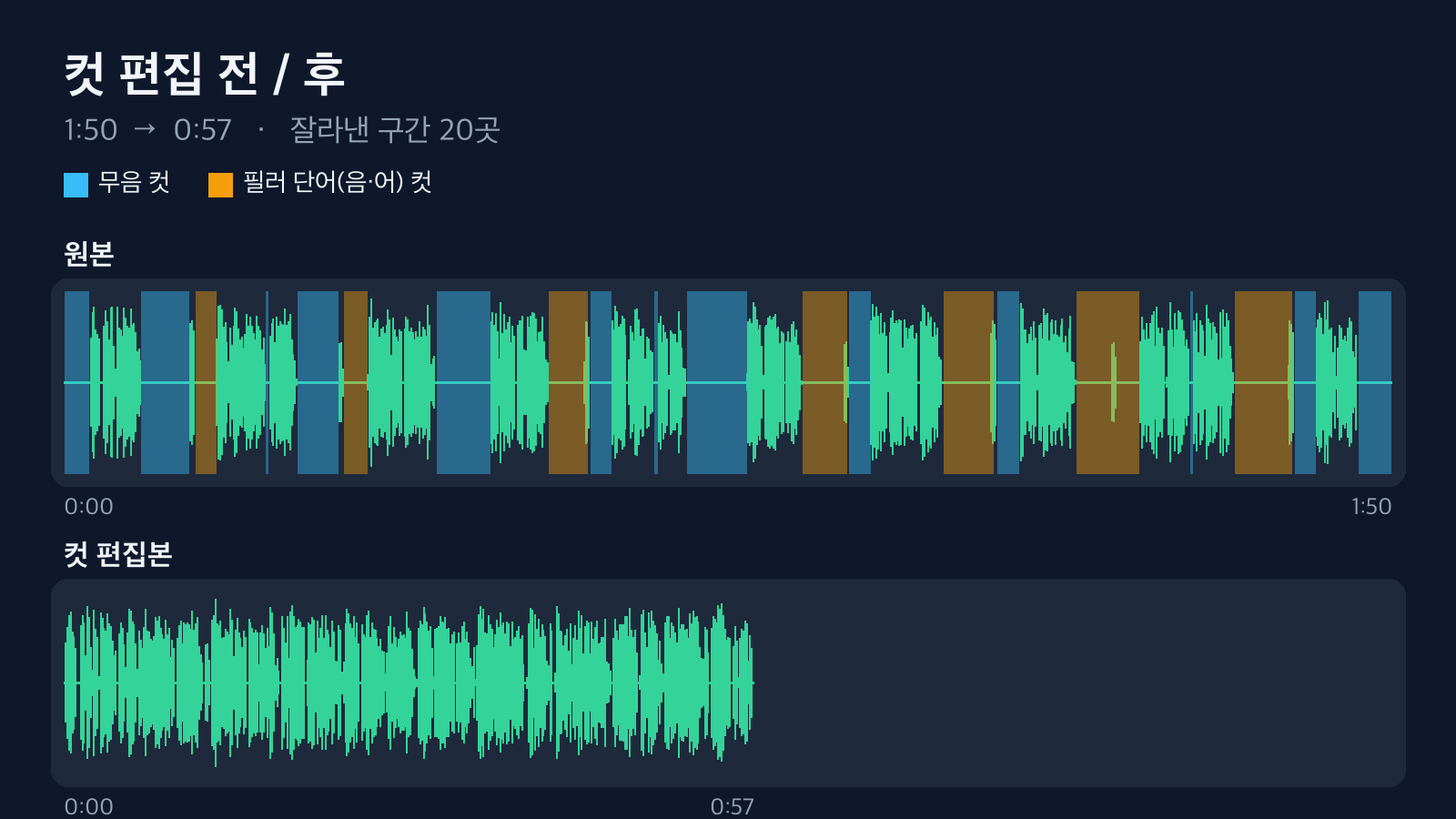
Actual result from a 110-second synthetic-voice sample. Blue blocks are silence cuts; orange blocks are "um/uh" cuts.
After you record a lecture or vlog, you're left scrubbing the timeline to find and trim every pause and every "um..." and "uh..." one at a time. Any single cut is easy — there are just a lot of them. CutSweep finds those spots, hands back a trimmed video, and generates edit lists you can carry straight into your editor.
Nothing gets installed on your computer. It all runs in the Capafy cloud.

A demo made from a test video.
How it works
Upload a video to the chat and type a single line:
Cut the silences and the "um"s and "uh"s out of this video.
When it's done, the files come back in the same conversation. Turnaround was about 30 seconds for a 1:50 video and about 3:20 for an 11-minute video.
What you get back
| File | What it is |
|---|---|
name_cut.mp4 |
Your video with the silences and fillers removed and the pieces stitched together. Each cut gets a 25 ms audio fade so there's no click. |
name.fcpxml |
A sequence you can keep editing against your original footage in Premiere, DaVinci Resolve, or Final Cut. |
name.edl |
A CMX3600 edit list. Import it into DaVinci Resolve. |
name.csv |
A table of cut points, so you can eyeball exactly where it trimmed. |
summary.md |
Length before and after, number of cuts, and the audio/video length difference. |
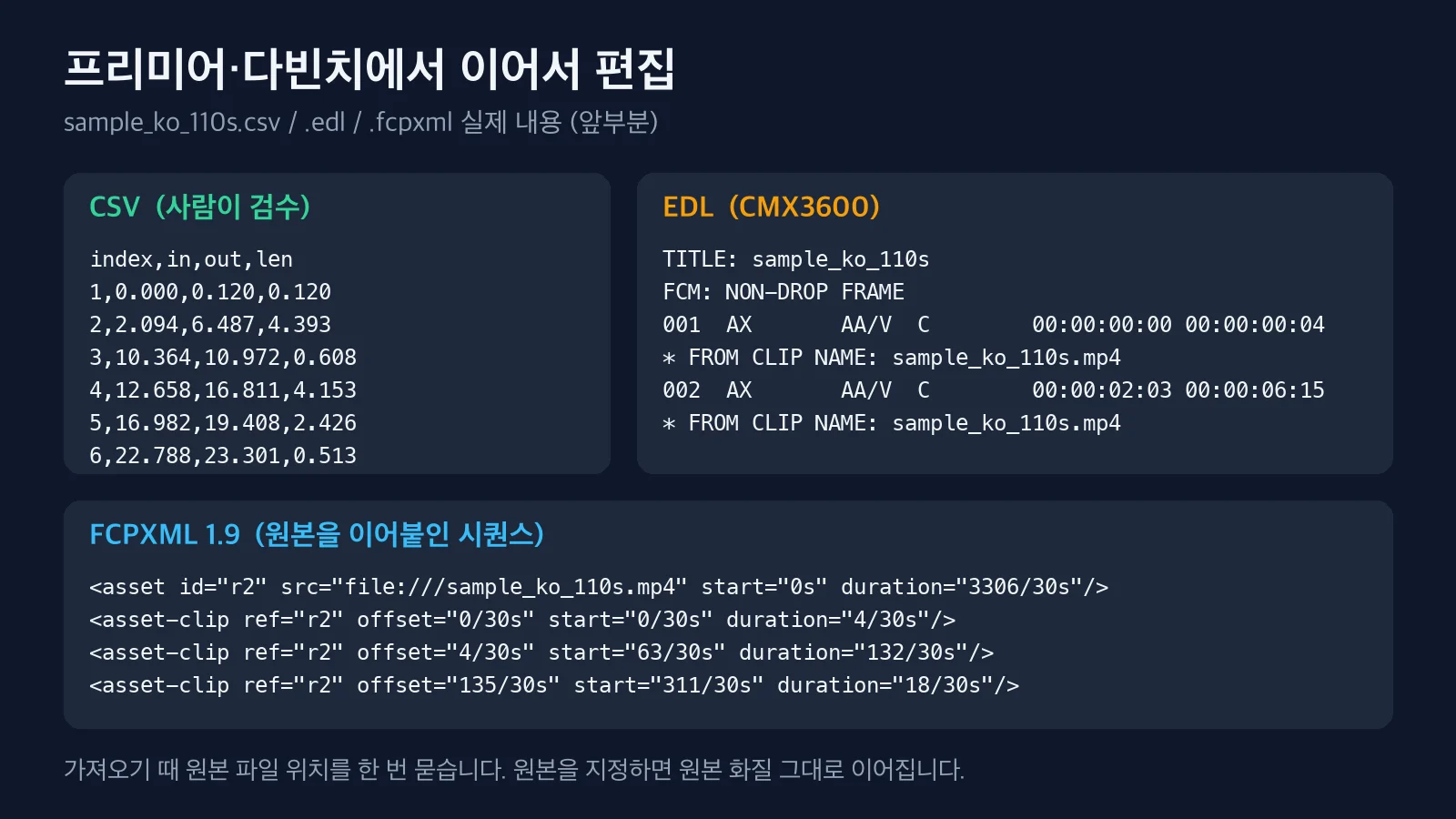
The edit lists reference your original file by name only. Point your editor to the original video once on first import, and you pick right back up at full source quality.
Real results
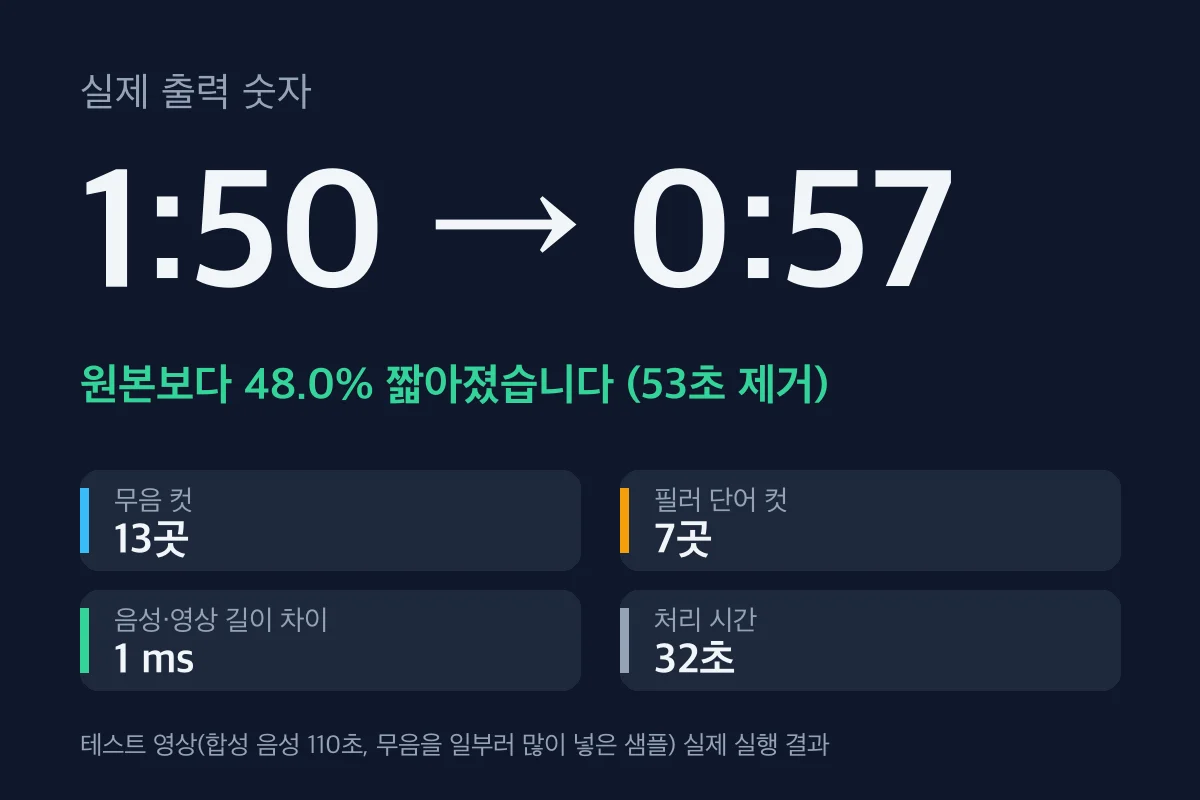
These are synthetic-voice samples with extra silence added on purpose, so the reduction looks large. Real footage usually shrinks less than this.
| Input | Environment | Result | Time |
|---|---|---|---|
| 1:50 sample | 2 CPU, 4 GB | Down to 0:57, 20 cuts (13 silence, 7 filler), 1 ms audio/video offset | 32 s |
| Same sample, filler detection off | Same | 0:59, 21 cuts | 12 s |
| 11:01 sample | Same | Down to 5:37, 109 cuts (69 silence, 40 filler), 31 ms audio/video offset | 193 s |
Of the 42 "um/uh"s deliberately planted in the sample, it caught 40, and all 42 it flagged overlapped with a real occurrence. These figures are from synthetic speech — with real human mumbling, expect more misses.
What this agent doesn't do
- Pick highlights or short-form clips. It only strips the dead time out of the whole video.
- Delete retakes or flubbed lines. If there's sound, it stays.
- Subtitles, background music, or color grading.
- Catch every filler word. The speech-recognition model sometimes misses or mishears them, and the results report how many it caught.
- For videos with nonstop talking (a speech, say), there's almost nothing to cut, so the result comes out close to the original.
FAQ
The cuts are too tight. Just say "only cut pauses longer than 0.6 seconds" and it'll rerun at that sensitivity. If words are getting clipped at the ends, say "leave more room."
Which filler words does it catch? In Korean: 음, 으음, 어, 그니까, 인제. In English: um, uh, erm, hmm. Words that double as real vocabulary (like "그게" or "저기") are left alone.
Does it work on English videos? Yes. Just tell it "this is in English."
Does my video go anywhere? Everything is processed inside the agent's workspace. The only external call is a single pass to the speech-recognition model.
What counts as one request? Trimming one video and getting the results back is one request. Rerunning the same video with different settings counts as a separate request.
Any length limits? 5 seconds to 30 minutes, in MP4, MOV, MKV, or WEBM. A 30-minute video should take about 9 minutes (extrapolated from the measured 11-minute run).
Questions: [email protected]
The test videos are samples we made ourselves using synthetic speech.