Digital Planner Builder: Hyperlinked PDF Planners
Build a hyperlinked PDF planner for tablet note apps on your own computer: cover, index, year at a glance, months with side tabs, weekly and daily pages, goals, habit trackers and notes, with every date, tab and breadcrumb linked. Any year or an academic start month, 5 themes, landscape or portrait, Monday or Sunday weeks. A link check confirms every tap lands on a page. No API key.
#Productividad#Diseño#Comercio
Valoración
Se necesitan más valoraciones
Vendidos
0
Cómo se usa
Descargar
A complete digital planner in one PDF
Tell your agent the year (or the first month of an academic planner), the tablet shape and a theme. It builds the whole planner and checks every link before you open it.
 ## What is inside
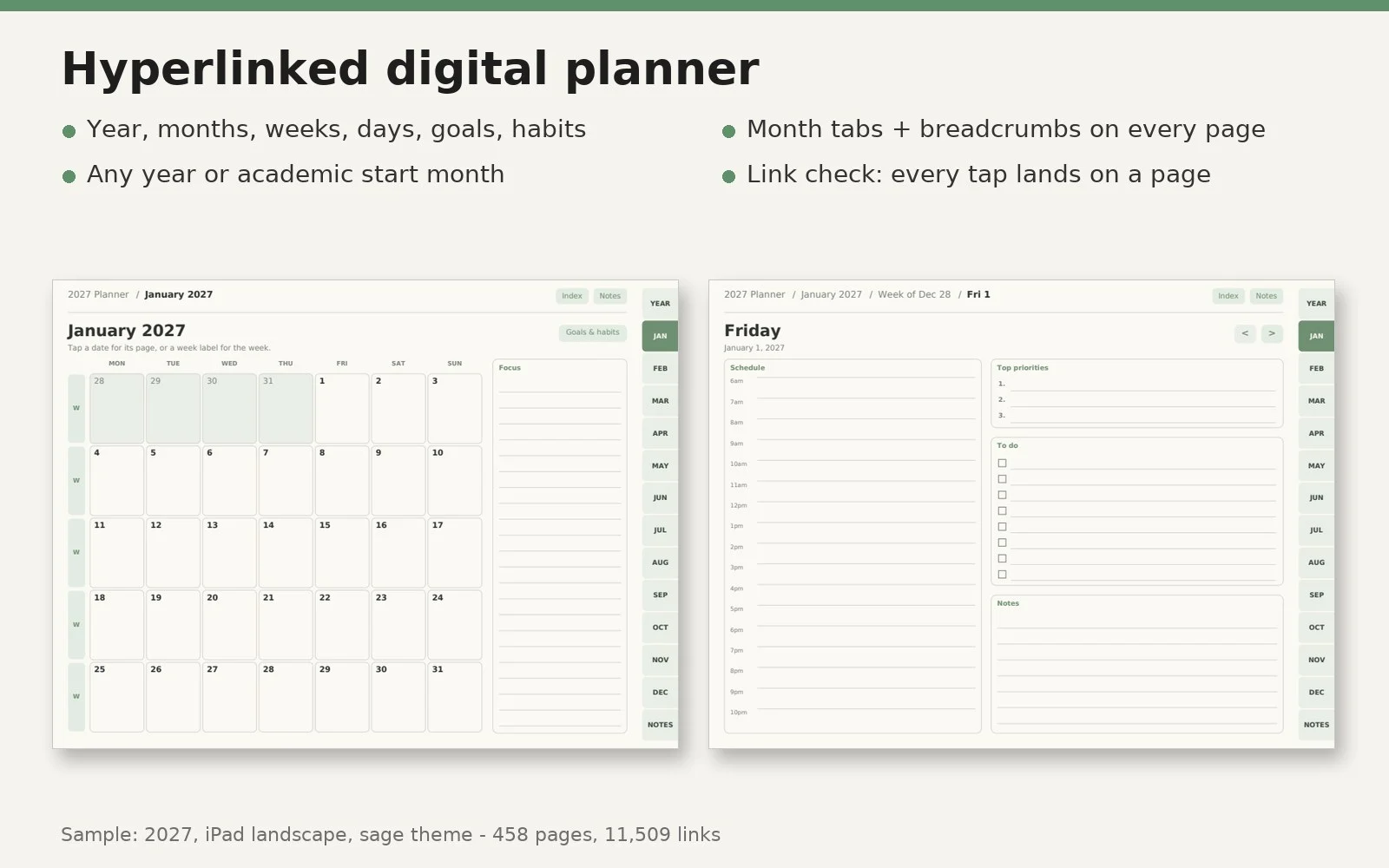
- Cover, index, year at a glance, goals
- One page per month with a tappable calendar; a goals & habit tracker page per month
- Weekly pages (7 days + priorities) and daily pages (hourly schedule, top 3, to-do, notes)
- Notes pages: lined, dot or grid
- Month tabs and a breadcrumb bar on every page; previous/next arrows on weeks and days
- Your own dates (birthdays, deadlines) on month, week and day pages
Options
- Any year, or any start month for 1-24 months (e.g. Aug 2026 - Jul 2027)
- iPad landscape or portrait, 10.3 in e-ink portrait, Letter, A4, A5
- Themes: sage, navy, blush, sand, mono; Monday or Sunday weeks; 12 or 24-hour schedule
- Weekly-only version (about 93 pages) or full daily version (about 458 pages, 11,500+ links)
Checked before you use it
Every link must land on a real page, every day page must be reachable from its month and its week, and every page must carry the tabs. The build stops and says what is wrong if not. A proof image of every page type is made for a final look.
Works with
PDF apps that follow internal links, such as GoodNotes, Notability, Noteshelf, Xodo and Acrobat (some apps follow links only in read-only mode or with a finger tap). Python 3.8+ with pip install reportlab pypdf pillow pypdfium2. Windows, macOS, Linux. No API key, no account, no internet.
Good to know
- The planners you make are yours to use or sell. The embedded font (Bitstream Vera Sans, shipped with reportlab) allows embedding; check the license of any font you swap in.
- No national holidays are added (they differ by country); add your own dates instead.
- It does not upload or sell anything, and it does not make print-ready KDP interiors (see the KDP builder below).
More printables tools from the same publisher
- KDP Journal & Planner Interiors - capafy.ai/agent/8145424644
- Puzzle Book Builder (word search, sudoku, mazes) - capafy.ai/agent/4139581055
- Mandala & Pattern Coloring Book Builder - capafy.ai/agent/1651177873
- Kids Math Worksheets & Workbooks - capafy.ai/agent/1594105240
- KDP Book Formatter (Kindle EPUB, covers, listing) - capafy.ai/agent/4773701800