eBook Builder — Local Kit (Download)
eBook Builder
What you're buying: a one-time purchase download package (skill instructions + Python scripts) that runs on your own computer inside your own AI agent — it is not a cloud service.
You need: an AI agent that supports skills (e.g. Claude Code or Codex) — its subscription or API costs are yours; Python 3.9+ withmarkdown,pillow,pypdfium2andreportlab, plus Google Chrome, Microsoft Edge or Chromium (used to lay out the print PDF).
Third-party services: none. Works offline, no API keys. Your manuscript never leaves your computer (apart from what your own AI agent reads to help you).
A Markdown manuscript in, a store-ready ebook and a print-ready paperback out — plus the cover maths that usually trips self-publishers up.
What you get
- 📱 EPUB 3 ebook: cover, clickable table of contents (nav + legacy NCX), metadata; optional vertical text for Chinese and Japanese
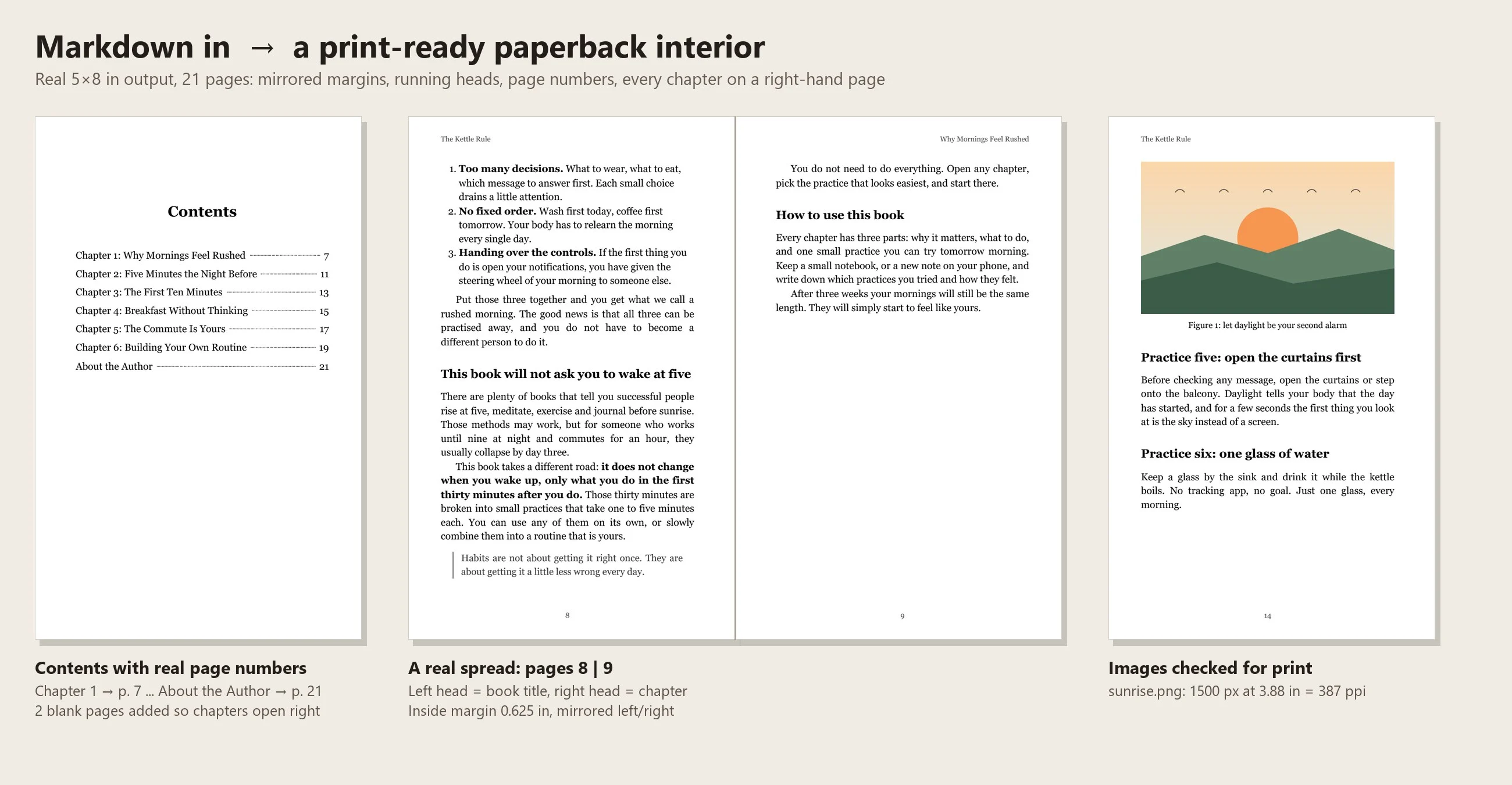
- 📖 Paperback interior PDF: 5×8, 5.5×8.5, 6×9 or A5 trim; mirrored margins; inside margin widened automatically as the page count grows; page numbers; running heads (book title left, chapter right); every chapter opening on a right-hand page; a table of contents with real page numbers; all installed fonts embedded
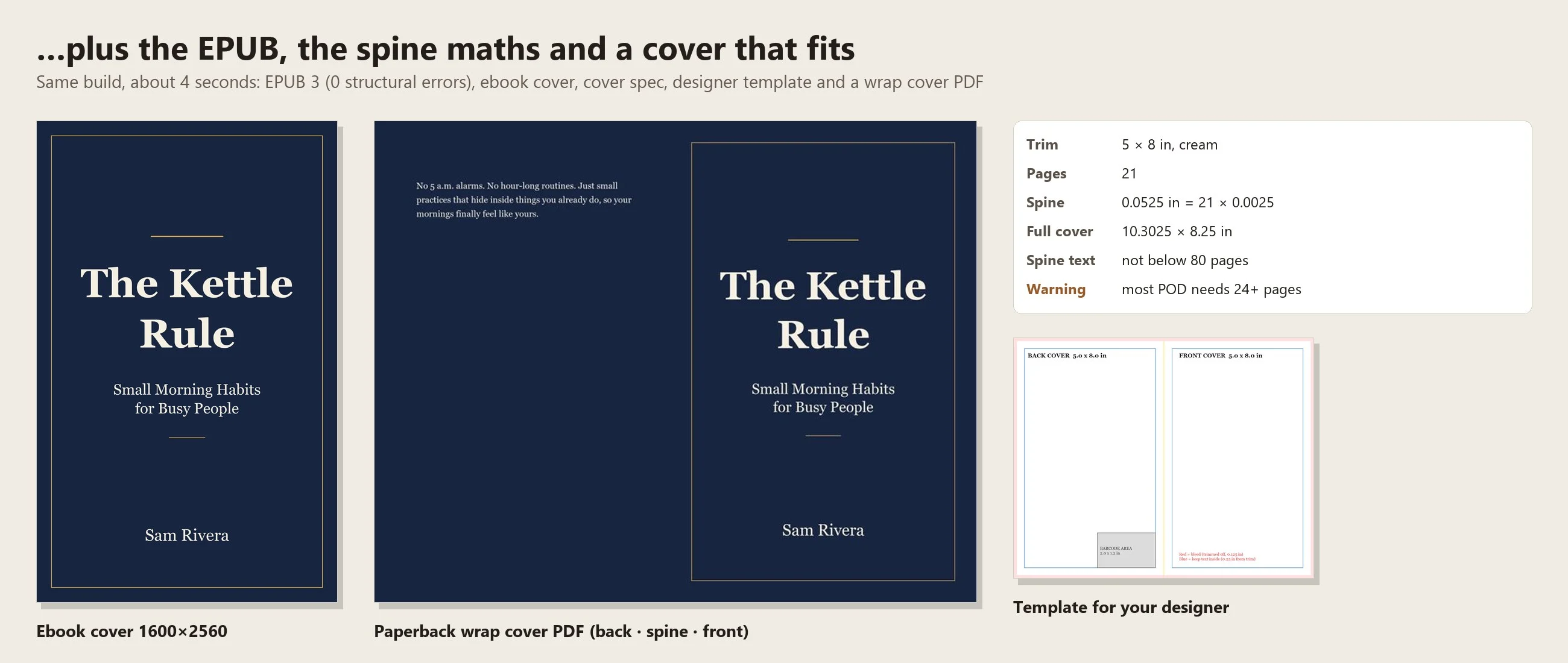
- 📐 Cover spec: spine width from page count and paper (white or cream), full wrap size with bleed, panel positions, barcode area
- 🎨 Designer template (bleed, spine, safe area and barcode marked) and a ready-to-upload typographic wrap cover PDF
- 🖼️ Ebook cover 1600×2560
- 📋 Build report: page count, chapter start pages, image resolution at print size, and warnings
Example
A 6-chapter English manuscript ("The Kettle Rule", with a figure, tables, quotes and a footnote) built in about 4 seconds:
- EPUB 3 with 0 structural errors
- A 21-page 5×8 in paperback on cream paper — 2 blank pages inserted so every chapter opens on a right-hand page (pages 7, 11, 13, 15, 17, 19); inside margin 0.625 in; the figure prints at 387 ppi
- Spine 0.0525 in (21 × 0.0025), full cover 10.3025 × 8.25 in, no spine text below 80 pages
- The report warned: "most print-on-demand services need at least 24 pages"
A 9,000-character Traditional Chinese manuscript became a 25-page 5×8 paperback with 4 blank pages for right-hand chapter openings, and a 177-page manuscript widened its inside margin to 0.75 in and printed the title and author on the spine automatically.
Try it — copy a prompt
- "Make an EPUB and a 6×9 paperback from
my_novel.md, cream paper. Author: Jane Doe." - "Turn the blog posts in
posts/into a short ebook called 'Remote Work Field Notes', with a table of contents and an about-the-author page."
The details that usually go wrong
- Chapters start on the right: blank pages are inserted automatically where needed
- Gutter grows with the book: thicker books get a wider inside margin, so text doesn't disappear into the binding
- Spine width is calculated, not guessed — and recalculated whenever the page count changes
- Image resolution is checked at print size, so you know before ordering whether a photo will print soft
- Front matter — title page, copyright page, dedication — is laid out for you; no ISBN is ever invented
Why buy it
One payment, unlimited books — instead of paying a formatter US$50–300 per book or buying desktop layout software.
Who it's for
Self-publishing authors, bloggers and newsletter writers turning posts into a book, coaches and course creators making lead-magnet ebooks, small publishers, and families printing a memoir or recipe collection.
Requirements
- Python 3.9+
pip install markdown pillow pypdfium2 reportlab- Google Chrome, Microsoft Edge or Chromium (lays out the print PDF and embeds your installed fonts)
- Optional: Java + the official EPUBCheck for store-grade EPUB validation (steps included)
Limitations (please read)
- It formats your book; it doesn't write it or change your words.
- No ISBNs are provided or invented — if you don't give one, none is printed.
- The generated cover is a clean typographic design. For an illustrated cover, supply your own image (it is placed on the front panel automatically) or give the spec to a designer.
- Running heads also appear on chapter-opening pages (a limit of the browser layout engine); you can turn running heads off.
- Vertical text applies to the EPUB only; the paperback PDF is always horizontal.
- Not suited to fixed-layout picture books, comics or maths-heavy books.
- Paper thickness and gutter values are common print-on-demand figures — confirm with your printer's cover calculator and order a proof copy before publishing.
- The built-in check is structural; run EPUBCheck before uploading to a store.
Files
SKILL.md— agent workflowscripts/build_book.py— EPUB, print PDF, front matter, previews and the build reportscripts/make_cover.py— spine maths, cover spec, template and wrap cover PDFscripts/check_epub.py— structural EPUB check (and EPUBCheck if available)references/manuscript-format.md— manuscript and book.json formatreferences/publishing-notes.md— upload checklist for print-on-demand and ebook storesreferences/example_en/,example_zh/— English and Chinese example books