
Trade Review — High Win Rate, Losing Account?
Read this first. This skill is a tool that turns your own past trade records into statistics. It is not investment advice or a recommendation, and it does not tell you what to buy or sell. You alone are responsible for your investment decisions and their outcomes, and the author accepts no legal liability for any investment losses based on this tool.
A 60% win rate, so why is the account in the red?
An account that wins often but never grows usually has a reason. You take profits fast and sit on losses too long, or you keep averaging down on a sinking position until it costs you big. Trade Review turns a single trade-history file into your habits, in numbers.

A demo built from the real output. The numbers come from the fictional sample trade history included in the package (not a real account).
How you use it
Export your trade history as a CSV from your broker app or HTS, then tell the agent "review this for me." It recognizes the column names your broker uses, like 체결일, 종목명, 매매구분, 체결수량, and 체결단가.
uv run scripts/trade_review.py 체결내역.csv --out out
What's in the report
| Section | What it shows |
|---|---|
| At a glance | Realized P&L, win rate, average win/loss, risk-reward ratio, longest losing streak, best and worst trades |
| Habit check | Average holding days on winning vs. losing trades, and cases where the win rate is high but the risk-reward ratio is low |
| Averaging down | Win rate and P&L of positions you added to at a lower price, compared with positions you didn't |
| By holding period | Win rate and P&L across day, swing, medium-term, and long-term trades |
| By weekday and ticker | P&L by sell weekday, and top and bottom tickers by P&L |
| Charts | Cumulative realized P&L, monthly realized P&L |
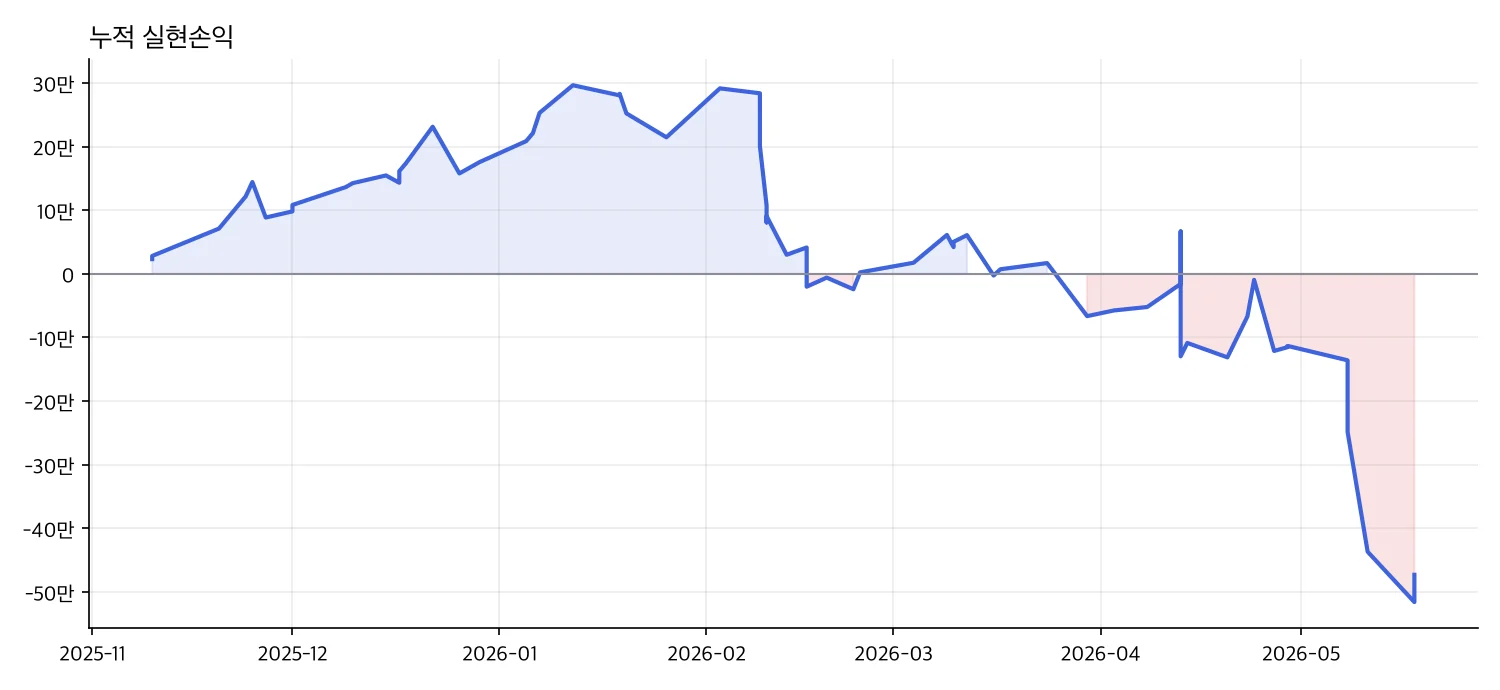
equity.png. Stretches that dip below the zero line are shaded red.
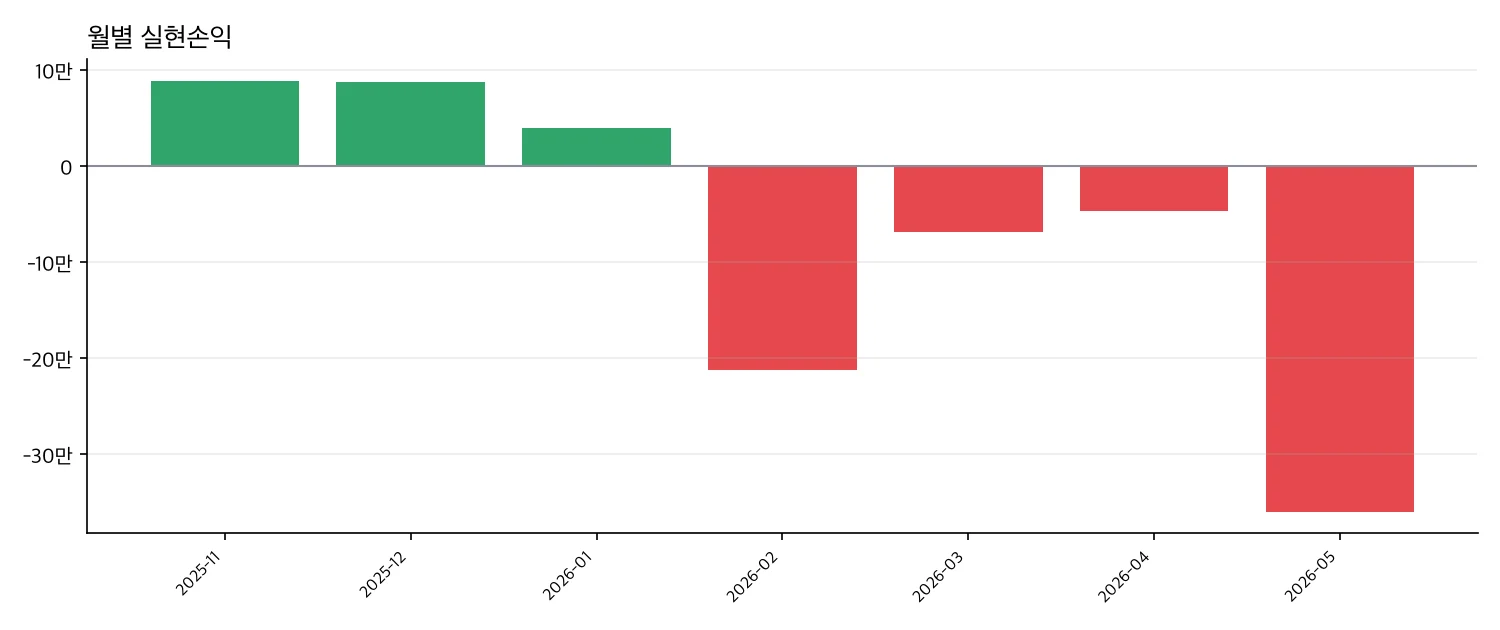
monthly.png. Based on the sample trade history.
What's included
| File | What it is |
|---|---|
SKILL.md |
Export → calculate → how to read it, plus the rules the agent follows |
scripts/trade_review.py |
FIFO P&L calculation with reports and charts |
examples/trades.csv |
A fictional sample trade history |
DISCLAIMER.md |
Notice to read before use |
What this skill does not do
- Trade advice, stock picks, or calls like "should I sell this one?" Instead, it helps you write down your own rules (stop-loss levels, maximum holding period).
- Tax-filing calculations. It uses FIFO, which can differ slightly from your broker's average-cost method.
- Account linking. You load the file yourself, and it runs only on your own computer with no internet.
What you need
uv(free to install). No internet or API key required.
FAQ
Q. I only have an Excel file. In Excel, choose "Save As → CSV." It also reads cp949 files where Korean text looks garbled.
Q. Does it work with overseas stocks? Yes. Switch the amount display with --unit USD. If a file mixes KRW and USD, split it and load each separately.
Q. My account number is in the file. It's a column the tool doesn't use, so you can delete it. Be sure to remove it from any file you share with others.
Notice This skill and its output are statistics on the past records you provide; they are not investment advice or a recommendation. Accuracy of the calculations is not guaranteed. You alone bear full responsibility for your investment decisions and their outcomes, and the author accepts no legal liability for investment losses based on this tool to the extent permitted by applicable law.