Offline Whisper Transcription to Obsidian Notes
Local Transcribe — Whisper to Obsidian, Fully Offline
Mac only (Apple Silicon M1–M4) — not available for Windows or Intel Macs. The local transcription engine (mlx) is Apple-Silicon-specific; there is no Windows or Intel version of this skill.
Turn recordings into notes without uploading a single second of audio anywhere.
Lectures, meetings, screen recordings — you record them and never turn them into notes, because transcribing is tedious and every cloud transcription service means uploading private audio to someone else's server. This skill sets up a transcription pipeline that runs entirely on your own Mac.
What it does
- Whisper large-v3 on Apple Silicon (via
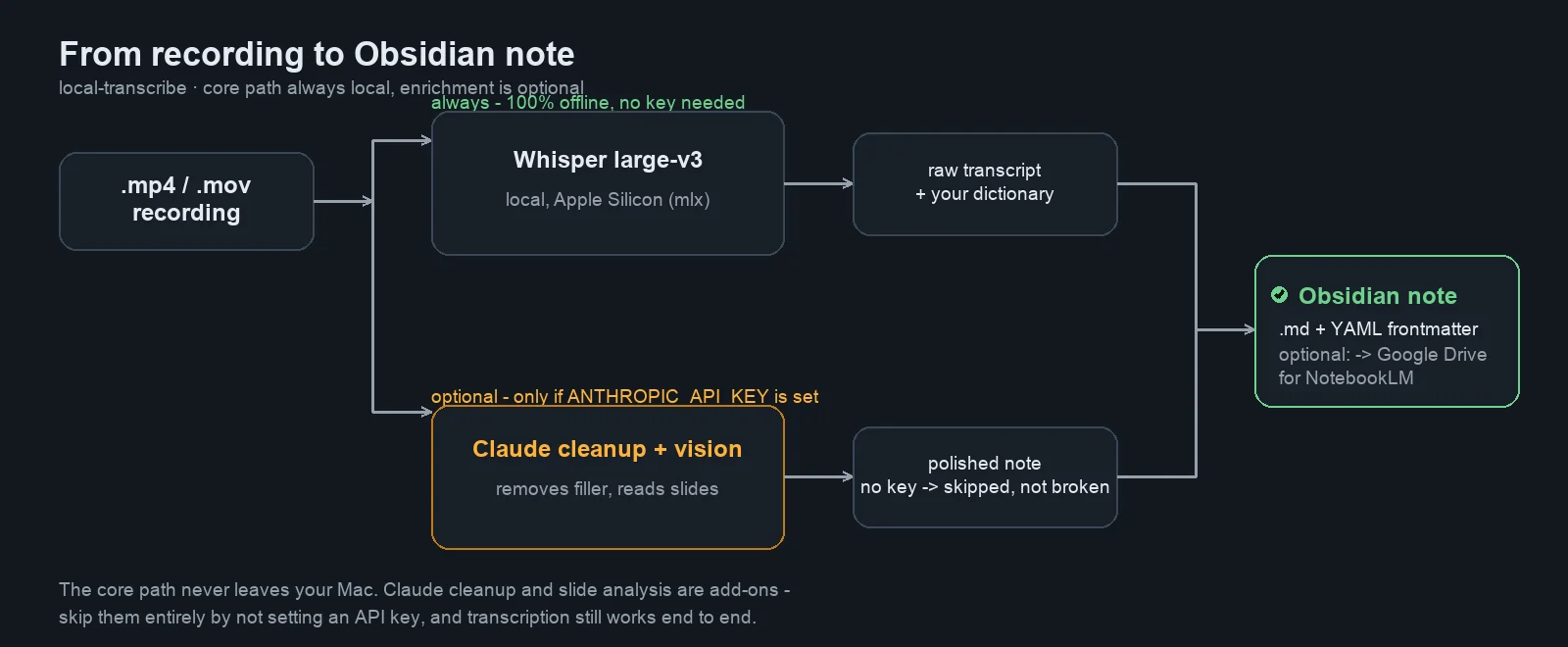
mlx_whisper) — fast, accurate, and 100% offline once the model is downloaded once. - Custom dictionary — feed it your own jargon (course terms, product names, colleague names) for measurably better recognition of specialist vocabulary.
- Optional Claude cleanup — strips filler, repetitions and meta-comments ("recording starts now", "see you next week") from the raw transcript. Uses your own Anthropic API key; skipped cleanly if you don't set one.
- Optional slide/diagram analysis — Claude Vision reads slides, tables and diagrams out of the video and merges them into the note.
- Obsidian export — the finished note lands directly in your vault as Markdown with YAML frontmatter (date, tag, source).
- Optional Google Drive upload — auto-feed NotebookLM.
How it works
 #
#
The core path (recording → Whisper → note) never leaves your Mac and needs no API key at all. Claude cleanup and slide analysis are opt-in add-ons: set ANTHROPIC_API_KEY and they run automatically; leave it unset and the pipeline still completes end to end, just without that polish.
Usage
Drop a recording into the input folder and run it:
python3 transcribe.py                    # processes everything in input/
python3 transcribe.py /path/to/file.mp4  # or a single file directly
Or just double-click Transkribieren.command in Finder — no terminal needed after setup.
Where recordings come from: anything that outputs .mp4 or .mov works out of the box — OBS Studio (set the recording format to mp4, or remux the default .mkv afterwards), QuickTime screen recording, local Zoom/Teams recordings, or phone videos.
Setup
- Run
bash install.sh— an interactive wizard that checks you're on Apple Silicon, installsffmpegand the Python dependencies, and writesconfig.jsonfor you (Obsidian vault path, target folder, tag). - Copy
woerterbuch.example.txttowoerterbuch.txtand add your own domain terms — this is the single biggest lever for recognition accuracy on specialist vocabulary. - Optional: export
ANTHROPIC_API_KEYfor cleanup and slide analysis. Optional: set up a Google OAuthcredentials.jsonfor Drive/NotebookLM export.
What's included
local-transcribe/
├── transcribe.py               # the full pipeline
├── install.sh                  # interactive setup wizard
├── Transkribieren.command      # Finder double-click launcher
├── config.example.json         # vault path, formatting, vision toggle, Drive folder
├── woerterbuch.example.txt     # domain-dictionary template
└── README.md                   # original project documentation
Honest limitations
- Apple Silicon only. The local Whisper model runs via
mlx, which is Apple-Silicon-specific — this does not run on Intel Macs or other platforms. - First run downloads the model (~3 GB) — needs internet once, fully offline afterwards.
- Cleanup and vision are only as good as your own Anthropic usage/billing — they're optional precisely so the core tool never depends on an external account.
- Not a live-transcription tool. It processes finished recordings, not a real-time stream.
All rights reserved — no open-source license attached. Contact the seller for anything beyond personal use.
API externes
Anthropic API · Google Drive API (OAuth)