
PodTrim | Podcast editor: cut ums, level -16 LUFS
PodTrim: podcast episode editor for pauses, ums and loudness
Upload a recorded podcast episode. PodTrim shortens the long pauses, cuts the ums and uhs, levels the episode to the podcast loudness standard (-16 LUFS, -1 dBTP) and sends back a publish-ready MP3 with ID3 tags and chapter markers, plus chapters, show notes, the edited transcript and a list of every cut.
It works on audio episodes. If you send a video file, only its sound is used and you get an MP3 back; it does not cut video. For video jump cuts, use a video editing tool.
What you send
- One episode: MP3, WAV, M4A, AAC, FLAC or OGG, up to 120 minutes. A video file (MP4, MOV, MKV, WEBM) is accepted for its sound only.
- Optional: show name, episode number and title, a cover image (PNG or JPEG) to embed in the MP3.
- Optional settings: pause cap (default 0.8 s, from 0.3 to 3.0 s), keep the fillers, loudness -16 LUFS stereo (default), -14 LUFS, or -19 LUFS mono, MP3 at 128 or 192 kbps.
What you get back
| File | What it is |
|---|---|
episode.mp3 |
The edited episode: 44.1 kHz MP3, 128 or 192 kbps constant bitrate, ID3 title, show and episode tags, ID3 chapter markers (CHAP and CTOC frames, read by Apple Podcasts, Overcast, Pocket Casts and other players that support ID3 chapters) |
chapters.txt |
"00:00 Title" lines for a YouTube or Spotify episode description |
show_notes.md |
A short summary of what was said and the chapter list, ready to paste into your podcast host |
transcript.txt |
The edited episode as text, with times that match the MP3 |
edits.csv |
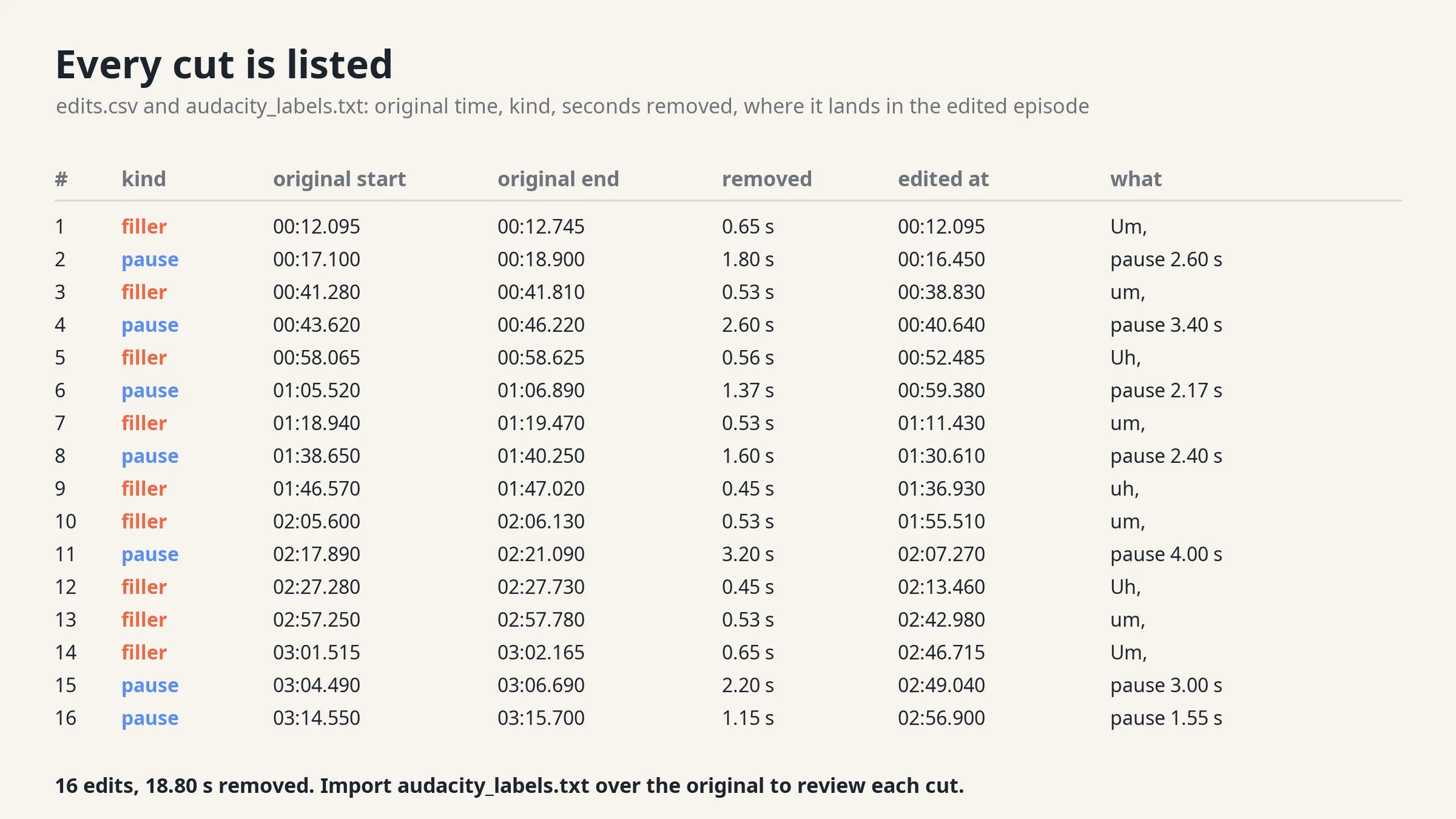
Every cut: original start and end, kind (pause or filler), seconds removed, where it lands in the edited episode |
audacity_labels.txt |
The same cuts as an Audacity label track, to review them over your original file |
report.md |
Length, loudness and true peak before and after, seconds removed by pauses and by fillers, and a check of every file |
How it edits
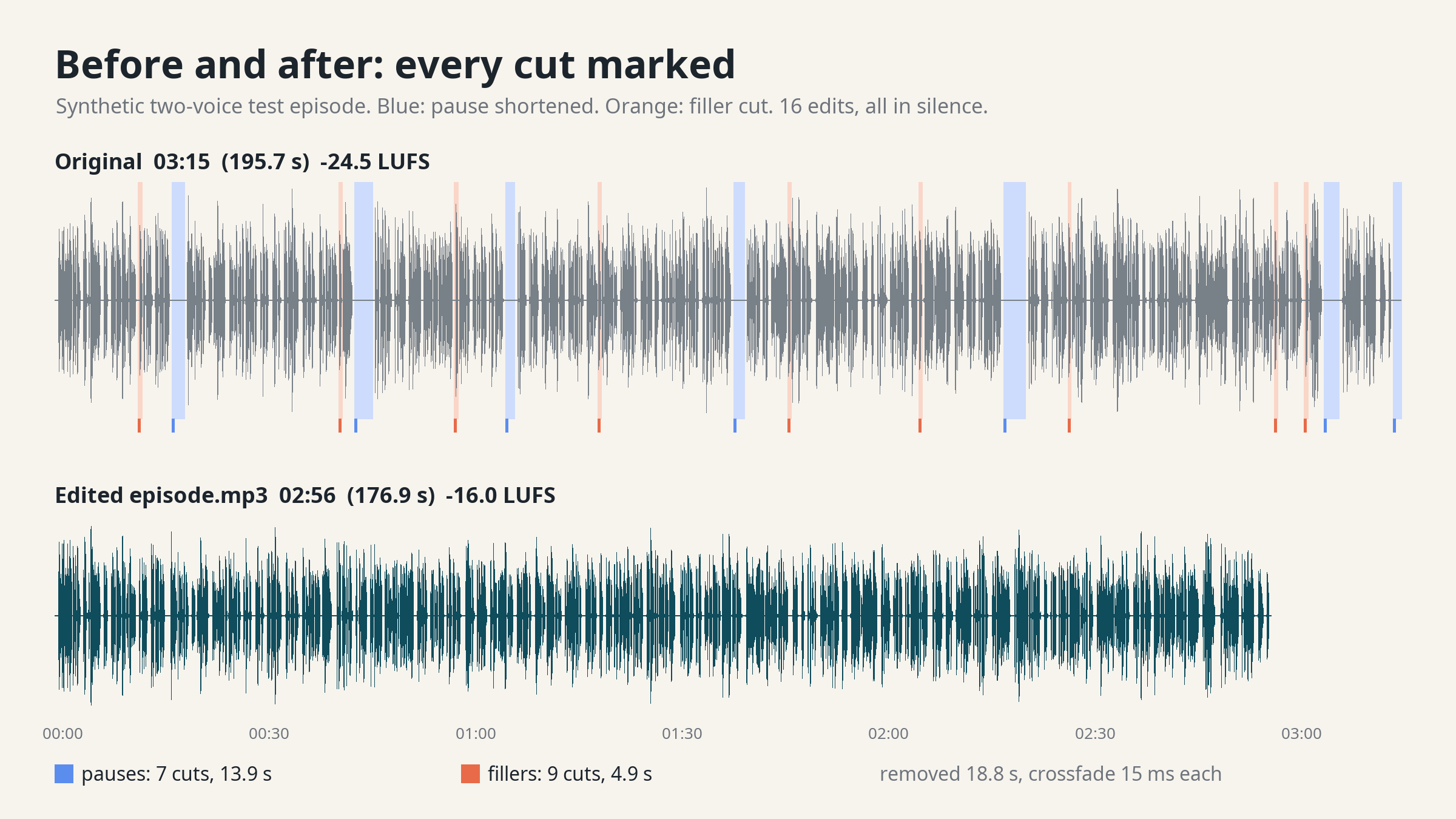
- Pauses are tightened, not jump-cut. Every pause longer than the cap (default 0.8 s) is shortened to the cap, so the conversation keeps its rhythm. Pauses are found from the measured level: a pause is a stretch of silence, so a cut never lands inside a word.
- Fillers. A small speech model bundled with the agent writes down um, uh, erm and hmm with their times. Each filler is cut together with the pause around it, leaving a natural gap. A filler said in one breath with the next word stays in, and the report lists it.
- Every edit gets a 15 ms crossfade, so there are no clicks.
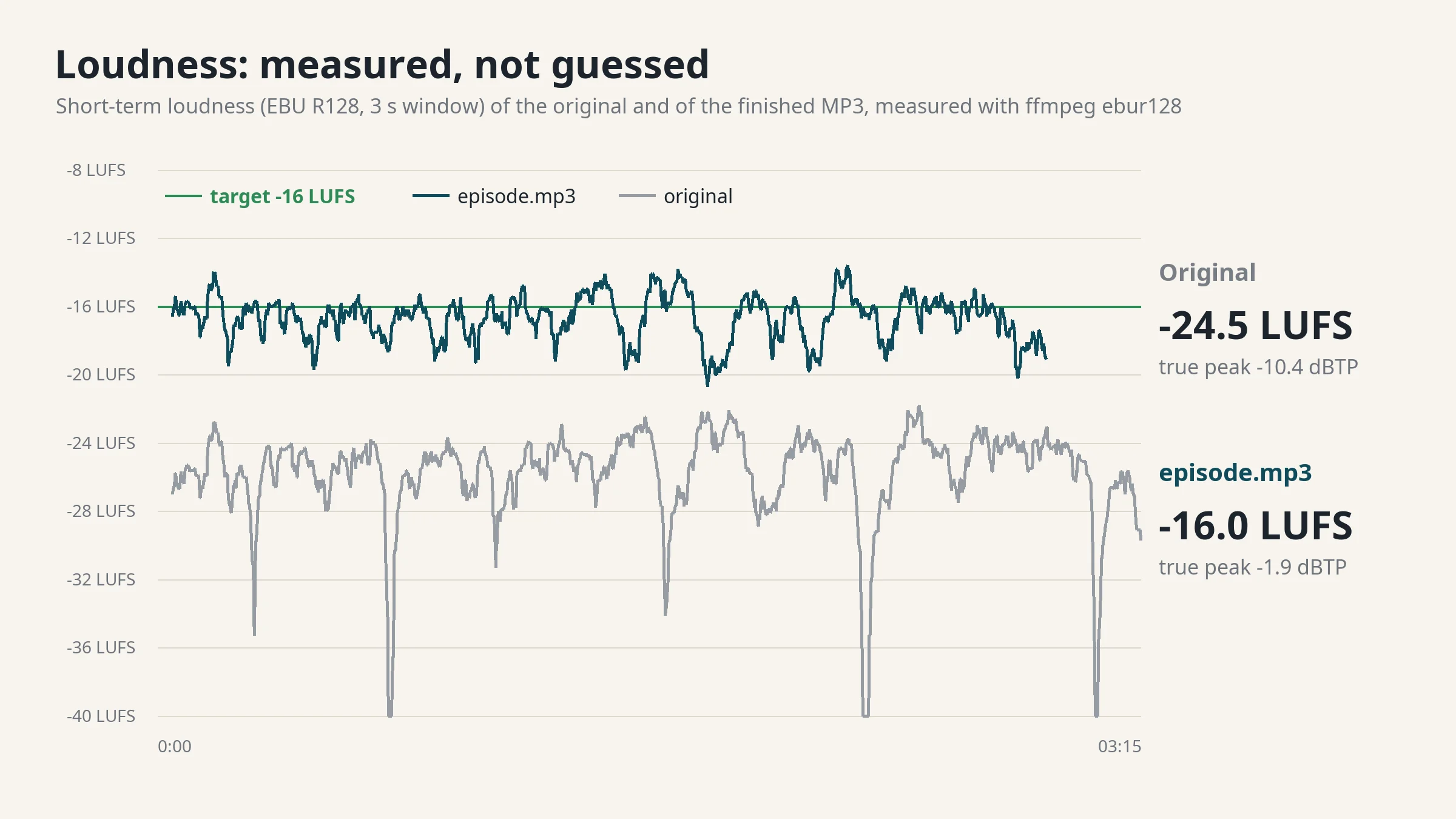
- Loudness in two passes. The episode is measured, normalised to the target and encoded, then the finished MP3 is measured again (EBU R128). If it is more than 1 LU off the target, the job fails instead of handing you a wrong file.
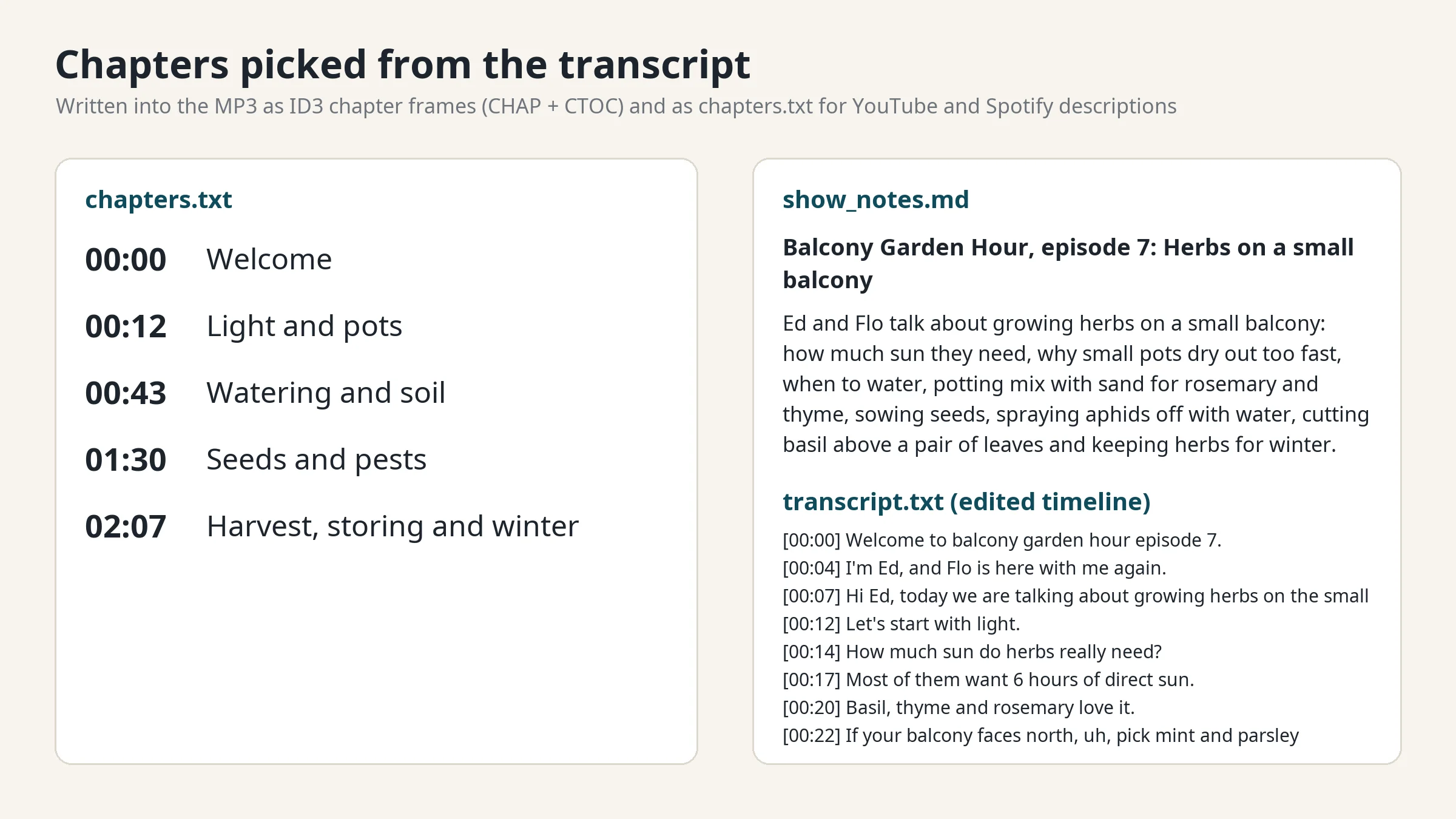
- Chapters and show notes. The agent reads the numbered transcript, picks where the topic changes, names each chapter and writes a summary using only what was said. The scripts move every chapter time onto the edited timeline and refuse a summary with a number nobody said.
Measured on a test episode
A synthetic two-voice podcast (synthetic voices, 3:15.7, recorded quiet at -24.5 LUFS) with 10 planted ums and uhs and 6 planted pauses of 2.0 to 4.0 s, run in a 2-CPU Linux sandbox:
- Length 3:15.7 -> 2:56.9: 18.8 s removed. Pauses 13.9 s (7 pauses), fillers 4.9 s (9 of the 10 planted fillers; the speech model did not write down the tenth on Linux).
- Every planted pause shortened to 0.8 s. No cut overlapped speech.
- Loudness -24.5 -> -16.0 LUFS, true peak -10.4 -> -1.9 dBTP.
- 5 chapters in the MP3, 5 lines in chapters.txt.
- Time: 7 to 8 s to transcribe, 14 to 17 s to edit, normalise, encode and check.
How long it takes
Measured in a 2-CPU, 4 GB Linux sandbox:
| Episode | Transcribe | Edit, normalise, encode, check |
|---|---|---|
| 3:15 test episode | 7 to 8 s | 14 to 17 s |
| 29:21 episode | 51 s | 104 s |
| 1:57:26 episode | 3 min 38 s | 6 min 48 s |
Most of the reply time is the agent reading the transcript and writing chapters and show notes.
Plans and requests
- Daily $3.99: 5 requests.
- Weekly $7.99: 12 requests.
- Monthly $19.99: 30 requests.
Every message you send uses 1 request from your plan. One request edits one episode. Asking for a different pause cap, the fillers kept or new chapter titles on the same episode is a new message and a new request.
What it does not do
- No video editing. A video file gives an MP3 of its sound.
- No noise reduction, EQ, music, intros, ads, speaker labels or multitrack mixing.
- Pauses under music or loud room noise are not shortened, because they are not silence.
- Filler removal is for English (um, uh, erm, er, hmm). In other languages pauses and loudness still work.
- The transcript comes from a small model, so names and rare words can be wrong. The agent corrects clear mishearings in the text only; the audio is never changed by a text fix.
- It does not publish to your podcast host or download from links. Upload the file.
- Up to 120 minutes per file, one file per request.
FAQ
Will it change what we said? No. It only removes pauses and filler sounds. Words are never cut, reordered or replaced.
Can I check the cuts? Yes. Open your original file in Audacity, import audacity_labels.txt as labels and every cut is marked with its kind and length. edits.csv holds the same list.
Which loudness should I pick? -16 LUFS is the common podcast target for stereo. -19 LUFS mono is the equivalent for mono shows. -14 LUFS matches music streaming levels.
Where does my audio go? It stays in the workspace. Nothing is sent to another service.
Support: [email protected]
API externes
PyPI (pypi.org, files.pythonhosted.org)