

Speech Writer: Generate Speaker Notes from Slides
😰 Have a PPT, but not sure what to say?
Making slides is one problem.
Presenting them is another.
This Agent turns your deck into a practical presentation prep package.
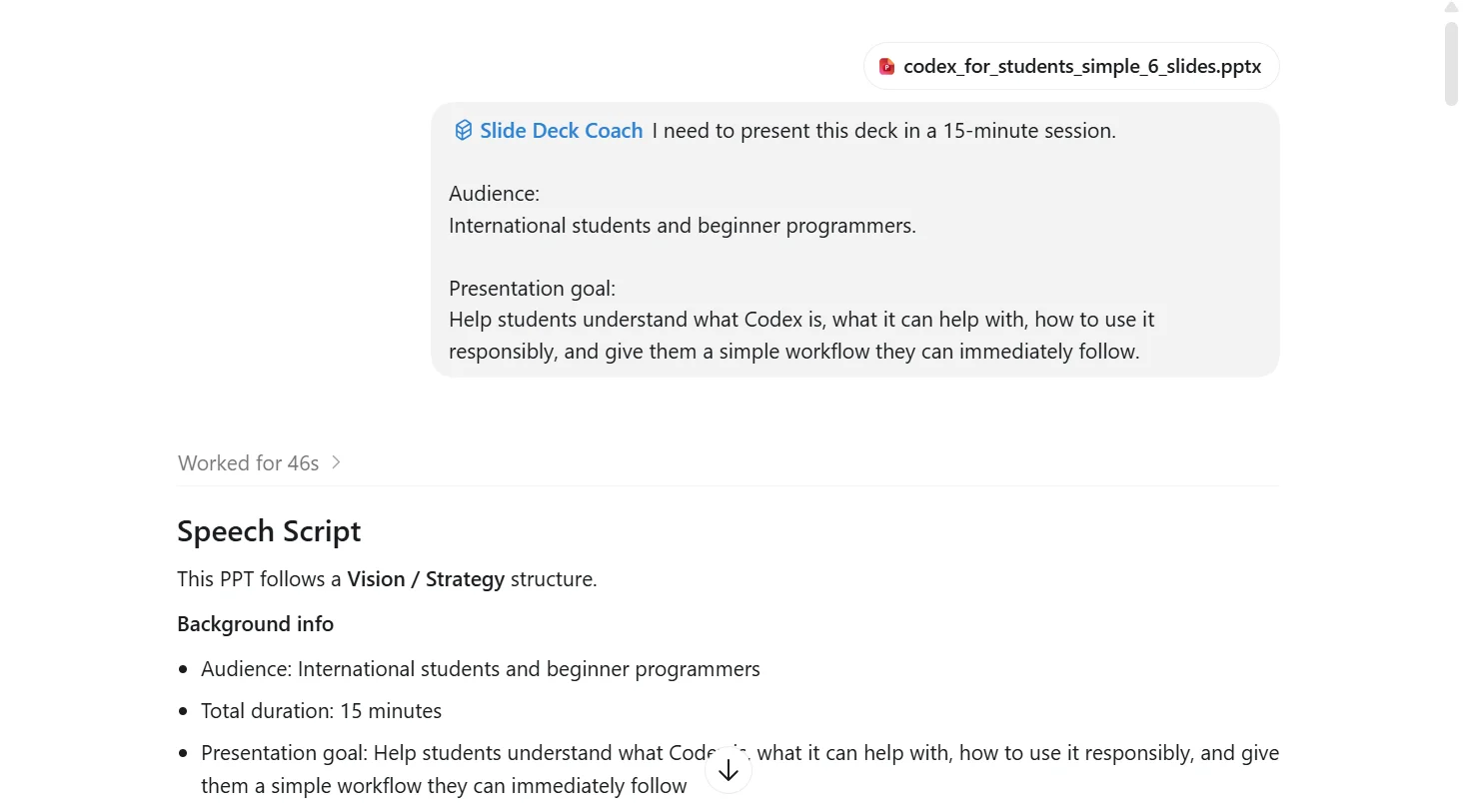
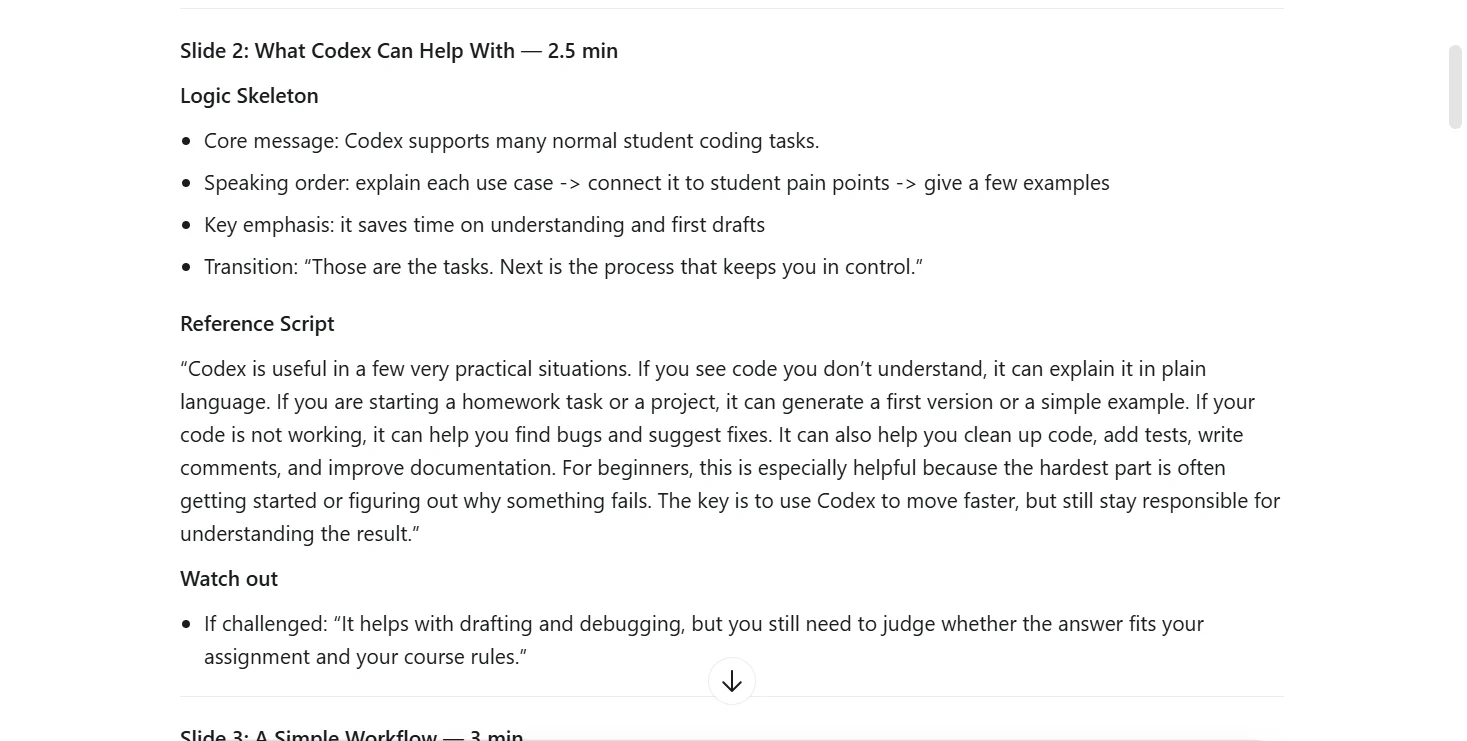
🎤 Slide-by-slide speaking guidance
For every slide, the Agent prepares:
- suggested timing
- speaking structure
- ready-to-use script
- likely challenge points
🙋 Then comes the part most people actually worry about.
You finish presenting.
Hands go up.
Questions start coming.
Want to prepare before that happens?
The Agent also builds a Q&A prep pack based on both your deck and the people in the room.
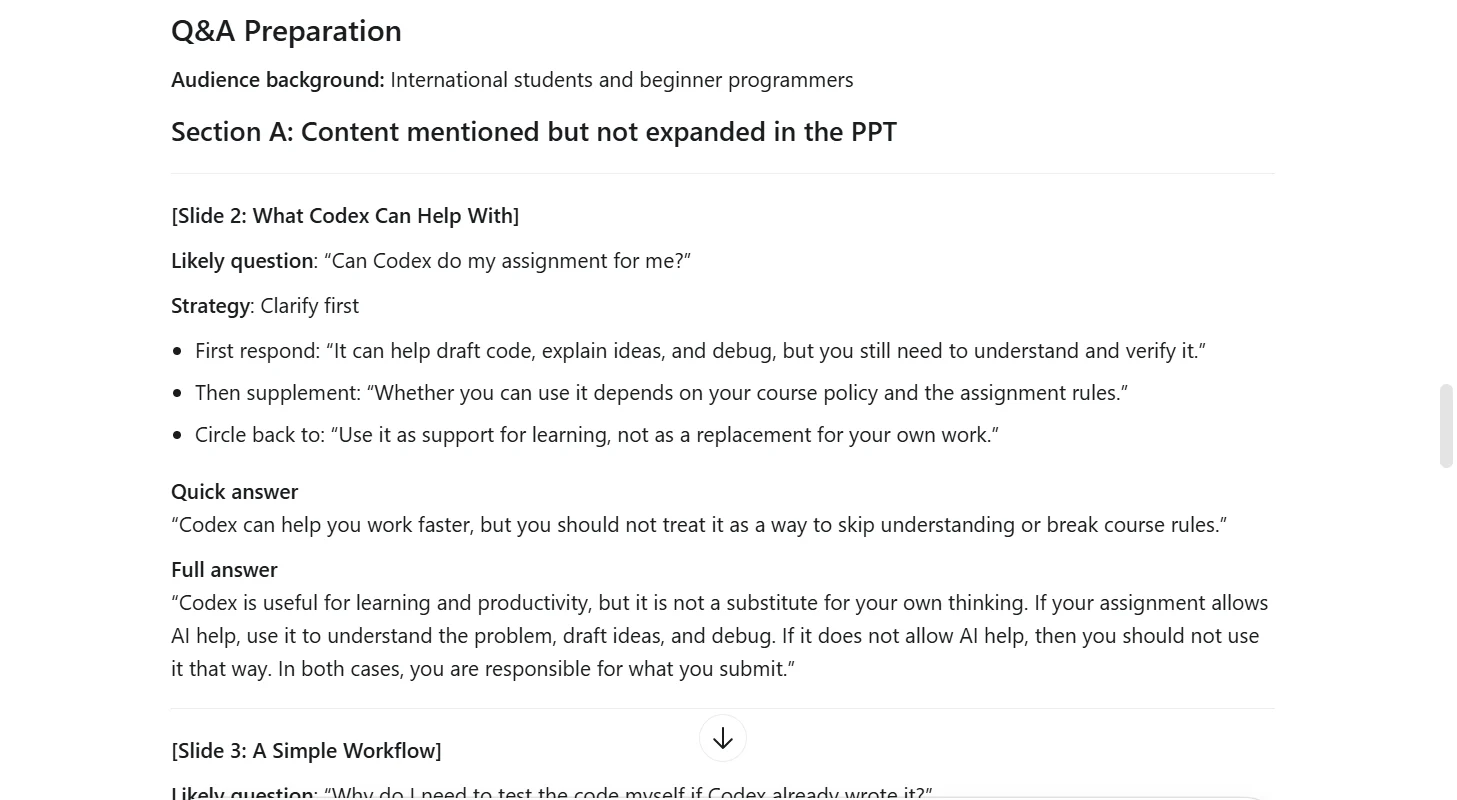
This includes:
- likely audience questions
- skeptical pushback
- quick answers for fast exchanges
- fuller answers for deeper discussion
- difficult scenario response patterns
🔍 Still not fully confident in the deck itself?
Sometimes the problem is not your speaking.
Sometimes the deck has weak logic, unclear claims, or missing support.
Before the meeting, the Agent can review the deck like a critical second pair of eyes.
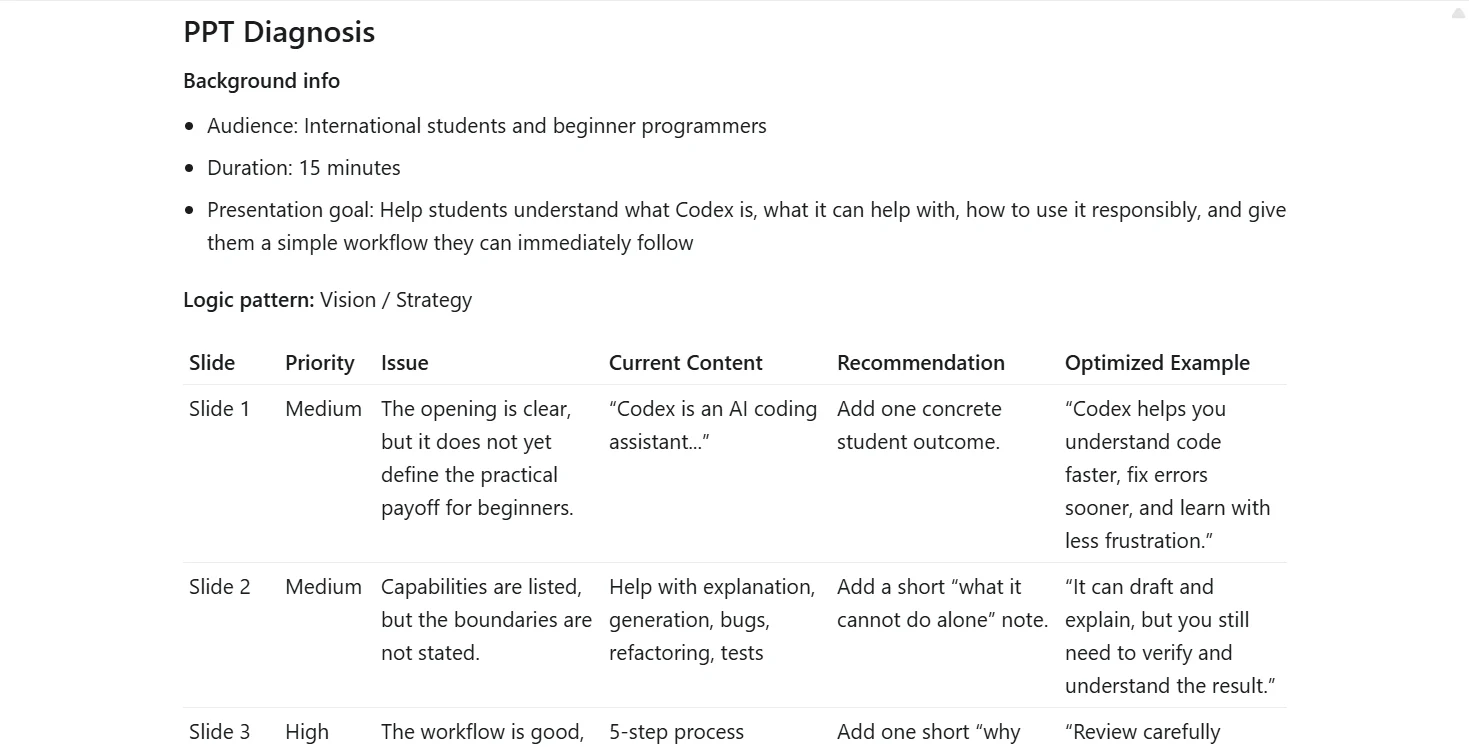
It highlights:
- weak argument structure
- unclear messaging
- unsupported claims
- persuasion gaps
- practical improvement suggestions
So this is the Agent I built for anyone who has something important to say, but doesn’t want the presentation itself to get in the way.
✨You are not bad at presenting — you may just need the kind of preparation a good assistant would help you do in advance.✨
If you'd like the full breakdown, the detailed description continues below.
What It Does
Feeling pressure before walking an audience through your slides? This skill is built for exactly that.
Use when: you already have a slide deck and need to deliver it in a real meeting.
This skill helps users prepare for a presentation, briefing, pitch, or internal report from an existing PPT.
It does not rewrite slide copy or redesign visuals. It focuses on the part that usually matters most before the meeting:
- what to say
- how to say it
- what questions will come
- where the deck's argument is still weak
Core output: three deliverables in order:
- A slide-by-slide speech script
- A Q&A preparation pack
- A deck diagnosis for structure and persuasion gaps
Why It Helps
Most people are not blocked by making slides. They are blocked by presenting them.
They need to:
- explain the same deck differently for a CEO, client, or technical reviewer
- stay within a time limit
- know where they will get challenged
- close in a way that moves the room toward a decision
Result: the deck becomes something the speaker can deliver, defend, and use to move the conversation forward.
How It Works
First, it asks three setup questions:
- Who is the audience?
- How long is the presentation?
- What should the audience do after hearing it?
Then it parses the PPT content when possible and organizes the deck slide by slide.
Before writing the script, it identifies the presentation logic pattern:
- problem-solution
- data-driven
- comparative analysis
- story
- vision or strategy
Then it generates:
- A recommended speaking flow and reference script for each slide
- Likely audience questions, with quick-answer and full-answer structures
- A diagnosis of missing logic, weak evidence, and slides that need stronger support
It also adapts the user-facing output to the language the user writes in.
What Makes It Different
Most deck-to-script tools treat the PPT as an outline and expand each slide into speaker notes.
This skill starts one layer earlier: it identifies the logic pattern behind the deck before writing the script.
That matters because a problem-solution deck, data review, comparison deck, strategy story, and vision presentation should not be delivered with the same rhythm or argument structure.
It is different in five ways:
- It builds the thinking before the wording.
Each slide gets a Logic Skeleton before the speaker notes. The script is not just a nicer version of the slide text; it is built from the slide's role in the argument, the point the speaker needs to land, and the transition into the next slide.
- It flags weak claims before the room does.
The Watch out note looks for the claim, number, decision, or evidence gap most likely to be challenged on each slide, then gives the speaker a short response to use if that challenge comes up.
- It prepares Q&A by audience role.
The Q&A pack is based on both the deck content and the people in the room. A CEO, client operator, technical reviewer, finance lead, or partner team will not ask the same kind of questions, so the answers are prepared for the meeting context rather than as a generic FAQ.
- It gives quick and full answers.
For likely questions, the skill prepares a short answer for fast exchanges and a fuller answer when the speaker needs to explain the reasoning. That helps the presenter handle both rapid-fire Q&A and deeper objections without rambling.
- It includes field scenarios for hard rooms.
The skill prepares response patterns for hostile questions, rapid-fire questioning, out-of-scope questions, and moments when the speaker does not know the answer. It is designed for the room after the slides appear, not just the script before the meeting.
What The Output Looks Like
Output format: a working presentation-prep package, not generic presentation advice.
Users receive:
- Slide-by-slide speaking notes with recommended timing
- Transition guidance between slides
- High-risk challenge points to watch for
- Q&A prep based on both deck content and audience roles
- A structured diagnosis showing what is missing in the argument and what to improve
Typical Use Cases
- Prepare a CEO update from an internal project deck
- Turn a PPT into a delivery-ready script before a client briefing
- Rehearse for a pitch, strategy review, or technical committee presentation
- Anticipate stakeholder objections before a decision meeting
- Stress-test whether a deck's argument is actually convincing
Example
Input
Help me prepare this PPT for a 15-minute presentation. The audience is the CEO and partner team members. I want the partner team to tell me what else they need, and I want the CEO to decide the next action.
Output
A presentation-prep package with:
- a slide-by-slide speech script
- per-slide timing suggestions
- likely challenge points
- role-based Q&A prep
- a deck diagnosis focused on decision-making logic
Inputs It Handles
Just send:
- A PPT file or slide content
- The audience
- The presentation length
- The action or decision you want after the presentation
It can also work with copied slide text when the PPT file cannot be parsed automatically.
Best For
- Founders and operators preparing leadership updates
- Consultants and account teams presenting to clients
- PMs and cross-functional leads running decision meetings
- Anyone with a deck who needs to present, not just design


