TinyStage — Miniature Ad Prompt Studio
TinyStage — Miniature Ad Prompt Studio
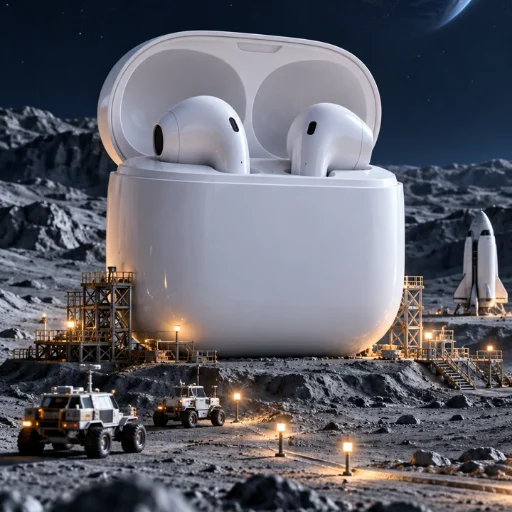
Turn your product into the landmark of a tiny cinematic world. An orange cup towers above a miniature coast, an earbud case anchors a moon station, and a candle becomes the centerpiece of a greenhouse island. Choose a scene, describe your product, and export a timed storyboard with a ready-to-copy English video prompt.
One-time download · v1.0.0. Includes an offline prompt studio, 12 scene templates, an optional AI Skill, and three original concept illustrations. The gallery contains images actually generated for this project with ImageGen; they illustrate fictional products and are clearly labeled concept illustrations.
| Cup Lighthouse | Earbud Moon Station | Candle Greenhouse Island |
|---|---|---|
 |
 |
 |
What you receive
- 12 miniature-world scene templates: three each for drinkware, earbud cases, candles, and general products.
- Offline Prompt Studio: open one HTML file in your browser, enter a product brief, choose a scene, and copy or download the result as text. Export a structured brief for the optional compiler.
- A selected creative plan: opening hook, scale reveal, clear product ending, timing, camera direction, English video prompt, and Chinese storyboard explanations.
- Product identity and copy guidance: shape, color, component and mark constraints; permitted copy selected from your supplied facts.
- Optional installable Skill and readable Python compiler: useful in a compatible AI client; the browser studio works on its own.
- Three worked examples and original full-resolution images: cup, earbud case, and candle.
Default planning format: 8 seconds, vertical 9:16, suggested 720p. Choose 4–15 seconds and supported frame formats. These are creative-plan specifications.
How to use
- Download and unzip the package. Open
prompt-studio.htmlin your browser. - Fill in the product name and visible appearance. Add facts you permit in copy and claims to avoid.
- Choose one of the scenes. Review the timed storyboard, then copy or download the English prompt.
- If you want a finished video, use the exported prompt in a video tool you choose separately and inspect its output.
Example: “Plan an 8-second vertical miniature-coast ad for an orange cup. Keep the ivory lid closed and the cup shape unchanged. Do not claim 24-hour insulation.”
Requirements and scope
The bundled browser studio and compiler make no network requests and need no API key. The studio uses fixed scene templates, not a hidden AI generator. Python 3.10+ is required only for the optional compiler. Using the optional Skill requires a compatible AI client and follows that client's own access and pricing.
Your purchase delivers planning tools, templates and source files. Finished videos, model access and video-generation credits are not included. You choose any external video tool yourself; its fees and terms are separate. Generated product geometry, marks, timing and scene continuity still need inspection. There is no promise of exact product reproduction, a seamless loop, sales lift or viral performance.
Data handling
The offline studio keeps the current product brief in browser memory and exports only when you choose. It does not send product information to a server or save it in local storage. The compiler reads and writes local files. Using the Skill in an external AI client subjects your conversation to that client's policies; separately pasting an exported prompt into a video tool subjects it to that tool's policies.
TinyStage · 微缩造物局
把商品变成微缩世界里的巨大地标:橘色杯子矗立在海岸悬崖,耳机盒成为月球站中心,蜡烛坐落在温室小岛。选择场景、填写商品信息,即可导出带时间线的分镜与可复制的英文视频提示词。
一次性付费下载 · v1.0.0。 包含离线提示词工作台、12 个场景模板、可选 AI Skill 和三张原创概念图。上方图片由本项目实际使用 ImageGen 生成,展示虚构商品的视觉创意。
下载包里有什么
- 12 个微缩场景模板: 杯具、耳机充电盒、蜡烛、通用品四类,每类三个。
- 离线提示词工作台: 双击 HTML 文件即可使用,填写商品后复制或下载文本,也可导出结构化商品信息。
- 一份选定场景的创意方案: 开场吸引、尺度揭示、商品收尾、镜头时间、英文提示词与中文分镜说明。
- 商品与文案约束: 保留颜色、形状、组件和标记;建议文案从你提供的事实中逐字选择。
- 可选 Skill 与可读的 Python 编译器: 方便在兼容 AI 客户端中使用;工作台可以单独运行。
- 三套完整示例与原始高清概念图: 杯子、耳机盒、蜡烛。
默认规划 8 秒、竖屏 9:16、建议 720p;可选择 4–15 秒及支持的画面比例。这些参数描述创意方案。
怎样使用
- 下载并解压,双击
prompt-studio.html。 - 填写商品名称、外观、允许使用的事实和需要避免的宣称。
- 选择场景,审阅分镜,复制或下载英文提示词。
- 如果需要视频成片,再自行选择视频工具使用提示词,并检查实际输出。
示例:“为橘色杯子规划一支 8 秒竖屏微缩海岸广告。象牙色杯盖保持关闭,外形不变,不宣称保温 24 小时。”
使用要求与交付范围
随包的浏览器工作台与编译器不联网,也不需要 API 密钥。工作台通过既有场景模板生成方案。Python 3.10+ 仅用于可选编译器;可选 Skill 需要兼容的 AI 客户端,使用费用由该客户端决定。
购买后获得规划工具、模板和源文件;不包含视频成片、模型权限或生成额度。 外部视频工具由你自行选择,其费用与条款另计。商品形状、标记、镜头时间与场景连续性仍需看实际输出;不保证商品精确复现、无缝循环、销量增长或爆款。
数据处理
离线工作台只在当前浏览器页面内存中处理商品信息,由你主动导出;不会上传至服务器,也不写入浏览器本地存储。编译器只读写本地文件。若在外部 AI 客户端使用 Skill,或把提示词粘贴到视频工具,数据处理遵循你选择的服务规则。