
DB2MCP | 4 tools, scored search, every call logged
Born from running 50 MCP tools at once: Claude picked wrong tools, logged nothing, and 50 tools were unmanageable. DB2MCP hides every query behind 4 fixed tools. The AI says what it needs, a BM25 score picks the query, weak or tied scores return "none" or a question; call will not run without a purpose, so every call is logged. Add tables, the 4 never change. Connection string in, 5 minutes later your AI queries your DB. Every answer links to a dashboard and Excel of the same query. Read-only. #Ingegneria #Produttività #Analisi
Your database shows the AI 4 tools; a score picks the query, and every call is logged
This design came out of my own experience running about fifty MCP tools at once. With that many, Claude started picking the wrong tool; it never wrote down what it had called or why; and fifty tools were impossible to manage. DB2MCP puts every query on your database behind 4 fixed tools, lets a score do the picking, and makes call keep its own record.
Give it a connection string. Five minutes later your AI can query your database, and every answer comes with a link you can open to check the number. No database at hand? Try it on the built-in sample data first. Have an Excel file? That works too.
Why only 4 tools
Most "database to MCP" tools expose one tool per table. Twenty tables, sixty tools, and the AI has to pick one out of sixty descriptions on its own; the more tools, the more wrong picks. Nothing records why it chose that one. And every table you add makes everyone re-approve permissions.
This generator exposes four: search_tools, describe_tool, call and whoami. The dozens of real query tools sit behind them. The AI says in a sentence what it needs; BM25 scores each query on its title, keywords and past call purposes and returns the top hits with their scores. A low score comes back as "no query answers that", two close scores as a question back to you, instead of a guess. call does not run without a stated purpose, so every call leaves one line: time, tool, arguments, purpose.
Because everything depends on search, the install measures it: a few sentences written the way you would ask, each paired with the query that should answer, and the share where the right one comes first (15 of 16 on the sample data). After a while the same check can run on the questions you actually asked, taken from the audit log.
Add as many tables as you like; the tool list your AI sees never changes, and nothing needs re-approval.
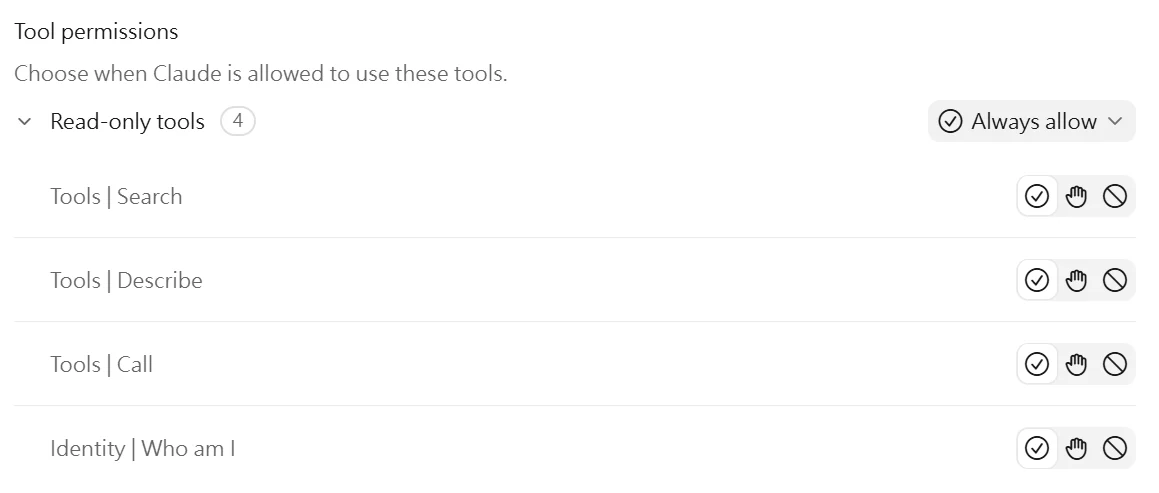
The same design has run in production for six months across several data sources.
Who it is for
You already use Claude Code or Claude Desktop, you have a database or spreadsheet you keep needing answers from, and you do not want to spend a weekend learning MCP to connect the two. You know what a connection string is. That is all it assumes.
How it works
Install the skill, open Claude Code, and say one of these:
| You say | What happens |
|---|---|
| "db2mcp, just try it" | Generates sample finance (AR / AP) and order-to-shipment data and builds the server on it |
"db2mcp, connect postgresql://..." |
Reads your tables, builds a set of query tools per table, registers the server |
"db2mcp, use sales.xlsx" |
Each worksheet becomes a table, then the same as above |
It then runs the tests, registers the server with Claude Code and Claude Desktop, and asks one real question to prove it works. Claude Code: start a new conversation. Claude Desktop: quit it fully once and reopen, and it appears under Connectors.
No questionnaire. Everything it had to guess goes into the Assumptions list in the README, and you correct any of it with one sentence.
What you get
Ask: "How much AR is still open at the end of October?"
Answer: 58 open invoices, $765,680.15 in total, of which $533,588.09 is overdue.
Followed by a link: http://127.0.0.1:8000/d/ar_open_list?as_of=2026-10-31
Open it and you see the same query with the same arguments laid out as a table in your browser, with the actual MCP call printed above it. No number has to be taken on trust. The dashboard is a small background process that keeps running after you close the AI, so links in last week's answers still open.
Say "give me that as Excel" and you get another link: the same query run again and written to a file, every column, one sheet per list, plus an About sheet with the arguments, the definitions and the totals.
What is inside
- FastMCP server (Python 3.10+), stdio by default: started by your AI, no port, no Docker, no OAuth
- One set of tools per table: get by key, list by filters, monthly summary, column descriptions
- Search hit-rate check: sentences in your words paired with queries, scored on how often the right one comes first; later runnable on the audit log
- Cross-check dashboard on localhost that outlives the AI, so links in old answers still open
- Excel download: any query result becomes a file from one link, values without formulas
- Scheduled reports: a fixed set of queries written as one definition and handed to the OS scheduler; runs with Claude closed, nothing emailed or uploaded
- Schema reading that pulls the actual values of status codes, so nothing is guessed
- Excel import (one worksheet, one table)
- Read-only connection layer: SELECT only, bind parameters, row and time limits
- Audit log:
callrefuses to run without a purpose, and every call is recorded as one line with it - Tests, an offline smoke test, and an end-to-end check that speaks the real MCP protocol, opens the dashboard link and downloads the Excel file
- Optional HTTP mode with API key or SSO header authentication for teams
Supports SQL Server, PostgreSQL, MySQL, SQLite, Oracle, and any documented REST API.
Requirements
- Claude Code on your own computer (it needs to run shell commands). In chat-only environments it writes an
install.batfor you to double-click. - Python 3.10 or newer
- A read-only database account (it gives you the GRANT statements)
- It runs on your own machine. In claude.ai on the web or any other cloud sandbox it stops and tells you how to run it locally instead.
- Tested on Windows 11 with Python 3.12. macOS and Linux use the same code paths and should work; report anything odd and it will be fixed.
What it does not do
Writes. Ever. If you need the AI to add or change data, this is not the tool.