
Excel / CSV Data Analyst: Clean, Analyse, Report
Clean messy Excel or CSV files automatically (title rows, totals, merged cells, $ amounts, mixed dates, broken encodings), then get monthly trends, year-on-year comparison, rankings and cross tables. Output: an Excel workbook with SUMIFS formulas and native charts, plus a PDF report in English or Chinese. Runs offline. #Produttività #Analisi #Commercio
Still building reports by hand from POS exports, online shop orders or expense sheets every month? Excel / CSV Data Analyst lets your AI assistant do it in one go: clean the data, analyse it, build the Excel workbook and write the PDF report.
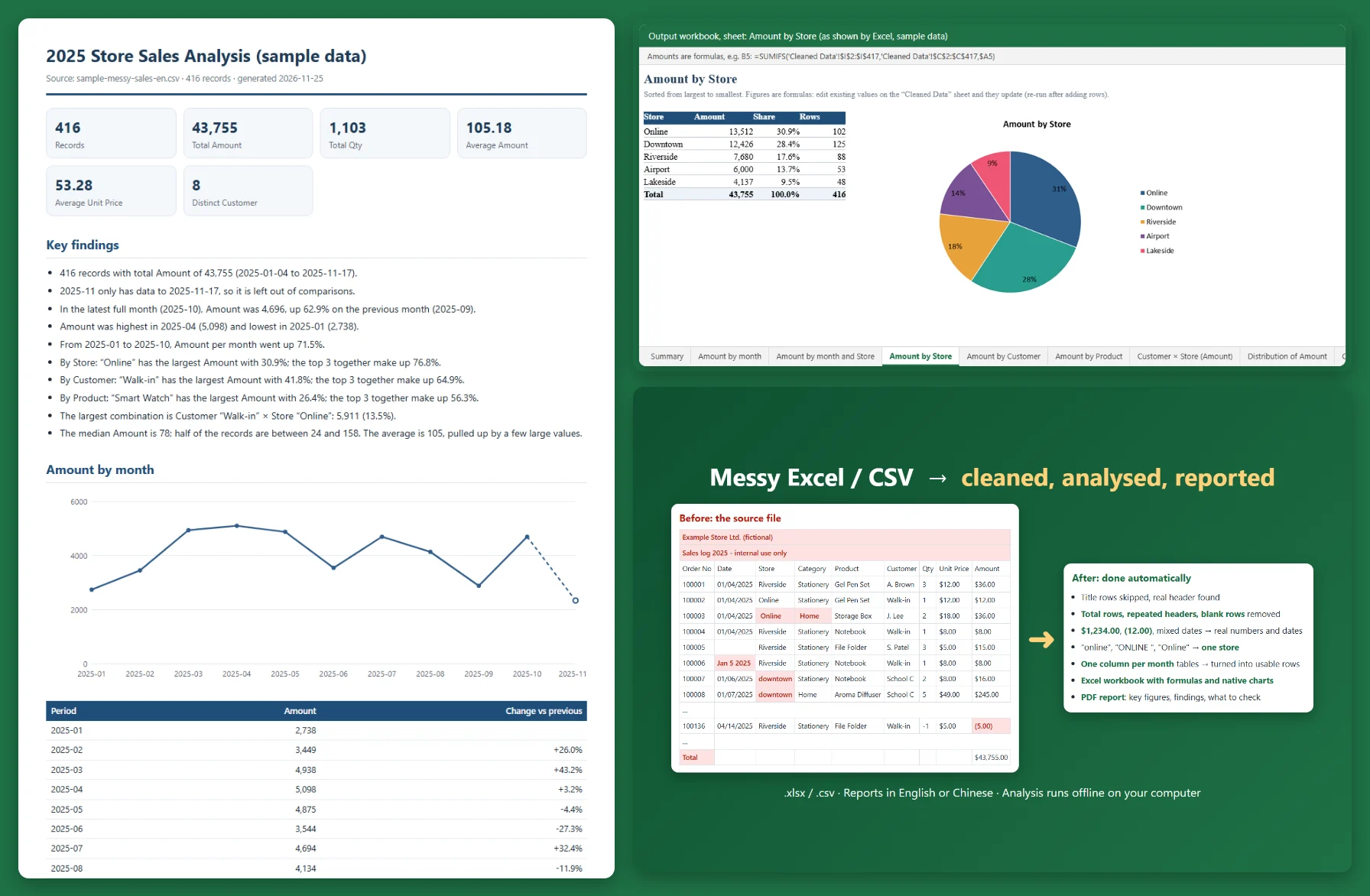
Sample output above. All data is fictional.
What you get
- Excel workbook (.xlsx): a summary sheet and one sheet per analysis (monthly trend, year on year, rankings by store / product / customer, cross tables, distribution) with native Excel charts
- Tables and most key figures are formulas (SUMIFS, COUNTIFS and so on). Change existing values on the "Cleaned Data" sheet and tables and charts follow. New rows, new categories and the written findings need a re-run
- PDF / HTML report: key figures, findings (such as "the latest full month is down 16.9%" or "the top 3 stores make up 77%"), charts and data checks
- Cleaned CSV and a list of everything that was cleaned and what you should check
Handles real-world messy data
- Company name or title rows above the table: finds the real header
- Total and subtotal rows, repeated headers, blank rows, footnotes: removed and recorded so nothing is counted twice. Rows that look like totals but do not add up are kept and flagged
- Tables with one column per month or quarter: turned into rows that can be analysed
- One sheet per month or per store: combined, even if the column order differs. A yearly summary sheet is left out to avoid double counting
- Separate income and expense columns: monthly net amount worked out; balance columns are not added up
- Merged cells, or dates and names only on the first row of a group: filled down
- $1,234, £, €, (477) negatives, 15%, European 1.234,50: real numbers. "-", "N/A": blank
- 2025/1/5, Jan 5 2025, 03/04/2025 (day/month order worked out from the data, with a warning when it cannot be), 2025Q1, Jan-25, 20250105, separate year and month columns: real dates
- Several currencies in one column: flagged, not simply added together
- Bank, payment app and online shop exports with notes before and after the table: finds the table
- UTF-8, UTF-16, Big5 and GBK files: no broken characters
- "online", "ONLINE ", "Online": merged into one item
- Unfinished last month, months with no records, outliers, duplicate rows or IDs, missing dates: flagged
Example requests
- "Analyse this sales Excel file and make a monthly report"
- "Which store and which product sell best? Add charts"
- "Work out the gross profit (sales minus cost) and compare regions"
- "Compare 2025 with the same period in 2024. Which store grew most?"
- "Only the first half of 2025, please"
Requirements
- An AI assistant that supports Skills. Tested in Claude Code, and on the Claude website with a free account (there it makes the Excel workbook and an HTML report, but no PDF). Other assistants that support Skills (such as Codex, OpenClaw or Hermes) should work but have not been tested one by one
- Python 3.8 or newer (free at python.org). No extra packages and no Excel needed
- Optional: Chrome, Edge or Chromium for automatic PDF
- The program works offline and never connects to a website. Your AI assistant uses its own AI provider as usual when it reads the results
- An English sample file and a step-by-step guide in English and Chinese (HOW-TO-USE.html) are included
FAQ
Which files are supported? .xlsx, .xlsm, old .xls, .xlsb, .ods (LibreOffice / Google Sheets), .csv, .tsv, .txt, and the "fake .xls" files (really web pages, XML or text) that banks and shop systems export. Remove passwords first; export Apple Numbers files to Excel first.
Can I open the workbook in WPS or Google Sheets? Usually yes. It uses common functions such as SUMIFS and COUNTIFS.
Is there a size limit? A test file with 200,000 rows took about 1 minute (depends on the computer). Above 1 million rows the workbook holds the first million; the analysis still covers all of them.
Will it change my file? No. All results go to a new folder.
Please note: Results depend on the source data. Check the "data cleaning and checks" section of the report.