
FocusPan | Screen recording to auto-zoom tutorial
FocusPan: screen recordings to auto-zoom tutorials
Upload a screen recording. FocusPan finds where the screen changes, zooms into each of those spots with smooth moves, pans between them, and goes back to the full screen when nothing happens. Your audio stays in sync. No cursor log, plugin or special recorder is needed: it works on the MP4, MOV or WEBM you already have.
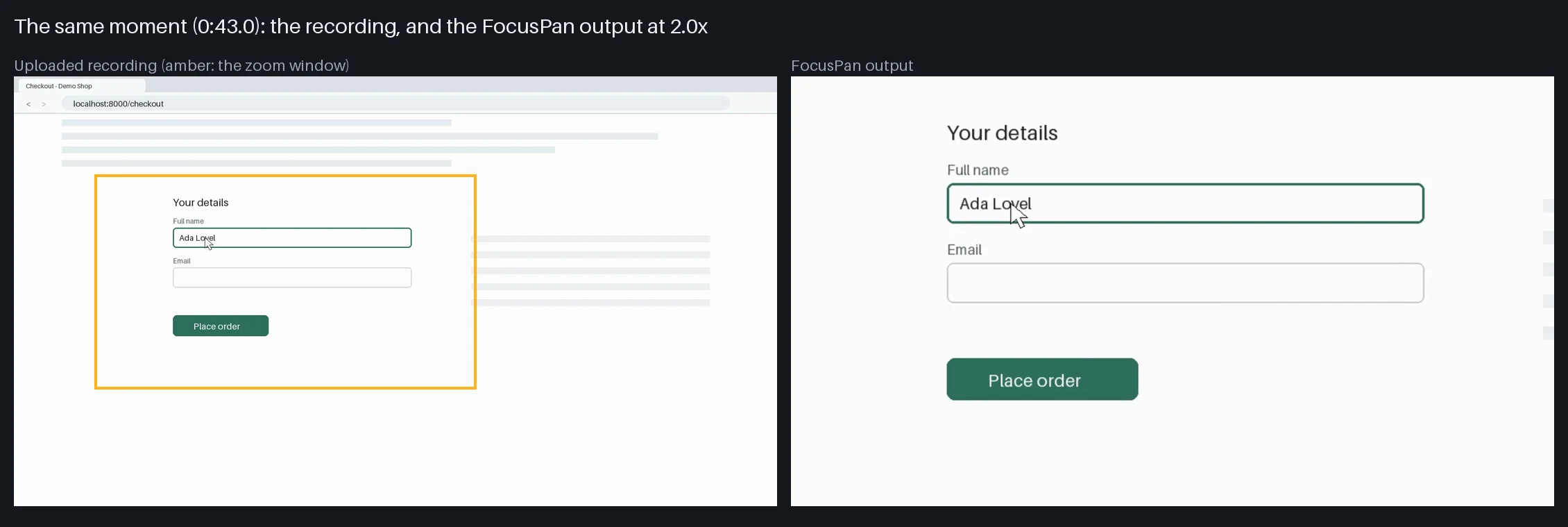
What you send
- One screen recording: MP4, MOV, WEBM or MKV, 720p to 4K, up to 30 minutes, with or without sound.
- Optional: "make a vertical version", "use the padded style", "cut 0:30 to 1:10", "zoom less", "no zoom from 2:00 to 2:20".
You can send just the file. The defaults zoom up to 2x and keep the recording's own aspect ratio.
What you get back
| File | What it is |
|---|---|
focuspan.mp4 |
The zoomed video in the recording's aspect ratio, up to 1080p by default, H.264 and AAC |
focuspan_9x16.mp4 |
On request: 1080x1920, a vertical window that follows the action |
focuspan_zooms.csv |
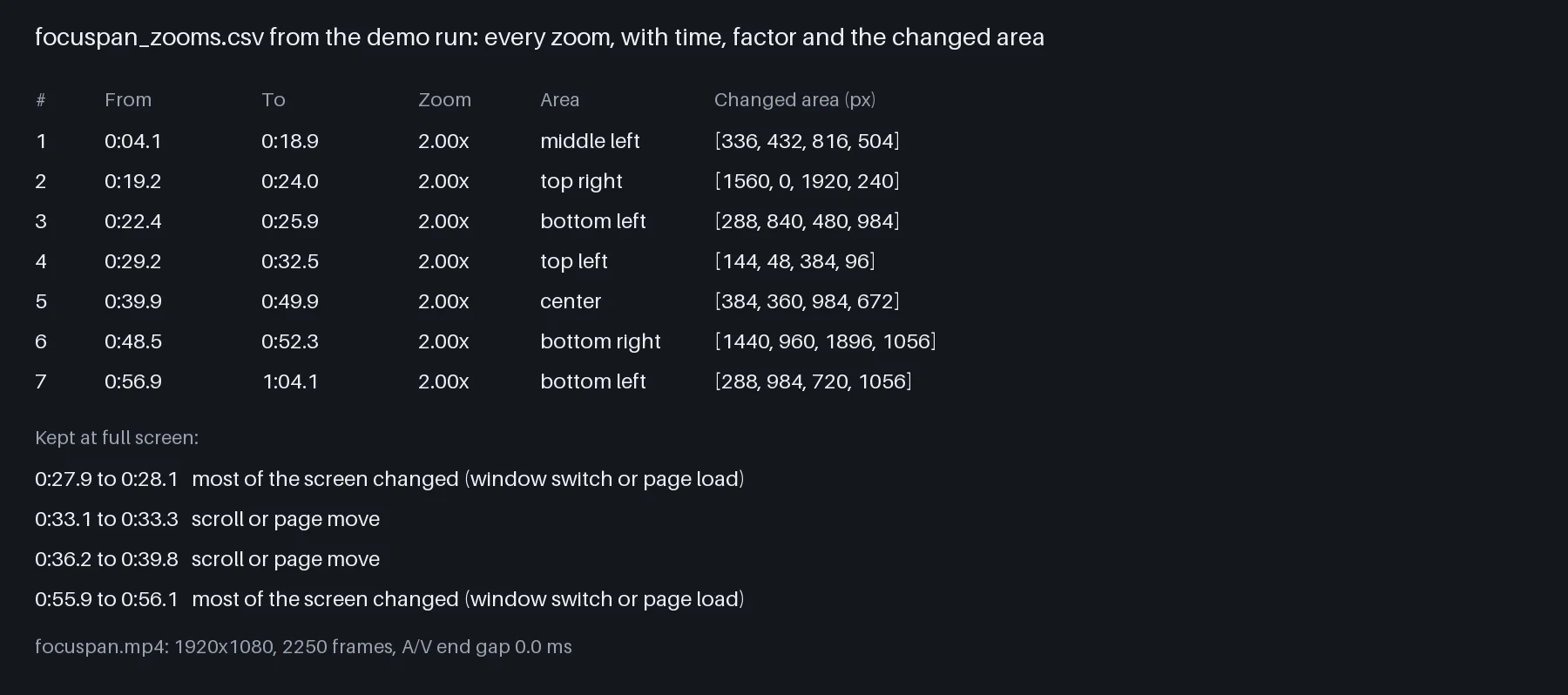
Every zoom moment: start, end, zoom factor, centre and the changed area in pixels |
focuspan_zooms.json |
The same, plus the full-screen stretches and the camera path every 0.5 s |
focuspan_preview.png |
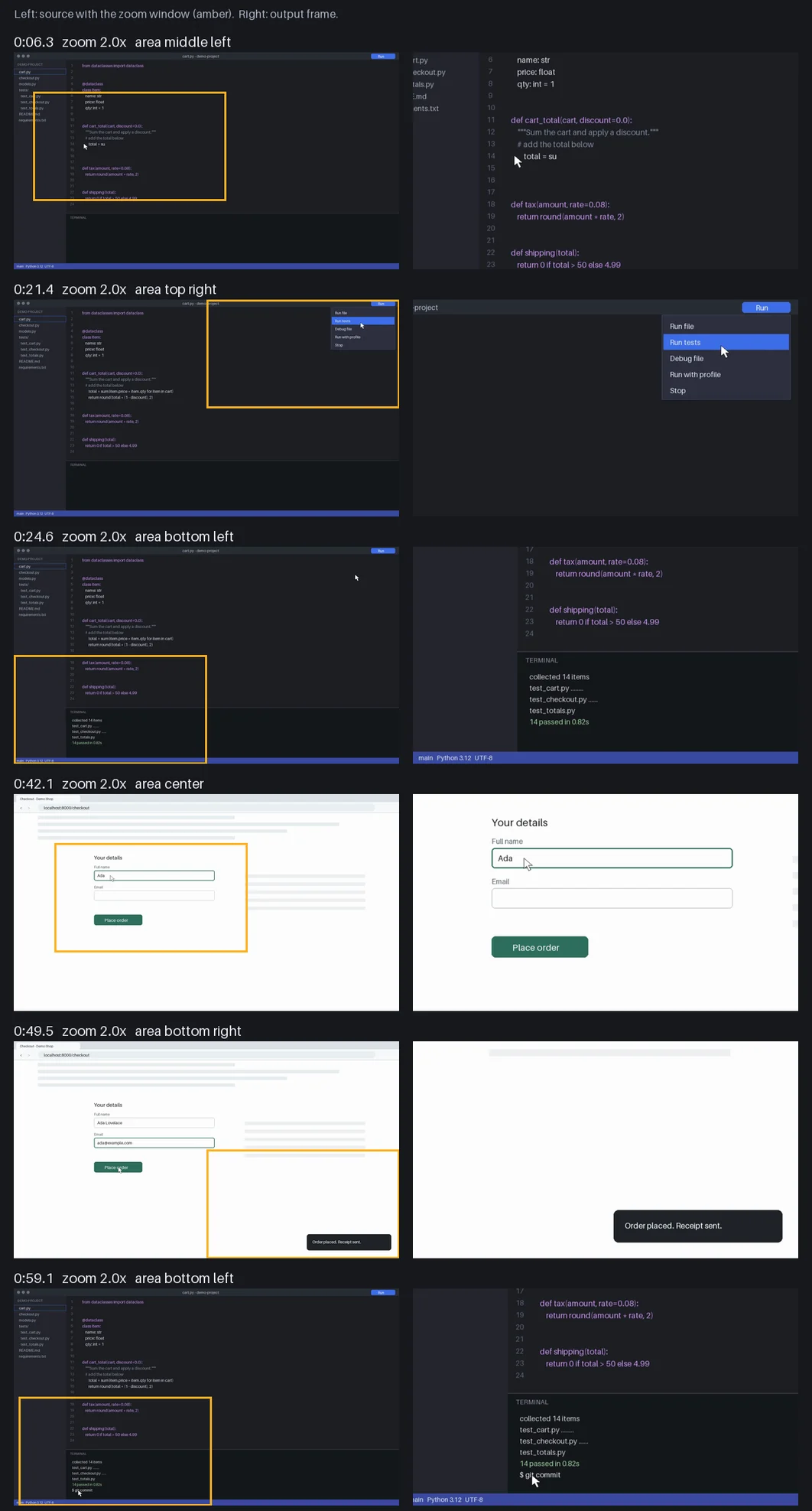
Source and output side by side at each zoom moment |
focuspan_report.md |
Settings, each file's frame count and A/V check, the zoom list, cuts |
How it decides where to zoom
The recording is sampled 10 times a second. A change counts when new content appears and stays: typed text, a menu opening, terminal output, a form being filled, a notification. The pointer moving across the screen does not count on its own, and neither does a blinking caret.
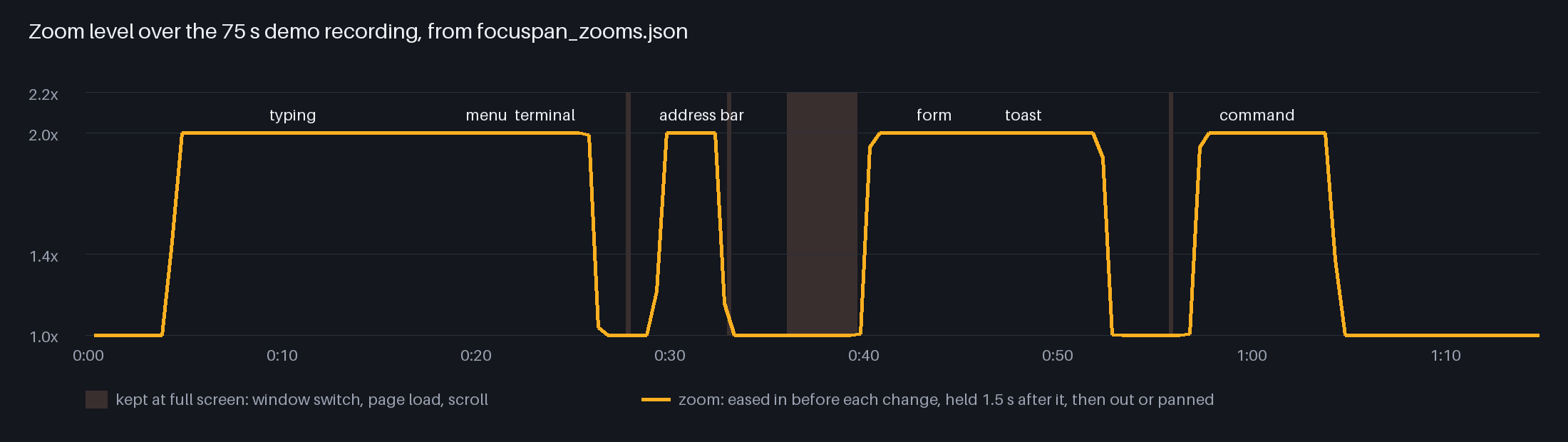
Changes close together in time and place become one zoom moment. Each zoom fits the changed area with a margin (1.4x to 2.2x, 2x by default), starts a fraction of a second before the change, holds 1.5 seconds after it, then pans to the next spot or eases back out.
When most of the screen changes at once, the view stays wide: scrolling, switching windows, a page load, a video playing. Zooming there would only show a blur of moving content.
Tested against a known answer
The demo recording in these images is synthetic: a made-up code editor and browser drawn for this test, with typing, a dropdown menu, terminal output, an address bar, a form, a toast and a terminal command, plus two window switches, a page load and a scroll. Every changed area is known to the pixel. In the test run, all 7 areas got a zoom, every zoom window held 100% of its area, and every zoom centre landed inside the true area (4 to 63 px from its middle). The 4 whole-screen changes and the idle stretches stayed at full screen. Rendered frames match the planned zoom windows (39.9 dB PSNR or better).
Padded style and vertical version
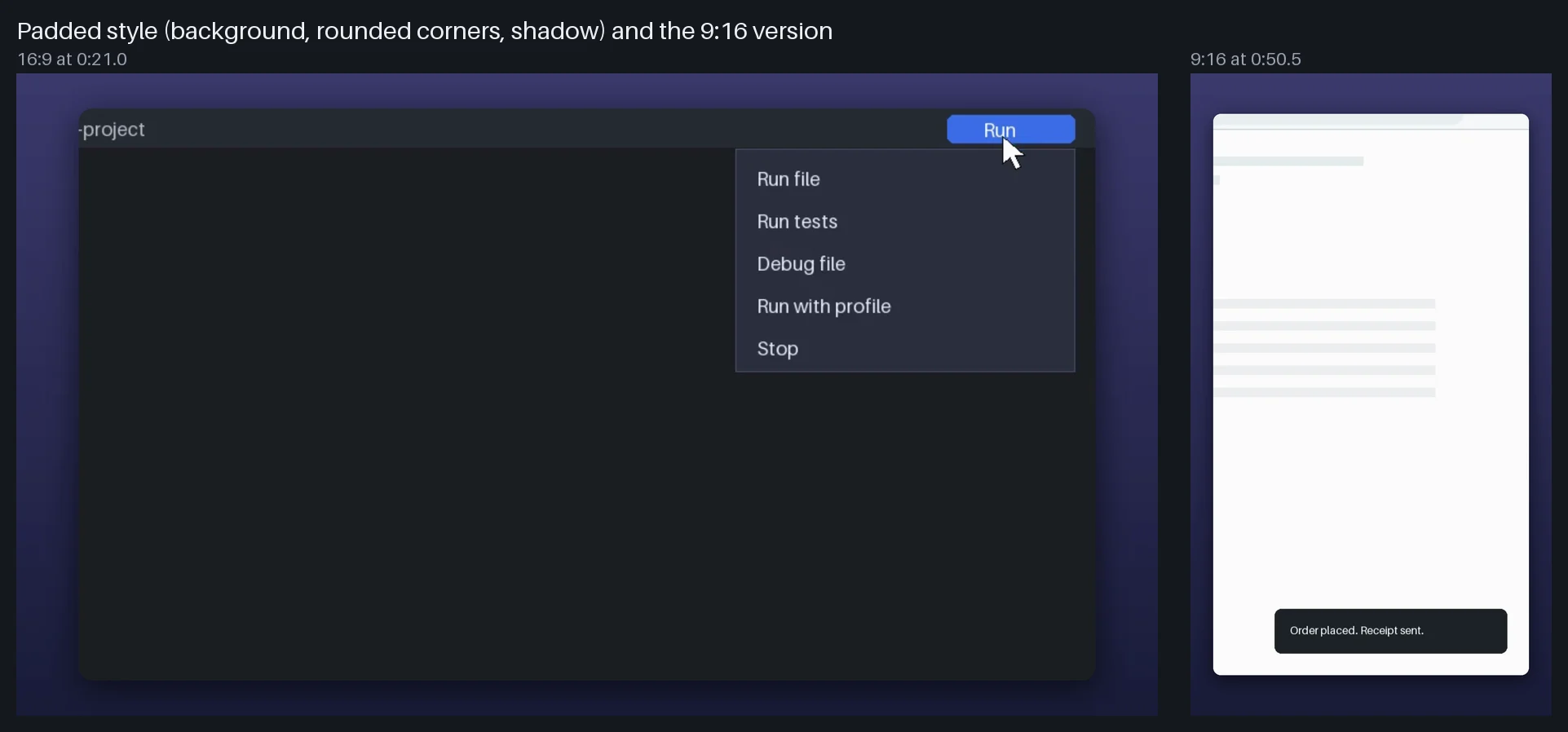
Ask for the padded style and the recording sits on a background with rounded corners and a soft shadow. Pick a preset (slate, dusk, sand, mint, paper, ink) or your own colour or two-colour gradient. The vertical version is a 9:16 window of the screen that moves with each zoom moment, for Shorts, Reels and TikTok.
Sound stays in sync
The original audio is kept as it is. Cuts remove picture and sound together with 8 ms fades at the joins. Every file is measured after rendering: if picture and sound end more than 40 ms apart, the file is not delivered. In the sync test (white flashes with tone bursts at known times, with a 3 second cut) the picture followed the sound within 17 ms and every burst landed where it should be after the cut, to the 5 ms step of the measurement.
How long it takes
Measured in a 2 CPU, 4 GB Linux container like the one the agent runs in:
| Recording | What you get | Time |
|---|---|---|
| 75 seconds, 1080p | zoomed video + vertical version | 76 to 87 s |
| 5 minutes, 1080p | zoomed video | 156 s |
| 5 minutes, 1080p | zoomed video + vertical version | 319 s |
| 5 minutes, 1080p | padded style + vertical version | 287 s |
Longer recordings scale with their length: about half a second per second of recording for the main video, a little over one second per second with the vertical version. Recordings up to 30 minutes are accepted.
Changes you ask for afterwards ("zoom less", "cut 0:30 to 1:10") re-render from the saved analysis.
Plans
| Plan | Price | Requests |
|---|---|---|
| Daily | $3.99 | 5 per day |
| Weekly | $7.99 | 10 per week |
| Monthly | $19.99 | 30 per month |
Every message you send uses 1 request from your plan. A typical video (upload, render, reply) is one request; asking for a change afterwards is another, so put all your changes in one message.
What it does not do
- It does not use a cursor log, so it follows changes on screen, not the pointer. A click that changes nothing visible gets no zoom.
- Scrolling, window switches and full-screen video are never zoomed. A scroll inside a small panel is treated as a scroll too.
- Recordings that change everywhere all the time (games, video editors, animated backgrounds) get few or no zooms.
- No blur or redaction, captions, text overlays, cursor highlights, click sounds or music.
- Zooming enlarges recorded pixels: at 2x on a 1080p recording, text is half as sharp as in the original. 1440p and 4K recordings stay sharper.
- The vertical version shows about a third of a 16:9 screen's width, so wide areas are cut at the sides.
- It does not download from YouTube, Loom or Drive links. Upload the file.
FAQ
Can I control where it zooms?
You can change how strong the zooms are, how long they hold, how fast they move, and keep any time range unzoomed or cut it out. You cannot draw a zoom area by hand.
Does it work with recordings from any tool?
Yes, as long as it is a normal video file. It never needs cursor data from the recorder.
Can I get several versions?
Yes. Ask for a different style, zoom or a vertical version in one message; each render keeps or replaces the earlier files as you wish.
Where do my files go?
Nowhere. Analysis and rendering run inside the workspace. The only network use is installing Python packages from PyPI at setup.
Do I need the rights to the recording?
Yes. Use recordings you made or have permission to edit. If a recording shows private data, cut that part before sharing the result.
API esterne
PyPI (pypi.org, files.pythonhosted.org)