

MomentCut
Find it. Lock it. Post it.
Turn your footage into a ready-to-post Short, Reel, or TikTok — centered on the exact moment you want.
Instead of searching through your video manually or letting AI choose a random highlight, simply describe the moment you're looking for.
MomentCut searches for that scene, verifies the match, protects the important action and reaction, and builds the edit around it.
Turn the Moment You Want Into a Short
Tell MomentCut what you're looking for in natural language.
For example:
"Find the moment my daughter touches the shark fin for the first time and include her surprised reaction. Make a 30-second Reel."
MomentCut uses your request as the editing goal.
It doesn't start by asking:
"What does AI think is the best highlight?"
It starts with:
"What moment does the user actually want?"
━━━━━━━━━━━━━━━━━━━━━━━━━━━━━━

Use the MomentCut hero image:
"Turn long videos into the exact Short you wanted."
This image should show:
Original Video (12 minutes)
→ Moment Found
→ 30s Vertical Short
→ Ready to Post
━━━━━━━━━━━━━━━━━━━━━━━━━━━━━━
How MomentCut Works
1. Upload Your Video
Add the footage you want MomentCut to work with.
Then describe the exact event you're looking for.
2. Describe the Moment
Use normal language.
You can describe:
- Who is involved
- What happens
- The object or action you're looking for
- A reaction you want to keep
- Whether original audio matters
- Your preferred Short length
For example:
"Find when my dog jumps into the pool for the first time and keep my family's reaction. Make a 35-second TikTok."
3. Find & Verify
MomentCut searches the footage for scenes matching your request.
Rather than automatically treating the first possible match as correct, MomentCut can evaluate candidate moments against the details in your request.
If the requested moment cannot be identified reliably, MomentCut should not invent a match.
🔒 Moment Lock
Finding the scene is only half the job.
Once the requested moment is identified, MomentCut protects the important part before the video is shortened.
Depending on your request, this can include:
The main action
The immediate reaction
Important surrounding context
Original audio
The goal is simple:
Keep the moment you asked for while removing footage you don't need.
━━━━━━━━━━━━━━━━━━━━━━━━━━━━━━
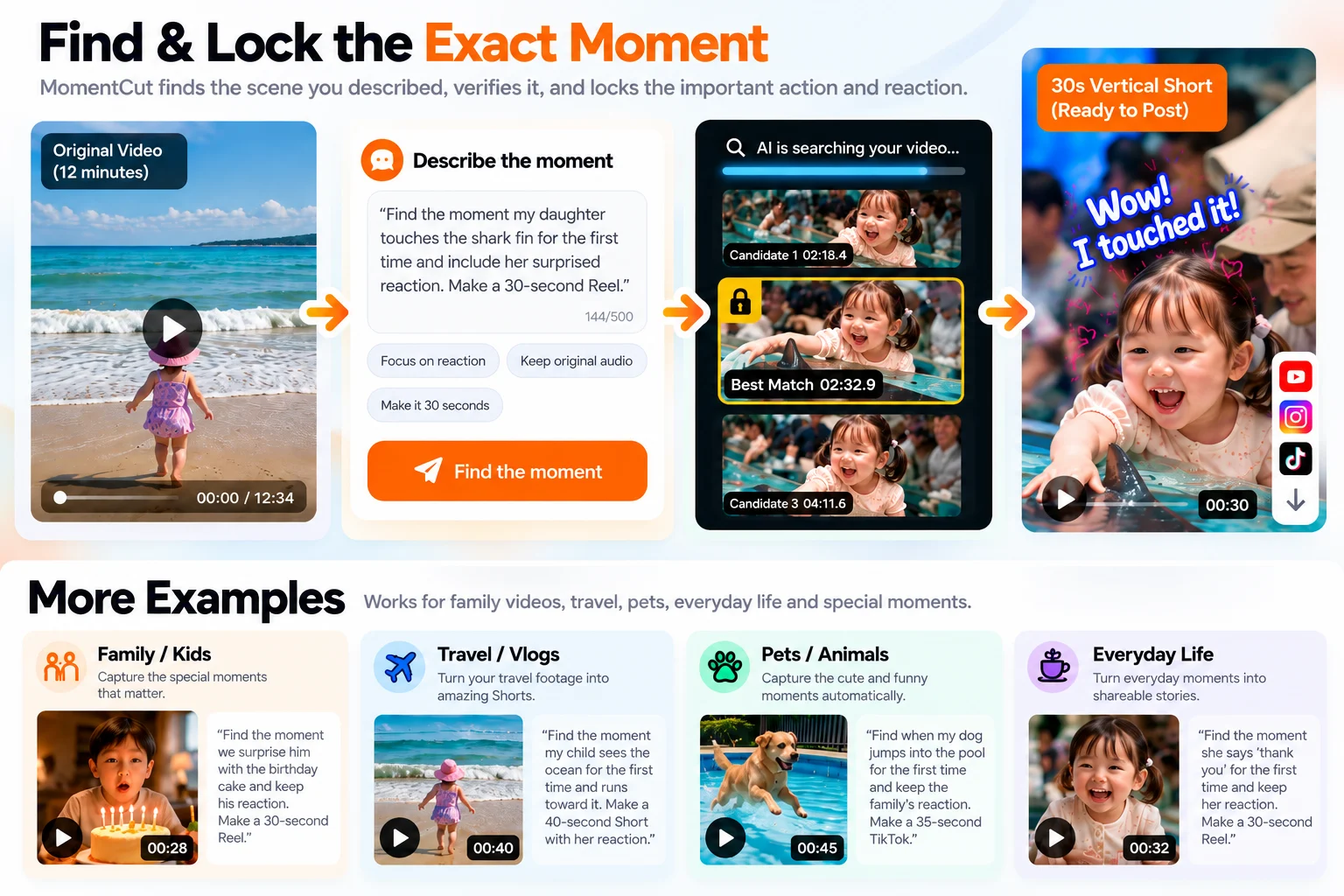
Use the:
"Find & Lock the Exact Moment"
image.
It should show:
Original Video (12 minutes)
→ Describe the Moment
→ AI Searches
→ Candidate Moments
→ Best Match
→ Moment Lock
→ 30s Vertical Short
The lower section showing Family / Travel / Pets /
Everyday Life should remain visible.
━━━━━━━━━━━━━━━━━━━━━━━━━━━━━━
Build the Short Around the Moment
After the moment is locked, MomentCut builds the shorter edit around it.
The editing priority is:
Requested Moment → Context → Reaction → Original Audio → Pacing → Target Duration
This is important because hitting an exact duration should never be more important than preserving the event the user asked for.
Made for Vertical Social Video
MomentCut is designed to prepare clean vertical edits for:
YouTube Shorts
Instagram Reels
TikTok
When supported by the source material and workflow, the final edit can include:
- 9:16 vertical formatting
- Clean trimming
- Protected reactions
- Original audio
- Captions
- Titles
- Social post suggestions
More Than One Type of Moment
MomentCut isn't limited to talking-head videos.
Family & Kids
"Find the moment we surprise him with the birthday cake and keep his reaction. Make a 30-second Reel."
Travel & Vlogs
"Find the moment my child sees the ocean for the first time and runs toward it. Make a 40-second Short."
Pets & Animals
"Find when my dog jumps into the pool for the first time and keep the family's reaction. Make a 35-second TikTok."
Everyday Life
"Find the moment she says 'thank you' for the first time and keep her reaction. Make a 30-second Reel."
Not Just Another Highlight Picker
Many automatic clipping workflows start by deciding which parts of a video appear interesting.
MomentCut takes a different approach.
You describe the event.
MomentCut finds it.
MomentCut verifies it.
MomentCut locks it.
Then the edit is built around it.
The goal isn't to guess which moment you wanted.
The goal is to preserve the moment you actually asked for.
Find it. Lock it. Post it.
Describe the moment.
Keep what matters.
Turn it into a Short.
