Amazon KDP Editor (AKE)
📚 Amazon KDP — Complete Self-Publishing Skill
name: amazon-kdp
description: >
Complete Amazon KDP self-publishing workflow — from manuscript formatting to going live.
Trigger for: KDP, Kindle Direct Publishing, self-publishing on Amazon, publishing a book on
Amazon, trim size, spine width calculation, full-wrap cover dimensions, bleed and safe zone,
CMYK vs RGB for print, DPI for Amazon (including children's books and illustrated books),
book formatting in Word (fonts, margins), KDP pricing and royalties, 70% royalty threshold,
printing cost formula, minimum viable price, book description with HTML, 7 keywords for Amazon,
BISAC categories, bestseller badge, pre-publication checklist, copyright page template,
print-on-demand, ebook conversion. Also trigger when the user says "publish my book on Amazon"
or "self-publish" without naming KDP explicitly. Do NOT trigger for: generic cover design without
Amazon context, ISBN purchase only, Goodreads setup, writing tools (Scrivener, Google Docs),
or non-Amazon platforms (Gumroad, Etsy, Shopify).
Amazon KDP — Complete Publishing Guide
This skill covers the full Amazon Kindle Direct Publishing workflow, from manuscript formatting
to going live. It covers both paperback (Print on Demand) and Kindle ebook publishing.
1. MANUSCRIPT FORMATTING (Interior)
Common trim sizes
| Format | Dimensions | Best for |
|---|---|---|
| 5×8 | 5" × 8" | Novels, fiction |
| 5.5×8.5 | 5.5" × 8.5" | General non-fiction |
| 6×9 | 6" × 9" | Reference non-fiction, essays — RECOMMENDED |
| 7×10 | 7" × 10" | Textbooks, technical guides |
| 8.5×11 | 8.5" × 11" | Workbooks, activity books |
Margins (6×9 format, 150+ pages)
| Margin | Recommended value |
|---|---|
| Inside (gutter) | 0.375" minimum — increase for books over 300 pages |
| Outside | 0.5" |
| Top | 0.75" |
| Bottom | 0.75" |
For books over 300 pages, increase the inside margin to at least 0.5".
Recommended typography
- Body text: Palatino Linotype 11pt or Garamond 11–12pt (optimal print readability)
- Chapter titles: same font at 16–18pt, bold
- Line spacing: 1.15 to 1.5 (never double-spaced)
- Alignment: justified for body text
- First-line indent: 0.2" (not after titles or white space)
Front matter page order (standard)
- Half-title (page 1, recto) — Title only, centered
- Blank page (page 2, verso)
- Full title page (page 3, recto) — Title, subtitle, author, publisher/brand
- Copyright page (page 4, verso) — see section 6
- Dedication (optional, page 5)
- Table of contents — starts on a recto page
- Foreword / Introduction (optional)
- Main content begins
Page numbering starts at chapter 1. Front matter uses Roman numerals (i, ii, iii...) or no numbers.
2. COVER DIMENSIONS CALCULATOR
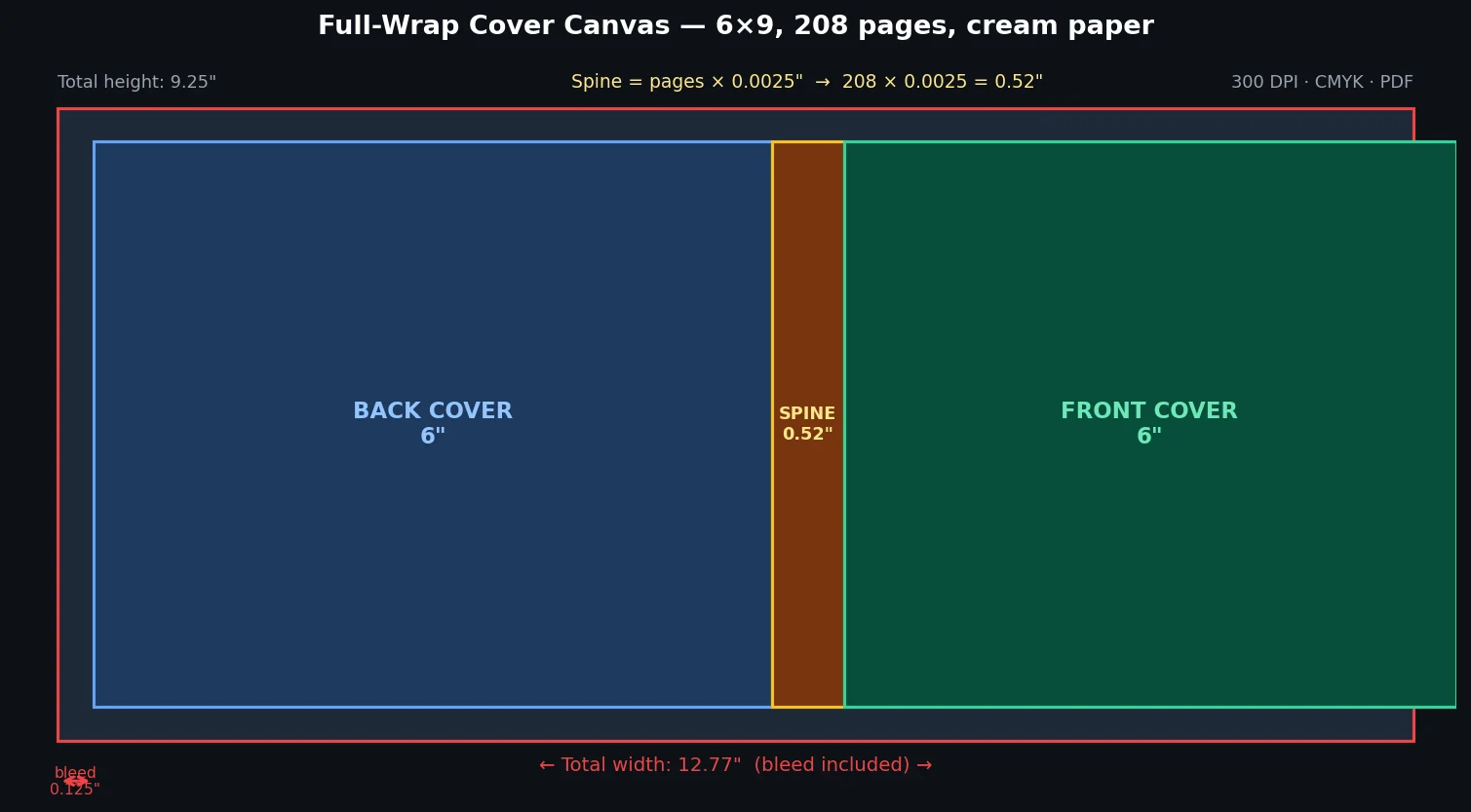
The full KDP cover (front + spine + back) must be calculated precisely.
Spine width formula
Spine (inches) = Number of pages × paper factor

White paper  : × 0.002252" per page
Cream paper  : × 0.0025"   per page
Example: 208 pages, cream paper
→ Spine = 208 × 0.0025 = 0.52"
Full cover canvas dimensions
Total width  = (2 × trim width) + spine + (2 × 0.125" bleed)
Total height = trim height + (2 × 0.125" bleed)
Example — 6×9, 208 pages, cream paper:
- Trim width = 6"
- Trim height = 9"
- Spine = 0.52"
- Total width = (2 × 6) + 0.52 + (2 × 0.125) = 12.77"
- Total height = 9 + (2 × 0.125) = 9.25"
Cover technical specs
- Resolution: 300 DPI minimum
- Format: PDF (preferred) or JPG
- Color space: CMYK for print (NOT RGB)
- Safe zone: keep all text at least 0.125" from any edge
- Bleed: 0.125" on all sides (already included in total dimensions above)
3. PRODUCT PAGE OPTIMIZATION
Title and subtitle
- Title: include the primary keyword naturally if possible (max 200 characters)
- Subtitle: 1–2 key benefits, secondary keywords (max 200 characters)
- Amazon displays: Title + " : " + Subtitle
- Avoid repeating keywords across both fields
Description (max 4,000 characters)
KDP supports a subset of HTML in the description:
Supported tags:
<br>         — line break
<p>          — paragraph
<b> <strong> — bold
<em> <i>     — italic
<h1>–<h6>   — headings
<ul><li>     — bullet list
<ol><li>     — numbered list
Recommended description structure:
[Emotional hook — 1–2 sentences]

[Problem the book solves or question it explores]

[What the reader will discover/learn — 3–5 bullet points]

[Who this book is for]

[Call to action: "Order your copy today"]
7 Keywords
- Use long-tail phrases (2–5 words), never single words
- Think like the reader searching: "how to use AI to..."
- Include variations: synonyms, skill levels (beginner, advanced...)
- Avoid terms already in the title (KDP indexes them automatically)
- Avoid competitor names or celebrity names
- Max 50 characters per field
Example for an AI book:
- artificial intelligence for business
- AI automation guide
- practical artificial intelligence book
- AI tools for professionals
- digital transformation with AI
- AI productivity tools
- understanding artificial intelligence
BISAC categories (2 maximum)
Strategy: pick one broad primary category + one niche sub-category
where the "Best Seller #1" badge is easier to reach.
4. PRICING STRATEGY & ROYALTIES
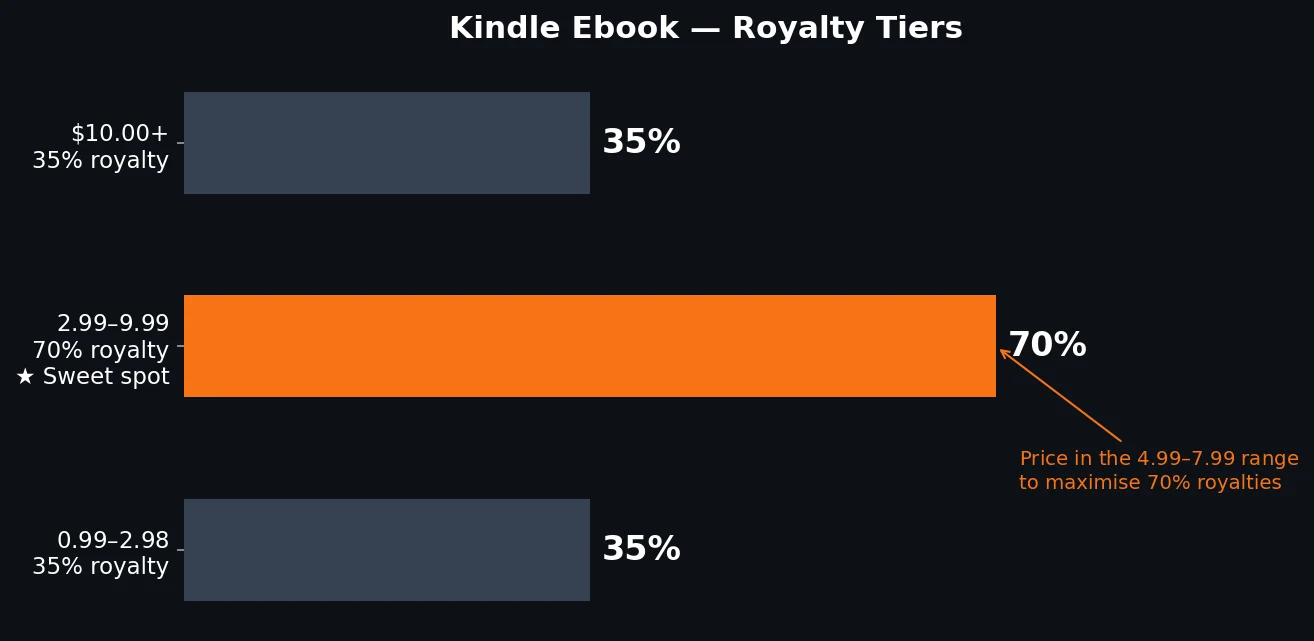
Kindle ebook
| Price range | Royalty | Eligible markets |
|---|---|---|
| $0.99–$2.98 | 35% | All |
| $2.99–$9.99 | 70% | US, UK, DE, FR, ES, IT, JP, CA, AU, BR, MX, IN |
| $10.00+ | 35% | All |
Recommendation: price between $4.99–$7.99 to maximize 70% royalties while staying competitive.
Paperback (Print on Demand)
KDP printing cost (approximate):
Cost = $0.85 (fixed) + (pages × $0.012) — B&W, white paper
Cost = $0.85 + (pages × $0.020)         — B&W, cream paper
Example: 208 pages, cream paper
→ Cost = $0.85 + (208 × $0.020) = $5.01 per copy
Paperback royalty = List price × 60% − Printing cost
Minimum viable price = Printing cost ÷ 0.60
Example: $5.01 ÷ 0.60 = $8.35 minimum to break even
Recommendation: Price paperback between $14.99–$19.99 for a 200–300 page non-fiction book.
This generates ~$4–7 royalty per paperback sold.
5. PRE-PUBLICATION CHECKLIST
Check every item before clicking "Publish":
Interior (manuscript)
- Spell-check and grammar check completed
- Table of contents with correct page numbers
- All images at 300 DPI minimum
- Fonts embedded in the PDF
- No clipped margins (preview PDF before uploading)
- Page numbering starts correctly (at chapter 1)
- Complete and accurate copyright page
- All URLs mentioned in the text are working
Cover
- Dimensions calculated precisely (see section 2)
- 300 DPI resolution
- PDF or JPG format accepted by KDP
- All text within safe zone (≥ 0.125" from edges)
- ISBN barcode on back cover if applicable
- Author name identical on cover and KDP listing
Product listing
- Title and subtitle proofread (no typos)
- HTML description tested (paste into an HTML editor)
- 7 keywords filled in
- 2 categories selected
- Price set for all markets (none left at zero)
- KDP Select decision made (Kindle Unlimited exclusivity or wide distribution)
Before submitting
- KDP previewer used (mandatory)
- Read at least 5–10 pages in the previewer
- Cover checked in the previewer
- ISBN choice made (free KDP ISBN or your own)
6. COPYRIGHT PAGE — TEMPLATE
Copyright © [YEAR] [AUTHOR NAME / COMPANY NAME]

All rights reserved. No part of this book may be reproduced, distributed,
or transmitted in any form or by any means, including photocopying, recording,
or other electronic or mechanical methods, without the prior written permission
of the author, except in the case of brief quotations embodied in critical
reviews and certain other noncommercial uses permitted by copyright law.

For permission requests, contact the author at:
[EMAIL OR WEBSITE]

First published: [MONTH YEAR]

ISBN: [ISBN NUMBER]
Adapt as needed: add publisher/brand name, add a disclaimer for advice/health/finance books.
7. TYPICAL WORKFLOWS
Workflow A — First publication (paperback + ebook)
- Finalize and format the manuscript (section 1)
- Calculate cover dimensions (section 2)
- Have cover designed or design it to the correct dimensions
- Create KDP account (kdp.amazon.com)
- Fill in the product listing (section 3)
- Upload interior file + cover
- Set pricing (section 4)
- Preview and validate
- Publish (KDP approval time: 24–72 hours)
Workflow B — Optimizing an existing publication
- Analyze sales by category; research better-fitting categories
- A/B test the description (edit, wait 4–6 weeks, measure)
- Revisit keywords based on current search trends
- Adjust price based on competitive positioning
8. TOOLS & RESOURCES
- KDP Cover Calculator: kdp.amazon.com/cover-calculator (official tool)
- KDP Community: kdp.amazon.com/community
- Free formatting: Reedsy Book Editor (app.reedsy.com)
- Advanced formatting: Vellum (Mac), Affinity Publisher
- Cover design: Canva KDP templates, Adobe InDesign, Affinity Publisher
- Keyword research: Publisher Rocket, Google Trends, Amazon search bar autocomplete
This skill covers KDP parameters current as of 2025–2026. Printing costs and royalty rates
may change — always verify at kdp.amazon.com for the latest figures.
Specs current as of 2025–2026. Always verify printing costs and royalty rates at kdp.amazon.com.