Fetch-Past-CORS-and-Cloudflare-No-Backend
Fetch Past CORS & Cloudflare (No Backend)
Read cross-origin content in the browser — no server of your own, and no CORS error or Cloudflare bot wall stopping you.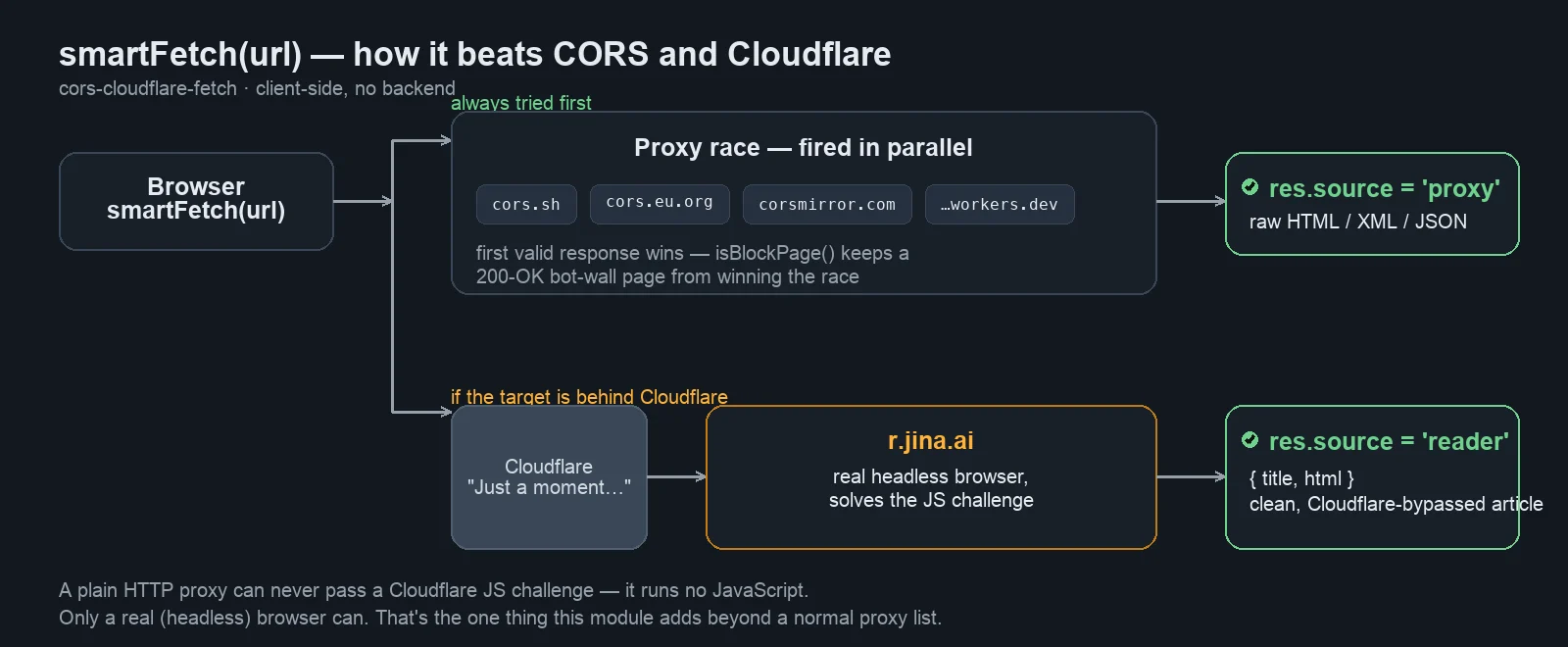
A dependency-free JavaScript module for exactly the situation anyone building a purely client-side app (static site, GitHub Pages, browser extension, Electron, bookmarklet) eventually hits when they need to read content from another domain:
Access to fetch at '...' has been blocked by CORS policy
No 'Access-Control-Allow-Origin' header is present
...or worse: the page loads, but the content is just Just a moment… — a Cloudflare challenge that a normal proxy can never solve.
What it does
1. Beats CORS — a race of several public CORS proxies runs in parallel; the first valid response wins. A dead or slow proxy can never stall the whole request.
2. Beats Cloudflare — a plain HTTP proxy fundamentally cannot solve a Cloudflare JS challenge (it runs no JavaScript, gets no cf_clearance cookie). In that case the module falls back to r.jina.ai, which drives a real headless browser and returns clean, already-extracted article text. This is the only free way to get past Cloudflare from the client side.
No build step, no npm, no framework. Works from file://.
How it works
The diagram shows the full decision path of smartFetch(url): proxy race first, Cloudflare reader only as a fallback when needed.
Quick start
import { smartFetch } from './cors-cloudflare-fetch.js';

const res = await smartFetch('https://www.theblock.co/post/...');
if (res.source === 'proxy') {
  const doc = new DOMParser().parseFromString(res.text, 'text/html');
} else {
  // res.source === 'reader' → clean, Cloudflare-bypassed article
  reader.innerHTML = `<h1>${res.title}</h1>${res.html}`;
}
Reading an RSS feed:
import { fetchViaProxies } from './cors-cloudflare-fetch.js';
const xml = await fetchViaProxies('https://krebsonsecurity.com/feed/');
const items = new DOMParser().parseFromString(xml, 'text/xml').querySelectorAll('item');
API
| Function | Returns | Purpose |
|---|---|---|
smartFetch(url, opts) |
{source:'proxy', text} or {source:'reader', title, html} |
One-shot: proxy race + Cloudflare-reader fallback |
fetchViaProxies(url, opts) |
Promise<string> |
Raw text via the proxy race |
fetchReadable(url, opts) |
Promise<{title,html}|null> |
The Cloudflare bypass on its own (Jina reader) |
isBlockPage(html) |
boolean |
Detects a bot-wall page served with HTTP 200 |
mdToHtml / parseJina |
string / {title,html} |
Tiny Markdown→HTML converter for Jina output |
okText / okJson |
Promise<string> / <any> |
Response helpers that throw on HTTP error |
opts: direct (try a direct fetch first, default true), timeout (per-proxy, default 20000ms; reader 30000ms), minLength, validate, signal.
Real-world origin
Extracted from an actual, running project: a client-side, Windows-95-style RSS news dashboard where article pages — including Cloudflare-protected ones — had to load inside a built-in "IE5" reader with no server at all. That's where the race-plus-reader combination proved itself as the reliable fix, after single proxy solutions kept failing.
Honest limitations
- Not every Cloudflare page yields. Interactive Turnstile ("click the box") and aggressive fingerprinting defeat even the reader. Realistic fallbacks then: the site's RSS feed, an archived snapshot (Wayback), or opening it in a real browser. 100% is not achievable with free tools — only a backend running a real stealth headless browser gets closer.
- Privacy. Every request transits a third-party proxy that can read and log it. Built for public content only — never route credentials or private data through it.
- Rate limits.
r.jina.aiwithout your own key is limited to roughly 20 requests/minute — plenty for a single reader, not for bulk scraping. - Respect target sites' terms of service. Built for personal dashboards and legitimate reading, not mass extraction.
What's included
cors-cloudflare-fetch/
├── SKILL.md                          # skill definition (triggers + how-to)
├── scripts/
│   ├── cors-cloudflare-fetch.js      # the module — copy straight into your project
│   └── test-proxies.sh               # re-validate the proxy list
└── references/
    ├── proxy-list.md                 # proxy status, evaluation, graveyard of dead ones
    └── cloudflare-bypass.md          # why/how the Cloudflare bypass works, limits
MIT licensed.
外部API
r.jina.ai (Jina Reader) · Public CORS proxies (cors.sh, cors.eu.org, corsmirror.com, cors-get-proxy.sirjosh.workers.dev)