Schedule Engineer—Resource Conflict Arbitration
PM Scheduling Engine — Resource Conflict Arbitration
You have a pile of demands and a fixed set of people. The question is not "what's the task order?" — it's "who goes first, and what do I tell the person who loses?"
See it in action
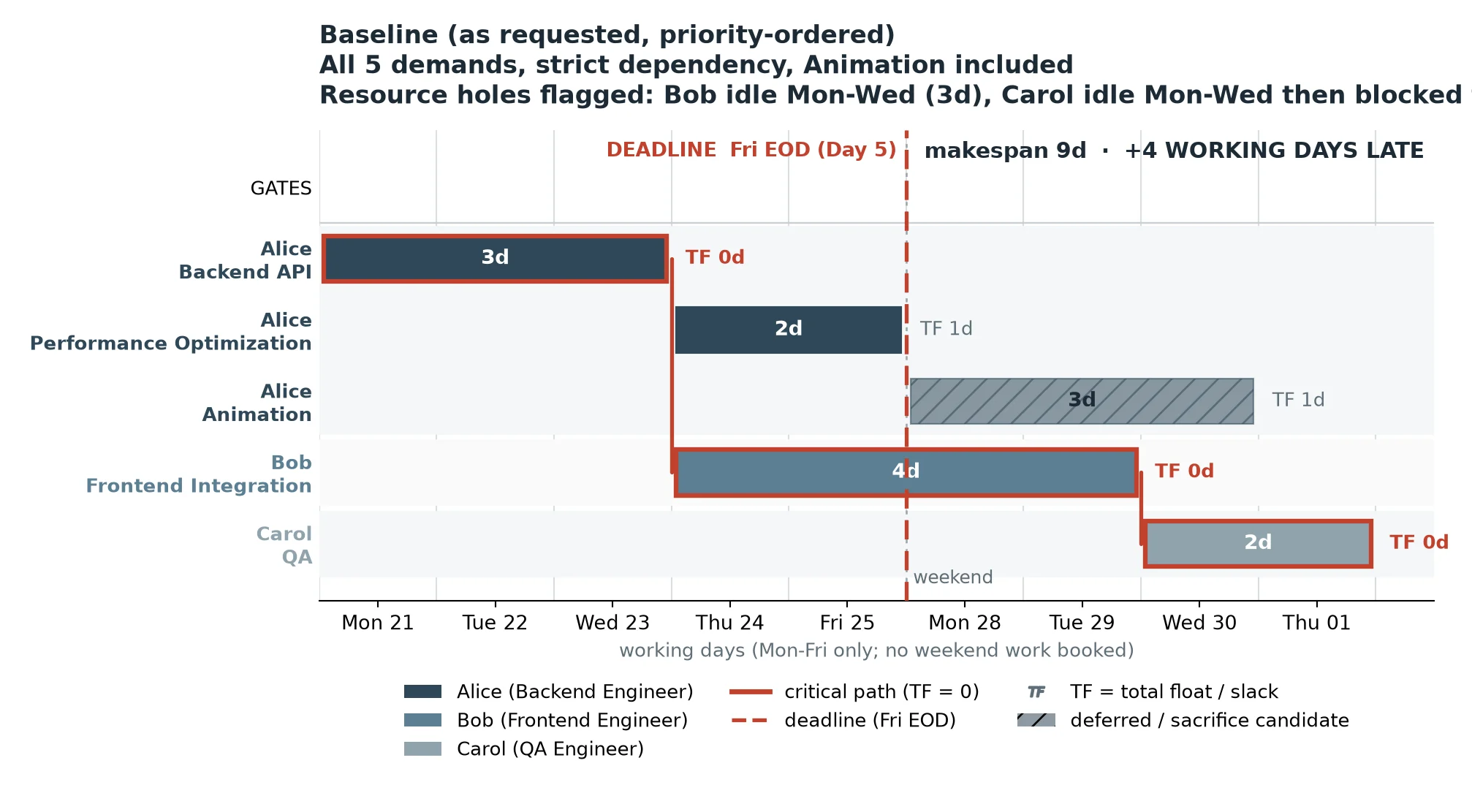
A worked example. Five demands, three people (Alice / Bob / Carol), a hard deadline of Friday EOD (Day 5) — and Alice is shared by three of the demands.
The engine's first pass tells you the truth you did not want:
Baseline: makespan 9 days — 4 working days LATE.
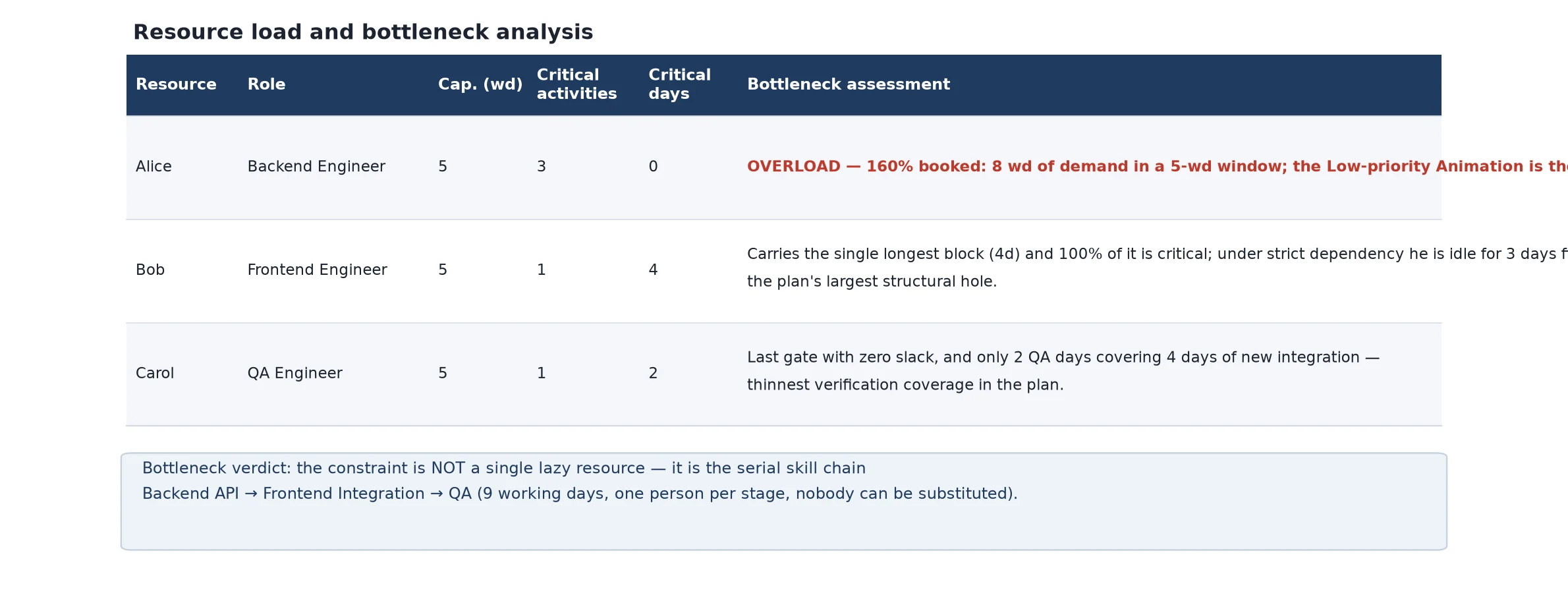
Alice is the bottleneck: three tasks in sequence on one person.
Bob sits idle Mon–Wed (3d). Carol sits idle Mon–Wed too, then gets blocked.
This plan is not "tight". It is impossible, and now you can prove it.
Then it gives you the options — with the price tag on each:
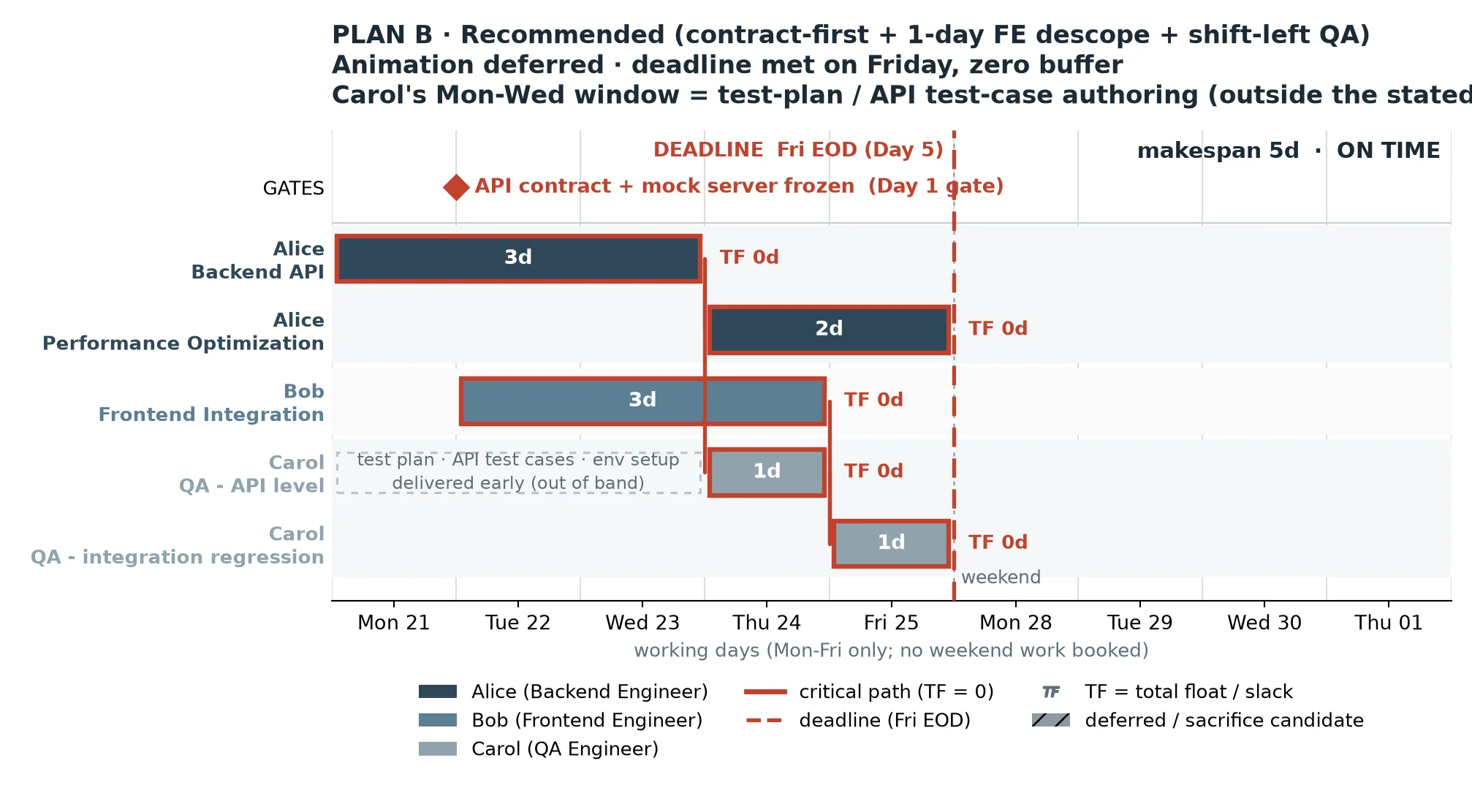
Plan B — contract-first + 1-day frontend descope + QA shifted left: makespan 5 days, ON TIME.
Animation is deferred out of this version. One acceptance criterion is cut from the frontend scope.
Plan C — same, plus a second frontend engineer on the integration sprint: makespan 5 days, ON TIME with one day of buffer.
Full requirement scope retained, at the cost of one additional engineer-week.
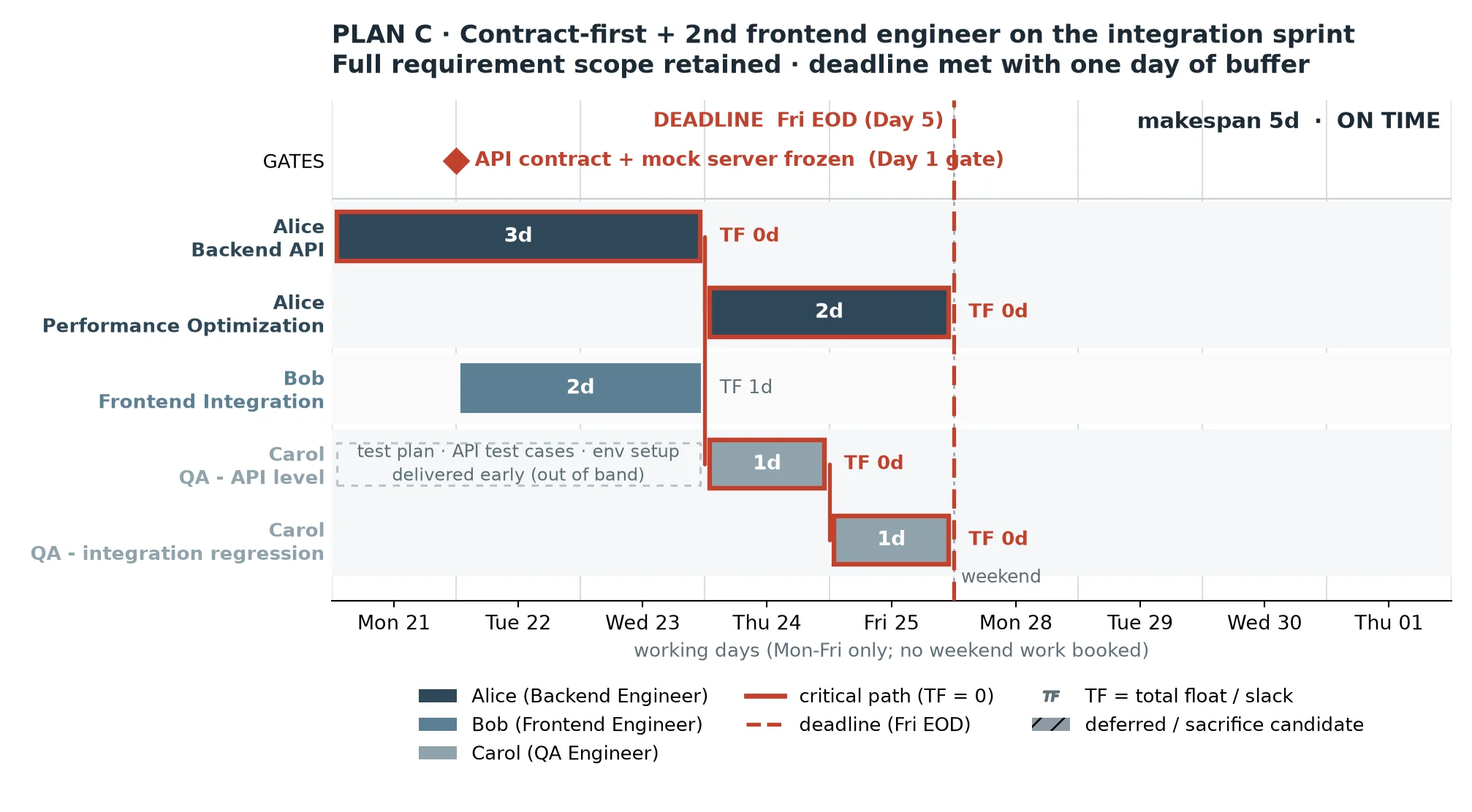
Every schedule ships with the critical path highlighted, every resource conflict resolved with a reason you can check and override, and the honest number attached to every trade-off — so the decision is yours, not the tool's.
Run your first project free in under a minute.
What you get
- 📊 A Gantt schedule — built from your real availability calendars, not a flat task list
- ⚖️ Resource conflicts resolved — when the same engineer, animator or slot is claimed twice, it decides who goes first, who waits, and why
- ⚠️ Early risk warnings — deadline slippage, bottleneck single points and idle-gap defects, flagged before you commit the plan
- 🧭 A zero-float critical path — the chain that actually decides the ship date, not the longest one
- 💰 Costed recovery options — when the plan doesn't fit, you get dated alternatives with their price, not a shrug
- 🎯 Bottleneck detection that load percentage misses — the person carrying the critical work, not the busiest-looking one
- 📐 Estimates for unestimated work — derived from historical analogues, with an honest confidence label instead of fake precision
It answers the questions most tools skip: Who goes first when resources are genuinely contested · When to escalate instead of pretending a schedule is feasible · Which chain decides the ship date · What is about to go wrong, and how much room you still have.
📖 Reading the float column
The Gantt shows total float (TF) per task — computed on a forward/backward pass that includes both dependency arcs and same-person resource arcs.
Why resource arcs matter: when one person owns two tasks, the second one cannot start until that person is free — even with no dependency between them. Omit that arc and waiting-for-a-person time is misread as float, and you get told there is slack that does not exist.
TF = 0 means: this task is on the critical path. If it slips, the deadline slips.
TF > 0 means the project still has slack — but float can sit on a busy person's chain, so read the Gantt bars for the real hand-off order, not the float column alone.
This is why the critical path here is not simply the longest chain.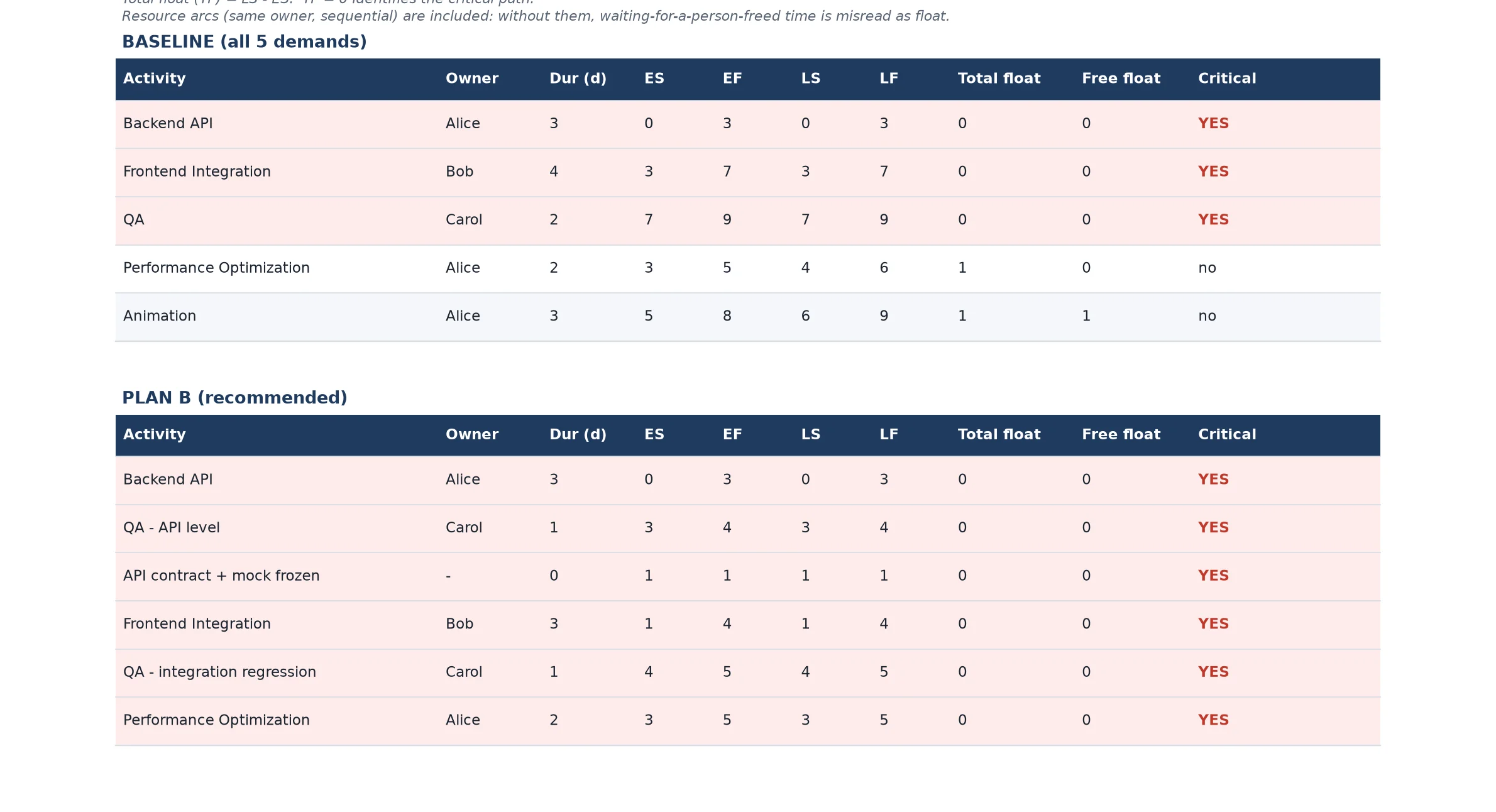
⚠️ What it warns you about
| Warning | What it means for you |
|---|---|
| Deadline slippage | You learn who loses before you promise them anything |
| Bottleneck single point | One sick day = the whole version slips a day |
| Idle-gap defect | A short schedule with a broken-looking chart is still a broken schedule |
| False-conflict alarm | Stops you from "fixing" a schedule that was already correct |
| Optimism trap | Ships the date you can hit, not the one that looks best |
Who it's for
Anyone who has to sequence shared resources against a deadline:
- Project / production PMs and PMOs sequencing a version, a milestone, or a release train
- Team leads and tech leads answering "can we take this on, and what slips if we do?"
- Studio owners / small teams where one person covers three roles and every conflict is personal
- Producers on non-game projects — the method is about contested resources, not about games
The question it answers is always the same: who wins the contested resource, and what do I tell the person who loses?