ResumeFit | Tailor Resume to Job, ATS Checker
Your resume, fitted to one job post
Most resume tools write you a new resume. ResumeFit starts from the one you already have. Upload it, paste the job post, and it rewrites your real experience in the post's own wording, then checks the files the way an applicant tracking system (ATS) reads them.
Nothing is invented. Every sentence in the new resume comes from a line in your original or from something you tell it in the chat, and the report shows each changed sentence next to the original.
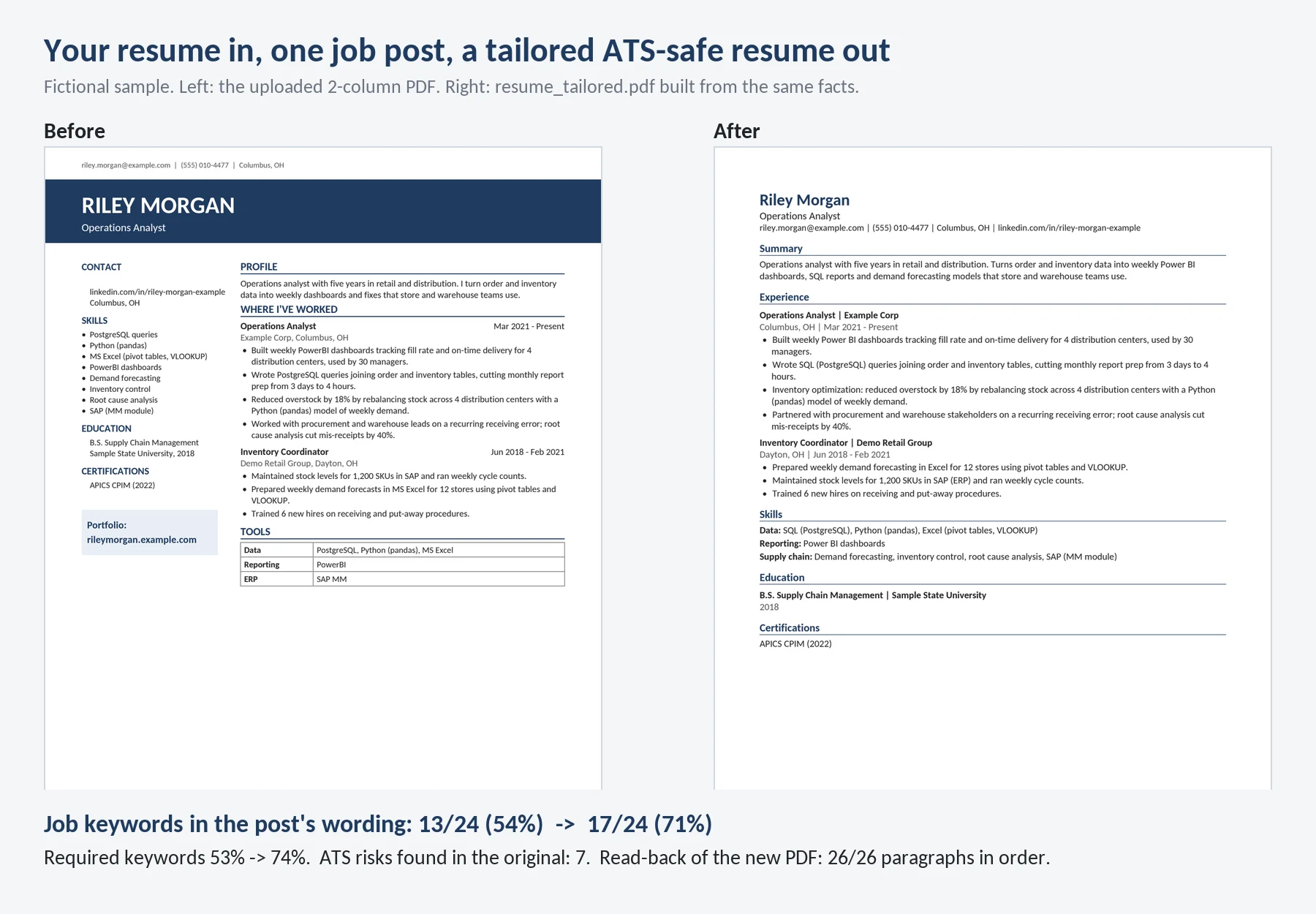
A fictional two-column resume and the tailored version for a supply chain analyst post. Both pages are real files from the agent. Keyword match in the post's wording went from 54% to 71%.
How you use it
Here is my resume and the job post I'm applying to. Tailor it, and tell me what's missing.
Upload your resume as PDF or Word (.docx). Paste the job post in the chat, or upload it as a text, Word or PDF file. Ask for a cover letter in the same message if you want one.
What you get
| File | What it is |
|---|---|
resume_tailored.docx |
One-column Word file you can keep editing |
resume_tailored.pdf |
The same resume as a PDF with embedded fonts |
match_report.md |
Keyword match before and after, missing keywords, every changed sentence with the original, ATS risks found |
cover_letter.md |
Only when you ask for one. Same facts, no new claims |
What a parser sees in your file
Many good-looking resumes break in an ATS. Two columns get read straight across, so your skills list ends up in the middle of a job description. Contact details in the page header, text boxes, tables, icons and text inside images are often skipped.
ResumeFit reads your original file like a parser and lists what it found: columns, tables, text boxes, header or footer contact details, images, icon fonts, non-standard headings, unreadable characters and the file name.
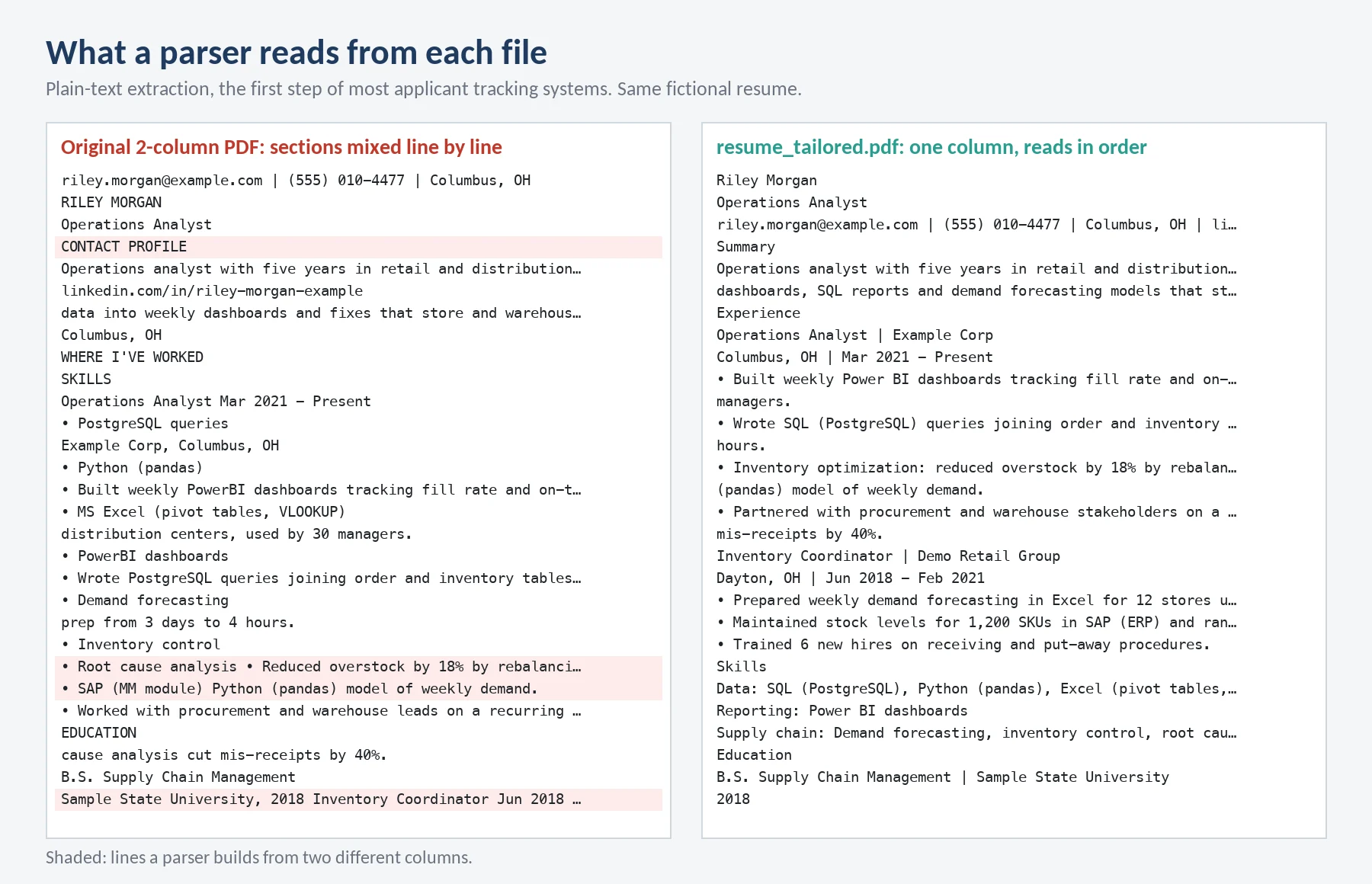
Left: plain-text extraction of the two-column original. Shaded lines mix the two columns. Right: the tailored PDF reads in order.
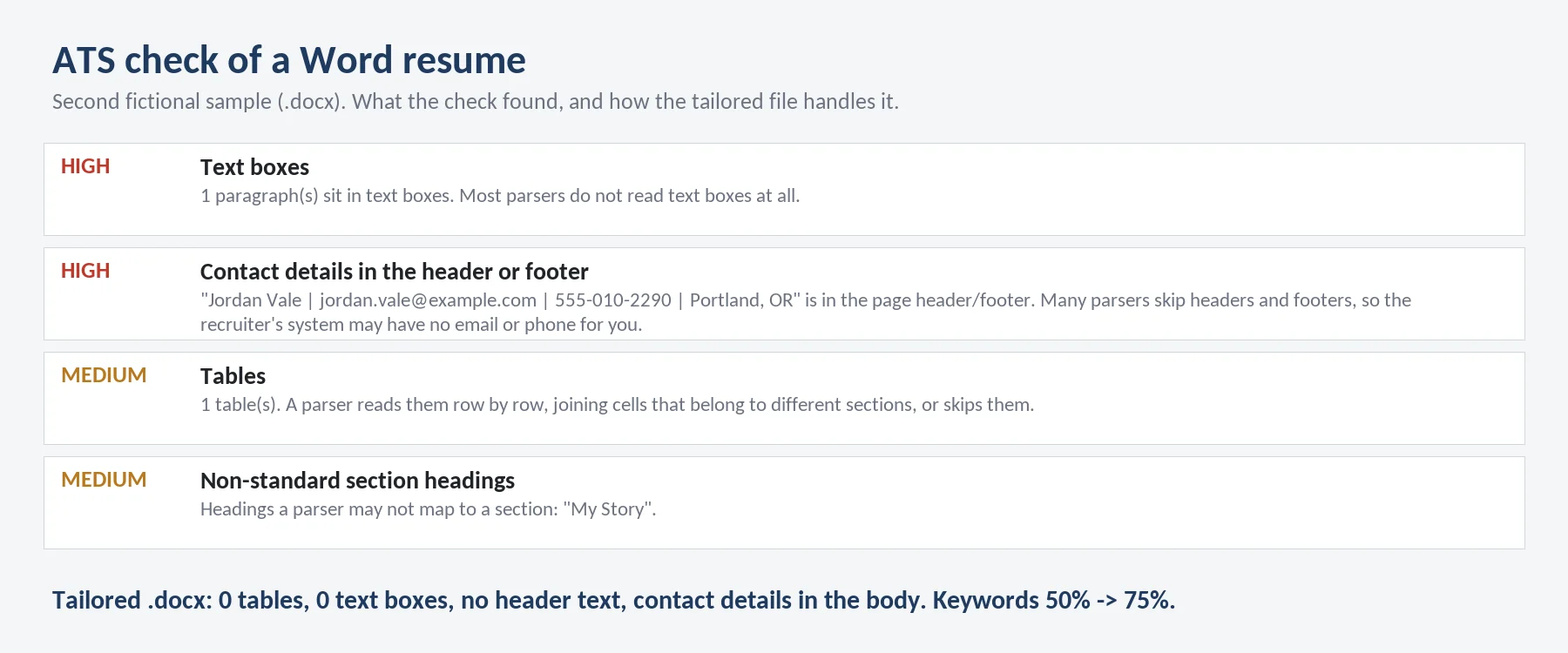
A second fictional resume in .docx: contact details in the header, a portfolio link in a text box and skills in a table. The tailored file has none of these.
How the keywords work
The agent pulls the keywords from the job post (tools, skills, certifications and repeated phrases, marked required or preferred) and checks each one against your resume:
- exact: the post's wording is already there.
- synonym or implied: you have it, written another way. "PowerBI" for Power BI, "PostgreSQL" for SQL, "MS Excel" for Excel. These are rewritten in the post's wording.
- missing: not in your resume. It is not added. The report lists it and the agent asks whether you have that experience. If you say yes and give details, it goes in the next version.
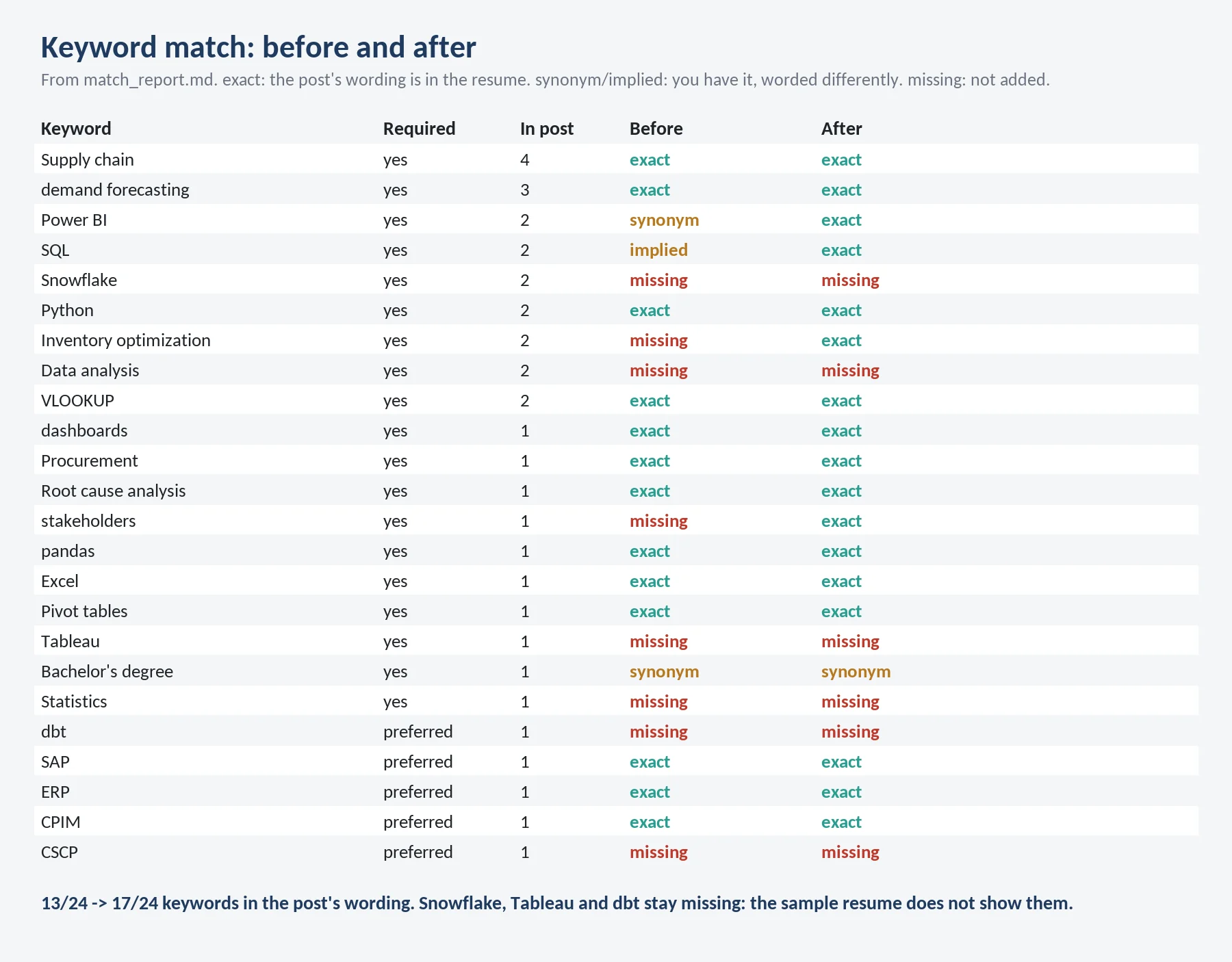
Coverage is measured on the text read back from the finished PDF, not on the draft.
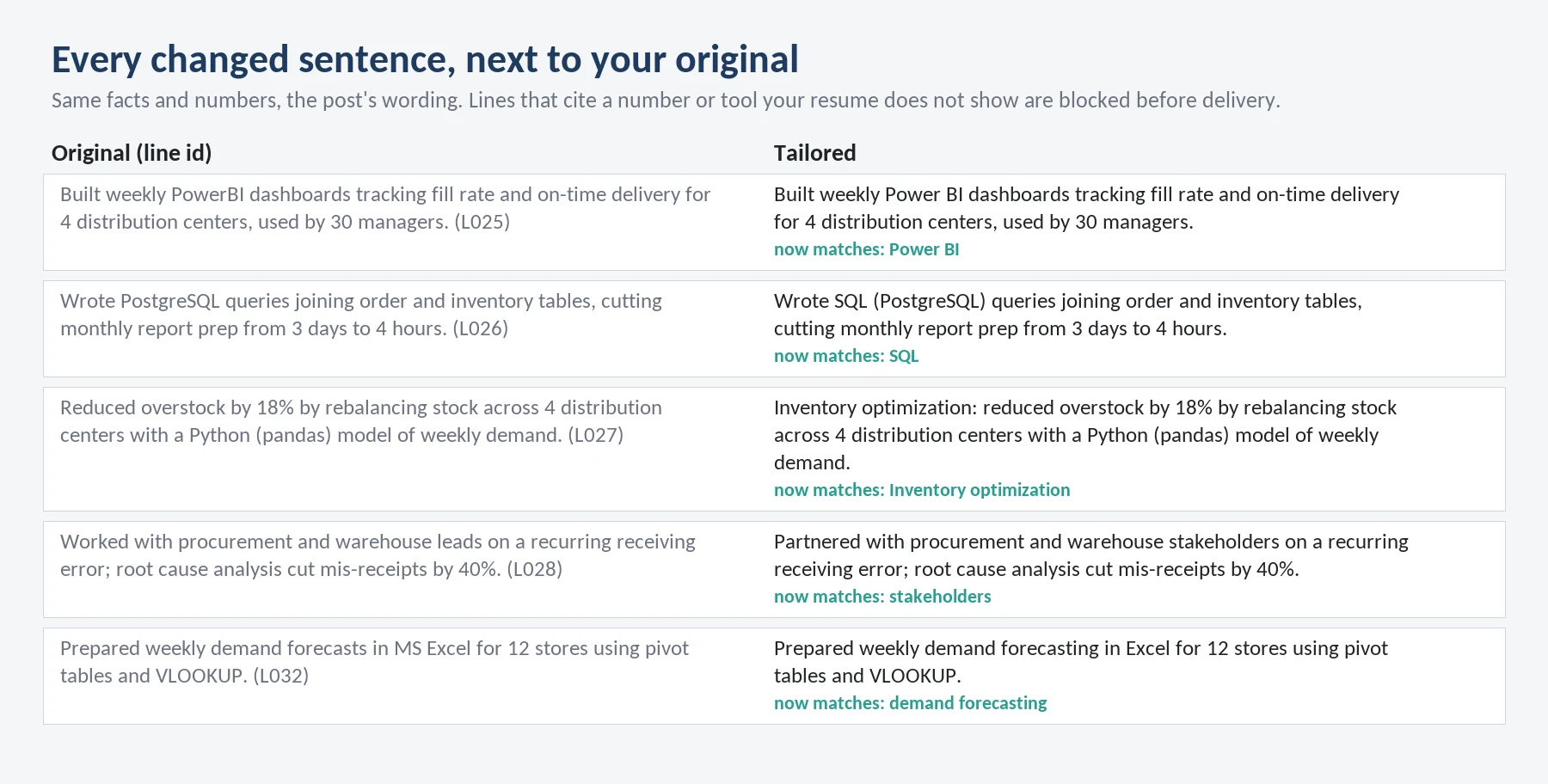
Five of the nine changes in the sample. Numbers, employers, titles and dates stay as you wrote them.
How it stays honest
Before any file is delivered, a script compares the new resume with your original:
- every number must be in the original line it came from,
- tools, software, languages, certifications and degrees must appear in that line,
- job titles, employers, places and dates must match your resume,
- no filler words or emoji.
A draft that fails any of these is fixed and rebuilt, not delivered.
Timing
Measured on a local copy of the sandbox (2 CPU, 4 GB): reading and checking a resume and a job post about 0.2 seconds, building and checking both files about 0.7 seconds. Most of the time per request is the AI rewriting your bullets.
Plans and limits
| Plan | Price | Requests |
|---|---|---|
| Daily | $3.99 | 5 per day |
| Weekly | $7.99 | 10 per week |
| Monthly | $19.99 | 25 per month |
Every message you send uses 1 request from your plan.
What this agent doesn't do
- Write a resume from scratch or add experience you don't have.
- Promise that a specific employer's ATS will rank you higher. Each ATS has its own parser; this is a check of your file and your keywords.
- Read scanned PDFs without a text layer, or text inside images.
- Open job post links. Paste the text instead.
- Make PDFs in Chinese, Japanese, Korean, Arabic or Hebrew script. Latin, Greek and Cyrillic are supported.
- Apply to jobs or contact employers.
FAQ
Q. Will it add skills from the job post to my Skills list? No. A skill goes in only if your resume shows it or you tell the agent where you used it.
Q. Can I edit the result? Yes. The .docx is a plain one-column Word file with standard headings and real bullet points.
Q. What if my resume is two pages? It keeps it to one or two pages. Ask for "one page" and it drops older or weaker bullets; the report lists what was left out.
Q. Can I tailor the same resume to several jobs? Yes. Each job post is a new request.
Q. Does my resume leave the workspace? No. Your resume and the job post are processed inside the agent's cloud workspace and are not sent to any other service.
Q. Questions? [email protected]
외부 API
PyPI (pypi.org, files.pythonhosted.org)