Long Screenshot Stitcher
Long Screenshot Stitcher
Turn several overlapping screenshots of a scrolling page — chat histories, articles, web pages, feeds, documents — into one seamless long screenshot. Upload the screenshots, and you get back a single tall image with no duplicated content, no repeated navigation bars and no scrollbar.
What it does
- Pixel-accurate alignment – finds exactly where each screenshot overlaps the previous one, even through JPEG compression.
- Removes repeated bars – the top bar appears only once at the top and the tab bar only once at the bottom; nothing is repeated in the middle. Works with translucent "glass" bars and a status-bar clock that changes between shots.
- Never cuts text in half – each join is placed on a blank row inside the overlap.
- Skips duplicates – accidental identical screenshots are dropped automatically.
- Erases the scrollbar – if a scrollbar is visible in the screenshots, it is detected (left or right side) and cleaned away.
- Handles real-world input – PNG, JPG, HEIC and WebP; iPhone Display P3 color; EXIF rotation; screenshots of slightly different widths.
How to use
- Take screenshots while scrolling, keeping some overlap between consecutive shots (a few lines of text is enough).
- Upload them and say, for example: "Stitch these screenshots into one long image."
- Tell the Agent the order if it isn't the upload order (e.g. "the order is by filename" or "I scrolled upwards").
Example
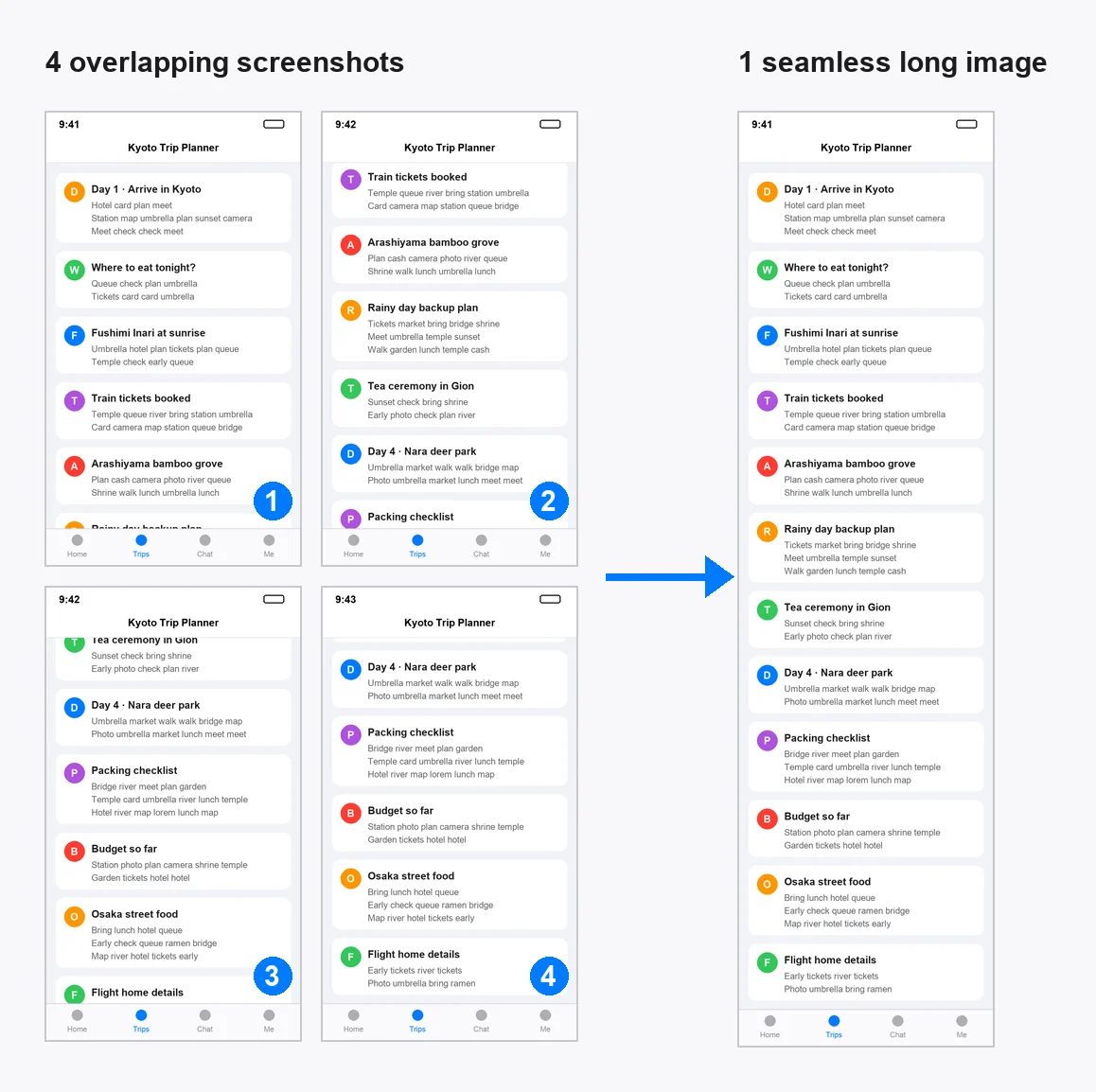
Input: 4 phone screenshots of a trip-planning feed (750 × 1334 px each)
Output: long_screenshot.png — one 750 × 2746 px image, plus a short summary:
Stitched 4 screenshots into a 750 × 2746 px long image. All screenshots overlapped correctly; no duplicates or scrollbar were found.
Output format
- Image file: one PNG (or JPG on request) saved as the result file. Very tall images (over 65,000 px) are always delivered as PNG because JPEG can't store them.
- Chat summary: final size, number of screenshots used, skipped duplicates, whether a scrollbar was removed, and a warning if any neighbouring screenshots had no overlap (they are then joined end to end, and you'll be asked to check the order).
Tips for best results
- Scroll in one direction and keep 10–50% overlap between shots.
- Upload in top-to-bottom order, or tell the Agent the correct order.
- Up to ~50 phone screenshots per run works comfortably.
FAQ
My screenshots don't overlap. Will it still work?
They will be joined end to end with the repeated top/bottom bars removed, and the Agent will tell you which pairs had no overlap. For a truly seamless result, retake them with some overlap.
Does it work for horizontal scrolling or screen recordings?
No. It is designed for vertical scrolling screenshots.
Is my content sent anywhere?
No third-party service or AI model API is used to process the images. Stitching runs as a local script inside this Agent's workspace, and only the result file is returned to you.
The same stitching engine powers the iOS app 无界截图 / Boundless Screenshot, which also turns scrolling screen recordings into long screenshots.
中文简介
把多张有重叠的滚动截图(聊天记录、文章、网页、信息流、文档)自动拼成一张无缝长图:像素级对齐,重复的顶栏与底栏只保留一次,接缝处不会切断文字,自动跳过重复截图并抹除滚动条。支持 PNG / JPG / HEIC / WebP。上传截图后说"把这些截图拼成长图"即可;如果顺序不是上传顺序,请告诉 Agent 正确的顺序。