ShortsPacer Studio — Batch Voice De-Breath Engine
【Lifetime Buyout · 100% Offline】Industrial batch voice & de-breath engine for YouTube Shorts, TikTok & podcast creators! Drag & drop an entire folder of audio/video to cut silent gaps and breath pauses in 0.3s. Features 10ms anti-click cosine crossfade, 50ms consonant buffer to protect word endings, and -14 LUFS mastering. Bundled standalone FFmpeg, 1-click Windows launcher, zero token costs, and 100% local privacy. Ditch tedious Audition timeline slicing forever!
#Video#Sociale media#Productiviteit
Beoordeling
Meer beoordelingen nodig
Verkocht
2
Gebruikswijze
Downloaden
⚡ ShortsPacer Studio — Batch Voice De-Breath & Viral Pacing Engine (Lifetime Buyout)
【Lifetime Buyout · 100% Local Offline · Zero Token Costs】
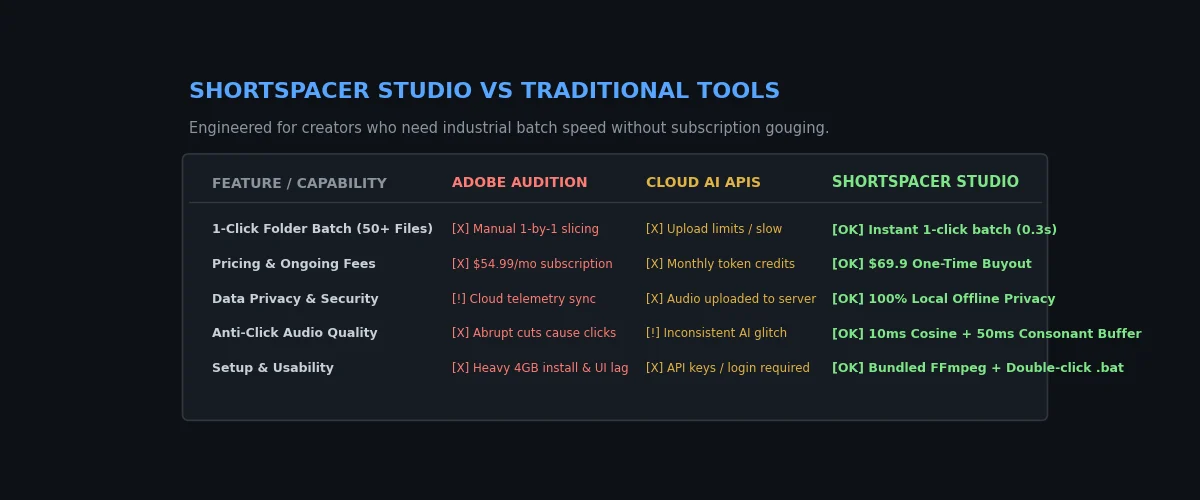
Pay once, own forever! Engineered specifically for TikTok, YouTube Shorts, Reels, Podcast, and Commentary creators to eliminate tedious manual timeline cutting. Process entire folders of audio/video in seconds.
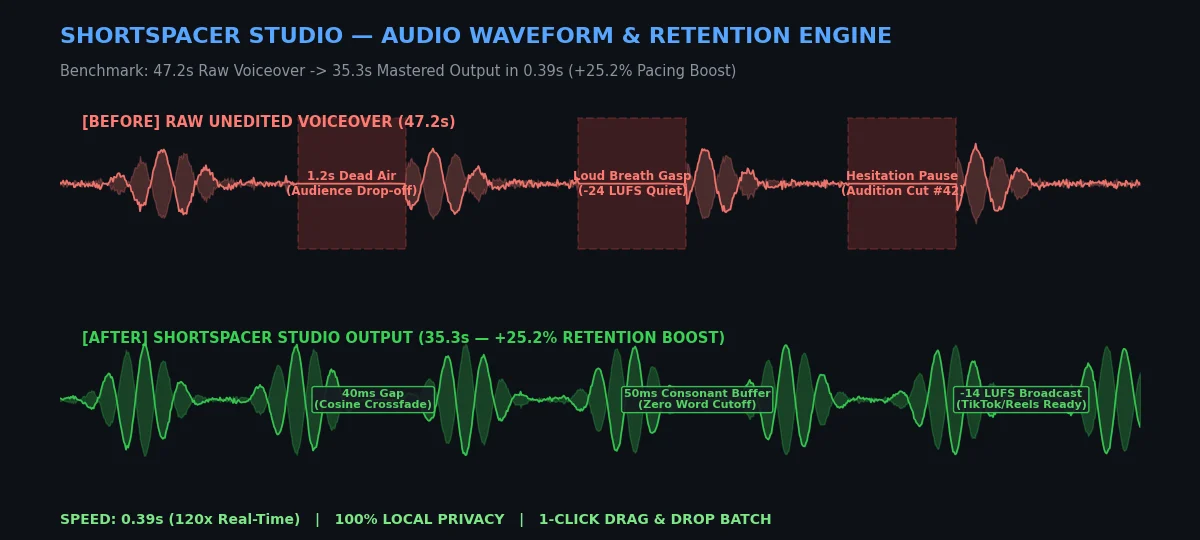
📊 Benchmark Test: Real Voiceover Audio
- Source Audio Duration:
47.20 seconds(Standard voiceover with natural pauses) - ShortsPacer Output Duration:
35.33 seconds - Processing Time:
0.39 seconds(Over 120x real-time playback speed) - Retention Impact: +25.2% tighter pacing, dead silence eliminated, viewer retention velocity boosted significantly!
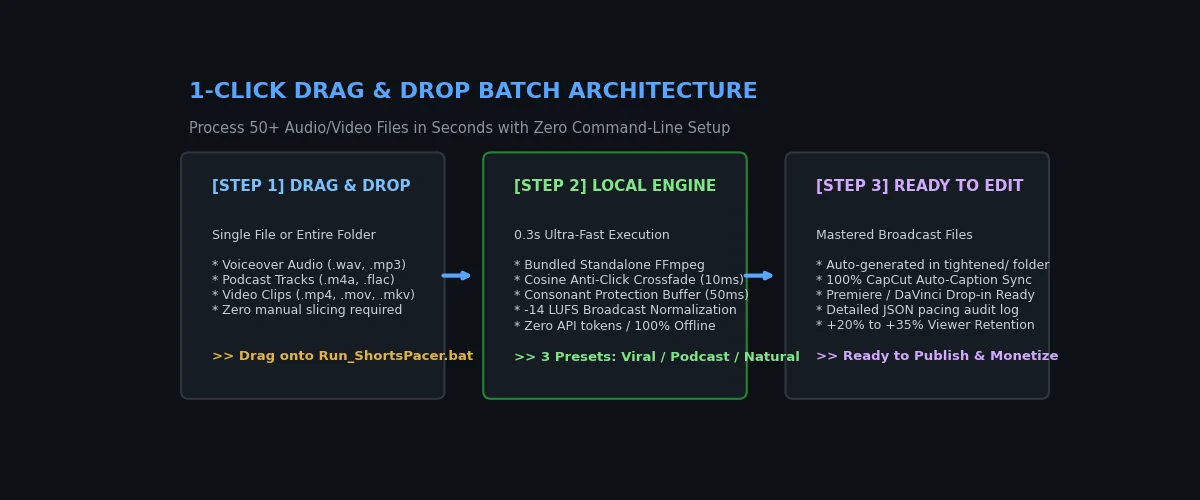
🚀 1-Click Drag & Drop Architecture
🎛️ 3 Engineered Pacing Presets Included
- 🔥 Viral Shorts / TikTok Pace (
short_gap= 40ms)
Ultra-fast, punchy rhythm tailored for high-retention short-form videos. Keeps viewers hooked from the first second. - 🎙️ Podcast & Long-Form Video Pace (
podcast_gap= 120ms)
Comfortable, natural dialogue rhythm that preserves conversational warmth while removing awkward dead air. - 🎬 Natural Voiceover Pace (
natural_gap= 80ms)
Perfect balance for documentary, essay, and anime/movie commentary videos.
🛡️ Enterprise-Grade Audio Engineering
- 10ms Cosine Anti-Click Crossfade: Eliminates waveform DC offset and abrupt edge pops. Zero clicking sounds on transition cuts.
- 50ms Consonant Protection Buffer: Adds micro-padding before and after voice segments, guaranteeing that word-initial plosives (p, b, t, k) and trailing syllables are never clipped.
- TikTok-Standard Loudness Mastering: Built-in normalization to
-14 LUFSand-1.5 dB True Peak, ensuring compliant, broadcast-ready loudness without platform compression distortion. - 100% Privacy & Security: Operates completely on your local machine. No voice recordings or video files are ever uploaded to cloud servers.
📦 What's Inside the Deliverables
ShortsPacer_Studio_Lifetime_v1.0.0.zip(34.15 MB, fully verified standalone package):Run_ShortsPacer_Batch.bat— Pure ASCII Windows 1-click batch launcher with smart multi-tier Python auto-detection.【双击运行】ShortsPacer批量剪气口.bat— Chinese interactive launcher.ffmpeg.exe— Standalone static FFmpeg build (98.7 MB uncompressed) pre-configured. Zero PATH setup needed.scripts/shortspacer_engine.py— Core high-performance batch de-breath audio engine with sleek CLI.SKILL.md— Complete agent skill specification & parameter documentation.README_EN.md&README.md— Comprehensive bilingual user manuals.LICENSE— Commercial Single-User Lifetime License.
🛠️ Quick Start (Windows)
- Unzip
ShortsPacer_Studio_Lifetime_v1.0.0.zipto any local folder. - Double-click
Run_ShortsPacer_Batch.bat(or【双击运行】ShortsPacer批量剪气口.bat). - Drag and drop your audio/video file or an entire folder into the terminal window and press Enter.
- Done! Mastered audio files are automatically generated in the
tightened/output directory, 100% synchronized for CapCut, Premiere, and DaVinci.
📩 Support & Inquiries
- Developer: ShortsPacer Team
- Support Email:
[email protected] - Updates: Lifetime buyout includes all v1.x bug fixes and maintenance updates.