
CliffReel | Vertical drama series plans & prompts
CliffReel
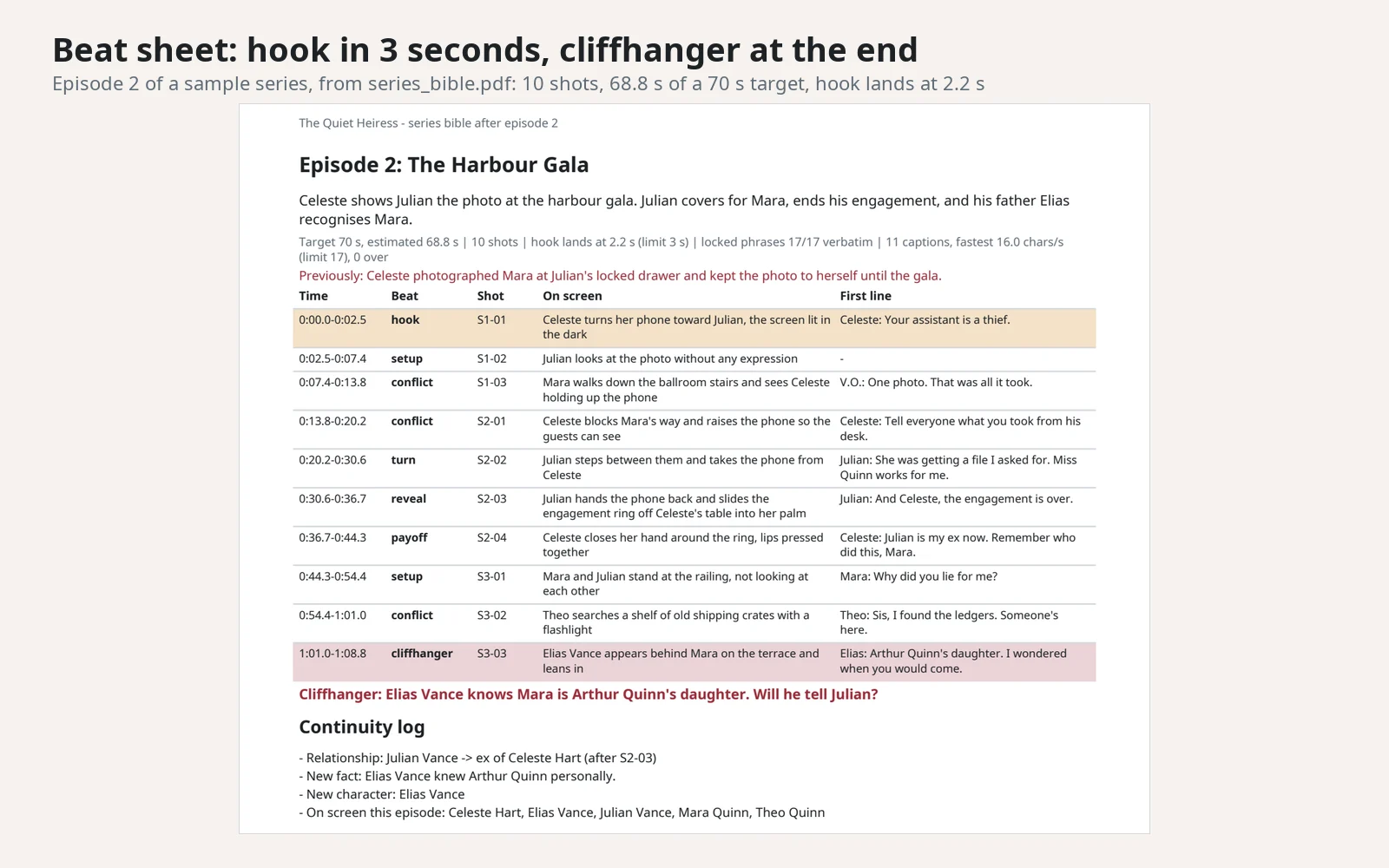
Plan a vertical short-drama series (the 60 to 90 second episodes of revenge, romance and family-secret apps) for the AI video tool you already use. Describe the series once. CliffReel writes a series bible that locks each character's look, then turns every episode idea into a beat sheet, a script, one prompt per shot and draft captions.
CliffReel writes plans and prompts. It does not make video, images or voices. You generate those in your own tool.
What you send
- First episode: the genre, the two or three main characters and the conflict, the episode length (30 to 120 seconds) and your video tool if you have one. Anything you leave out gets a default: 75 seconds, teen rating, a generic video tool, English.
- Next episodes: upload the
bible.jsonyou got last time, plus what happens next. New characters can join. The old ones keep their names, looks and relationships unless you ask for a change.
What you get back
| File | What it is |
|---|---|
series_bible.pdf |
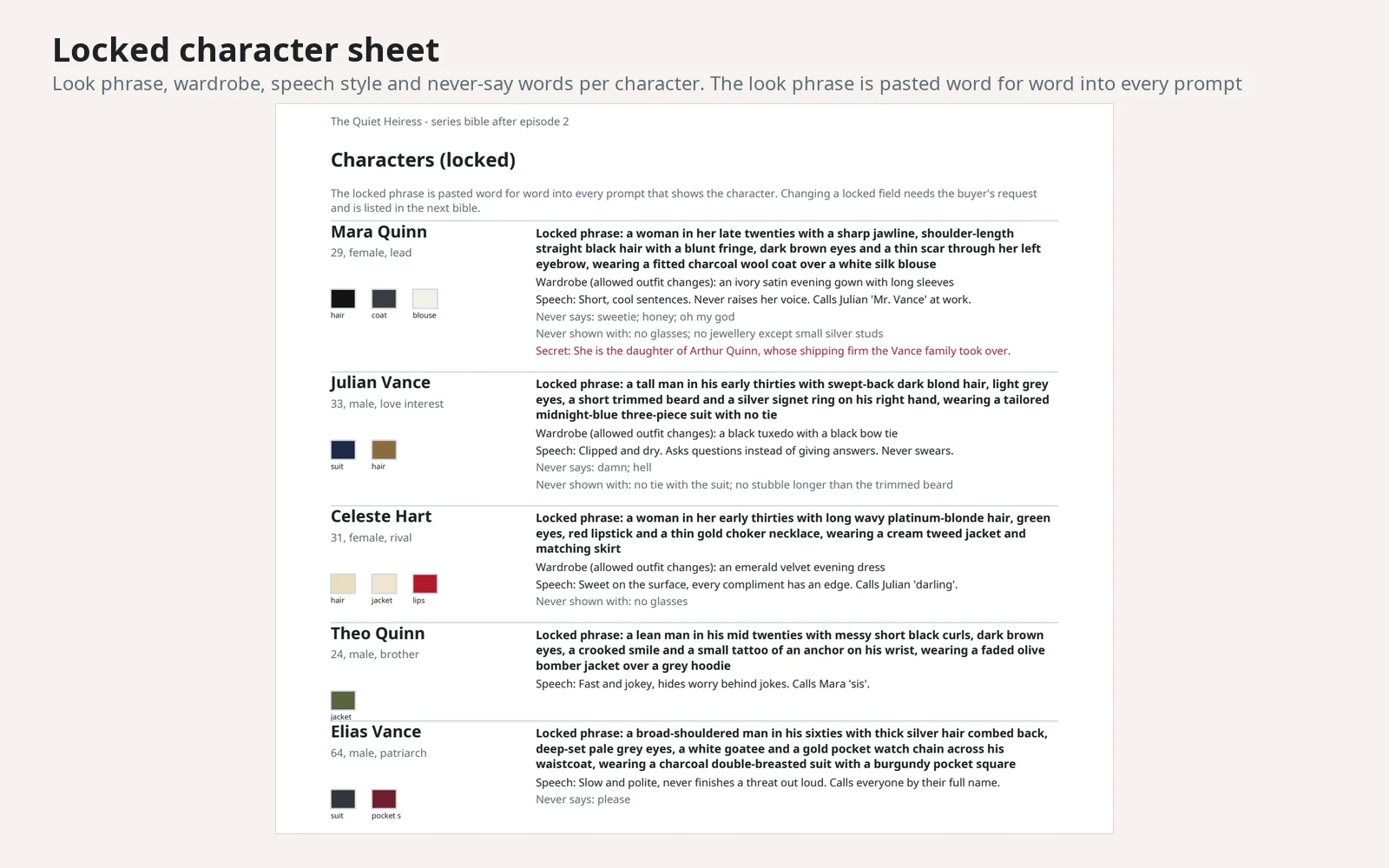
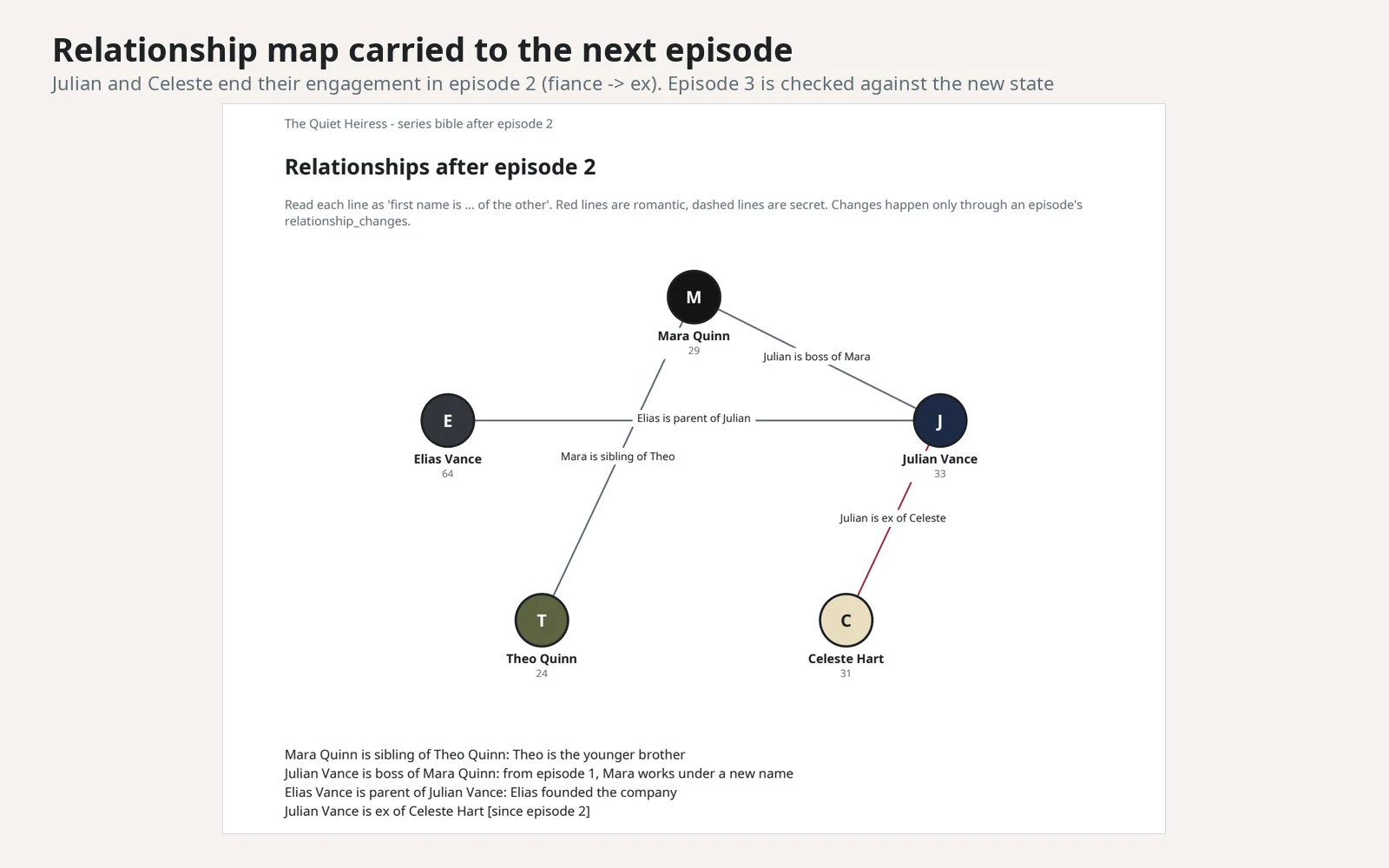
Series page, character sheets with locked looks, relationship map, this episode's beat sheet and the continuity log |
episode_NN.md |
Beat sheet and script with dialogue, voice-over and the cliffhanger |
prompts.md |
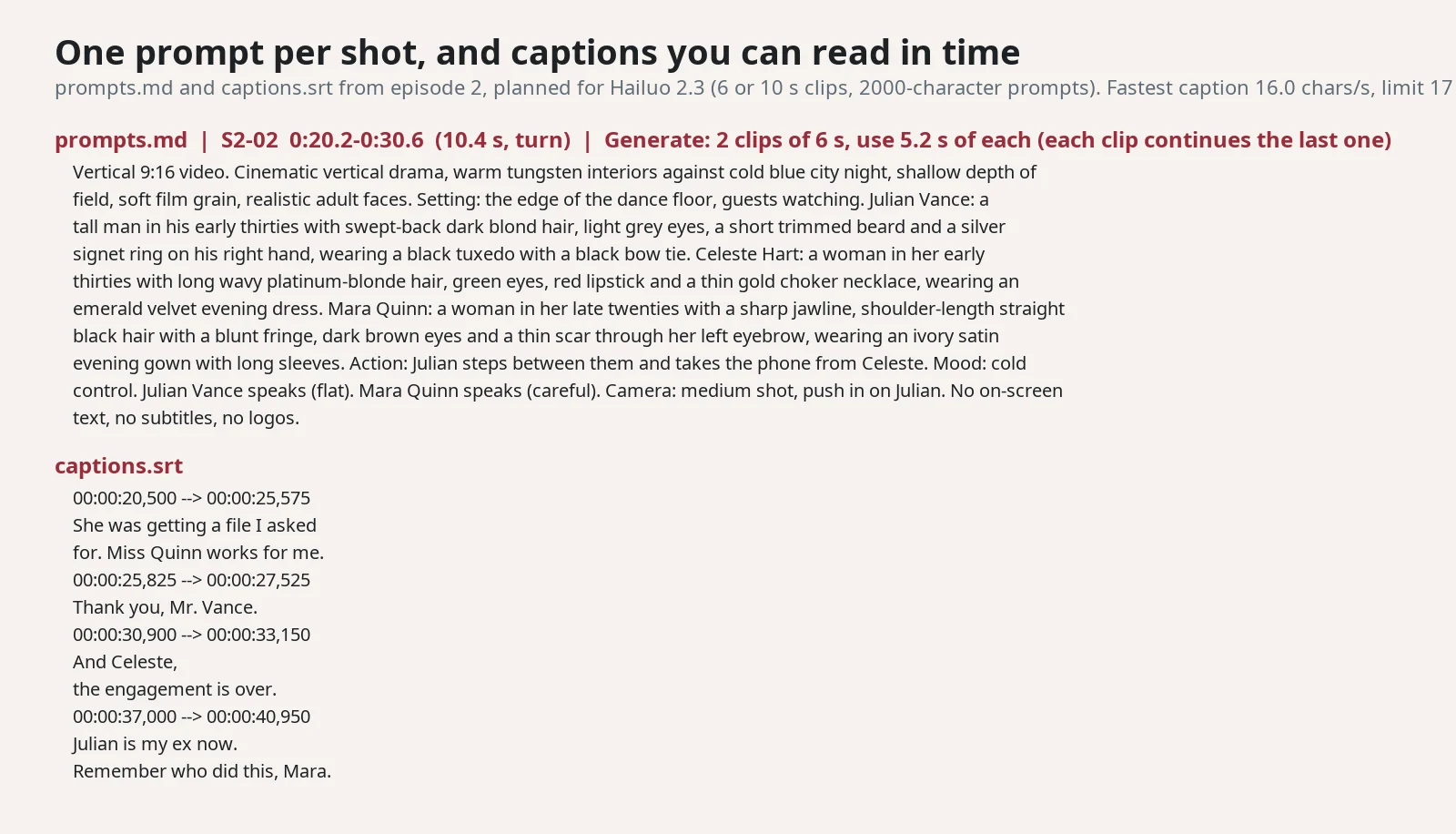
One prompt and one negative prompt per shot, with the clip lengths to generate in your tool |
captions.srt |
Draft captions for a vertical screen: at most 2 lines of 32 characters, never faster than 17 characters per second |
bible.json |
The updated series bible. Upload it with your next request |
How the series stays consistent
- Locked looks. Each character gets one look phrase (age, build, hair, eyes, a distinctive detail) and a default outfit. The build pastes that phrase word for word into every prompt that shows the character, in every episode. Costume changes come from a wardrobe list in the bible; any other clothing or colour in the shot text is refused.
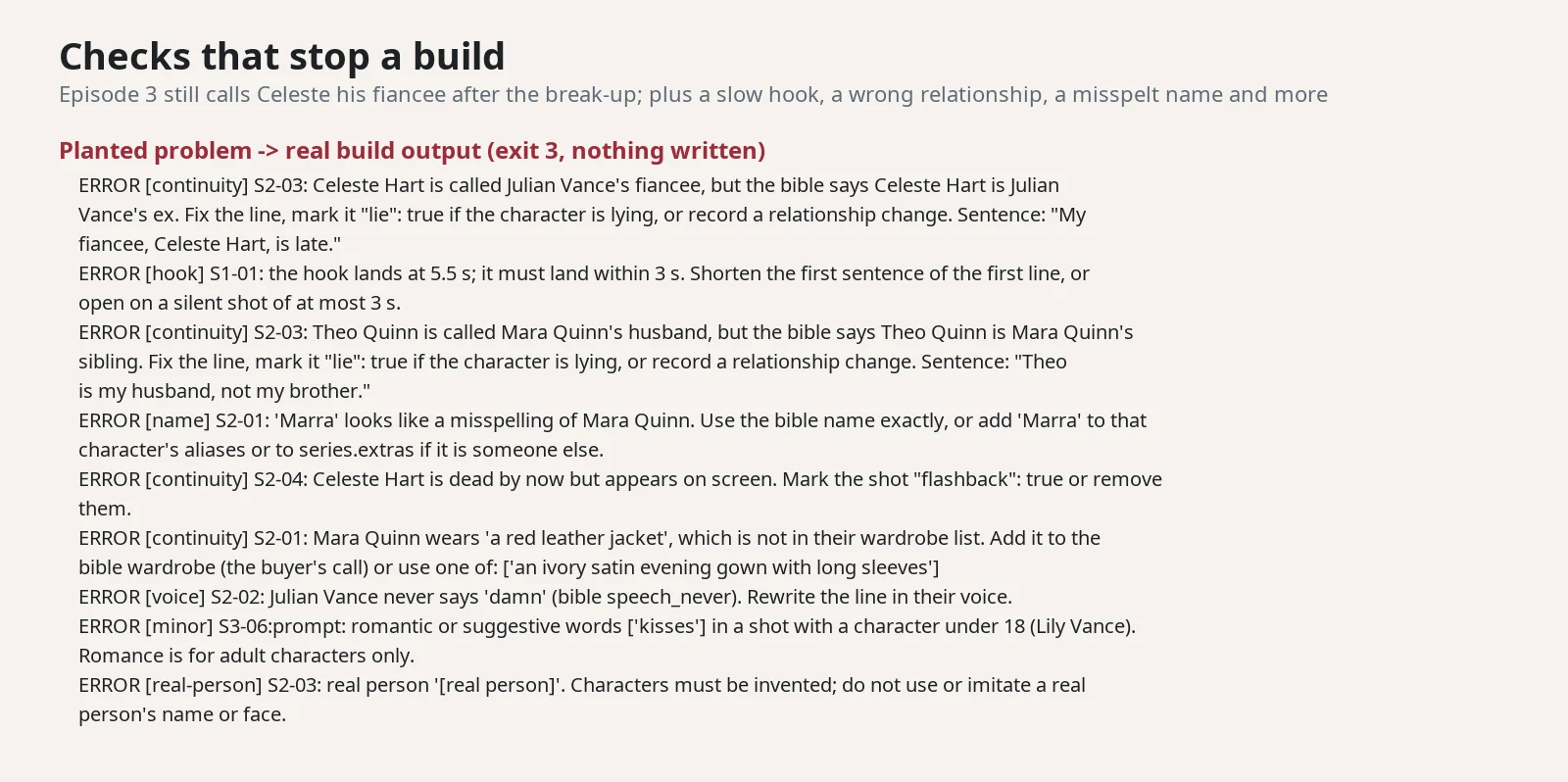
- Names, ages and relationships. Lines and actions are checked against the bible: a misspelt name, a wrong age, "my husband" for a brother, or a dead character back on screen (outside a flashback) stops the build.
- Story changes carry over. A break-up, a reveal or a death is recorded in the episode and written into the bible you upload next time. The next episode is checked against the new state and has to pick up the last cliffhanger.
- Voice. Each character has a speech style and words they never say; a never-say word in their lines stops the build.
An AI video tool can still drift. Using the same words every time reduces that; it does not guarantee it.
Hook, cliffhanger and captions
- The first shot is the hook and has to land within 3 seconds. The last shot is the cliffhanger. At least one turn or reveal sits in the middle.
- Every shot is timed from its lines (160 words per minute) and the total is compared with your target length.
- Each caption stays on screen long enough to read at 17 characters per second or slower (10 for Korean, Japanese and Chinese), so a shot runs longer when a line needs more reading time.
Video tool limits
Only limits read on an official page are applied:
| Tool | Clip lengths | Prompt limit |
|---|---|---|
| Runway Gen-4 | 5 or 10 s | 1000 characters |
| Luma Ray2 | 5 or 10 s | check in your tool |
| MiniMax Hailuo 2.3 / 02 | 6 or 10 s | 2000 characters |
| Google Veo 3 | 8 s | check in your tool |
| Kling, Seedance 2.0 | not verified: tell us your clip length | check in your tool |
Shots longer than a clip are split into several clips. Sora is not offered because OpenAI closed it.
Content rules
- Adult drama, kept platform-safe: no explicit sex or nudity, no gore or torture, no slurs, no self-harm methods. Intimacy and violence stay implied. On the default teen rating, weapons, blood and suggestive scenes are flagged so you keep them off-camera.
- Nobody under 18 in any romantic or suggestive scene.
- Invented characters only: real people, celebrity lookalikes and existing shows or franchises are refused. Brand names are flagged because video tools may draw the logo.
How long it takes
Most of the time is the assistant writing the episode. The build itself takes about 0.3 seconds for a 15-shot, 75-second episode in a 2 CPU sandbox. The first request of a session also installs the Python packages (a few seconds).
Plans and limits
| Plan | Price | Requests |
|---|---|---|
| Daily | $2.99 | 5 per day |
| Weekly | $7.99 | 10 per week |
| Monthly | $19.99 | 30 per month |
Every message you send uses 1 request from your plan. One request plans one episode of up to 120 seconds and 24 shots. The weekly plan starts with a free trial period.
What it does not do
- It does not generate video, images, music or voices, and it does not post anything.
- It does not promise views, followers or income.
- Caption timing is a draft based on speaking and reading speed. Re-time the captions to your real voice track.
- Reading-speed limits for Korean, Japanese and Chinese are our defaults, not a platform rule.
- It does not check the videos your tool makes.
FAQ
Which video tools does it work with?
Any tool that takes a text prompt. Name your tool and the clip plan follows its verified limits; for tools without verified limits, tell us the clip length.
Can I change a character later?
Yes. Ask for the change, for example "Mara cuts her hair short from now on". It applies to every later episode and is listed in the bible.
Can the episode be in another language?
Yes. The PDF font covers Latin, Greek and Cyrillic scripts, Korean, and Japanese kana with common kanji. The assistant replies in the language you write in.
Is anything sent to other services?
No. The episode is built inside the workspace. The only network use is installing Python packages from PyPI at setup.
APIs externas
PyPI (pypi.org) · Python Package Files (files.pythonhosted.org)