
MixerCut
MixerCut
Your ideas. A new scene.
Watch the original character, scene variations and a fictional character blend in one animated showcase.
Create short videos from an idea, animate an image, or reimagine a short clip with MiniMax video models. Gemini guides the creative conversation; MiniMax generates the video. Build product moments, character introductions and visual experiments for social media.
Send your brief, image or short video. Tell MixerCut what should change and what should stay. A guided conversation turns your references into a clear creative plan before a render starts.
Create • Blend • Remix
- Create from an idea: choose the subject, action, atmosphere and framing.
- Animate an image: bring your character or product reference into motion.
- Blend two images: combine visual traits into one fictional character, or ask for separate subjects to interact. Say which result you want.
- Reimagine a clip: explore a different setting, a new color palette or a new visual direction using your clip as a reference.
These are AI-generated interpretations. Identity, motion and fine details can vary; exact preservation or replacement of logos, text and individual objects is not guaranteed.
Three real remix examples
These real remix demonstrations were generated from the same turquoise robot reference:
1 · A new world — a sunlit miniature greenhouse, with ferns, terracotta pots and a moss-covered table.
2 · A new color — a coral-red robot on the original warm desk, retaining its rounded character design.
3 · A new stage — a paper-crafted environment with layered mountains and a paper sun. The robot retains its rounded 3D appearance.
These earlier demonstration clips last 5 seconds. The remix examples are 480p previews; the original was generated at 768p. The images below are frames from the actual videos. New videos use the standard duration described below.
Original reference · Turquoise robot
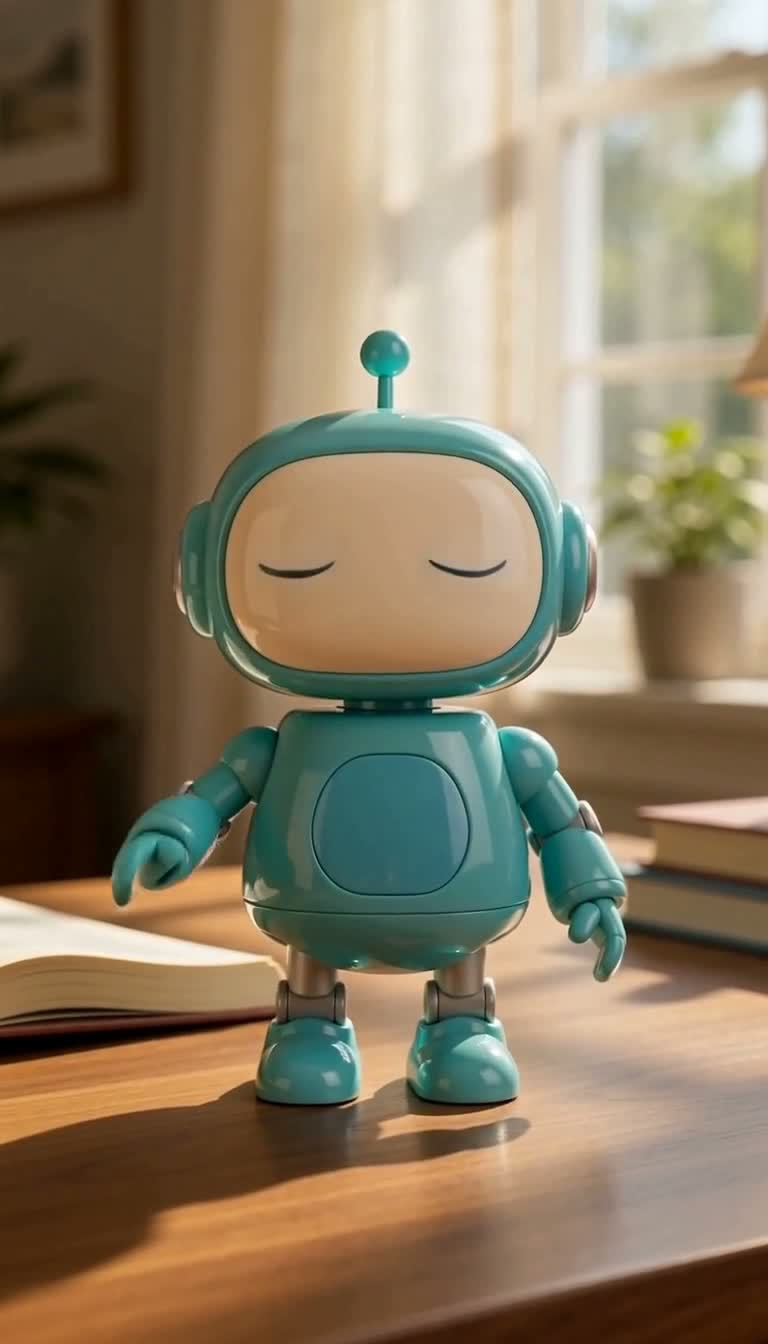
Remix 1 · A new world

Remix 2 · A new color
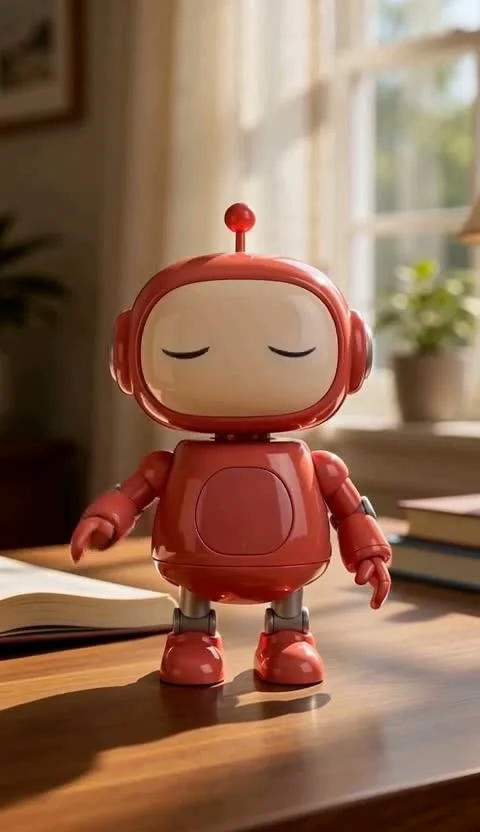
Remix 3 · A new stage

From your idea to a downloadable MP4
- Send your idea and any reference assets.
- Choose what changes, what stays, the format and clip duration.
- Review the creative plan and the generation allowance required, then confirm.
- Receive exactly one final, downloadable MP4.
One request. One final MP4.
Standard duration: 8–10 seconds. Default: 10 seconds. Hard maximum: 15 seconds. If you leave the duration unspecified, MixerCut plans 10 seconds automatically. Requests longer than 15 seconds are shortened with your agreement before rendering, never split into several delivered clips.
You receive one final MP4 only. Briefs, prompts, logs, thumbnails, raw clips, subtitle sidecars and ZIP packages stay internal. Provider overruns are normalized locally; the delivered file must not exceed 15 seconds. Source-video remix previews use one short 24fps reference.
All product text, guided replies and delivery messages are in English.
A conversation before creation
👋 Hi! I'm MixerCut. I help you create short videos from ideas and images, combine image references into new characters, and explore new settings, colors or styles for your scenes. Send your idea or reference assets and tell me what should change and what should stay. I'll show the plan before rendering. Standard videos last 8–10 seconds (10 by default), never more than 15 seconds, and you receive one final MP4. What would you like to create?
Try asking
Create a ten-second video of my toy, with warm light and a gentle camera move.
Use my clip as a reference, but move the scene into a greenhouse. Keep the main character recognizable.
Combine the character traits in Image 1 with the robot in Image 2. Make one fictional hybrid character, rather than two characters meeting.
Choose your plan
| Plan | Price (USD) | Video generations | Chat messages |
|---|---|---|---|
| Weekly — featured | $10.99 / week | 9 per subscription week | 90 / week |
| Monthly | $27.99 / month | 27 per subscription month | 270 / month |
| Annual | $143.88 billed yearly ($11.99 / month equivalent) | 13 each subscription month | 130 / month |
No daily generation limit. Use all 9 weekly video credits in one day or spread them across your subscribed week. Once the period allowance is exhausted, further renders are blocked until its next renewal. The annual plan releases 13 video credits each month, rather than the entire year's allowance upfront. Unused video credits do not carry into the next allowance period.
Chat messages and video credits have independent counters. Each message sent to the agent, including a generation request, counts toward Capafy's chat allowance. Questions and planning do not consume video credits. Before a render starts, MixerCut checks and shows the verified available video allowance.
Clear limits, informed choices
Chat requests and video generations are different. Asking a question or discussing ideas does not start a paid render. Capafy's conversation-request allowance still applies. One new video render uses one video credit; a revision that renders a new video also uses one video credit. Provider or system failures restore the reserved video credit. Your plan and available allowance must be checked before confirming a render.
Use references you have permission to use. For real-person likenesses, appropriate authorization is required. MixerCut does not imply endorsement by people or brands shown in a reference.
Support
Questions about a result or your plan? Contact [email protected] and include the agent name and a description of the issue. Never send passwords or API keys.
APIs externas
fal.ai · Supabase