
Savings Insurance Checker: True Return & IRR
Give your AI assistant the benefit illustration of a savings insurance or participating policy and get a clear report in minutes: the true annual return (IRR), when the guaranteed and the projected value break even, how much you lose by surrendering early, and whether the "X% a year" you were quoted matches the illustration. Reports in English or Chinese. Not financial advice. #Finanças #Produtividade
Before buying savings insurance you usually hear "6% a year" or "your money grows 2.5 times in 20 years". But what do the rows of numbers in the benefit illustration really say? What is the true return? When does the guaranteed part break even? What do you lose if you need the money early?
Savings Insurance Checker lets your AI assistant read the illustration, recalculates it with a bundled program, and writes a clear report in English, Traditional Chinese or Simplified Chinese.
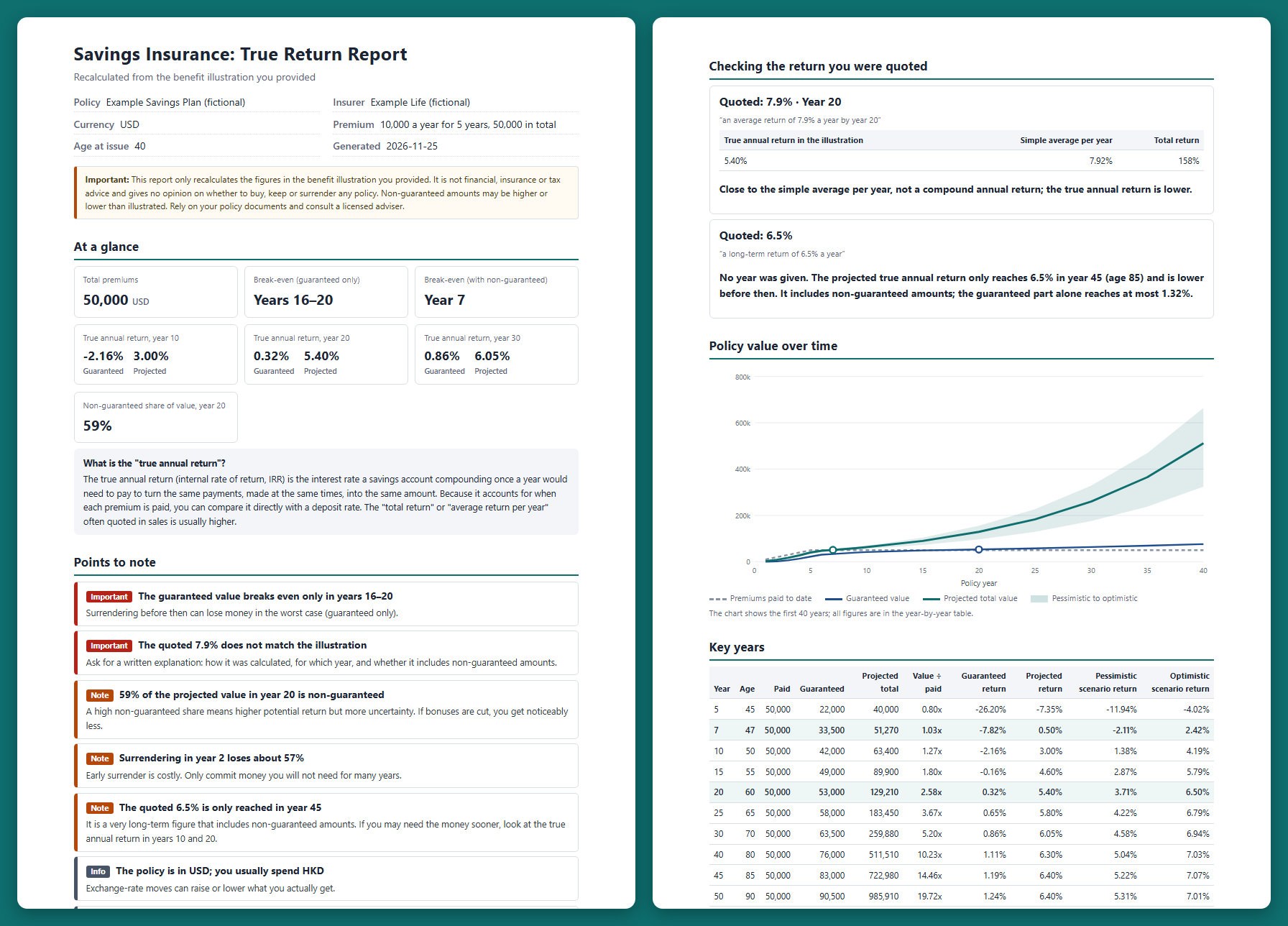
Sample report above. The policy and all figures are fictional.
What the report shows
- True annual return (IRR) in years 10, 20 and 30, both guaranteed only and with the non-guaranteed part, so you can compare it with a deposit rate
- Break-even years: guaranteed only, and with non-guaranteed bonuses
- Quote check: is the "7.9%" you heard a compound return, a simple average or a total return? For which year? From the optimistic scenario?
- Early surrender table: the expected and worst-case (guaranteed only) loss for each of the first 10 years
- Non-guaranteed share: how much of the long-term value depends on future bonuses
- Sensitivity test: what the return becomes if only 80%, 60%, 40% or none of the non-guaranteed part is paid
- Comparison with deposits at 2%, 3% and 4%
- Value chart: premiums paid, guaranteed value and projected value, with the pessimistic to optimistic range
- Eight questions to ask the agent, plus a summary of the relevant Hong Kong Insurance Authority guidance
- Supports yearly withdrawals (income plans), single premiums, instalments and illustrations that list only some years
Why it is more than a prompt
The skill ships with a calculation program (Python, standard library only), so the figures do not depend on the AI doing sums in its head:
- IRR follows the real payment dates (premiums at the start of each year, value at the end), not a misleading simple average
- Looks for misread numbers: guaranteed plus non-guaranteed not matching the total, guaranteed value dropping for no reason, scenarios with different guaranteed values. The AI is told to look at the document again
- Stops when required data is missing or invalid instead of forcing a report
- Writes HTML and PDF (A4, printable), plus Markdown and JSON
Example requests
- "Check this savings plan illustration (PDF attached). The agent said 6% a year. Is that right?"
- "Compare these two savings policies. Which guaranteed value breaks even sooner?"
- "If I surrender this policy in year 8, how much do I get back?"
- "Check this income plan. I was told 5% a year for retirement income."
Requirements
- An AI assistant that supports Skills and can read PDFs or images. Tested in Claude Code; other assistants that support Skills (such as Codex, OpenClaw or Hermes) should work but have not been tested one by one
- Python 3.8 or newer (free at python.org), no extra packages
- Optional: Chrome, Edge or Chromium for automatic PDF
- The program itself works offline. Your AI assistant uses its own AI provider as usual when it reads the document, so cover personal details first
- A step-by-step guide in English and Chinese (HOW-TO-USE.html) is included
FAQ
Which policies does it work for? It was designed first for Hong Kong savings, participating and income plans. It can also be used for Taiwan interest-sensitive policies, mainland China increasing whole life policies and participating policies in Singapore and Malaysia, as long as the illustration lists guaranteed and non-guaranteed values by year.
Do I need to enter personal data? No. Only the figures in the illustration are needed.
Will it tell me to buy or surrender? No. It only recalculates the illustration, helps you see it clearly and lists questions to ask. Talk to an independent licensed adviser before you buy, keep or surrender a policy.
Please note: This tool is not financial, insurance or tax advice. Non-guaranteed amounts can be higher or lower than illustrated, and past fulfilment ratios do not predict the future. Your policy documents prevail. AI can misread numbers, so check the year-by-year table in the report against your document.