Coverly — Covers That Get Clicks
📱 Social Media Cover Maker — Click-Driving Covers With Built-In Typography
Content brief, existing cover, or reference image → click-driving cover with typography designed directly into the artwork.
✨ What it does
This skill turns a content brief, existing cover, or visual reference into a click-driving social media cover designed for the target platform.
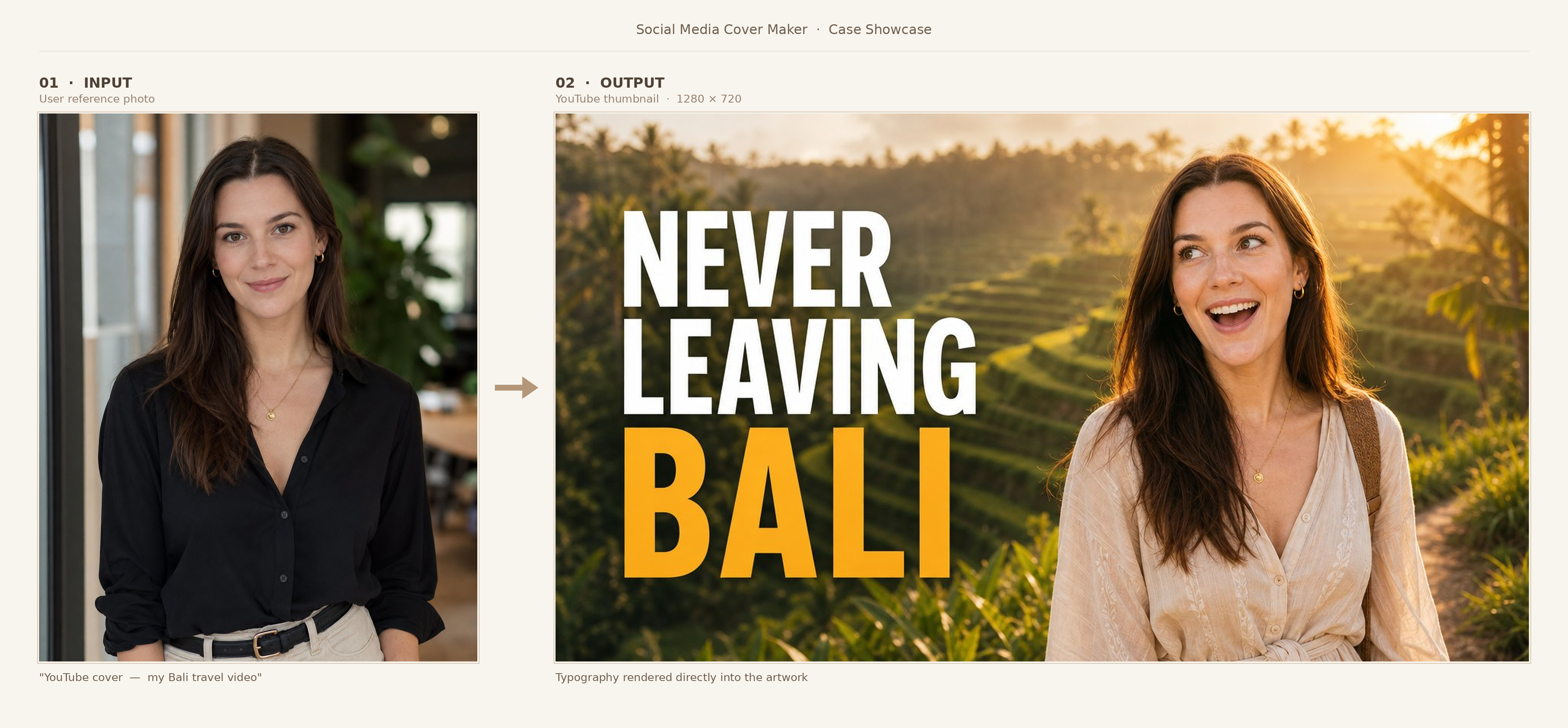
Covers are generated through OpenAI GPT Image 2, with composition, color, subject placement, typography, and platform-safe layout designed together as one complete artwork. Titles, hooks, and key text are rendered directly into the image — so the result feels like a finished cover rather than a template with text added afterward.
📲 Built for
YouTube · Instagram · TikTok · X · Facebook · LinkedIn · Pinterest · Podcast platforms
Including YouTube thumbnails, Shorts covers, channel banners, Instagram posts, Reels covers, TikTok covers, podcast artwork, and more.
🎬 Works for
Tutorials, vlogs, product reviews, interviews, news, food, travel, fitness, tech, channel branding, and other content where the cover needs to make people stop and click.
🛠️ Three ways to use it
| Mode | What you provide | What happens |
|---|---|---|
| 📝 Describe and Create | Topic, platform, hook text, style direction | Get a complete cover direction and generated result |
| 🔧 Upload and Optimize | An underperforming cover | Get a CTR-focused diagnosis, then an improved version |
| 🎯 Reference and Adapt | Competitor cover, style reference, brand asset, or subject image | Adapt the visual strategy to your own content |
📦 You get back
- 🖼️ A platform-ready cover generated with GPT Image 2
- ✍️ Professional typography rendered directly into the artwork
- 📐 Platform-specific dimensions and safe-zone handling
- 🧭 A visual direction matched to your content type and platform
- 👁️ Text placement designed for feed-size readability
- 🔍 Diagnosis and improvement guidance when optimizing an existing cover
- 🎯 Reference-guided generation when you want a specific visual style or layout
🚀 What makes this skill different
- 🖼️ Finished covers, not prompts — generated through GPT Image 2, not stopping at mockups or thumbnail advice
- 🎯 Click-through first — subject scale, contrast, hook text, typography hierarchy, and feed-size readability used to make the cover stand out
- 📐 Fits each platform — actual sizes, formats, safe zones, and UI overlay constraints, not one generic layout
- ✍️ Typography built in — hook text rendered directly into the artwork with professional design, not pasted on top
- 🔧 Diagnoses underperformers — identifies the specific issue limiting clicks and generates a stronger version
- 🔄 New + reference-guided — supports style references, subject photos, product images, brand assets, and existing covers
🔄 How it works
1️⃣ Understand the content and platform
Identifies topic, platform, content type, hook text, style direction, and whether to use a face, product, object, brand asset, or abstract visual.
📱 Platform matters — each one needs different dimensions, safe zones, and visual priorities. If unclear, the skill asks before designing.
2️⃣ Choose the click-driving visual direction
Designs around what the viewer grasps in the first moment — subject, composition, hook text, color, contrast, expression, and what makes it stand out in the feed.
🎯 Goal: make the topic instantly recognizable and give viewers a reason to click.
3️⃣ Apply platform specs and safe zones
Applies size, format, and safe-zone rules — keeping text and key visuals away from UI overlays on vertical formats, and adjusting composition so banner content isn't cropped.
4️⃣ Generate with integrated typography
Generated through OpenAI GPT Image 2 as one complete artwork. Title and hook text are designed directly into the image with platform-appropriate typography, contrast, placement, and scale.
🖼️ Reference images are first identified as subject / product / brand / style / existing cover, then used accordingly.
5️⃣ Check the final cover
Verifies text accuracy, feed-size recognizability, safe-zone placement, no unrequested text, and brief match. Refine any single part — hook text, layout, expression, background, color, or format.
📥 Input formats
You can provide:
- 📝 Content + hook text — topic, video idea, episode title, post theme, or channel concept, plus title / subtitle / supporting copy
- 📱 Platform + format — YouTube, Instagram, TikTok, X, Facebook, LinkedIn, Pinterest, or podcast platforms (thumbnail, Shorts/Reels/TikTok cover, channel banner, post cover, pin, podcast artwork)
- 🖼️ Existing cover or reference image — for diagnosis & optimization, or for style / subject / product / brand / layout guidance
- 🎨 Style & preferences — color mood, visual tone, example covers, face/no-face preference, brand assets, target audience, content type