
DB2MCP|Database to MCP Server Generator
Database to MCP Server Generator
Give it a connection string. Five minutes later your AI can query your database, and every answer comes with a link you can click to check the numbers.
No database handy? Start with the built-in sample data. Have an Excel file? That works too.
Who this is for
You already use Claude Code or Claude Desktop, you have a database or a spreadsheet you keep answering questions from, and you do not want to spend a weekend learning MCP to connect them. You know what a connection string is. That is all it assumes.
How it works
Install the skill, open Claude Code, and say one of these:
| You say | What happens |
|---|---|
| "db2mcp, just try it" | Generates sample finance (AR / AP) and order-to-shipment data and builds a server on it |
"db2mcp, connect postgresql://..." |
Reads your tables, builds one query tool set per table, registers the server |
"db2mcp, use sales.xlsx" |
Each worksheet becomes a table, then same as above |
Then it runs the tests, registers the server with Claude Code and Claude Desktop, and asks one real question to prove it works. Claude Code: start a new conversation. Claude Desktop: quit it fully once and reopen, and it shows up under Connectors.
No questionnaire. Anything it had to guess goes into an Assumptions list in the README, and you fix it with one sentence.
What you get back
Ask: "How much AR is still open at the end of October?"
Answer: 58 invoices open, $765,680.15 total, $533,588.09 of it overdue.
Followed by a link: http://127.0.0.1:8000/d/ar_open_list?as_of=2026-10-31
Click it and you see the same query, same arguments, rendered as a table in your browser, with the exact MCP call printed above it. Nothing to take on faith. The dashboard is a small background process that stays up after you close your AI, so links in last week's answers still open.
Why only 4 tools
Most "database to MCP" setups create one tool per table. Twenty tables, sixty tools, every conversation starts by reading all of them, and every new table forces everyone to re-authorize.
This generator exposes only four: search_tools, describe_tool, call, whoami. The dozens of real query tools sit behind them and are found by natural-language search. Add tables all you like; the tool list your AI sees never changes.
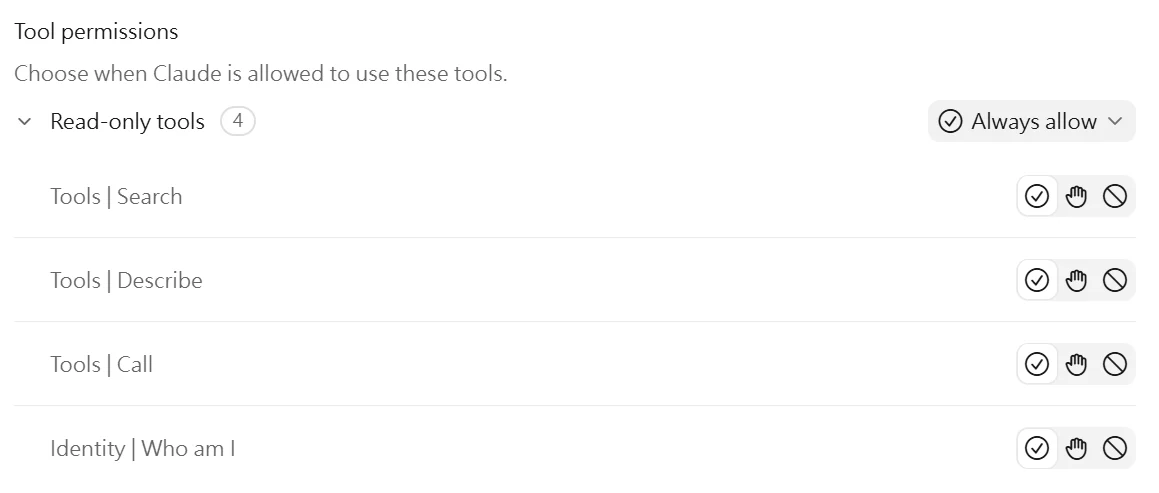
The same design has been running in production for six months against several data sources.
What is in the box
- FastMCP server (Python 3.10+), stdio by default: your AI starts it, no port, no Docker, no OAuth
- One tool set per table: get by key, list by filters, monthly summary, schema
- Cross-check dashboard on localhost that stays up after you close your AI, so links in old answers keep working
- Schema introspection with actual status-code values, so no guessing
- Excel importer (one sheet, one table)
- Read-only connection layer: SELECT only, bind parameters, row and time caps
- Audit log of every call with its stated purpose
- Tests, offline smoke test, and an end-to-end check over the real MCP protocol
- Optional HTTP mode with API-key or SSO-header auth for teams
Supports SQL Server, PostgreSQL, MySQL, SQLite, Oracle, and any REST API with docs.
Requirements
- Claude Code on your own computer (it needs to run shell commands). In chat-only environments it writes an
install.batfor you to double-click. - Python 3.10 or newer
- A read-only database account (it tells you the GRANT statement)
- Runs on your own computer. In claude.ai web or other cloud sandboxes it stops and tells you how to run it locally instead.
- Tested on Windows 11 with Python 3.12. macOS and Linux use the same code paths and should work; report anything odd and it gets fixed.
What it does not do
Writes. Ever. If you need your AI to insert or update, this is not the tool.