LoopReveal | 30 no-repeat ASMR reveal video plans
LoopReveal
LoopReveal plans ASMR and oddly-satisfying reveal videos for people who make them with an AI video generator. Tell it
your niche and how many videos you want. It sends back a dated posting calendar with no repeated concepts, and for every
video the prompts to paste into your generator, timed to the length of clip your generator can make.
What you get is a plan and prompts, not a rendered video. You paste the prompts into the video generator you
already use. LoopReveal works with any generator that takes text prompts; you tell it the longest clip yours makes.
What you send
- A niche. Built in: soap cutting, glass fruit cutting, kinetic sand, resin pour and demold, slime, paint mixing, ice
cutting, cake and dessert cutting, wax melting and sealing, press and squish. Anything else (chalk crushing, foam
cutting, honeycomb...) you describe in a sentence or two and LoopReveal builds the vocabulary for it. - How many videos (up to 31 per request), how long each one is (default 30 s), the longest clip your generator makes
in one go (default 8 s), the aspect ratio (default 9:16) and the first posting date. - Optional: the
history.csvorcalendar.xlsxfrom your last batch, or any CSV or Excel list of videos you already
posted. Nothing in it is planned again.
What you get back
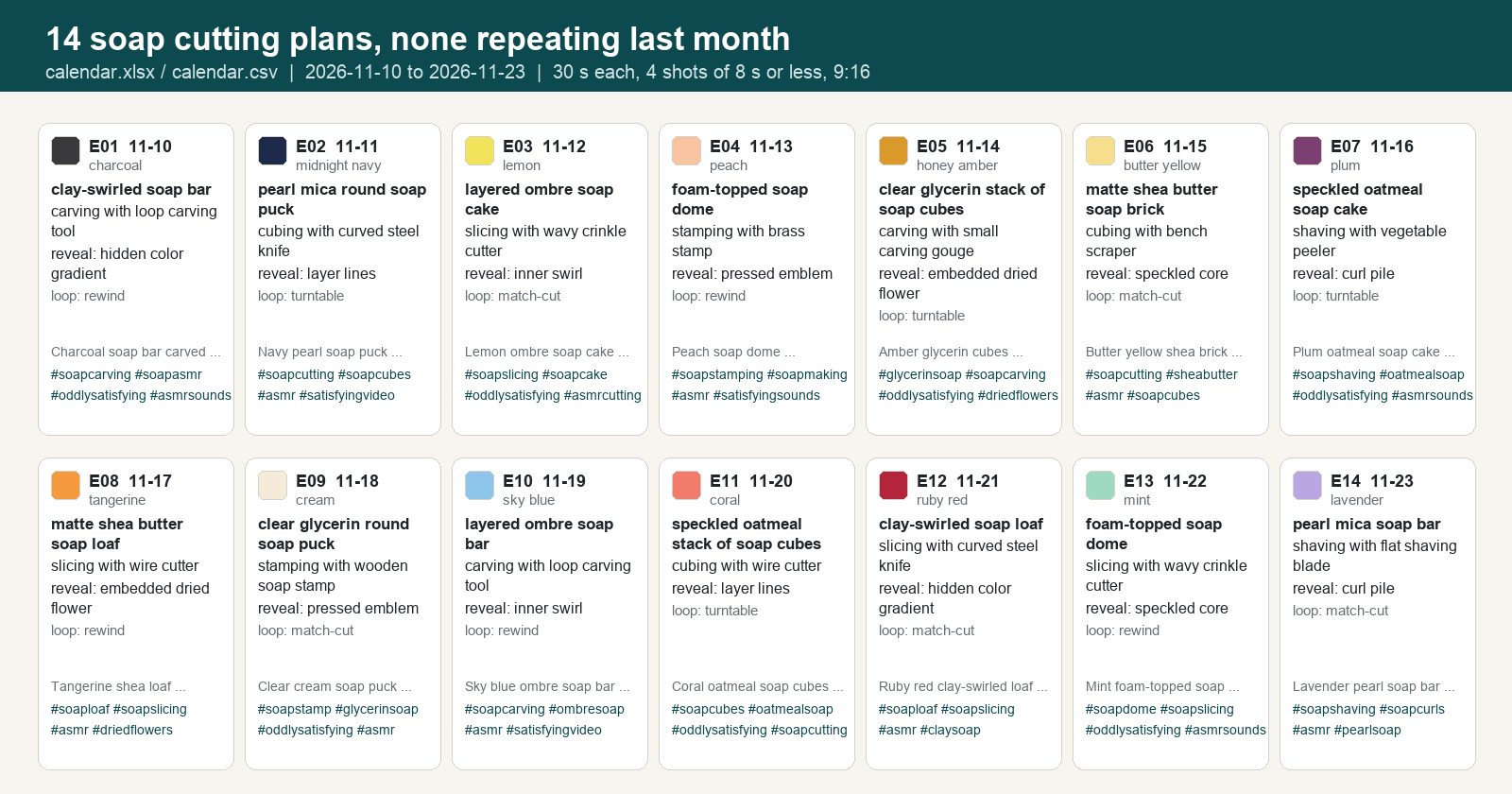
calendar.xlsx: one row per video with date, colour swatch, object, material, action, tool, reveal, set, camera,
lighting, loop style, title, caption and hashtags. Further sheets: every shot prompt with its timing, the keyframe
and negative prompts, the sound cues, and the full history.calendar.csv: the same calendar for Notion, Airtable or a scheduler.- For every video, a folder with
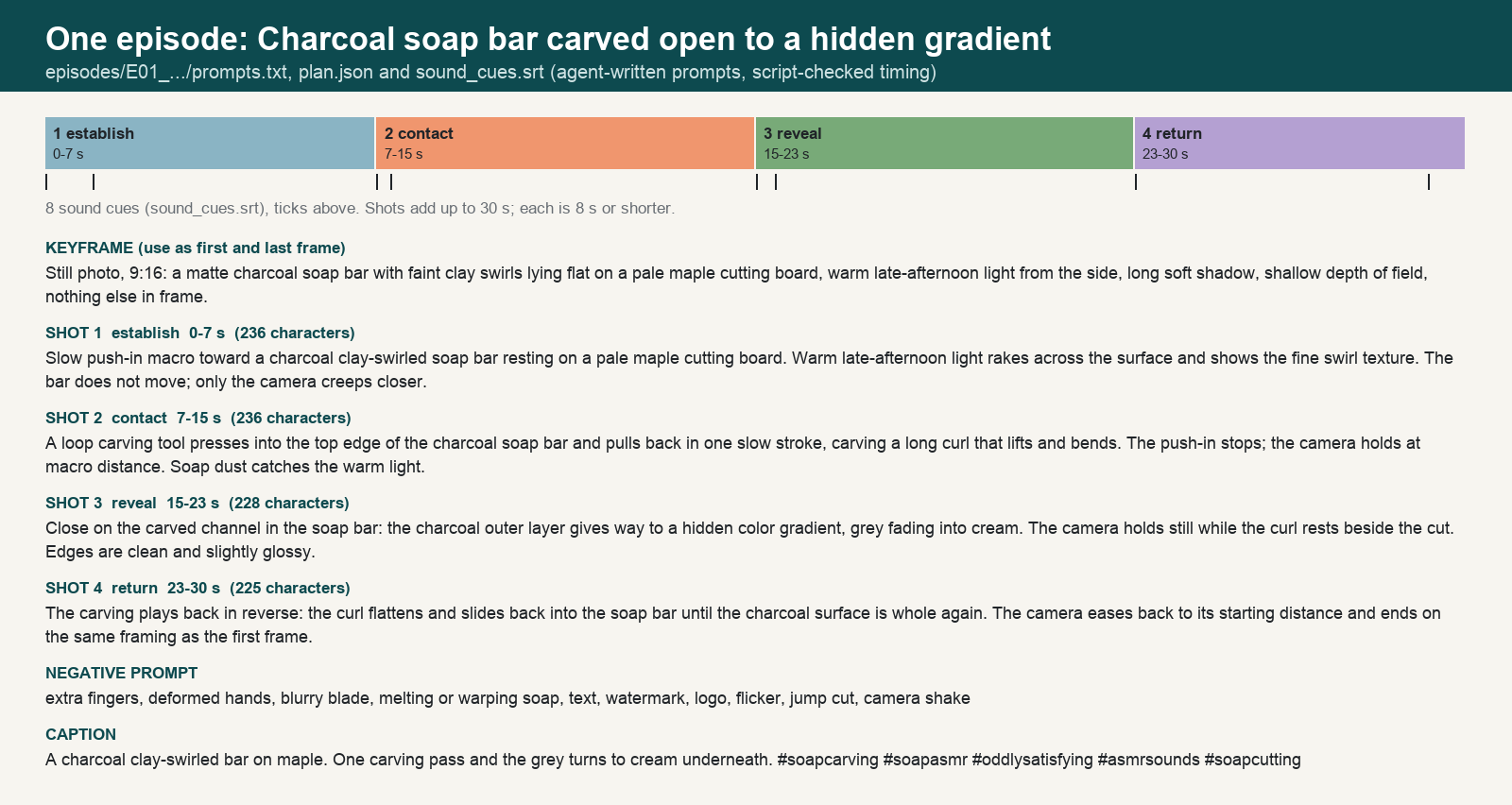
prompts.txt(copy-paste order: keyframe, negative prompt, shot 1 to n, caption),plan.json(the same as data) andsound_cues.srt(timed sound notes you can import into your editor as markers). history.csv: everything planned so far. Upload it next time and the next batch skips all of it.README.mdand one zip with all of the above.
How the plan is made
- Concepts come from a grid of objects, materials, actions, tools and reveals for the niche, with pairings that make
sense (a stamp makes an emblem, a peeler makes curls). Colours, surfaces, camera angles and lighting rotate so two
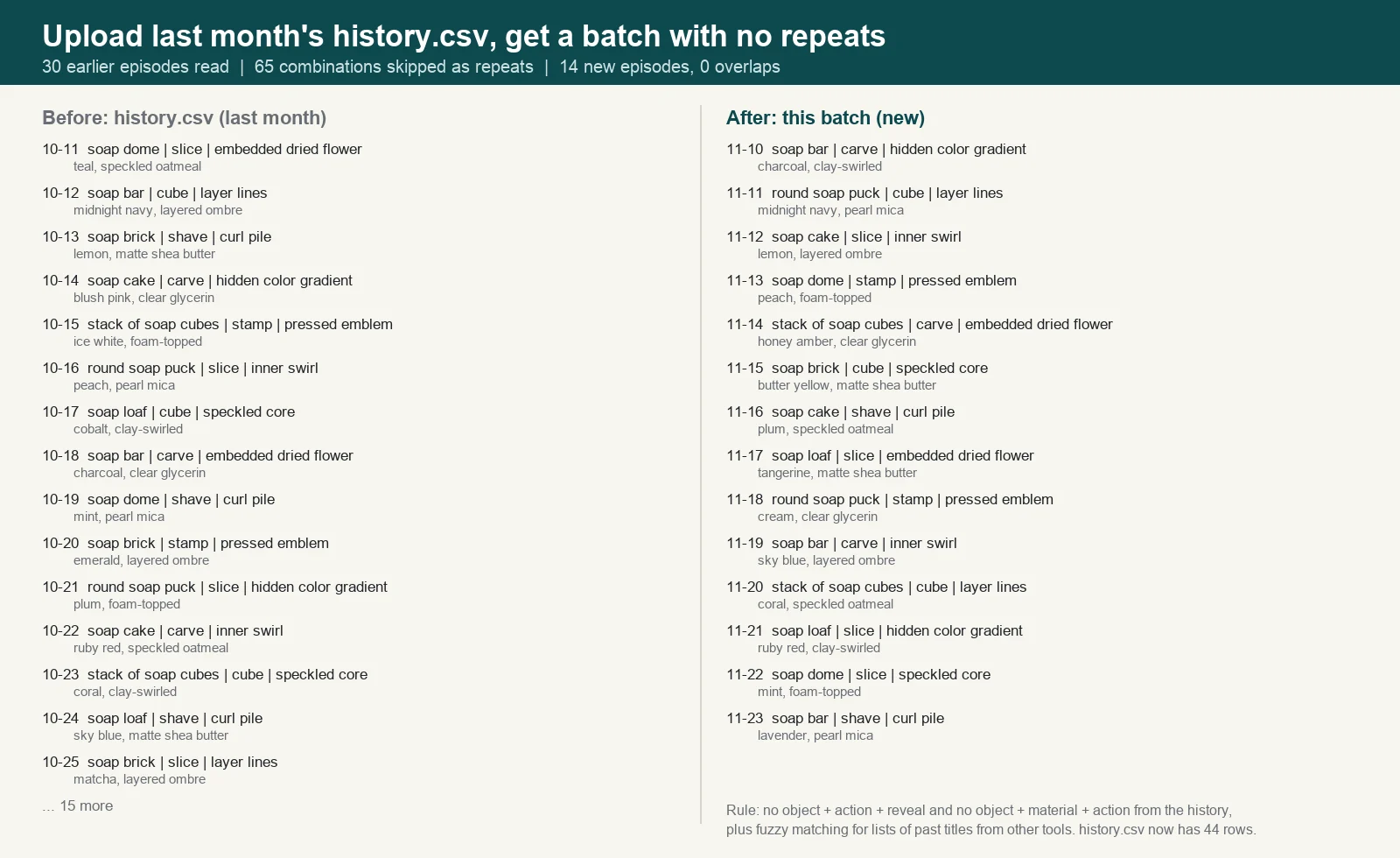
days in a row do not look alike. - No repeats: a concept is refused if the same object, action and reveal, or the same object, material and action, is
already in your history or earlier in the batch. Lists of past titles from other tools are compared with fuzzy
matching. In the run shown here, 65 combinations were skipped because of last month's 30 videos, and none of the 14
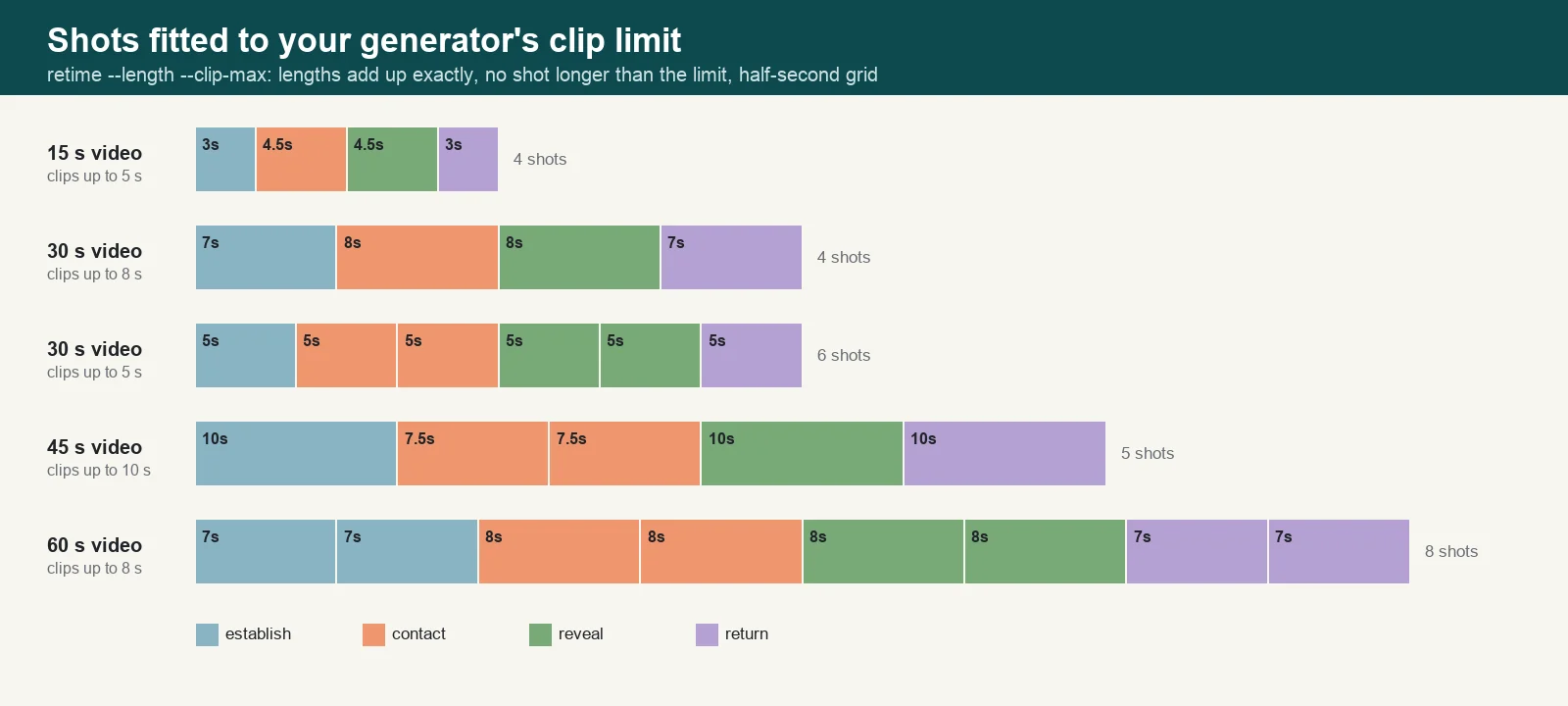
new videos overlaps them. - Every video is split into shots (establish, contact, reveal, loop return) whose lengths add up to the video length
exactly, on a half-second grid, with no shot longer than your clip limit. The last shot returns to the opening frame,
so the video loops. - Sound cues are timed to the shots: room tone, the pause before contact, the sound of the action, the pause before the
reveal, and a tail that matches 0:00 so the loop has no click.
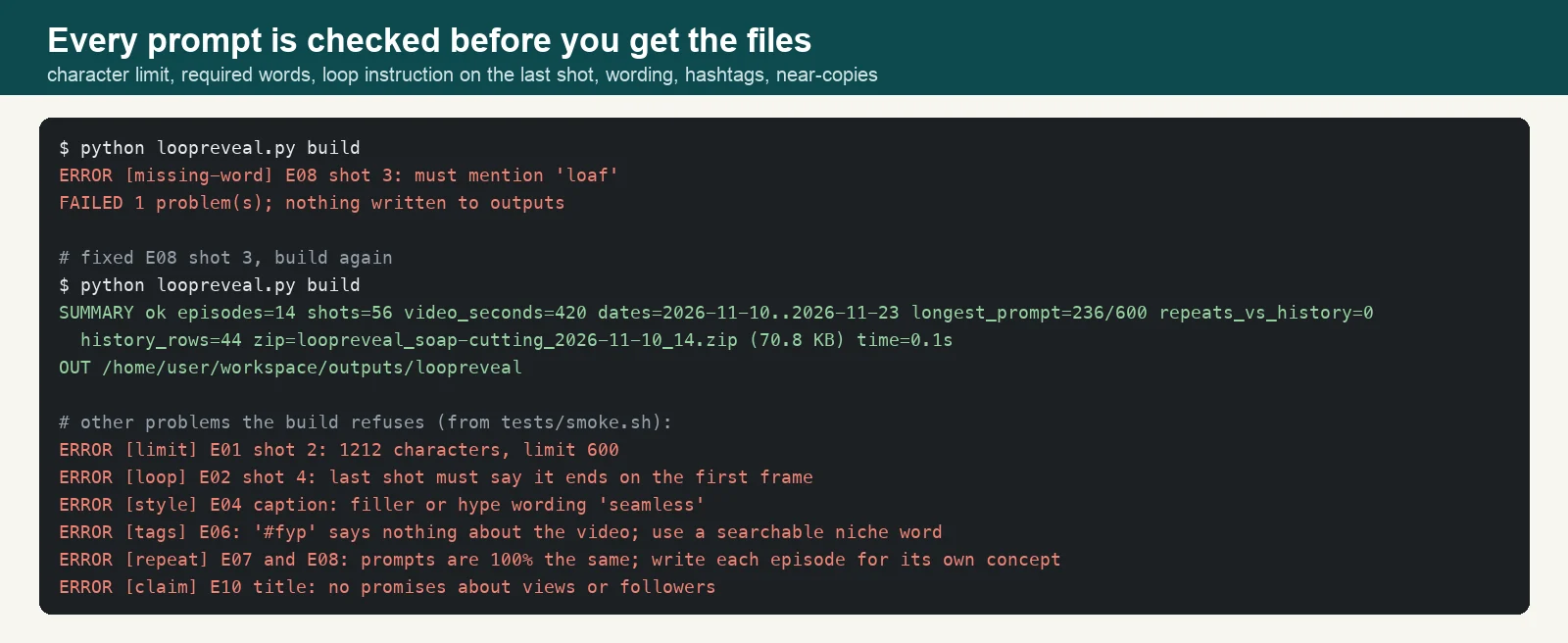
Checked before you get the files
The prompts are written by the agent and then checked by a script. If anything fails, the agent fixes it and builds
again before you see anything:
- Every prompt within the character limit (600 by default; you can ask for shorter).
- Every shot names the object, the contact shot names the action, the reveal shot names the reveal, the first shot
names the camera, and the last shot says it ends on the first frame. - Exactly 5 hashtags per video, searchable niche words, not #fyp or #viral.
- No filler or hype wording, no emoji, no promises about views or followers.
- No near-copies between videos: an episode whose prompts are 90% the same as another one is refused.
Clip limits
Tell LoopReveal how long a clip your generator makes and it fits the shots to it. A 30 s video with 8 s clips is 4
shots; with 5 s clips it is 6 shots. Change your mind later and it retimes the whole batch.
Time
The planning and checking scripts take under a second for 30 videos (measured in a 2 CPU sandbox: plan 0.1 s, build
0.2 s). Most of the time in a request is the agent writing the prompts; for 30 videos that is a long answer, so expect
a few minutes.
Plans and limits
| Plan | Price | Requests |
|---|---|---|
| Daily | $3.99 | 5 per day |
| Weekly | $7.99 | 10 per week |
| Monthly | $19.99 | 25 per month |
Every message you send uses 1 request from your plan. One request plans up to 31 videos (at most 160 shots: for 60 s
videos with 8 s clips that is 20 videos). Asking to redo one video, change the length or rewrite captions afterwards is
another request.
What it does not do
- It does not render video, images or sound, and it does not post anything. Results depend on your video generator;
some shots will need a re-roll. - It does not know the current limits of every generator. It uses the clip length and prompt length you give it.
- It does not use brand names, characters, celebrities or real people, and it does not copy another creator's series.
- It does not promise views, followers or income.
FAQ
Which video generators does it work with? Any that takes a text prompt. If yours can take a start and an end image,
use the keyframe still for both on the first and last shot for a cleaner loop.
Can I use my own niche? Yes. Describe it and LoopReveal writes the vocabulary (objects, materials, actions with
their tools and sounds, reveals, surfaces) before planning. Physical, filmable things only.
What happens when a niche runs out of new ideas? Each built-in niche allows 55 to 185 videos before a repeat. When
your history uses them up, LoopReveal adds new objects, materials or actions to the niche instead of repeating.
Can I change one video? Yes: "redo E07" gives that day a new concept that is not in the batch or the history, and
only that video is rewritten.
Prompts in other languages? Shot and keyframe prompts are in English because video generators follow English best.
Titles, captions and hashtags follow your language.
Support: [email protected]
外部 API
PyPI (pypi.org, files.pythonhosted.org)