
Photo Slideshow Video — Local Kit (Download)
Photo Slideshow Video
What you're buying: a one-time purchase download package (skill instructions + Python scripts) that runs on your own computer inside your own AI agent — it is not a cloud service.
You need: an AI agent that supports skills (e.g. Claude Code or Codex) — its subscription or API costs are yours; Python 3.9+, ffmpeg,pillowandnumpy.
Third-party services: none. Works offline, no API keys. Your photos are never uploaded (your own AI agent looks at a thumbnail sheet to plan the order and captions).
A folder of photos in, a music video with motion, captions and beat-matched transitions out. No editing software to learn.
What you get
- 🎬 16:9 (YouTube, TV, event screens) and 9:16 (Reels, Shorts, TikTok) in one run — 1:1 and 4:5 also available
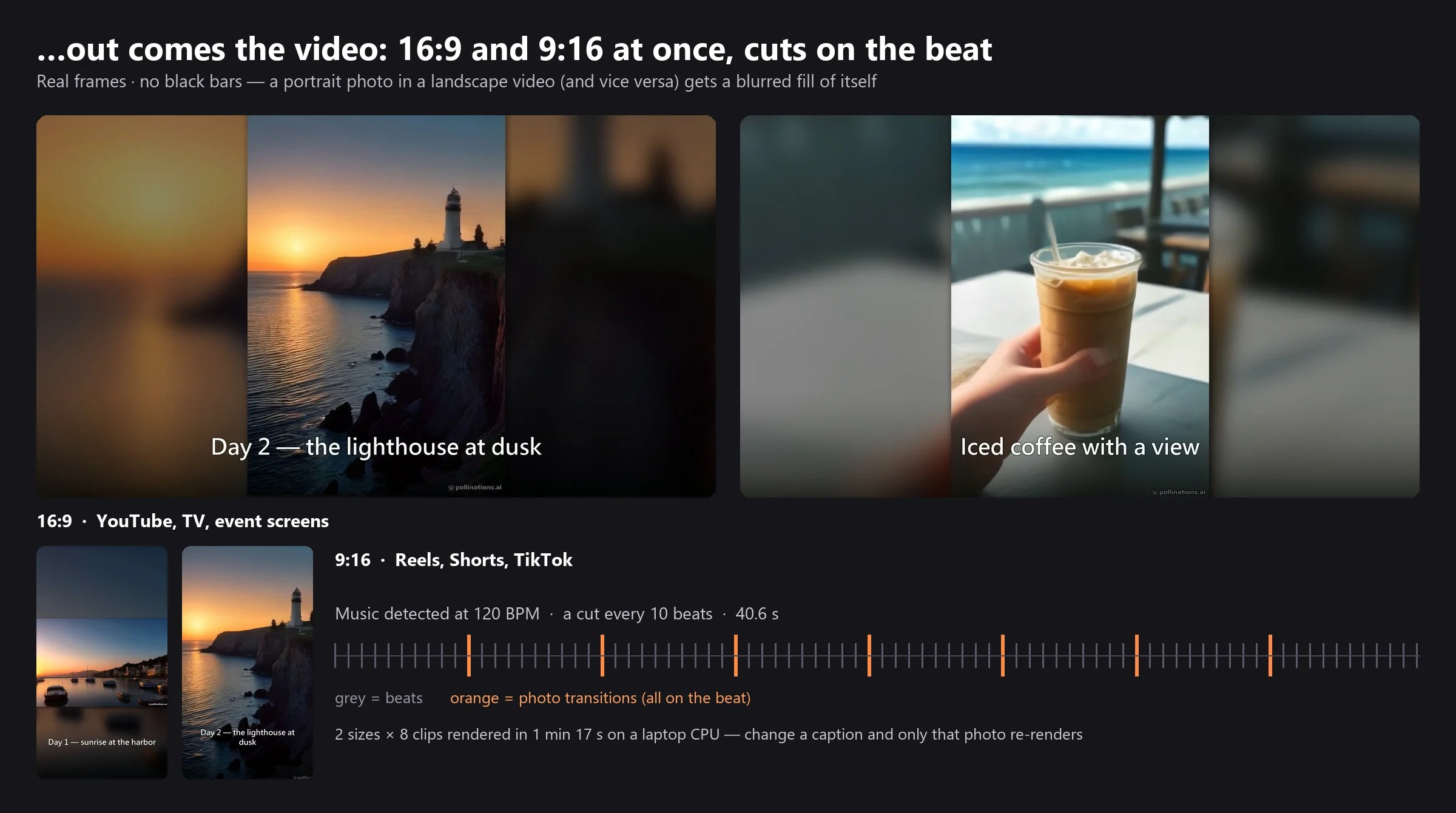
- 🎵 Transitions on the beat: the song's tempo (BPM) is detected and photo timing fits the song
- 🖼️ No black bars with mixed photos: a photo that doesn't fit the frame is shown whole over a blurred fill of itself
- 🎥 Ken Burns motion (slow push and pan) on every photo
- ✍️ Title card, photo captions and end card — fonts for English, Chinese and Japanese
- 🔍 6-frame preview sheet for each video, so you can spot cut-off text at a glance
Example
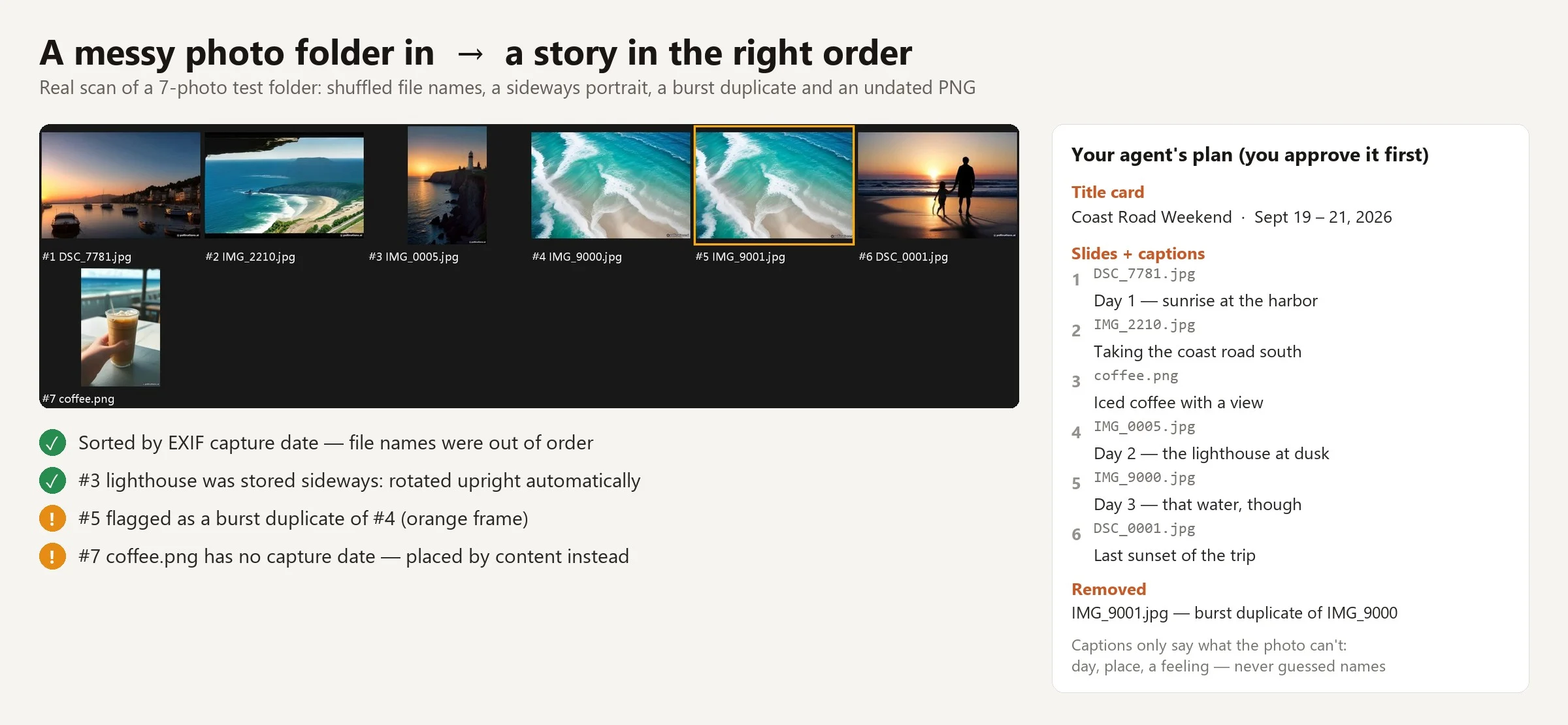
A 7-photo test folder with shuffled file names, a portrait photo stored sideways, a burst duplicate and a PNG with no capture date. The scan sorted the photos by capture date, turned the sideways photo upright, flagged the duplicate and warned that the PNG had no date. The plan dropped the duplicate, moved the coffee photo to Day 1 by its content and wrote short captions.
With a 120 BPM track, the result was "Coast Road Weekend": 40.6 s in 16:9 and 9:16, a transition every 10 beats — all on the beat — rendered in 1 min 17 s on a laptop CPU.
What the AI does (not just stringing photos together)
- Looks through a thumbnail sheet of every photo
- Orders them by capture date (phone EXIF) and turns sideways photos upright
- Drops burst shots, blurry photos and near-repeats — and tells you what it removed and why
- Builds a story: an establishing shot, then day by day or place by place, ending on a group photo or a sunset
- Writes short captions that add what the photo can't show (the day, the place, a feeling) — it never guesses people's names or places
- Waits for you to approve the order and captions before rendering
Try it — copy a prompt
- "Make a travel video from
Japan_2026/withsummer.mp3, 16:9 and 9:16, title 'Kyoto in 4 Days'." - "Make a slow, warm 16:9 slideshow from
mom_photos/for her 60th birthday, memory style, ending with 'Happy Birthday, Mom'."
Four styles
- Memory: slow pace, warm text, serif font — birthdays, pets, a year in review
- Travel: brisk slide transitions — trips, events, clubs
- Wedding: soft fades, white flashes, serif font — weddings, anniversaries, graduations
- Product: quick, clean cuts — product showcases, property listings, portfolios, menus
Why buy it
One payment, unlimited videos with no watermark — and your family photos stay on your own computer instead of going to an online editor.
Who it's for
Families and travellers, wedding and party organisers, schools and clubs making event recaps, small shops and real-estate agents showing products or listings, and anyone with a phone full of photos.
Requirements
- Python 3.9+ and ffmpeg (the skill checks your setup first and tells you what's missing)
pip install pillow numpy(addpillow-heiffor iPhone HEIC photos)- No internet or GPU needed; on a laptop each photo takes about 5 seconds per size (30 photos in two sizes ≈ 5–6 minutes)
- Change a caption or the order and only the affected photos are re-rendered
Limitations (please read)
- You supply the music and must have the right to use it. Commercial songs may be muted or removed by platforms when posted publicly; use royalty-free music (e.g. the YouTube Audio Library).
- Beat detection works best with a clear rhythm; for solo piano or ambient music, photos are spaced evenly instead.
- Photos only — it doesn't edit video clips, retouch or colour-grade photos, or generate images.
- Low-resolution photos look softer full-screen.
- Captions are AI-written — check them before publishing (especially names and dates).
- Get consent before publicly posting photos of other people, especially children.
- The demo above uses AI-generated sample photos and a synthesised test track.
Files
SKILL.md— agent workflowscripts/scan_photos.py— scans photos (capture date, orientation, burst duplicates) and makes the thumbnail sheetscripts/make_slideshow.py— renders the video (motion, transitions, beat timing, captions, title/end cards, multiple sizes)scripts/common.py— photo loading, fonts and text layoutreferences/styles.md— styles, pacing, photo counts, caption writing and music rightsreferences/example_slideshow.json,example_slideshow_en.json— Chinese and English examples