QR Menu Maker — Local Kit (Download)
QR Menu Maker
What you're buying: a one-time purchase download package (skill instructions + Python scripts) that runs on your own computer inside your own AI agent — it is not a cloud service.
You need: an AI agent that supports skills (e.g. Claude Code or Codex) — its subscription or API costs are yours; Python 3.9+ withqrcode,pillow,openpyxlandpypdfium2, plus Chrome, Edge or Chromium (used to lay out the PDFs).
Third-party services: none. Works offline, no API keys. To put the phone menu online you upload one HTML file to a free static host of your choice (Netlify, GitHub Pages, Cloudflare Pages or your own site — step-by-step guide included); the skill never uploads anything itself.
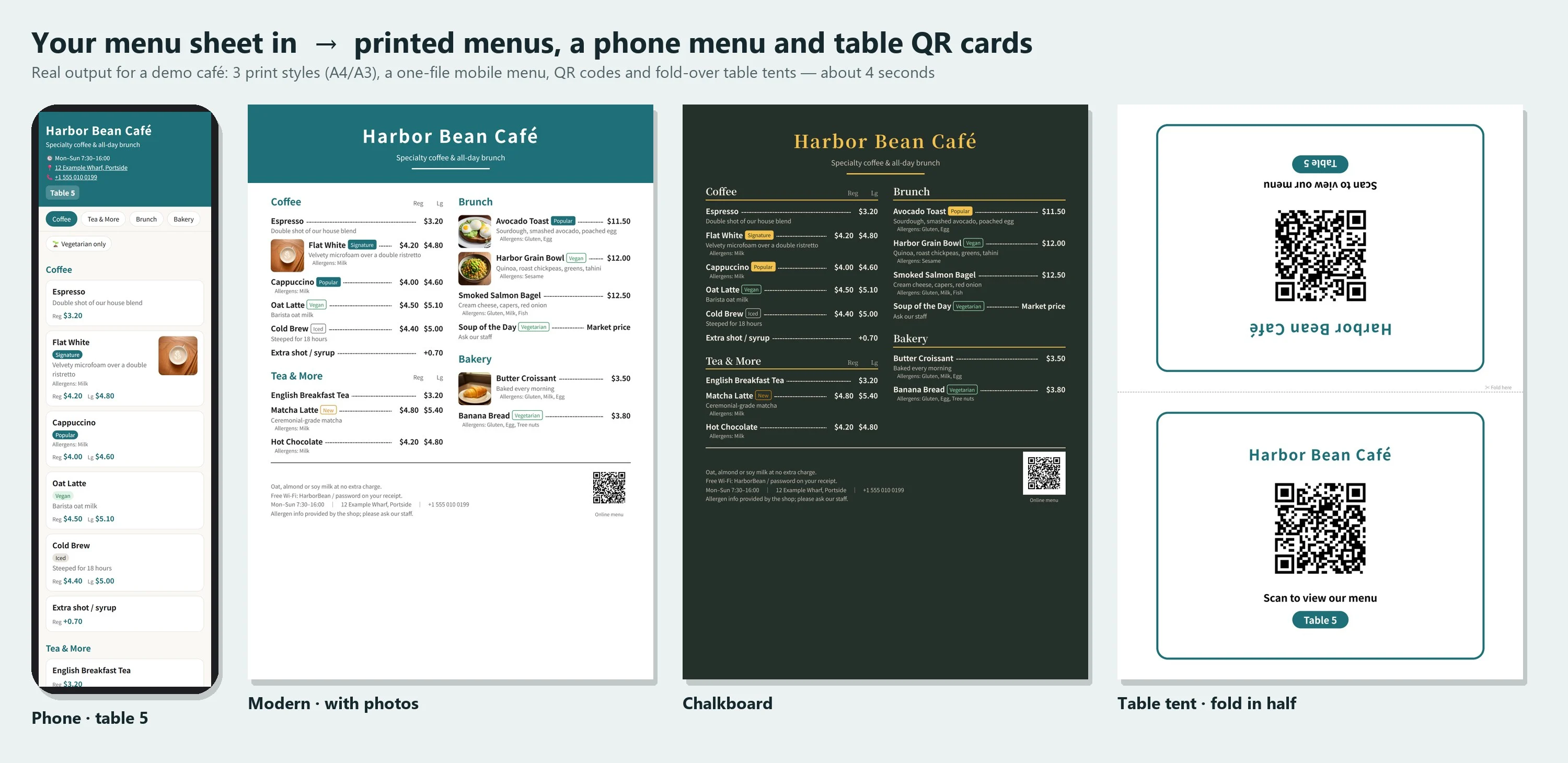
Your menu sheet in — printed menus, a phone menu and table QR cards out. Prices printed exactly as you typed them, and checked. No menu platform, no monthly fee.
What you get
- 🖨️ Printed menus in 3 styles — Classic, Modern (with dish photos) and Chalkboard — on A4, A3 or Letter, with a QR code to the online menu
- 📱 Phone menu: one self-contained HTML file with category tabs that follow your scroll, a "Vegetarian only" filter, allergen notes, dish photos, and the table number shown when a guest scans a table card; optional Chinese/English toggle
- 🔳 QR codes (PNG + SVG) and fold-over table tent cards, one per table, each with its own QR (
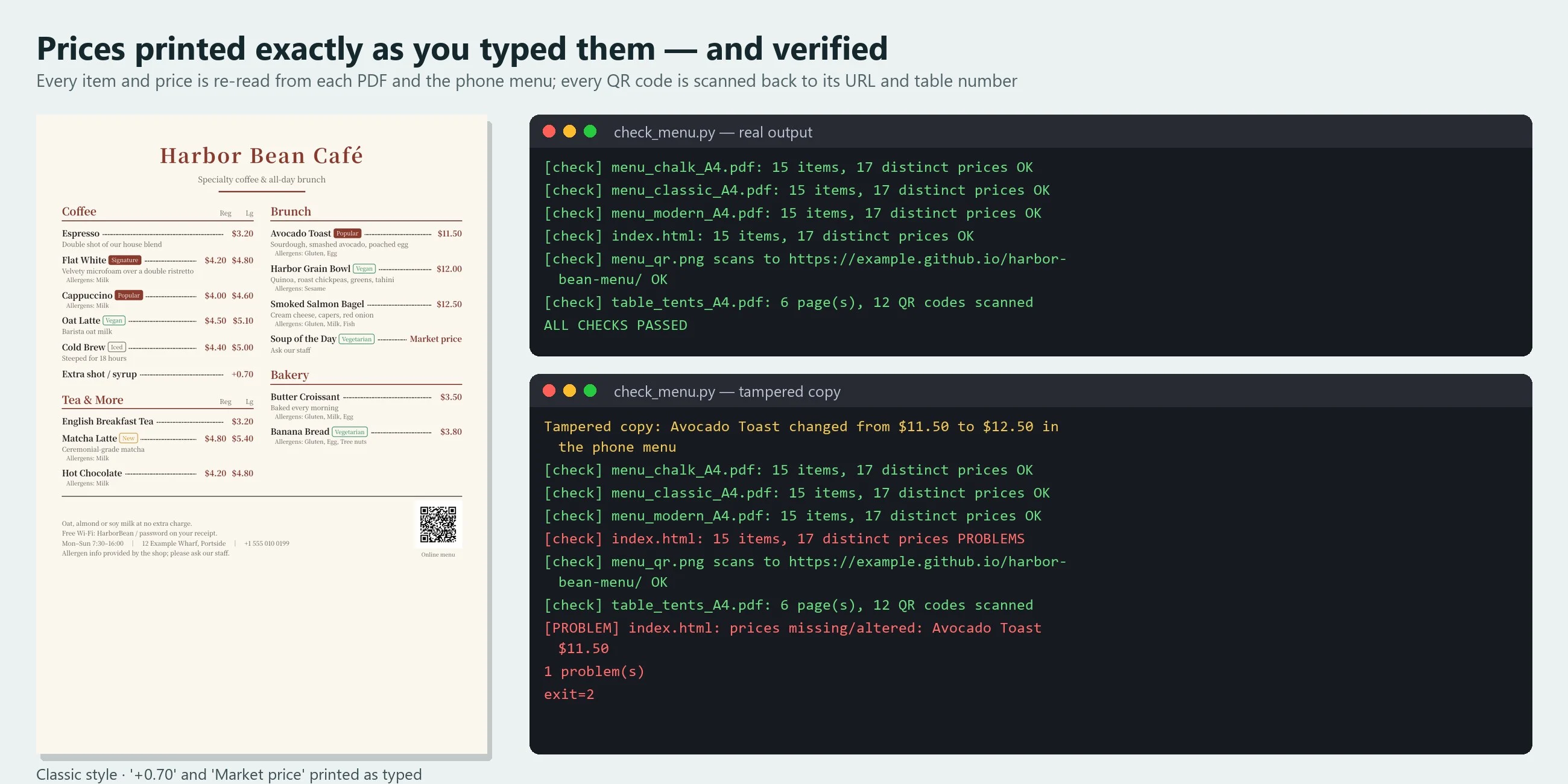
?t=5→ "Table 5") - ✅ Verification: every item and price is re-read from each PDF and the phone menu, and every QR code is scanned back
Example
A demo café sheet — 16 items, regular/large prices, a "+0.70" add-on, a "Market price" soup, one item marked unavailable and 4 dish photos — built in about 4 seconds: 3 one-page A4 menus, the phone menu, QR codes and 6 table tents. The checker re-read 15 items and 17 distinct prices from all four menus and scanned the main QR plus all 12 table-card QR codes: ALL CHECKS PASSED. The unavailable tart was left out, and "+0.70" and "Market price" were printed exactly as typed (no stray "
quot;).Then the phone menu was tampered with (Avocado Toast $11.50 → $12.50): the checker flagged it immediately.
A Taiwanese bubble-tea shop menu (Chinese + English, M/L sizes, 6 tables) produced the same kit with a Chinese/English toggle on the phone menu.
Try it — copy a prompt
- "Make a QR menu from
menu.xlsxfor Harbor Bean Café, teal brand colour, 12 tables, A4." - "Here's a photo of our paper menu — turn it into a bilingual Chinese/English QR menu and table cards for 8 tables."
Update prices in seconds
Change the sheet, run it again, re-upload one file. The QR codes stay the same, so you never reprint the table cards just because a price changed.
Works with
- CSV or Excel (column headers in English or Chinese), or a photo / text of your current menu that your agent transcribes for you to approve
- Several sizes per item (e.g. Reg / Lg), add-ons, "market price" and text prices
- English-only menus, or bilingual Chinese/English menus for tourists
- Tags (Signature, Popular, New, Vegan, Vegetarian, Spicy…) and allergens
Why buy it
One payment, unlimited menus and updates — QR menu platforms usually charge every month.
Who it's for
Cafés, restaurants, bubble-tea and juice bars, food stalls and trucks, bakeries, bars, B&Bs with breakfast menus, and event caterers.
Requirements
- Python 3.9+
pip install qrcode pillow openpyxl pypdfium2(optionalopencv-python-headlessto test-scan every QR code)- Chrome, Edge or Chromium
- A free static host for the phone menu (guide included)
Limitations (please read)
- It does not take orders or payments — it's a menu, not a POS.
- You host the phone menu yourself (free options are explained step by step); if you move it, re-run with the new URL and reprint the QR codes.
- Prices, allergens and tags are printed exactly as you provide them — check them; allergen information is your responsibility.
- Translations written by your AI agent are suggestions; have dish names checked if the English matters to you.
- Transcribing from a photo can misread prices — unreadable prices are marked "?" for you to fix before anything is built.
Files
SKILL.md— agent workflowscripts/make_menu.py— printed menus, phone menu, QR codes and table tentsscripts/check_menu.py— re-reads every item and price and scans every QR codereferences/sheet-format.md— sheet columns and store.jsonreferences/hosting.md— putting the phone menu online for freereferences/example/— example menu with photos