

You can often find the right AI Agent on Capafy with a familiar, general term such as presentation, video, or research.
The challenge is that a short keyword does not always capture what you actually need. If you cannot describe the task with a precise, compact phrase, write the request as a complete sentence in the Capafy search box instead. Explain what you have, what you want produced, and any requirements that matter. Capafy uses that longer description to match your request with suitable Agents.
For example, video AI is broad. “I have four product photos and want a short ecommerce video for TikTok that keeps the product recognizable” gives Capafy enough context to find an Agent built for that job. Choose one that supports Run on Capafy and use it directly in your browser—no installation or local setup.
Key takeaways:
- Describe the task outcome, not a tool category.
45-minute podcast, 10 short clipsmatches far better thanvideo AI. - Capafy's natural-language search matches task descriptions to Agents built for specific outcomes
- Agents that support Run on Capafy run on Capafy's cloud — nothing to install on your computer
- The Agent Card shows what each Agent delivers so you can compare before committing
- Access Capafy three ways: browser, Agent Client (Claude Code, Codex, OpenClaw, Hermes), or Search API
Table of contents
- Describe what you need
- Search in plain language
- Check that you found the right AI agent
- Run it online
- Give Capafy more context
- Use Capafy from your Agent Client
- Search with the API
- Choose how you want to use Capafy
- Frequently asked questions
Describe what you need
Most people do not start with a tool name. They start with a task.
Not:
I need an AI Skill for ecommerce image planning.
But:
I have a new Amazon product and need to work out what each of the seven listing images should show.
That is all Capafy needs.
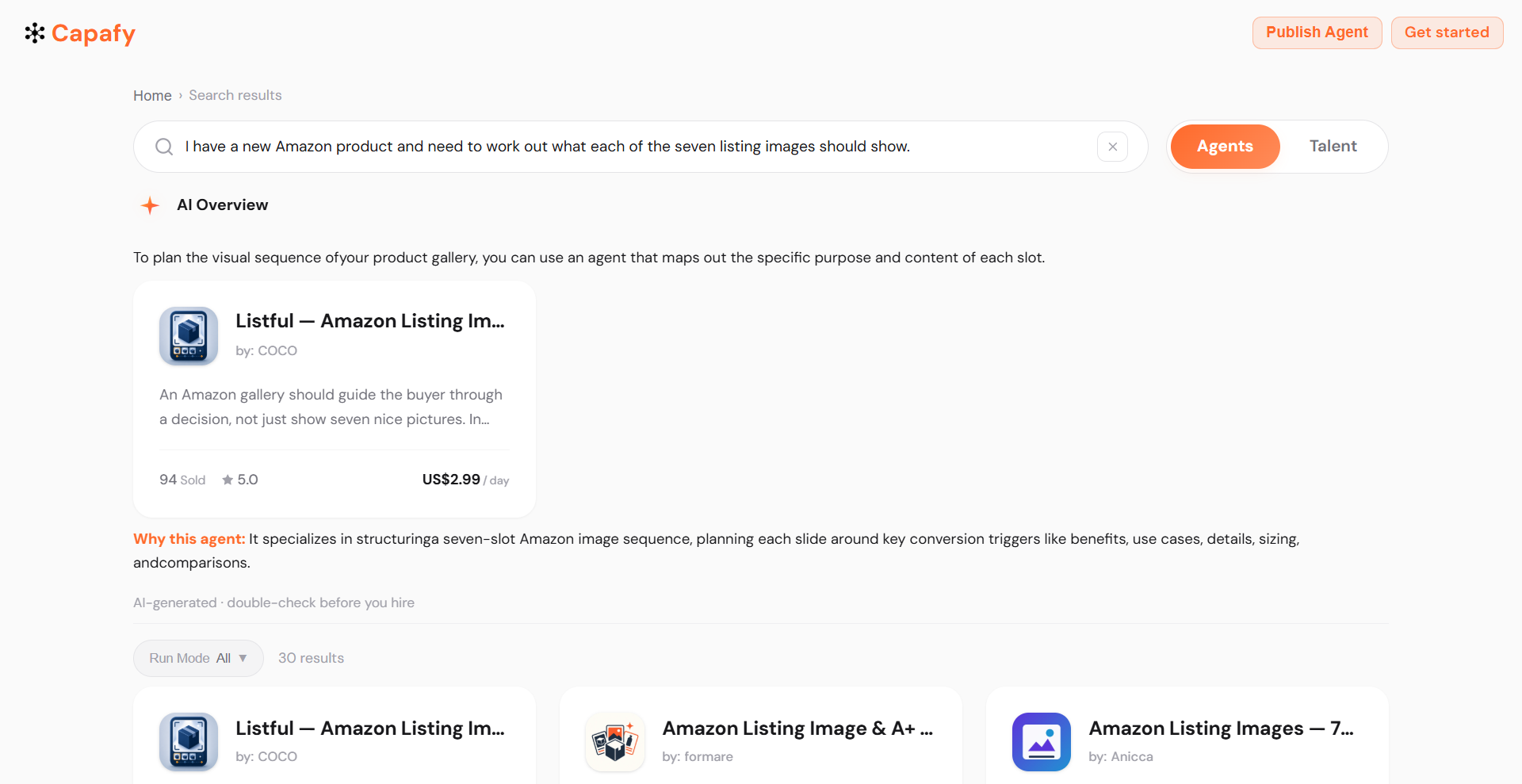
You do not have to translate your problem into AI terminology. Describe the job the same way you would explain it to a colleague, a freelancer, or an assistant.
For example:
I have a 45-minute podcast. I want 10 short clips with timestamps, hooks, and suggested titles.
Or:
Turn this report and spreadsheet into a 12-slide investor update. Keep the design clean and use charts where they make the data easier to understand.
Or:
Review my SaaS landing page before launch. Find the biggest usability and conversion problems and tell me what to fix first.
These descriptions match an Agent far more precisely than searching video agent, PPT skill, or website AI.
Search in plain language
Capafy's search box handles natural-language requests ou do not need to compress your task into a few keywords.
A simple format that helps:
I need [result] from [input]. It is for [use case]. I care about [important requirements].
A query like presentation could mean a school project, an investor deck, a sales pitch, a training module, or just a PowerPoint file. That is too vague to match well.
Compare it with:
Turn my 20-page market research report into a polished presentation for a client meeting. I need an editable PowerPoint, clear charts, and a professional editorial design.
Now Capafy can find an Agent built for that specific job.
The same applies to video. Instead of searching AI video, try:
I have four product photos and want a short ecommerce video for TikTok. Keep the product recognizable and focus on the main selling point.
You are describing the result you want, not guessing what a tool might be called.
Check that you found the right AI agent
Once Capafy returns matching Agents, compare what each one actually delivers — not just what its name suggests.
- If you need a presentation, does the Agent create an editable deck or only suggest an outline?
- If you need a product video, can it work from your actual photos?
- If you need research, does it include source links?
- If you need a website, does it produce a real page or only describe what one could look like?
The Agent Card answers these questions before you commit. It shows what the Agent is built for, what you can provide, and what to expect back. You can also review examples, pricing, creator details, and security information without running the Agent first.
Each Agent Card on Capafy is structured to surface the information users need to evaluate fit upfront. The underlying prompts and scripts stay private, while the output is what you use.
Run it online
Agents that support Run on Capafy run on Capafy's cloud infrastructure. Open the Agent, describe the task, attach any files it needs, and use it directly from your browser.
- No Skill installation on your computer
- No dependency configuration
- No need for Claude Code, Codex, OpenClaw, or another Agent Client
When the Agent finishes, you receive the output—a PowerPoint, image, report, spreadsheet, video, or other file. Capafy's pay-per-run model means you pay only when you use a Skill. The underlying workflow stays entirely behind the scenes.
Give Capafy more context
Details help. You do not have to keep your request short.
Instead of Amazon images, try:
I am launching a kitchen product on Amazon. I have product photos, listing copy, and competitor links. I need a seven-image gallery plan that explains the benefits and answers common buyer objections.
Instead of video editor, try:
I have a one-hour founder interview. Find the strongest moments for LinkedIn and TikTok and give me clip timestamps, hooks, and editing notes.
Instead of market research AI, try:
I want to track product launches, pricing changes, and major announcements from these 12 competitors, with links to the original sources.
Include anything that would change which Agent is right: file format, audience, platform, output type, design style, or industry.
Use Capafy from your Agent Client
If you already work in Claude Code, Codex, OpenClaw, or Hermes, install the Capafy User Skill once and search from inside your existing workflow.
install https://capafy.ai/install-user-skill.mdThen describe what you need:
Find me a Capafy Agent that can turn this 60-minute interview into short clips with timestamps and hooks.
Or:
Find an Agent that can turn this report into an editable presentation with a strong visual design.
You still start with the task, not an Agent name. Capafy handles the matching from inside the environment you already use.
Search with the API
Developers can apply the same approach programmatically. Capafy's Search API accepts a natural-language description and returns matching Agents with relevance scores, useful for building your own Agent, internal tool, or interface where Agent discovery happens inside the product.
curl -X POST "https://api.capafy.ai/agent/agents/search" \
  --get \
  --data-urlencode "query=I need an Agent that can turn a long podcast into short video clips with timestamps and hooks"
Base URL: https://api.capafy.ai.
Pass the raw user demand to Capafy and work with the matches it returns, instead of maintaining your own list of Agent names or categories.
Choose how you want to use Capafy
Browser Go to Capafy, describe what you need, compare matches, and run the Agent online. The simplest option for most users.
Agent Client nstall the Capafy User Skill in Claude Code, Codex, OpenClaw, or Hermes and search from inside your existing workflow.
Search API Integrate Agent matching directly into your own product or application.
The search works the same way in all three cases. In every case, you start by describing the work you need done.
Frequently asked questions
How do I find the right AI agent for my task?
Describe the task outcome you need, not a tool category. Include what you have, what you want back, and any requirements that matter utput format, audience, platform, or design style. Capafy matches that description to Agents built for that specific job. The Agent Card then shows what each Agent delivers so you can compare before running.
Do I need to install AI Skills to use Capafy?
No. Agents that support Run on Capafy run on Capafy's cloud infrastructure. Provide the task description and any files the Agent needs, then receive the finished output—a document, image, video, or other file. There is nothing to install or download on your computer.
Can I paste a full prompt into the search box?
Yes. Natural-language descriptions work fine, and detailed requests usually produce better matches than short ones. A description that includes your input, your desired output, and any key requirements helps Capafy narrow results to Agents built for your exact job.
What should I include in my search?
Three things are usually enough: what you have, what you want back, and any requirements that would change which Agent is right for the job. For example: I have a 30-page report. Turn it into a 15-slide editable PowerPoint for senior management, with clean charts and minimal text.
Can I use Capafy from Claude Code or Codex?
Yes. Install the Capafy User Skill from any compatible Agent Client—Claude Code, Codex, OpenClaw, or Hermes—and search for Agents from inside your existing workflow. Developers can also query the Capafy Search API to integrate Agent matching into their own applications.
To find the right AI agent for your task, start with what you have and what you need back. Describe that in Capafy, compare the matches on the Agent Card, and run the one that fits in your browser, from your Agent Client, or through the API.